The first steps
ioBroker is installed and running. This page guides you through the necessary steps that come before everything else. They take about half an hour in total and will save you a lot of trouble later.
Not installed yet? Then install first.
1. Open the surface
Enter the server address and port in your browser.8081 call:
http://<adresse-des-servers>:8081
The administrator appears without logging in. This is correct initially and will be changed in step 4.
2. Fill in the system settings
Open the system settings via the gear icon in the bottom left corner. Four pieces of information must be correct before adding the first adapter:
| Information | Why |
|---|---|
| Language | This applies to the user interface and to the names that adapters create. |
| Location | ioBroker calculates sunrise and sunset times based on latitude and longitude. Almost every automatic timer system depends on this. |
| temperature unit | Degrees Celsius or Fahrenheit. |
| currency | For adapters that provide prices or operating costs. |
!> Enter the location correctly. If this is omitted, ioBroker will assume a preset location, and the lights will turn on at the wrong time.
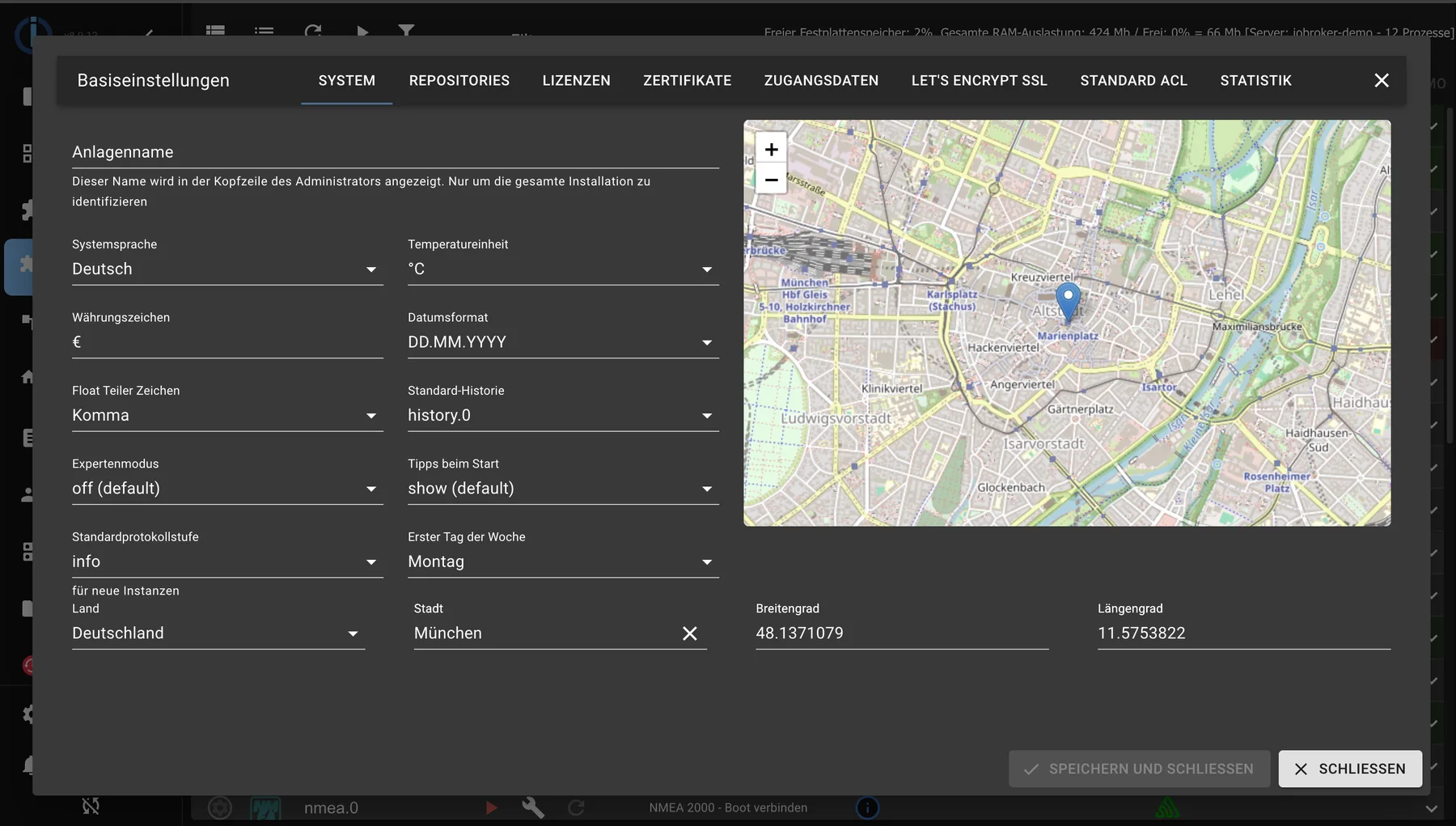
The system settings include language, temperature unit, date format, and location. The location is used for sunrise and sunset times.
3. Check for updates
The Hosts tab indicates whether a newer version of the js-controller is available. On a fresh installation, everything is usually up to date. Instructions on how to perform an update can be found under "Installing Updates" .
4. Assign a password
As long as no login is enabled, anyone on the network can open the interface and change everything.
- In the Users tab, the user
adminGive a password. - Then in the instance settings
admin.0Enable authentication .
The order is important: first the password, then the login. Detailed information can be found under Authentication .
5. Set up data backup
The step that almost everyone postpones and later regrets. The BackItUp adapter creates regular backups; these must be stored to a destination outside the computer. The procedure is described under Data Backup .
Then manually trigger a backup and check if the file has actually arrived at its destination. A backup that has never been checked is just an assumption.
6. Install the first adapter
Now comes the part you installed ioBroker for. In the Adapters tab, find the appropriate adapter and create an instance using the plus sign. The difference between an adapter and an instance, and the potential pitfalls, are explained under Managing Adapters .
Adapters without hardware are suitable for testing, for example.openweathermap for the weather orping , to see which devices are reachable on the network.
What happens next?
| Next | What it's about |
|---|---|
| tour | What the surface riders do and which ones you need daily. |
| Manage adapters | Install, update, uninstall. |
| First automation | Turning values into action. |