The first automation
Up to this point, ioBroker has been collecting data. Now we want something to happen automatically. We'll build the simplest sensible rule: if a state changes, do something . Everything else is a variation of that.
What you need
The JavaScript adapter. It brings Blockly, rules, JavaScript and TypeScript with it, so all four methods at once.
- In the Adapter tab after
javascriptsearch and create an instance. - Then the new " Scripts" tab appears on the left.
You also need two data points: one that changes and one that you are allowed to set. If you haven't connected any devices yet, you can add them in the Objects tab under...0_userdata.0 You define two custom data points, one of type number and one of type logic value . This is the most convenient way to practice because you can adjust both manually.
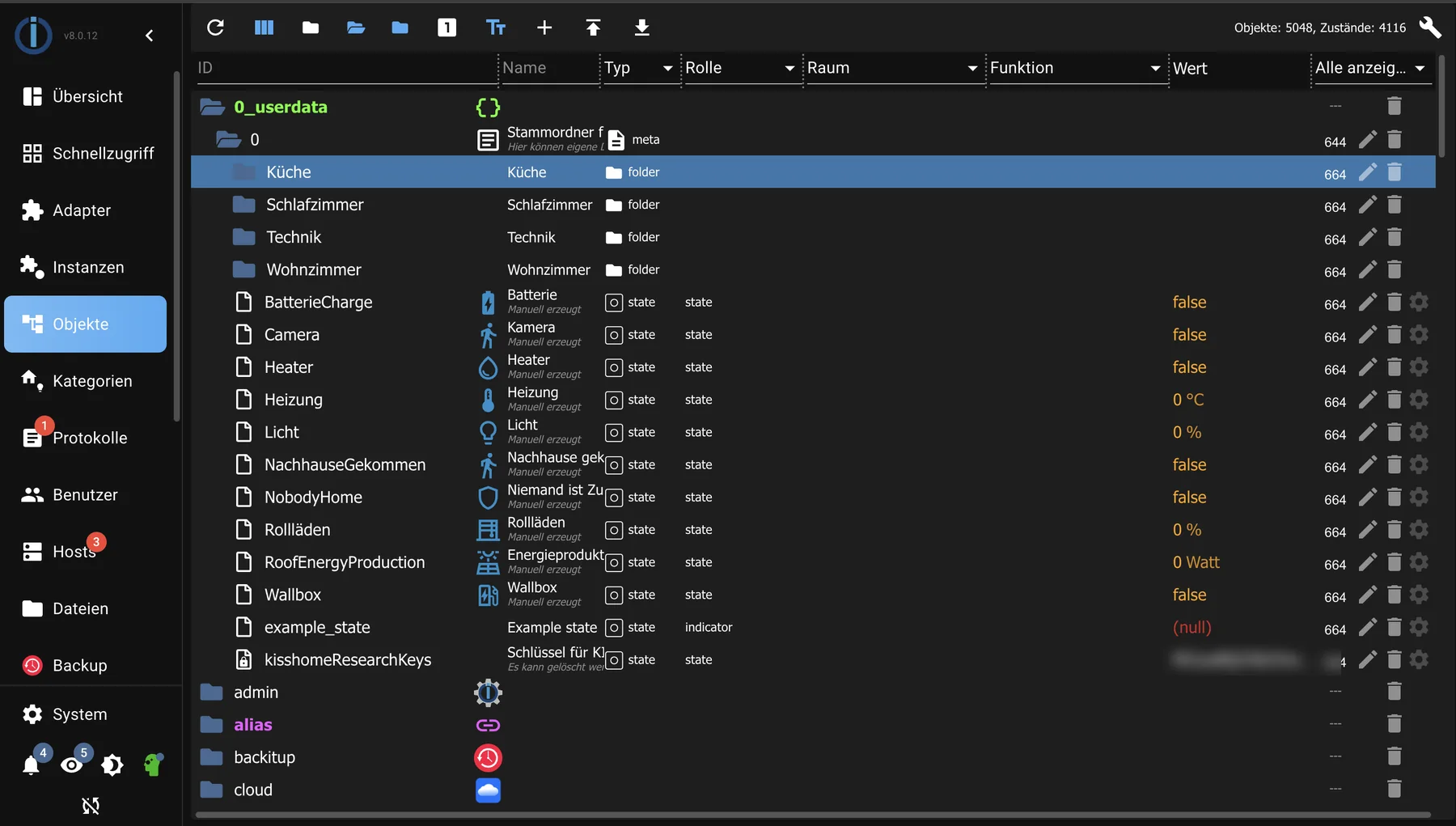
For practice, create two of your own data points under0_userdata.0 : one that changes, and one that you are allowed to set.
Blockly or text
| Blockly | JavaScript | |
|---|---|---|
| operation | Assembling the building blocks | Tap |
| Good for | Getting started and clear rules | Anything that gets longer |
| Mistake | Almost no typos possible | Typographical errors are possible. |
For the first rule, we'll use Blockly. Switching later is easy: Blockly generates JavaScript in the background, and you can view it.
The rule builds
- In the Scripts tab, create a new Blockly script and give it a name that will later indicate what it does.
- From the Trigger group, select the building block for state changes and place it on the workspace. It asks three things: which state, what triggers the response, and what type of change.
- Select the data point to be observed.
- From the Actions group, insert the building block for setting a state below the trigger and enter the second data point and the desired value there.
- Save and start the script.
To try it out, manually change the first data point in the Objects tab and see if the second one follows.
Components that are outside of a trigger run exactly once, namely when the script starts. This is one of the most common misconceptions at the beginning.
The three classic beginner mistakes
Confusing commands and feedback. Each state has a marker in addition to its value:ack = false means "someone wants that",ack = true This means "that's how it is." A trigger that reacts to both fires twice.
The feedback loop. Script A modifies data point 1, which triggers script B, which modifies data point 2, which in turn triggers script A. This is visible in the log as the same lines appearing in rapid succession.
Too much in one script. It's better to have several small scripts with descriptive names than one that tries to do everything. Otherwise, in six months you won't even remember why the light comes on.
If it doesn't
Each script has its own log output, and the Logs tab shows what the JavaScript instance encountered difficulties with. A log entry is the most useful tool for troubleshooting: it shows whether the trigger actually fired.
What happens next?
The individual building block groups and the transition to JavaScript are described under Blockly . An overview of all ways to write logic is found under Logic and Automation .
Next in the tutorial: The first visualization .