Logic and automation
ioBroker collects data: a temperature, a switching state, a time. Only the logic turns this into a smart home. It observes states, makes decisions, and sets other states – "if the balcony door is open for more than five minutes and the heating is on, then turn off the heating and send a message to the phone."
There are several ways to write this logic. They are not mutually exclusive: in a mature installation, graphical rules and JavaScript exist side by side, each in the position that requires the least effort.
Where the logic runs
Most of the methods involve a single adapter, the JavaScript adapter . After installation, it adds the Scripts tab to the admin interface and executes Blockly, rules, JavaScript, and TypeScript there. Anyone wanting to use one of these four only needs to install this one adapter.
Two other approaches are custom adapters: node-red includes the Node-RED Flow Editor, and scenes saves scenes without requiring any programming.
The routes at a glance
| Away | What it is | adapter |
|---|---|---|
| Blockly | Graphic building blocks that can be slotted together | JavaScript |
| Regulate | A form based on the pattern "if - then" , without any building blocks. | JavaScript |
| JavaScript | The full programming language with the ioBroker scripting API | JavaScript |
| TypeScript | JavaScript with type checking before startup | JavaScript |
| Node-RED | A dedicated editor where nodes are connected with lines. | node-red |
| scenes | A list of states and their target values, not a program | scenes |
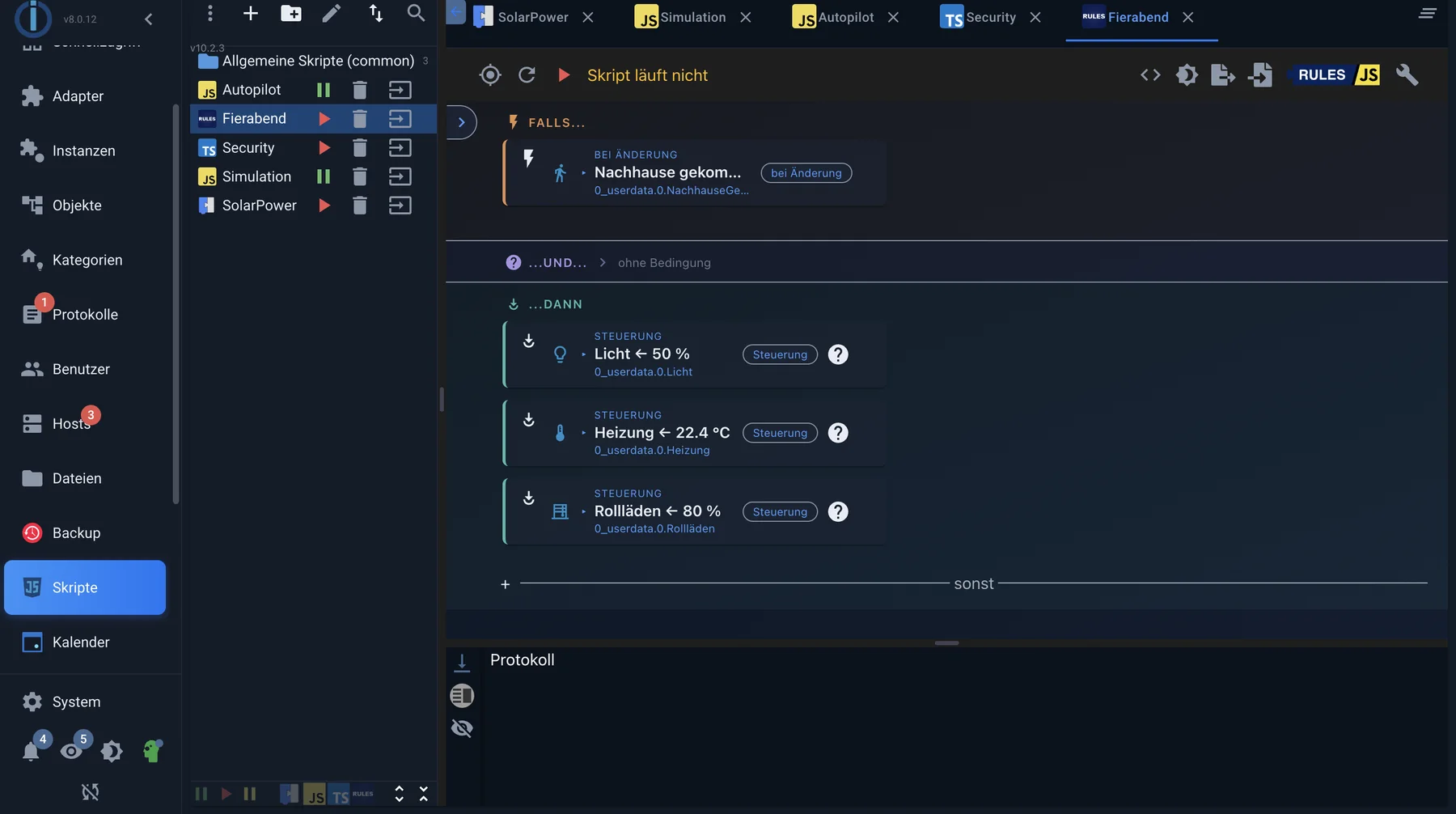
A rule in the editor: at the top the trigger, below that the condition, below that the actions. Nothing is assembled, but rather selected.
Which path for what
Scenes are not a program, but a stored situation: "Television" sets five lamps to specific values. Those who only need such situations don't need logic, but rather the scenes adapter. Scenes can later be recalled from any of the other methods.
Rules offer the quickest entry point when automation truly follows the pattern of " if this condition, then that action ." Nothing is assembled; instead, elements are selected. Since version 10.1.0 of the JavaScript adapter, a wizard guides the user step-by-step through triggers, conditions, and actions, ultimately displaying the completed rule. It opens automatically once for newly created rules; after that, it remains available in the rule block bar.
Blockly is the right choice when multiple conditions, delays, or loops come into play, and nobody wants to write code. It's not a toy version: the building blocks cover most of the scripting API, and the generated JavaScript code can be viewed from any Blockly script.
JavaScript becomes worthwhile when a script becomes complex – many similar cases, custom functions, data structures, npm modules. A Blockly script with thirty building blocks is usually ten lines of JavaScript.
TypeScript is JavaScript with pre-run validation. It's useful for longer scripts that you rarely access and therefore don't remember.
Node-RED excels where data from multiple sources converges and is processed – protocols, HTTP requests, queues. For "if motion, then light" scenarios, it's the more complex approach, as it runs as a separate process alongside ioBroker.
One approach doesn't exclude the other. It's common to keep simple automations as rules or in Blockly, and only use JavaScript for what would be cumbersome there.
This applies to all routes
No matter which path is chosen, three things are always the same.
Logic reacts, it doesn't ask. A script that checks every second for changes is almost always wrong. ioBroker reports every change automatically; the logic then latches onto this report. This is not only more efficient, it's also more accurate.
The ack flag separates command and feedback. Each state carries a flag in addition to its value.ack .ack: false means "this is a command to the device",ack: true This means "the device reports that it is so." If you don't differentiate between the triggers, you create loops: the script switches, the device acknowledges, the acknowledgment triggers the script again. See States for more details .
States are the shared memory. Scripts do not share variables—not even two scripts within the same instance. If one script needs to communicate something to another, it does so via a state.
Begin
- In the Admin section under Adapters , install the JavaScript adapter and create an instance.
- Enter the geo-coordinates in the instance settings. Without them, sunrise and sunset cannot be calculated, and you need them quickly.
- The new Scripts tab appears. Create a new script there using the leaf icon on the left and select the type - rules, Blockly, JavaScript or TypeScript.
- The script will only be executed when it is activated via the play button.
For initial testing, a second JavaScript instance is recommended. A critical error will then only terminate this test instance and not the one running the heating control system. More information can be found under Troubleshooting .