Node-RED
Node-RED is a standalone workflow management tool that is not part of ioBroker, but integrates well with it. Programming is done using flows : nodes are placed on a map and connected by lines along which messages travel.
Access is via the node-red adapter . It includes Node-RED, starts it, and establishes the connection to the ioBroker states. Since adapter version 7, Node-RED 5 has been included; it is updated along with the adapter and not separately.
Node-RED runs as a separate process alongside ioBroker, with its own memory usage and editor. For simple automations, this is a noticeable overhead – Blockly is the easier way.
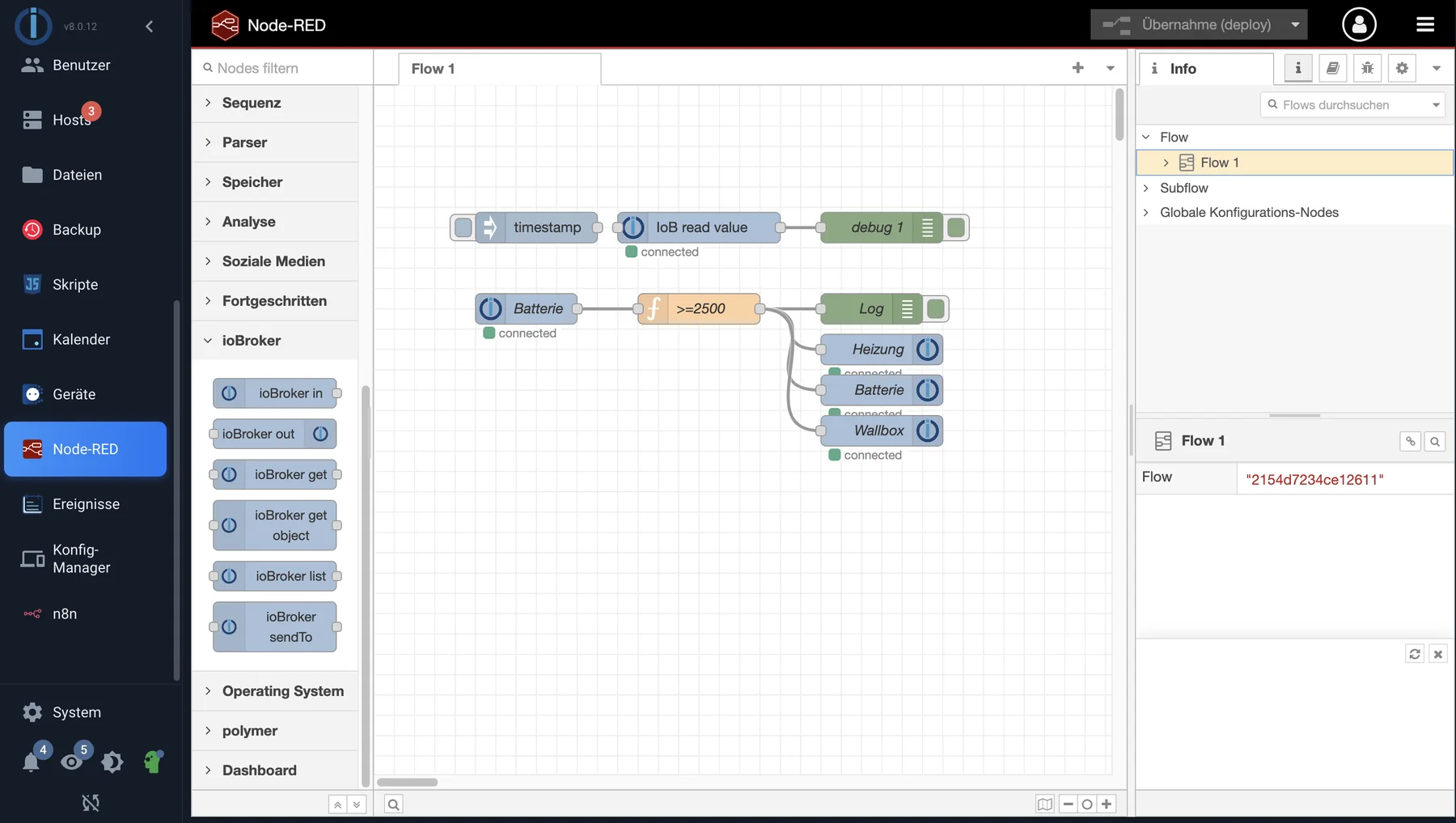
A flow in the editor: nodes on the left, the area in the middle. The nodes of the ioBroker group read and write states.
Furnish
- Install the node-red adapter and create an instance.
- In the instance settings, adjust the port and access protection if necessary. The default is port 1880 on all network interfaces, without authentication.
- The editor is opened via the instance button in the admin panel or directly under
http://<adresse-des-servers>:1880.
!> Accessible without registration and on all interfaces means: Anyone on the network can change the flows and thus control everything that ioBroker controls. Users of Node-RED should configure access protection in the instance settings.
The ioBroker nodes
A separate group , ioBroker, with six nodes appears in the editor's palette:
| node | For what |
|---|---|
| ioBroker in | Trigger: outputs a message as soon as a state changes |
| ioBroker out | Writes the message content to a state |
| ioBroker get | Retrieves the current value of a state without waiting for a change. |
| ioBroker get object | Retrieves the object by its ID, i.e., its description instead of its value. |
| ioBroker list | Returns a list of states for a pattern |
| ioBroker sendTo | Sends a command to an adapter instance, such as Telegram. |
A simple flow therefore consists of two nodes: ioBroker in for the trigger, ioBroker out for the reaction, and in between, what needs to be decided.
What's important in the instance settings
- Memory limit. The default is 128 MB. Flows that hold large amounts of data need more; otherwise, Node-RED will terminate for no apparent reason.
- Additional nodes. Palette management is disabled by default. To install additional node packages, enable them or add the packages in the settings.
- Creating external objects is also disabled by default. As long as it remains disabled, a flow can only create states below its own instance.
- Context storage. Node-RED can retain values across a restart. From adapter version 7 onwards, this file-based storage is called...
fileinstead ofdefaultAnyone who has explicitly selected a storage location in a node must select it again there.
Why Node-RED is worthwhile
Node-RED excels where data flows : merging multiple sources, querying and responding to HTTP interfaces, MQTT, multi-step transformations, and queues. For classic home automation – triggers, conditions, actions – it's not superior to the JavaScript adapter, but it does require a second process and a second editor.
Both happening simultaneously is possible and common. The states are the common language: what a flow writes, a script sees immediately, and vice versa.