States and data points
A data point is the location where a value is stored: the temperature of a room, the switching state of a lamp, the name of the currently playing track.
It consists of two parts:
- the object of type
state- the description, which rarely changes (see objects ), - the state - the value itself, which is constantly changing.
In everyday language, "data point" usually means both together.
Only objects of typestate They have a state. And the direction is clear: If the object is deleted, the state disappears with it - conversely, the object remains if only the value is removed.
The condition
A state is not just a number. It also carries with it where it comes from and when it arose:
| Field | Meaning |
|---|---|
val | the value |
ack | Whether it's a command or a response - see below |
ts | when the value was last written |
lc | when he last actually changed |
from | which adapter instance wrote it |
q | A quality value other than 0 means: something is wrong with this value. |
user | who wrote it, provided they registered |
expire | After how many seconds will the value benull falls |
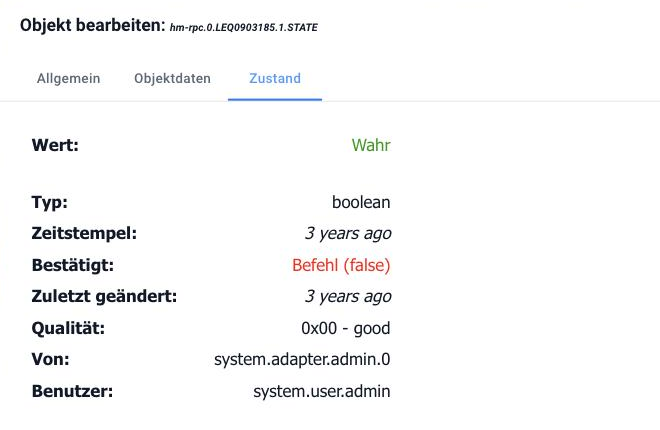
In the object editor, all of this is found in the State tab. The "ack" flag there is "acknowledged" - shown in red in the image because the value represents a command and there is no feedback yet.
The difference betweents andlc is more useful than it looks: A sensor that reports the same value every 30 seconds updatests every time,lc But only if there's a genuine change. Anyone wanting to know how long a door has been open should look at...lc .
The ack flag
This is the term that most people get stuck on - and the most important one on this page.
ack: falseis a command. "Lamp, turn on." That's how an automation, a switch in the visualization, a script writes.ack: trueThis is a response. "Lamp is on." This is what the adapter writes after the device has confirmed.
The process is as follows: A script sets the value withack: false The adapter sees this, sends the command to the device, and when the device responds, it writes the same data point again – this time withack: true .
If you don't distinguish between the two when triggering an automation, you create a feedback loop: The script switches, the device acknowledges, the acknowledgment triggers the script again. Rule of thumb: listen for feedback, send commands. See Logic and Automation for more details.
This can be seen in the admin panel: In the object list, the value of an unacknowledged state is highlighted. A data point that remains permanently unacknowledged indicates that a command did not reach the device.
The description of this
The object associated with the data point specifies how to handle the value. The fields that are relevant in everyday life are listed incommon :
| Field | For what |
|---|---|
type | number ,string ,boolean ,array ,object ,json ,mixed , file |
name | the displayed name, in one or more languages |
unit | the unit, for example°C or% |
min ,max ,step | the permissible range and step size, e.g. for a controller |
read ,write | Whether reading and writing are allowed – both are mandatory |
role | what the data point represents; the interfaces then select their controls accordingly, see Roles |
states | a list of possible values in plain text, for example {0: "AUS", 1: "EIN"} |
def | the target value |
custom | Settings of other adapters for this data point - for example, the recording is entered here. |
read andwrite These are not rights, but a statement about the device: A temperature sensor isread: true, write: false Anyone who enters it anyway won't get an error – the value will simply be there and mean nothing.
?>common.custom This is where the recording of a value is enabled. In the admin panel, this is done via the gear icon next to the data point; behind it is an entry like this:{"influxdb.0": {"enabled": true}} .
Set values manually
In the admin panel, under Objects , the value of a writable data point can be changed using the pen icon. When writing, you can choose between command and feedback – the same distinction as above. For testing purposes, the command option is correct; manually setting feedback tricks the system into believing a device state that doesn't actually exist.
Read more
- Objects - Structure, IDs and Namespaces
- Roles - the complete list of
common.role - Aliases - custom, stable names for external data points
- Object structure - all fields, for developers