JavaScript
The JavaScript adapter executes standard JavaScript and provides a number of additional functions for reading, writing, and monitoring state. These functions constitute the ioBroker scripting API; they are the only difference compared to JavaScript as it normally runs in Node.js.
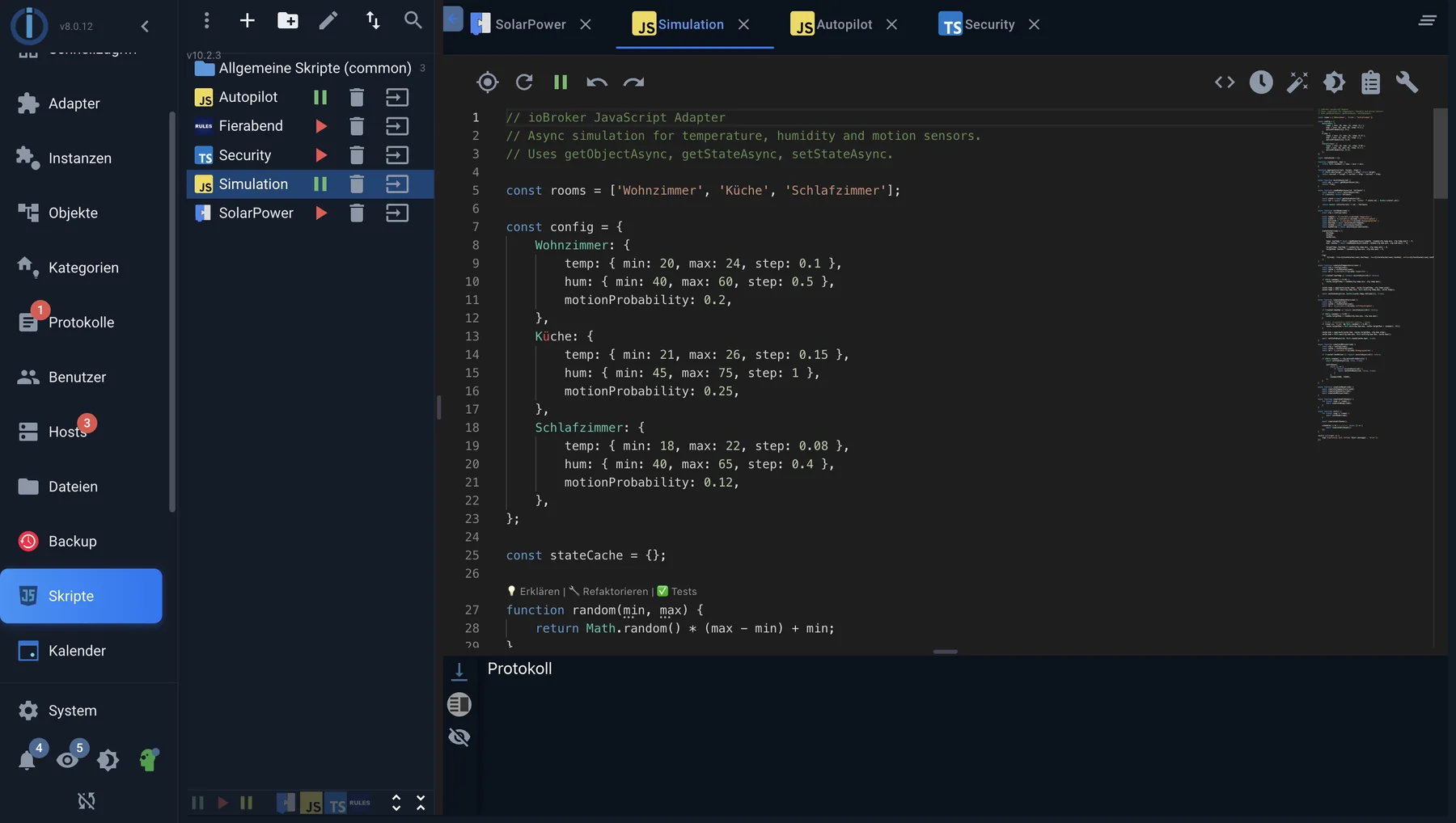
The editor in the Scripts tab: scripts on the left, code on the right, log of running scripts at the bottom.
A first script
on({ id: 'hm-rpc.0.LEQ1234567.1.STATE', change: 'ne', ack: true }, obj => {
    if (obj.state.val) {
        setState('hm-rpc.0.LEQ7654321.1.STATE', true);
    }
});
Translated: As soon as the motion detector reports a change (change: 'ne' , also not equal ) and it is a feedback from the device (ack: true ), the lamp is switched on.
The most important functions
The complete reference with all parameters can be found in the adapter's script documentation . A handful will suffice to begin with.
Responding to changes
| function | For what |
|---|---|
on(muster, callback) | Responding to changes in one or more states |
once(muster, callback) | The same, but only the first time. |
unsubscribe(handler) | Cancel a subscription |
$('...') | Addressing multiple states at once using a selector |
Reading and writing states
| function | For what |
|---|---|
getState(id) | Get the current value |
setState(id, wert, ack) | Setting a value |
setStateChanged(id, wert) | Only write if the value differs. |
setStateDelayed(id, wert, ms) | Set after a waiting period without pausing the script. |
existsState(id) | Check if the condition even exists. |
createState(name, wert) | Create a separate state below the instance |
Time
| function | For what |
|---|---|
schedule(muster, callback) | Run recurringly at a specific time, also known as CRON |
getAstroDate(name) | Sunrise, sunset, twilight, and similar events |
setTimeout /setInterval | As in any JavaScript |
Talk to other adapters
sendTo('telegram.0', 'send', { text: 'Fenster offen' }) Sends a message to an adapter instance. The documentation for each adapter specifies which commands an instance understands.
!>schedule andsetInterval They don't survive a script restart, but they also don't survive being forgotten: If you create an interval in the script and later modify the script, intervals will accumulate. The adapter cleans up its own schedules automatically when a script is restarted.
How a script is executed
Each script is its own separate area. Two scripts do not share variables – not even within the same instance. To pass values, you create a state for that purpose.
Scripts in the global folder are the exception: their contents are prepended to every other script. This allows you to maintain your own functions in one place and use them everywhere. However, even here, each execution gets its own copy of the variables. A global script is a shared collection of functions, not shared memory.
The adapter sets a state for each script.javascript.<Instanz>.scriptEnabled.<Skriptname> It indicates whether the script is running and can also be set – one script can therefore turn another on and off.
Additional modules
The instance settings allow you to enter npm modules that will then be used in all scripts of this instance.require available. For everything that Node.js brings with it - such asfs orhttp - No entry is required.
Log
console.log ,console.warn andconsole.error The output is written to the log below the editor and simultaneously to the ioBroker log. The log window only displays messages from the currently open script.
?> Messages ondebug These entries only appear if the instance's protocol level is set accordingly. This is the correct level for scripts that run continuously.info The log is filled with each motion detection.
The AI assistant in the editor
Since version 10 of the JavaScript adapter, the script editor includes a chat window to assist with writing. It can suggest code, explain existing code, modify it, add comments, fix errors, and generate tests; it also provides suggestions as you type and a preview that shows the change alongside the current version before you apply it. For Blockly, the same assistant suggests building blocks; see Blockly .
What he needs for that
The language model is not from ioBroker. The adapter provides the user interface; access to a language model is provided by the user: either through an account with one of the supported providers or by a language model on their own network. The specific requirements for this access are determined by the respective provider. As long as no key is entered, the function remains disabled, and everything else on the adapter works as before.
OpenAI, Anthropic Claude, Google Gemini, and DeepSeek are supported. Additionally, there's a field for a custom, OpenAI-compatible endpoint: this allows you to address a model running on your own network or another service that uses the same interface. The key is stored in the instance settings or retrieved from the central access credential manager. The adapter automatically retrieves the available models from the provider.
What goes outside
The assistant doesn't just work with what's in the editor. It can search for data points, read their values and objects, list and open existing scripts, read the editor content and selections, and execute code for testing purposes. The information it reads is then sent, along with the query, to the model provider—that is, from within the company. Users who don't want this should either use a model on their own network via their own endpoint or not enter a key at all.
A suggestion is just that—a suggestion. It should be read and tested before being applied to the heating system, garage door, or irrigation system. This applies to generated code as well as to modifications suggested by the assistant to a running script.
Further
- TypeScript - the same API with type checking
- Best practices
- Troubleshooting