authentication
In a fresh installation , no login is active. Anyone who knows the server address can open the admin panel and change everything. This is convenient in a secure home network, but as soon as ioBroker is accessible beyond that network, it's the first thing that needs to be enabled.
Login is enabled per instance , not even for the entire system. Each interface has its own web server and therefore its own switch: the admin switch, each one.web -instance,vis about the associatedweb -instance and so on. The users and groups are the same everywhere; see access management .
The admin
In the Instances tab, the wrench icon opens.admin.0 the configuration:
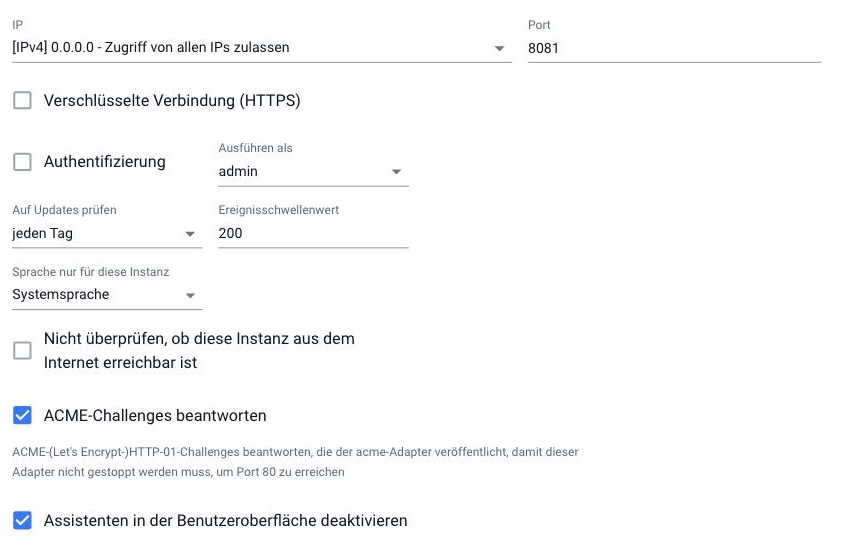
Two fields are important:
| Field | Meaning |
|---|---|
| authentication | Enable the login screen. Without this option, anyone can log in without a password. |
| Run as | Determines whose rights are used until the user logs in. The default setting is...admin , i.e., full access. |
Proceed:
- In the Users tab, the user
adminEnter a password. Do not enable authentication beforehand , otherwise there will be nothing to log in with. - Write down the password before proceeding.
- In the settings of
admin.0Check the box for authentication and save. The instance will restart. - Reload the page. The login form will now appear.
If you lock yourself out, the command line can help.iobroker set admin.0 --auth false The same command also works.--secure for HTTPS and--ttl The validity period of a login is measured in seconds. All commands are available via the CLI .
The other fields on this page do not relate to the login: IP and port determine what the admin is listening on, encrypted connection (HTTPS) is part of the encryption , and answering ACME challenges is required.acme -Adapter to obtain a Let's Encrypt certificate without having to stop the admin.
In the Instance Access tab (Easy Mode) , you can further restrict which instance configuration pages are accessible and which users are allowed to open them.
The web adapter
Atweb.0 The switch is called Authentication and is located directly next to the encryption:
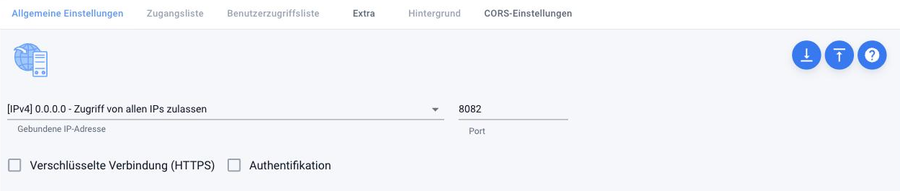
As long as it is disabled, the two tabs "Access List" and "User Access List" are grayed out. With login enabled, they become usable and allow you to further restrict access to individual pages and per user.
Those who only need access for vis should disable login at theweb -Instance under which vis runs. vis itself does not have its own web server.
What needs to be checked next
Adapters that access one of these interfaces themselves now require login credentials. This primarily affects external connections and scripts that access these interfaces via HTTP.web Access it. After switching over, therefore, check the log and look for messages about rejected requests.
Simply logging in is not enough if ioBroker is accessible from the internet. Otherwise, the password is transmitted unencrypted. Encryption is then required, or better yet, using the IoT adapter , which doesn't require any open ports.