Hosts tab
These are the computers running ioBroker. In a standard installation, this is exactly one; in a multi-host system, it's the master and all other hosts.
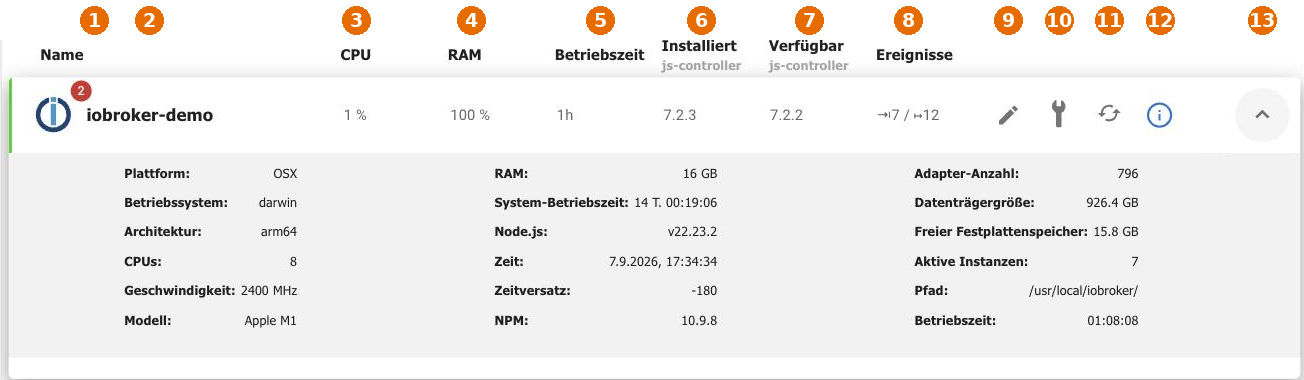
| No. | Meaning |
|---|---|
| 1 | Host notifications . The number indicates the number of unread messages. These may contain warnings about insufficient memory. |
| 2 | The host's name . |
| 3 | The current CPU load. |
| 4 | RAM usage. |
| 5 | The operating time of the js-controller. |
| 6 | The installed version of the js-controller. |
| 7 | The available version. If it is higher than the installed version, an update is required. |
| 8 | Events : incoming and outgoing messages per second. |
| 9 | Change the name . |
| 10 | Host basic settings. |
| 11 | Restart the host. |
| 12 | The host's log level . |
| 13 | Expands the details row . |
The details line lists the platform, operating system, architecture, number and speed of processors, model, RAM, system uptime, Node.js and NPM version, host time and time offset, as well as the number of known adapters, disk size, free disk space, number of active instances, and installation directory.
Time and time offset are worth considering: If the host's clock is running incorrectly, all data point timestamps will be wrong, and time-controlled processes will start at the wrong time.
Update js-controller
The js-controller is the core of ioBroker. Updates will be offered here as soon as a newer version is available in the repository. Instructions on how to do this and what needs to be done beforehand can be found under Updating ioBroker .
!> A backup should be created before updating the js-controller.