Data backup
An ioBroker installation grows over months: instances, objects, scripts, visualizations, recorded values. A defective SD card or a failed update can wipe it all out. Therefore, the question isn't whether to back up, but when to create the first backup , and the answer is: before something happens.
What belongs in a fuse
An ioBroker backup contains the two databases, i.e., all objects and states , the list of installed adapters with their configurations, and the file storage containing scripts and visualizations. It does not contain the adapters themselves; these are downloaded again during the restoration process.
Anything an adapter stores outside of these databases is not included and requires its own backup: the database ofinfluxdb orsql , the files of thehistory -adapter, the network card of the Zigbee stick, the configuration of a Homematic central unit, a Node-RED flow. The fuse adapter has dedicated switches for precisely these purposes, and these are not set by default.
This applies particularly to recorded values . A restore restores a fully configured system, in which all graphs are empty if the corresponding switch was missing. The location of each setting is explained under Data Recording .
BackItUp
The usual method is the BackItUp adapter. It includes a dedicated Backup menu item:
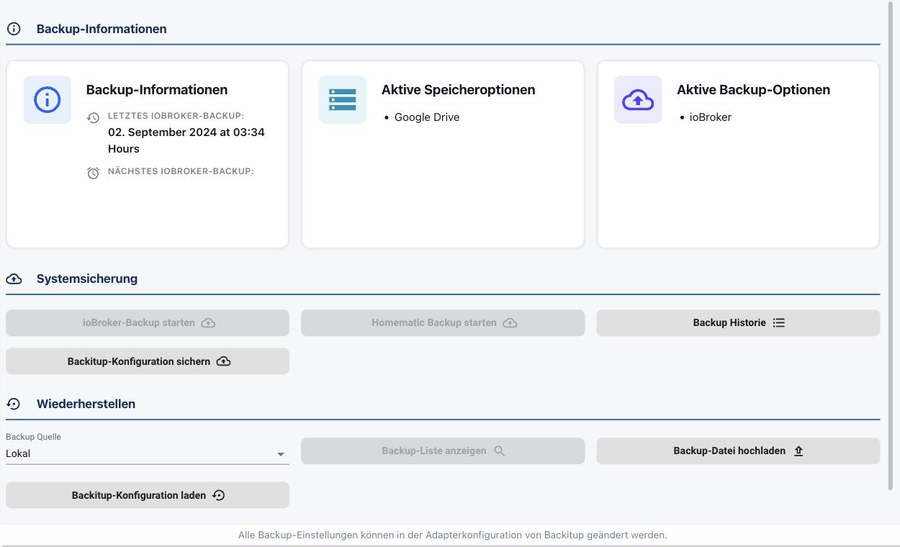
At the top, you'll find the times of the last and next backups, as well as the active backup and storage options. Below that, you can manually initiate backups and view the history; at the very bottom, you can restore from a previous backup.
Furnish
In the instance configurationbackitup.0 In the "Main Settings" tab, under "What should be backed up?", you'll find a list of possible components: next toioBroker These include Homematic, Redis, JavaScript, Zigbee, Zigbee2MQTT, history data, InfluxDB, MySQL, PostgreSQL, SQLite3, Grafana, Node-RED, and Yahka. Check the box for anything that actually runs on your system.
The storage locations listed below include the following destinations: NAS or Copy, FTP, Dropbox, Google Drive, WebDAV and OneDrive.
!> Select at least one destination outside the ioBroker computer. A backup that is only stored on the same SD card will be deleted along with that card.
The schedule is available in the ioBroker tab:
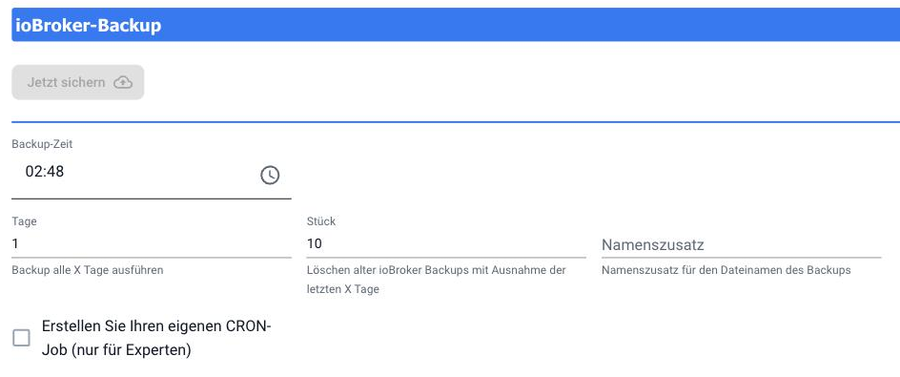
| Field | Meaning |
|---|---|
| Backup time | Time of backup. An odd time is better than a full hour because then not everything happens at once. |
| days | Distance in days.1 means daily. |
| Piece | How many backups are retained. Older ones are deleted. |
| Name suffix | It goes into the filename. Useful when backing up multiple systems to the same destination. |
If you need your own rhythm, turn on Create your own CRON job .
The complete description of all backup types and storage destinations can be found in the adapter's documentation .
Without an adapter, via the command line
ioBroker can also back up without an additional adapter:
iobroker stop
iobroker backup
The file is stored as<Datum>_backupIoBroker.tar.gz in the directory/opt/iobroker/backups The game is played back using:
iobroker stop
iobroker restore <Name oder Pfad der Sicherung>
iobroker start
Called without parameters, it listsiobroker restore the existing fuses.
ioBroker must be stopped for both commands. A backup performed while the system is running may be incomplete.
What makes a fuse a fuse
A backup that has never been restored is a gamble. It's worthwhile to practice a backup in a safe, controlled environment, either on a second computer or in a virtual machine. Step-by-step instructions on how to do this can be found under "Restore ."
A backup should also be performed before every major update, especially before changing the Node.js version or the js-controller.