Advanced
How do I get a beta version?
Sometimes you are asked to test a version that is not yet in the repository. This usually refers to the beta version of an adapter.
For a system that needs to run reliably, the beta repository is unsuitable.
The versions there are not yet fully tested, and reverting to a previous version requires manual effort.
The better way: only a single adapter
Since Admin 5, it is no longer necessary to change the entire repository for this:
- Activate Expert Mode. The icon is located in the bottom left corner of the menu bar.
- In the Adapters tab, go to Install from own source (the symbol
(with the Octocat).
- In the From npm tab, select and install the desired adapter.
All other adapters will continue to come from stable.
Convert the entire repository
If it is ever necessary: In System settings, in the Repositories tab, switch to beta in the Active column.
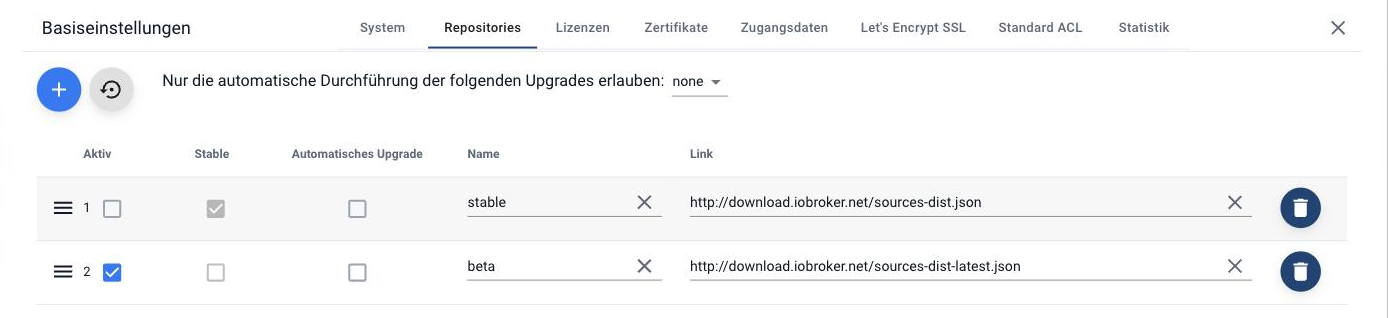
Then, in the Adapter tab, reload the list. If beta is active, a warning will appear. This is intentional and serves as a reminder to revert back.
In detail: What is a repository?
How do I switch an instance to debug mode?
In the Instances tab, expand the details row of the instance and click on the log level. In the dialog box, set it to Debug .
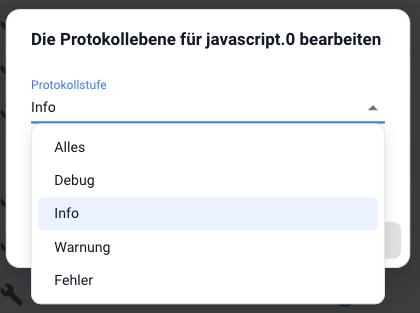
The setting is saved permanently. Without the " Without restart" checkbox selected, the instance will restart. This is usually intentional, as only then will it log the complete process from the beginning.
Then trigger the action that caused the error and check the logs .
!> After troubleshooting, reset to Info .
For an error message in the forum or on GitHub, please include an excerpt from the downloaded log file, not a screenshot of the list. Long lines will be truncated in the display.
How do I install an adapter from GitHub?
Only if a developer explicitly requests it. Anything on GitHub is a work in progress and may be unusable in the meantime. Dependencies are not checked with this type of installation.
- Turn on expert mode .
- In the Adapter tab, select Install from local source .
- Switch to the From GitHub tab and select the adapter.
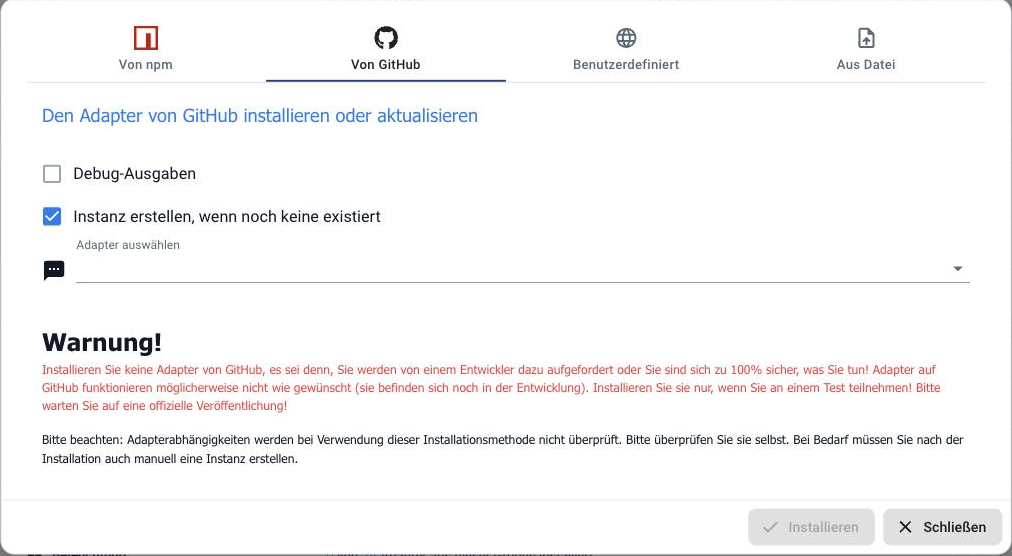
The "Custom" tab accepts any address, such as a specific branch or another developer's repository. "Install from file" installs a locally stored package.
Back again
An adapter that came from GitHub will not be automatically replaced by the next update from the repository. Its version number is usually higher than the official one. You can revert to the previous version by selecting "Install a specific version" on the back of the adapter tile.
Should I make a backup? Of what?
Yes, and that should happen before anything happens, not after.
ioBroker includes the BackItUp adapter for this purpose, which can be found in the admin panel under the Backup menu item. It backs up the two databases (objects and states), the configuration, and optionally also the data of connected systems, a HomeMatic CCU, Grafana, InfluxDB, and the scripts of the JavaScript adapter.
It makes sense to:
- a daily automatic run,
- the storage location outside the ioBroker computer (NAS, network drive, cloud),
- and at least one restore test. A backup that has never been restored is a guess.
A backup should also be performed before every major update, especially before updating the js-controller or changing the Node.js main version.
In detail: Backup
How do I set up my own SSL certificate?
The certificates are located centrally in the system settings under the Certificates tab and are used by admin, web, simple-api and socketio.
Ex-worksdefaultPrivate anddefaultPublic These are registered. They are the same in every ioBroker installation and therefore not secure. They do encrypt, but nothing can be verified with them.
Three ways to obtain your own certificate:
- Self-generated : sufficient within your own network, but the browser will warn you every time.
- Let's Encrypt : free and automatically renewed, but requires an externally accessible address and port 80. Configure it in the tab of the same name.
- Purchased : save as a file or specify the path.
!> Try a new certificate first with the web adapter, not with the admin adapter. Otherwise, you might lock yourself out.
Those who only want to access ioBroker remotely don't need any of this: The iot adapter works without open ports and without its own certificate.
What is Redis, and when does it become worthwhile?
ioBroker maintains two databases: one for the objects (the structure) and one for the states (the values). The default setting for both is...jsonl , a file that is kept in memory during operation.
Redis is an alternative for managing states. It's worthwhile if many values change very frequently, as a rough guideline starting at a few thousand states with frequent changes, or ifmemRss The js-controller is growing noticeably.
Please note:
- Redis must be persisted , otherwise the states will be lost after a reboot.
- The backup must include Redis. BackItUp can do that.
- For objects, as a rule,
jsonlthe better choice.
For a typical home installation, the default settings are perfectly adequate. Changing them without experiencing any problems usually just introduces an additional potential source of error.
In detail: Redis
What is a multi-host system?
Several computers together form an ioBroker installation. One is the master : it houses the two databases. The other hosts retrieve the data from there and only run their own instances.
This makes sense primarily for two reasons:
- Spatially : a second computer is located where the wireless dongle belongs.
- Load balancing : computationally intensive adapters run on their own hardware.
Everything is managed via the master's admin; the Instances tab allows filtering by host, and the Hosts tab lists each computer with its values.
The master server is the single point on which everything depends. If it fails, the entire system shuts down. A multi-host setup doesn't make the installation more resilient, it just makes it larger initially.
In detail: Multihost