Redis
Which databases are meant here?
ioBroker maintains two databases: one for objects , i.e., the description of all devices, channels, and data points, and one for states , i.e., their current values. Both are managed by the js-controller, and both only ever retain the current state.
!> This has nothing to do with the adapters that record the history .history ,influxdb andsql They store their data separately and handle it under data logging . Setting up Redis doesn't make your measurements faster to retrieve, and setting up InfluxDB doesn't reduce the load on the JS controller. This confusion is the most common misconception here.
| Objects and states | Recorded values | |
|---|---|---|
| Contain | The current state of the system | The course over time |
| Managed by | js-controller | history ,influxdb orsql |
| Filing | jsonl ,file or Redis | files or an external database |
| Read more at | objects | Data recording |
This page is about the first column, more specifically the possibility of keeping it in Redis instead of in files.
The two databases are configured separately . The usual approach is to only store the states in Redis and the objects injsonl to allow it. This brings the greatest benefit, because states change constantly and objects almost never, and it uses the least amount of memory.iobroker status shows what is currently in use.
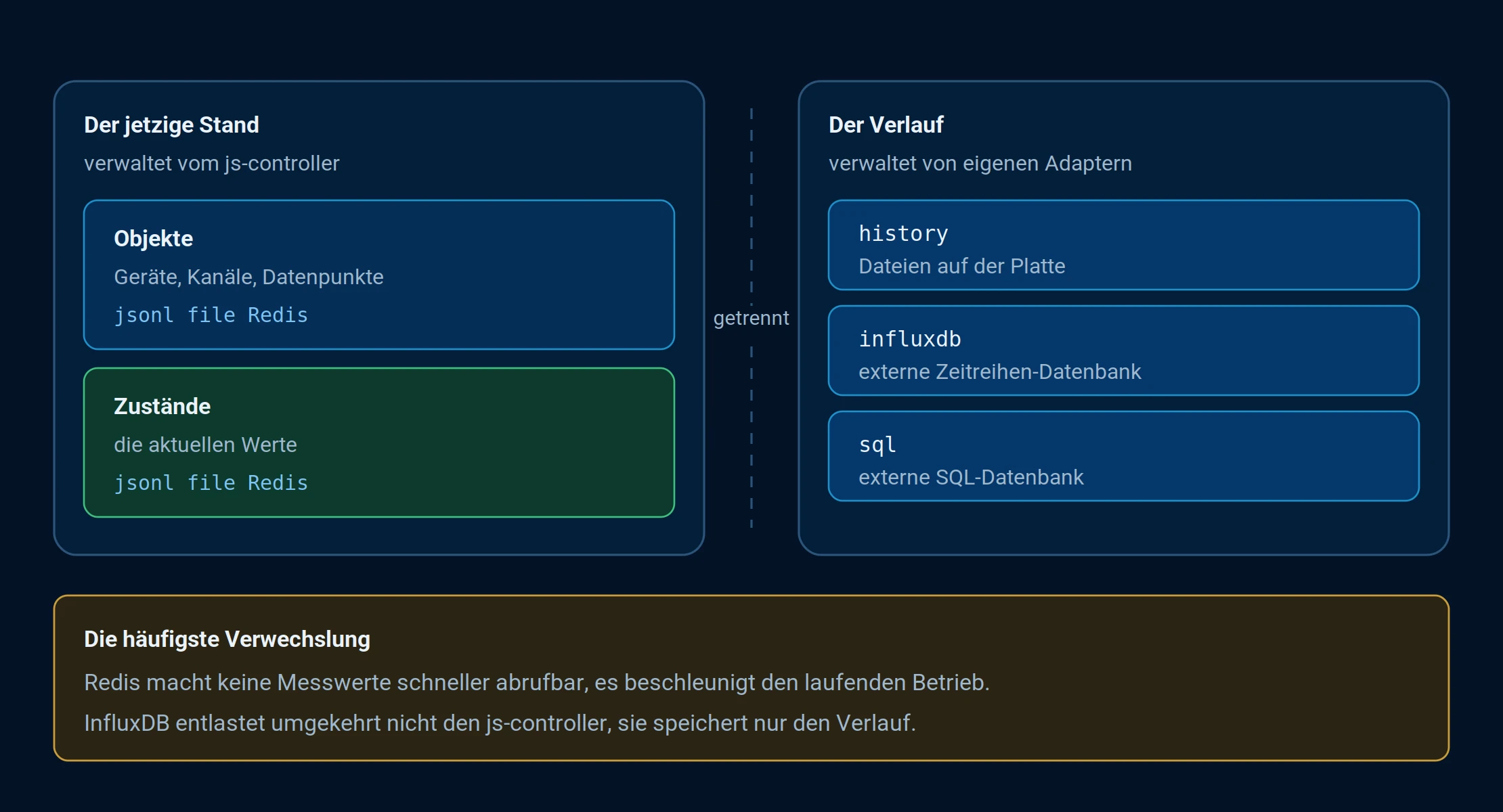
Two separate worlds: on the left, the current state maintained by the js-controller; on the right, the progress recorded by custom adapters.
What Redis is
Redis is an open-source in-memory database. Further information can be found at https://redis.io/
The big advantage of Redis:
Compared to the internal ioBroker databases, Redis offers advantages primarily in data access speed, file system I/O management, and better utilization of CPU resources. The JS controller is relieved of some of its workload. A previously sluggish system can become faster again. However, sufficient RAM is crucial, as Redis keeps all data in RAM. Depending on exactly what is stored in Redis, the RAM requirement ranges from a few MB (e.g., if only states are stored in Redis) to over 200 MB (if, for example, objects and files are also stored there).
Redis FAQ
-
Do I need Redis for my ioBroker or not? For all typical installations, ioBroker's own databases are usually perfectly sufficient! Only if the js-controller is constantly using 50-70% or more of the CPU and the system feels sluggish does it make sense to look into Redis. Alternatively, it becomes necessary if you're aiming for a highly available ioBroker system, but that requires a few more things.
-
How do I find out if I'm using Redis or not? Since ioBroker's own databases also use the Redis protocol for communication, it can sometimes be confusing to see Redis mentioned in the log. However, as long as ports 9000/9001 are mentioned, it indicates the internal database and has nothing to do with the external Redis database. A call to
iobroker statusThis indicates which database type is used for the States and Objects databases. "file" means that ioBroker's own databases are used. "redis" means that a Redis server is in use.
A detailed explanation of the topic of Redis, including further information, can be found in the forum.
Redi's persistence
Normally, Redis is an "in-memory database." This means the data is stored in RAM. When Redis is terminated, the data is lost. However, to allow for updates, Redis supports two types of data storage on disk: RDB and AOF persistence.
RDB is enabled by default; this method saves the entire content to an RDB file. The saving interval can be configured and should be adjusted to your specific needs! Configuring this requires a balance between data security (how much data can you tolerate losing in a crash) and the write load on the storage medium, as the entire content is always written (if objects are also stored in Redis, this can amount to several hundred MB!).
AOF ensures that the data is always up-to-date. To achieve this, an AOF file is continuously written, to which all changes are appended. This file is then consolidated at regular intervals, thus reducing its size. The exact final write load, and whether this is suitable for SD cards, depends on the type of data being stored. If objects and files are also stored in Redis, appending and infrequent consolidation is potentially much more efficient than regularly writing large amounts of data. As mentioned above, this requires more RAM. If this RAM is temporarily unavailable, everything will continue to run smoothly, depending on the settings. However, a data backup will not be created! Any such messages will only appear in the log file.
More details about persistence can be found at https://redis.io/topics/persistence
Using Redis slaves , or a second Redis server, is another way to ensure you always have up-to-date data as a backup. If the machine with the master Redis server fails, the data is still available on the slave in near real-time. You can use this to create a data dump to reinstall the master, or, as a quick fix, you can make the slave the master and change the database IPs in ioBroker, bringing you back online with almost up-to-date data. More detailed information on this can be found in the forum or at https://raw.githubusercontent.com/antirez/redis/5.0/redis.conf
However, a slave device does not protect against accidental data deletion, as the data is deleted immediately on the slave as well. Only backups can help in this case.
Redis installation
Redis must be installed and configured as a separate service, and the data should be included in the backup. The persisted databases are stored as JSON files in the "iobroker-data" folder. Installation is performed via the command line.
Debian
sudo apt update
sudo apt install redis
Ubuntu
sudo add-apt-repository ppa:chris-lea/redis-server
sudo apt-get update
sudo apt-get install redis-server
Warning : There are no official Redis builds for Windows.
Setting up Redis
You can check usingsudo systemctl status redis-server If it doesn't restart automatically after a reboot, asudo systemctl enable redis-server Redis uses port 6379 by default and also includes a command-line tool for accessing the database:redis-cli opens a shell. The commandinfo It displays some information about the system, memory usage and the stored data ("Keyspace"), which is currently empty.
If you are running a single-host system or if ioBroker is running on the same host, then that's all there is to it.
If other hosts (slaves, etc.) are also to access this Redis server, this must be allowed. To do this, edit /etc/redis/redis.conf and change the line `bind 127.0.0.1` to `bind 0.0.0.0` and set ` protected_mode` directly below it to `no` .
Then it startssudo systemctl restart redis-server restart the server with the updated configuration.
See Multihost for more details.
Migrating the ioBroker database to Redis
Most changes and data queries occur with the States database. All data changes arrive here and are then distributed to adapters once they have registered for specific data. Therefore, migrating the States database to Redis has by far the greatest and most noticeable performance impact. Those only migrating the States database should ideally install the Redis server on the same host as the ioBroker master.
The "states" are then changed via:
iobroker stop
iobroker setup custom
For "Objects," confirm the current settings ("file" as type, IP, port 9001) and for "States," now set the type to "redis," the IP address of the Redis host server (or 127.0.01 if on the same host), and 6379 as port. To avoid losing all state data, it's recommended to migrate the data, which the next configuration questions will ask you to do. After the migration, ioBroker can be restarted with `iobroker start` . If you are also using slave systems, the same settings must be configured on all of them using `iobroker setup custom` . However, you must answer "no" to the migration question!
Anyone who also wants to switch "Objects" should proceed in the same way, selecting the "redis" type, entering the IP and port of the Redis host, and migrating the data if necessary, which can take quite a while depending on the size.
Are states and objects in the same or separate redis processes?
The simplest approach is, of course, to store states and objects together in a single Redis process. However, this also means that all data can only be backed up together. With the ioBroker file database, states, objects, and files were separate and could therefore be backed up selectively. The write load is also higher when everything is stored in one Redis process, due to the larger database size. To separate frequently changing states from less frequently changing objects and files, even with a single Redis setup, you can simply use two Redis processes per host. Instructions for this can be found, for example, at https://gist.github.com/inecmc/f40ca0ee622e86999d9aa016c1b15e8c .
Atiobroker setup custom The respective different ports for states or objects/files are simply specified.
For states, it is recommended to use RDB persistence, which saves the data every 5-15 minutes depending on the number of changes. For objects/files, AOF persistence is more suitable to minimize write load.
Backup
Redis typically stores its files under /var/lib/redis. The dump.rdb or appendonly.aof file located there (depending on the chosen persistence setting) can be saved. You can also...redis-cli BGSAVE Create a dump.rdb file immediately before the backup and then save it away.