Usage
What is an adapter, what is an instance?
An adapter is a program that connects a system, manufacturer, protocol, or service to ioBroker. Initially, it is just the program itself and does nothing on its own.
An instance is a running copy of the adapter, with its own configuration. Only it is operational. There can be multiple instances of the same adapter, for example, one...hm-rpc.0 for radio and ahm-rpc.1 for the wired branch.
The instance name is also the namespace under which its objects reside: everything fromjavascript.0 begins withjavascript.0. .
Instances are created in the Adapter tab and managed in the Instances tab.
What is the js-controller?
The js-controller is the core of ioBroker. It starts and stops the instances, manages the two databases (objects and states), and monitors the system. Nothing works without it.
It is not an adapter and therefore does not appear in the adapter list. Its version is listed in the Hosts tab, and updates are performed via the ioBroker update function .
!> A backup should be created before updating the js-controller.
How do I install an adapter?
In the Adapter tab, find the desired adapter and click the button with the three dots on the tile. On the back, the " +" creates a new instance, automatically installing the adapter if it's already missing.
The configuration window usually opens immediately after that. What needs to be entered there is described in the documentation for the respective adapter; the button with the question mark leads directly there.
In detail: Adapter rider
If an adapter does not start after installation, it is worth first taking a look at the logs .
What is the difference between stable and beta?
The stable version contains the tested adapter versions. The beta version (formerly latest ) contains the latest versions. These may still contain bugs.
On a system that is intended to run reliably, the "stable" setting should be selected.
If a newer version of a single adapter is needed, there's no need to change the repository: The "Install from local source" dialog in the Adapter tab can retrieve a single adapter directly from npm.
In detail: What is a repository?
When should I install a version directly from GitHub?
Only if a developer explicitly requests it : for example in the forum or in an issue, to test a fix.
What's on GitHub is a work in progress. It might work, but it doesn't have to, and dependencies aren't checked with this type of installation.
Anyone who wants to try it out themselves should do so on a test system, not on the one to which the heating system is connected.
How to do it is explained under Advanced .
When should I manually install something using npm?
Normally: not at all.
ioBroker manages its own adapters.npm install by hand in the directory/opt/iobroker It creates files that ioBroker is unaware of. The change will be lost with the next update; in the worst case, the installation will be corrupted.
Everything you need is done through the admin or viaiob on the command line. The commands are listed under Command Line .
One exception is additional Node modules that require their own JavaScript script. These are not installed manually, but rather entered in the configuration of the JavaScript instance; ioBroker then takes care of it.
What do the symbols in front of an institution mean?
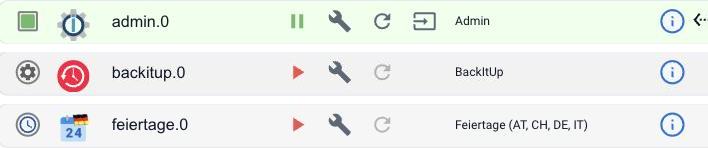
| symbol | Meaning |
|---|---|
| Green Square | The instance is running. |
| Grey gear | The instance is stopped. The red triangle next to it starts it. |
| Clock | A time-controlled instance. It only runs briefly at the set time and then terminates. This is not a bug. |
More details can be found by hovering the mouse cursor over the icon. Whether the instance is actually communicating with your device is not indicated here, but rather in its object.info.connection .
In detail: Instances tab
Where can I find the logs?
In the admin panel, under the Logs tab , you can filter by instance, level, and text.
They lie on the plate under/opt/iobroker/log/ One file per day. The full file can be downloaded via the "Download Log" button.
It also works via the command line:
iob logs          # die letzten 100 Zeilen
iob logs --watch  # fortlaufend mitlesen
Long lines are cut off in the browser display. Anyone who wants to investigate a message properly should check the downloaded file. The cause is often found in the lines preceding it.
How do I change the log level?
In the Instances tab, expand the details row of the instance and click on the log level:
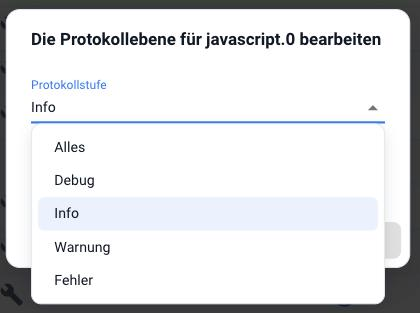
The available options, from most detailed to most concise, are: All , Debug , Info , Warning , Error . Info is the default.
To troubleshoot, enable debug mode , restart the instance, and review the logs again.
Then switch back. Debug mode grows the log quickly and consumes write accesses. This is not a good idea on an SD card.
The setting for new instances is in the system settings .