Controller and adapter
ioBroker consists of two types of programs: the js-controller and the adapters . The controller holds the system together, while the adapters provide the actual functionality.
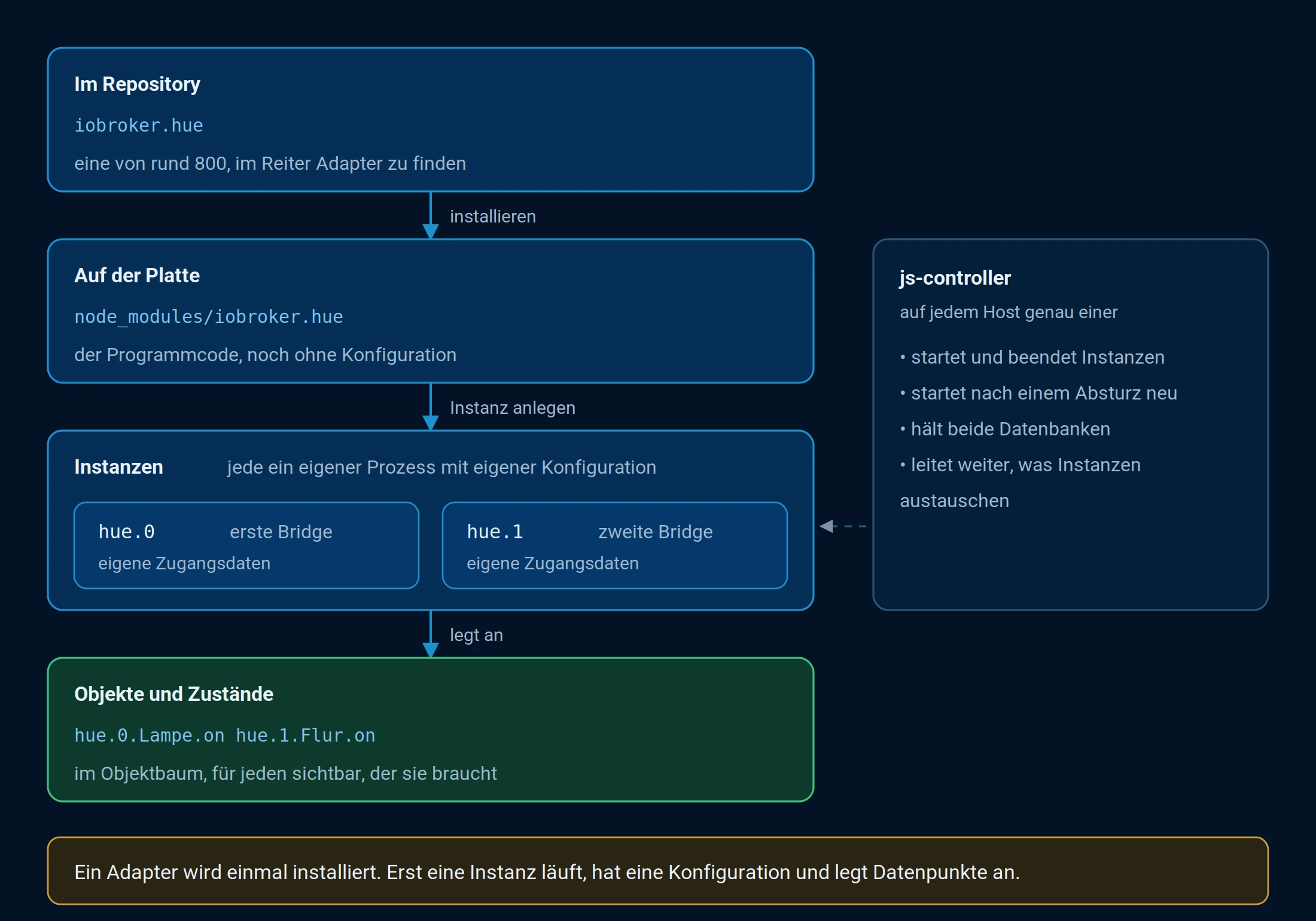
The path from the adapter to the data points: the adapter is installed once, the instances run.
The js-controller
The JS controller is the core of every installation. Exactly one runs on each host. It is written in TypeScript and performs four tasks:
| Task | What's behind it |
|---|---|
| Manage instance | It starts and stops the instances and restarts them as needed. |
| Data is stored | He manages the two databases, one for the objects and one for the states. |
| communication | All instances exchange their data via him, not directly with each other. |
| surveillance | It reports when an instance is no longer running, memory is running low, or an update is available. |
The JS controller is not updated in the Adapters tab, but via the Hosts tab or the command line. See Updating ioBroker for details.
adapter
An adapter connects a system to ioBroker: a device, a service, a protocol, or even just a data source on the internet. Externally, it speaks the language of the connected system; internally, it stores the data as objects and states. It thus acts as the interface between ioBroker and everything that is not part of ioBroker.
What an adapter can do depends on what it was designed for. Typical examples are:
- Retrieve data. Measurement values, states, and messages from the connected system are saved as data points in ioBroker.
- Control. Switch devices on and off, set values, issue commands.
- Record. Save values for later analysis, for example.
history,influxdborsql. - Visualize. Provide interfaces, for example.
vis-2orlovelace. - Automate. Trigger processes based on conditions or schedules, for example.
javascriptorscenes. - Notify. Send messages, for example.
telegramoremail. - Maintenance. Creating backups, updating firmware, monitoring the system.
Well-known examples include the Zigbee adapter for radios, the MQTT adapter for anything that uses this protocol, and the JavaScript adapter for custom scripts and Blockly.
Advantages
- Flexibility. Almost any system can be connected, regardless of its protocol.
- Expandability. New adapters are added for new devices without changing the rest of the installation.
- Centralization. All connected systems are managed in one place and can be linked together.
Adapter categories
Each adapter has a category that can be used to filter the list in the Adapter tab:alarm ,climate-control ,energy ,hardware ,lighting ,logic ,multimedia ,weather and more. The complete list with explanations can be found under Publish adapters .
Instance
An installed adapter is not yet running. An instance is created for this purpose, and only this instance will be operational. It contains the configuration, such as the gateway address or the access credentials.
There can be multiple instances of an adapter. This is always useful when the same system exists multiple times or when tasks need to remain separate.hm-rpc.0 for the radio interface andhm-rpc.1 for the wired, twotelegram -Instances for two recipient groups.
Each instance gets its own namespace in the object tree, consisting of the adapter name and a sequential number, for example:hm-rpc.0 The instance then places its devices, channels, and data points within this framework.
Instances are created and configured in the Instances tab. More information about the data structure can be found under Objects and States .