Categories and lists
Categories group devices and data points together: by room, by function, or by a user-defined criterion. In the object tree, they are calledenum In older texts and in the adapter documentation, the terms enumerations and enums are also used for this.
The benefit lies in the fact that scripts, visualizations, and voice control work with the group as a whole, rather than with individual data points. If a device is replaced or added, only the assignment changes. The script and visualization remain unchanged.
Categories are created and maintained in the Categories tab of the Admin.
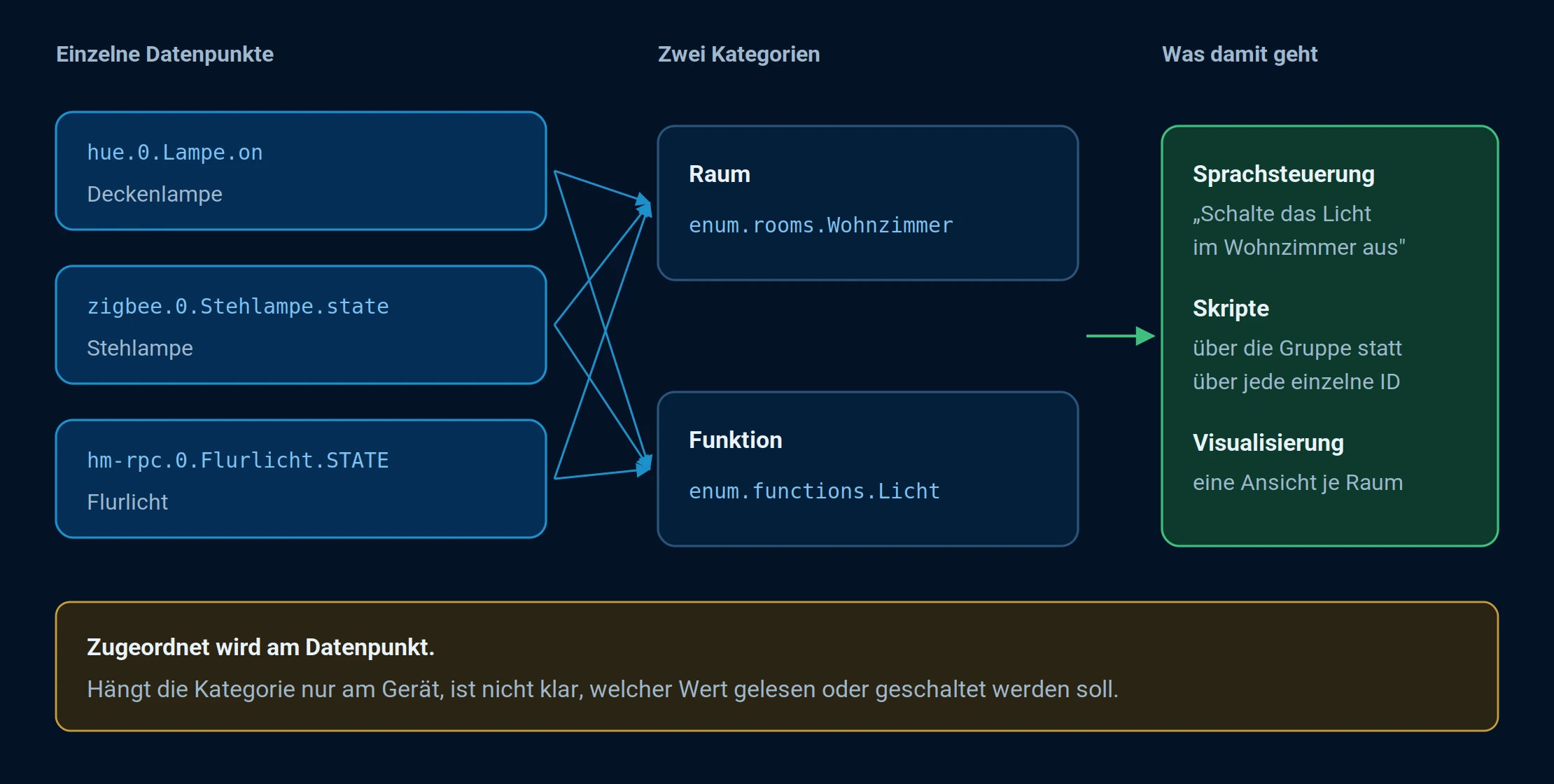
Each data point is associated with a room and a function. Only together do the two make "light in the living room" a definite selection.
The three types
| object | Meaning | Examples |
|---|---|---|
enum.rooms | Rooms | Living room, kitchen, bedroom |
enum.functions | Functions, formerly trades | Lighting, heating, windows, security |
enum.<eigener Name> | Self-created groups | enum.custom.batterie ,enum.custom.heimkino |
Rooms and functions are predefined because many adapters evaluate them. Custom categories can be freely named and are intended for anything that cannot be described as either a room or a function.
Devices, channels, and data points can be assigned. For voice control and most evaluation adapters, the assignment must be linked to the data point . Otherwise, it's unclear which value should be read or switched.
What's the point of that?
- Easy to maintain. A replaced device receives the same assignment; everything else remains unchanged.
- Scalable. New devices integrate without modifying any scripts.
- Clear and concise. Even with several hundred data points, a clear structure is maintained.
- Manufacturer-independent. The group describes what a data point does, not who it comes from.
Create and assign categories
Three paths lead to the same result:
- In the Categories tab, create a category and select the members.
- In the Objects tab, assign the Rooms and Functions columns directly to the data point.
- Via script, if many assignments need to be created at once.
Use in scripts
The JavaScript adapter selects objects using a selector. Categories are enclosed in parentheses , everything else in square brackets:
"name[commonAttr=wert](enumName=wert){nativeName=wert}[id=filter][state.id=filter]"
Examples:
// Alle Lichter im Wohnzimmer ausschalten
$('channel[role=switch][state.id=*.STATE](rooms=Wohnzimmer)').setState(false);

// Alle Fensterkontakte protokollieren
$('channel[state.id=*.STATE](functions=Fenster)').each((id) => log(id));

// Alle Datenpunkte der eigenen Kategorie "enum.custom.batterie" überwachen
$('state(custom=batterie)').on(obj => {
    if (obj.state.val < 20) {
        sendTo('telegram', 'Batterie schwach: ' + obj.id);
    }
});
The name in parentheses is the first level below...enum , the value behind it is the category itself.enum.custom.batterie will therefore become(custom=batterie) The complete description of the selector can be found in the documentation of the JavaScript adapter .
When a device is added, simply assigning it to the category is sufficient. No changes need to be made to the script.
Use in visualization
Adapters like the Devices adapter or Lovelace readenum.rooms andenum.functions They extract the data and build their views from it. Spaces become pages, functions become groups within them. A newly assigned data point then automatically appears in the correct position.
Use in voice control
Alexa and Google Home receive location and function information via cloud adapters. Only then can commands like "Turn on the living room light" understand which data points are being referred to. Without this information, only the individual device name remains.
Recommendations
- Maintain spaces and functions consistently, even if initially only one script needs them. Later, other adapters will access them.
- Assign meaningful names. These names will reappear in the voice control and in the visualization.
- Create your own categories only where space and function are insufficient.
- Briefly document the structure if multiple people are working on the system.