Report a bug
Something isn't working. Before reporting this to the developer, one question needs to be answered, and it's more important than anything else on this page: is the problem actually with the program?
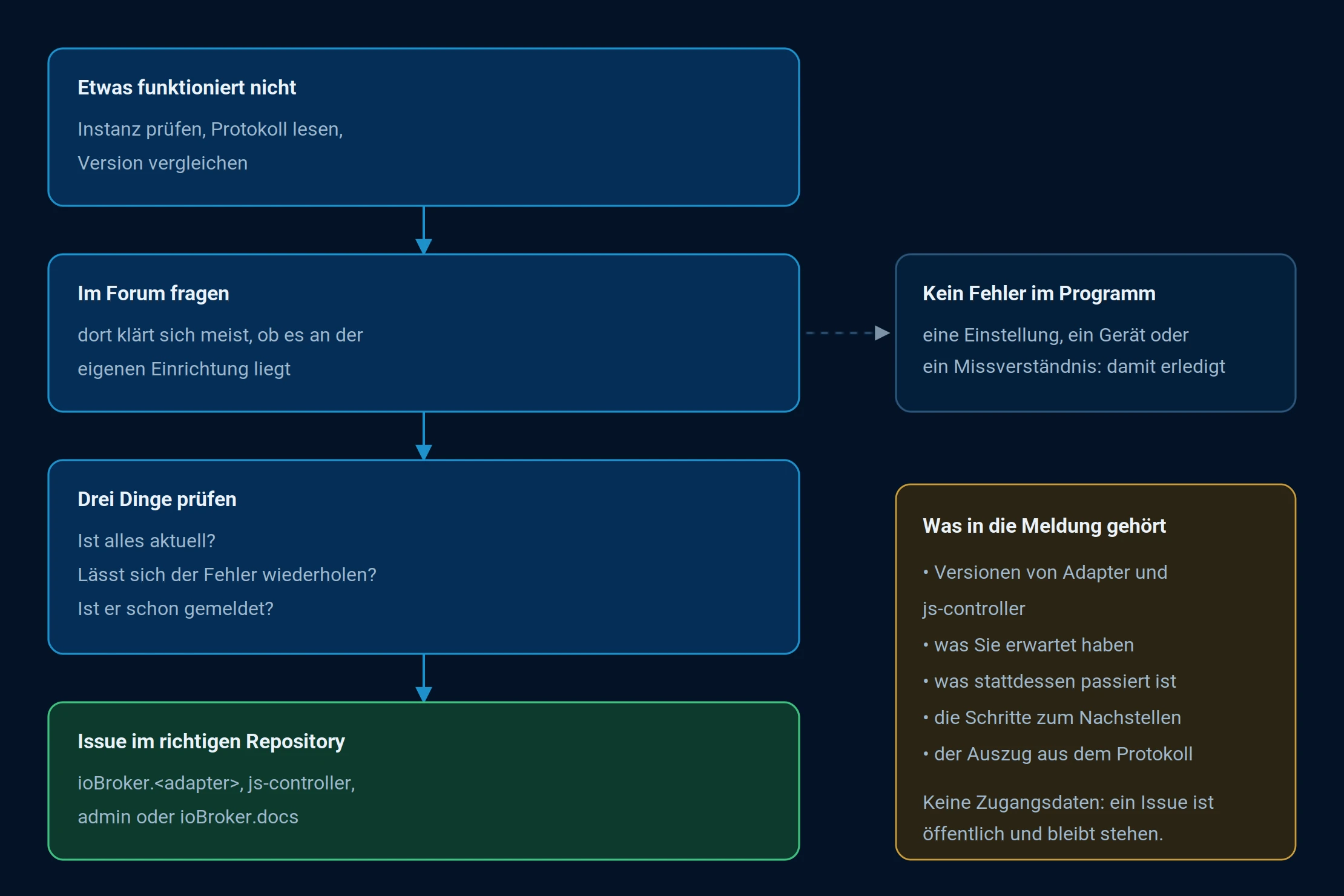
The path from problem to report. Most cases end up in the forum, and that's a good thing.
First: is it a bug in the program?
Most problems aren't problems at all. They stem from a setting, an outdated version, a device that isn't responding, or a misunderstanding of how something is supposed to work. So let's take it one step at a time:
- Narrow it down yourself. Is the instance running? Are values being received? What does the log say? The procedure is described under Troubleshooting .
- Ask in the forum . There, it will quickly be clarified whether the problem lies with your own setup. Very often, the answer is found there, and nobody needs to change anything in the program.
Rule of thumb: Check the forum first , as long as it's unclear whether there's actually a bug. Only report it to the developer once the bug is reproducible and it's clear which adapter is affected. If in doubt, check the forum first. If it turns out to be a real bug, someone there will usually point you in the right direction.
Then: check three things
- Is everything up to date? Adapter and JS controller are up to date. Many bugs have long since been fixed.
- Can the error be repeated? If so, note how. This is the most valuable piece of information in the entire report.
- Has he already been registered? Instructions on how to check are below.
What an issue is
Issues are not reported via email, but as an issue . This is an entry in a program's bug log. Every adapter, the js-controller, the admin interface, and even this documentation have such a log. It is stored on GitHub, the platform where the ioBroker source code is managed.
| forum | Issue | |
|---|---|---|
| Who is reading along? | Other users | The person who wrote the adapter |
| What is it intended for? | Questions, help with your own setup | A bug in the program |
| What will become of this? | An answer | A change to the program, or a reason why not |
Two characteristics are important to know.
An issue is public . Anyone can read it, it remains permanently online, and search engines can find it. This is intentional, so that the next person with the same problem can find it. However, it also means that no login credentials should be included.
And it's not a support contract . Adapters are written and given away in the author's free time. An issue is a notification to the person who created it, not a guarantee of a response within a specific timeframe.
Finding the right list
| What is affected | Where |
|---|---|
| A single adapter | The repository of this adapter |
| The admin himself | ioBroker/ioBroker.admin |
Start, Databases,iobroker -commands | ioBroker/ioBroker.js-controller |
| Installation under Linux | ioBroker/ioBroker |
| This documentation | ioBroker/ioBroker.docs |
The quickest way to find an adapter's repository is via the adapter list on this website: Select the adapter; a button with the GitHub logo will take you directly to the repository. Alternatively, you can search GitHub for "adapter".ioBroker.<name> .
Adapters are maintained by different people, so the repository is not always located under [the relevant user account].ioBroker The crucial point is that the name is onioBroker.<adaptername> ends.
Creating an issue, step by step
- Create an account. A GitHub account is required for writing. It's free; reading is possible without one.
- Go to the repository and open the Issues tab at the top.
- First, search. The search field above the list only searches open entries. For closed entries, use the filter.
is:openremove andis:issue <stichwort>Enter the answer. Often the solution is already there. - On
New issueClick. Some adapters will then offer a selection of templates, such as bug report and feature request . Select the error message. The template will ask for exactly what is needed; fill in all fields and do not simply delete the information lines. - Write the title and text. What belongs in it is explained in the next section.
- Send with
Submit new issue.
You will then receive an email as soon as someone replies. Answering follow-up questions is the most important part: a report that remains untouched after the first question is closed without any changes. Finally, the person who created the report closes the entry. If the error reappears, the same entry can be commented on or reopened.
What belongs inside
- A title that names the problem. "hm-rpc loses connection to CCU3 after restart" is useful, "doesn't work" is not.
- What you expected and what happened instead . Two sentences, but separate.
- How to trigger the error , step by step.
- The versions : Adapter, js-controller, Node.js, operating system.
iobroker versionand the Hosts tab provides the information. - The protocol excerpt at the level
debug, from the downloaded log file. How to change the level is described under Troubleshooting .
Protocols should be included as text, not as screenshots: long lines will be cut off in the display, and it's impossible to search or quote from an image. To preserve the formatting, enclose the text in three back quotes.
```
2026-09-08 14:02:11.431  - error: hm-rpc.0 (1234) Cannot connect to 192.168.1.20
```
For errors in the user interface, a screenshot is exactly what's needed. It can simply be dragged and dropped into the text field.
!> Review before submitting. Passwords, access keys, tokens, serial numbers, and the installation UUID do not belong in a public report.
Language
English reaches all developers. For adapters from German-speaking countries, German is fine. In both cases, an adapter represents work that someone has given away, and the tone often determines how quickly things happen.
Automatic error messages
Many adapters automatically report crashes to Sentry if this is enabled in the system settings . The program history of the crash is transmitted, not personal data. This allows the developer to see that an error occurs and how often, but not what you were doing when it happened. Therefore, a manually written report remains valuable.
And if you can fix it yourself
The next step is a pull request : a proposed change to the source code that the maintainer can then implement. How this works is explained under Working in a Team . The rules for adapters are under Best Practices , and those for documentation are under Writing Articles .