What is ioBroker?
ioBroker is software that connects devices and services from different manufacturers into a single system. Read values, control devices, automate processes: all in one place, regardless of the manufacturer of the individual device.
Make your life easier: Smart Home
Wouldn't it be practical to read temperatures, consumption values, or switching states of devices from various manufacturers in one central location? Wouldn't it be necessary to remember to switch devices on or off when certain conditions or states are reached?
This convenience is what a smart home can offer. And it offers even more, if desired: automation and the ability to access all these things remotely.
The solution: ioBroker - Automate your life
ioBroker is a software solution for automating your home. It enables the integration of a wide variety of smart home systems that would otherwise remain isolated, thus allowing for comprehensive control.
ioBroker is therefore the integration platform for the Internet of Things (IoT) and enables the integration of free and commercial products from almost all areas of life as well as the integration of self-created solutions.
The ioBroker system is modular and can be extended according to individual requirements by installing individual plugins, which we call adapters.
With well over 600 adapters, ioBroker enables the integration of various platforms, systems and devices from A as in Alexa to Z as in Zigbee and offers many other possibilities for automation.
What are adapters?
Adapters are plugins (software modules, small programs) written in JavaScript for Node.js that are specifically designed for certain devices, device types, devices from specific manufacturers, or other services, such as querying websites.
These adapters enable the connection between physical devices (for example, smart plugs, relays, remote thermometers, and similar devices) and the central ioBroker system. They are able to read the values measured by the devices and control them, often via Wi-Fi within the home network.
Other adapters are designed to graphically display measured values such as temperature, power, consumption, or switching states in diagrams. Visualization adapters also offer additional features, such as the integration of images (e.g., from surveillance cameras), weather data, and much more.
Additionally, there are adapters that offer functions for mathematical calculations or logical operations (such as comparisons). They can also be used to create small programs and to define the rules necessary for automation.
Since JavaScript is one of the most widely used programming languages, many ready-made modules already exist, and new ones can often be developed with relatively little effort. Therefore, if an adapter is missing, a suitable one can usually be developed quickly. The active ioBroker developer community is always happy to support new developers.
Tip: Overview of available adapters
ioBroker connects a wide variety of smart home systems.
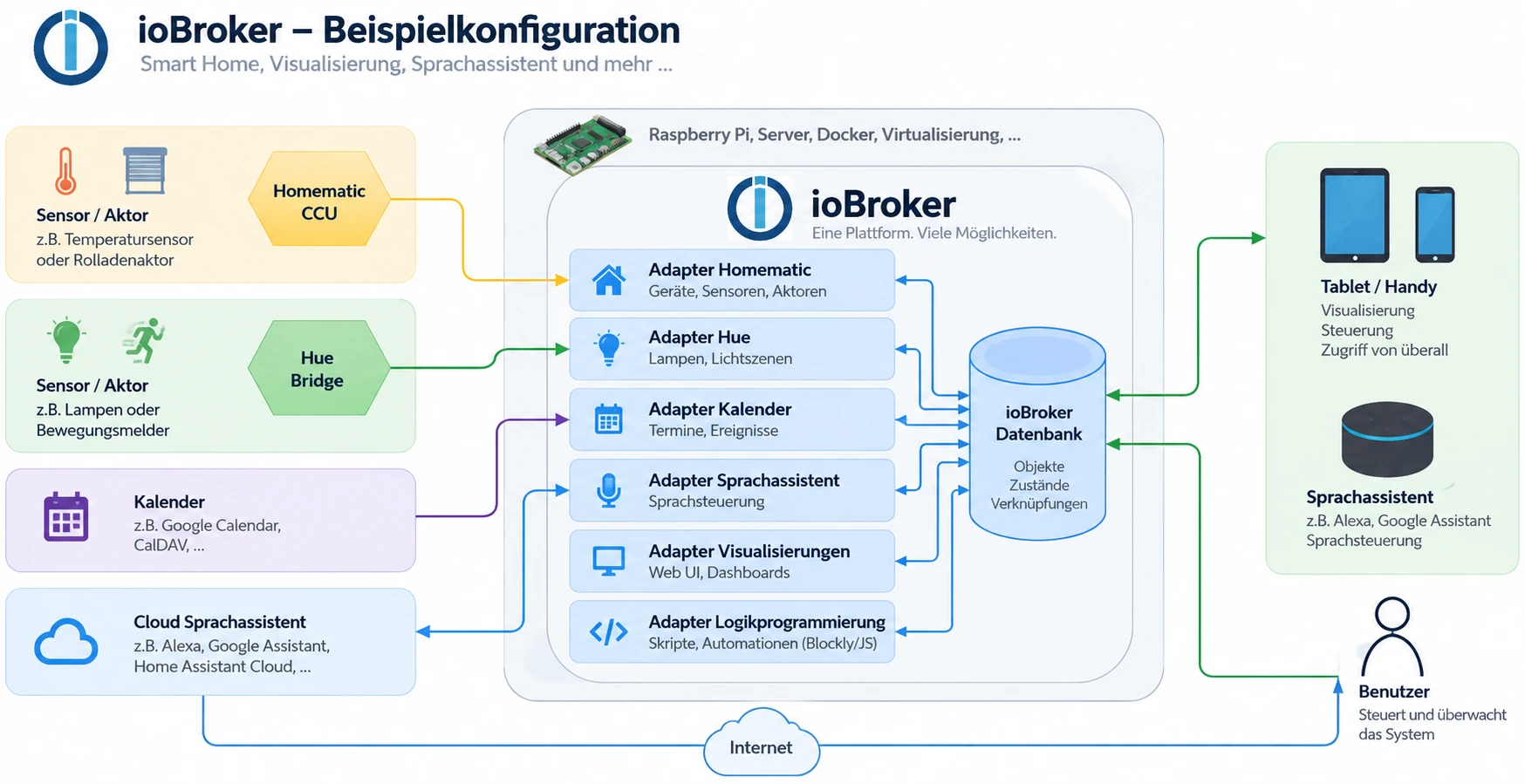
This graphic illustrates how ioBroker, as a central system, coordinates and connects a wide variety of smart home systems and other services, such as calendars. The adapters available in ioBroker enable communication with centrally managed calendars or manufacturer-specific smart home systems connected via LAN or WLAN. This allows the ioBroker software to retrieve status information or execute control actions.
Application example: Presence simulation
This application example demonstrates how the two independent smart home systems Philips Hue and Homematic IP are combined using ioBroker to create a presence simulation.
By connecting the two smart home systems to the ioBroker software, ioBroker is able to change the states of the Hue lights (on/off) and the blinds (up/down). Vacation time is detected by connecting to the calendar in ioBroker.
By using the logic modules (logic programming adapter) in ioBroker, the user can now implement the following process in just a few steps:
- If the calendar shows "Vacation", all HUE lights will be switched on at 6 pm.
- At 10:00 PM all the roller shutters are closed and all the Hue lights are switched off.
- At 8:00 a.m., all the roller shutters are raised again.
Using the available visualization adapters, the user can create individual status and control pages for their Hue lamps and roller shutters, which can be accessed with mobile devices from home or while on vacation (e.g. via ioBroker Cloud Services or VPN).
Strengths of ioBroker
Manufacturer-independent and open
ioBroker integrates devices, protocols, and online services via adapters, regardless of the manufacturer of the individual device. Zigbee, Z-Wave, KNX, Modbus, MQTT, manufacturer clouds, voice assistants: anything an adapter can translate becomes part of the same system. This means you're not tied to any specific manufacturer and can replace devices without rebuilding your automations.
Modular design
ioBroker consists of a lean core and adapters that you install individually. This means you only install what you actually need. Each instance of an adapter runs independently; if one fails, the rest continue to work, and you can stop, restart, or reconfigure them individually.
Runs on almost any hardware
ioBroker can be installed on almost all hardware platforms running Linux, macOS, Windows, or Docker as the operating system . This includes single-board computers (such as the Raspberry Pi), servers, NAS devices, servers with virtualization environments (such as Proxmox), desktop computers, and similar devices.
A simple, single-line installation routine (one-line installer) enables user-friendly installation under Linux and OSX, thus allowing for a quick start with ioBroker.
Everything about the surface
You don't need to edit any configuration files. Installing adapters, setting up instances, viewing objects, creating users, reading logs: all of this happens in the admin interface in the browser.
Individual programming of processes
With its logic adapters, ioBroker offers the possibility to create custom workflows and scripts. For example, a script can monitor a value from an adapter (e.g., "Vacation is entered in the calendar today") and trigger an action (e.g., "Turn on all Hue lights at 6 PM").
For simple processes, the graphical tools are sufficient: the rule wizard for "If this, then that" and Blockly, where you assemble building blocks. Those who want more can write JavaScript or TypeScript, use Node-RED, or integrate their own Node.js modules. All methods lead to the same data, and they can be used side-by-side.
Further explanations of the logic blocks, as well as an introduction to Node-RED or the scene adapter, can be found in the chapter Logic and Automation .
The js-controller as the core
The js-controller is the heart of the system. It manages objects and states, starts and monitors instances, and maintains the connection between all components. Adapters don't communicate with each other, but rather through this core. This results in the system's openness: A new adapter only needs to understand the common language, not every other device.
Scalable up to a multi-host system
If additional smart home systems are to be connected over time, these can be added at any time via additional adapters while the system is running.
ioBroker itself is also scalable: Multiple ioBroker servers can be connected to form a multi-host system. This even allows for the mixing of operating system platforms and the coupling of single-board computers with large multi-core servers. This reduces the load on individual computers and simultaneously increases reliability.
Redis as an optional database
By default, ioBroker stores objects and states in files. For larger systems, Redis can be used instead. This significantly speeds up access and is the standard approach when many states are written in quick succession.
Users and rights
You create users and groups and determine who can see and operate what. In a household with several people or in a facility managed by someone else, this is the difference between "everyone can do everything" and an interface that shows each person exactly what is relevant to them.
Your data stays with you.
ioBroker runs on your home network. Values, history, and rules are stored on your computer, not with a third-party provider. Whether an individual device requires additional cloud storage from the manufacturer depends on the device; the system itself doesn't need any. Separate methods exist for remote access, which you can enable as needed.
Visualization to your liking
There are several ways to access the interface you use daily: vis-2, webui, Lovelace, the Devices adapter, and others. The next section introduces them.
Open source and a strong community
ioBroker is open source and free. Its development is public, and a large portion of the adapters come from the community. In the forum, especially in the German-speaking section, you'll find help, examples, and tutorials, usually within a few hours. More information can be found below in the Community section.
Visualization
Ultimately, someone needs to be able to operate something: a page in a browser, on a tablet mounted on the wall, or on a phone, where rooms, devices, and measurements are displayed and can be controlled. ioBroker doesn't provide this interface itself; it's created using an adapter. And there are many of these, with very different approaches.
Some you draw yourself, element by element, until everything looks exactly the way you want it to:
- vis-2 and its predecessor vis , the most widespread
- webui , a standalone system made up of web components
The others build themselves up from what the system already knows about the devices:
- the Devices adapter , which creates a finished view from the configured devices
- Lovelace , the interface of Home Assistant
In addition, there are adapters for individual tasks: echarts and flexcharts for diagrams, energy flow for the path of electricity through the house, and over sixty more.
Having multiple interfaces side-by-side is no problem; in fact, it's quite practical when experimenting. The Visualization chapter explains which approach suits whom and how to get started.
Who is behind ioBroker?
ioBroker is an open-source project developed by the ioBroker community and administered by Bluefox as the project owner.
Many developers and many other helpers volunteer their free time to develop the central ioBroker system components, the many adapters, the social media support, the documentation and much more.
Thanks to the large and helpful community, a solution has been found for every problem so far.
ioBroker follows a decentralized approach, where each adapter is maintained in its own GitHub repository. This allows the respective adapter developer to make largely independent decisions regarding their adapter. Functionality extension requests and external feature extensions submitted as "pull requests" are, of course, taken into account.
Furthermore, some developers have joined forces in the ioBroker adapter community to ensure that even if individual developers no longer have time for their adapters, they can continue to be maintained.
There is no contractually agreed support from the open-source community, but together we have managed to solve every problem so far!
Directional decisions for the central components and the overall project are discussed within the core team and then implemented.
The ioBroker Core development team consists of:
A list of ioBroker developers can be found in the ioBroker forum.
ioBroker.net and ioBroker.pro - Platforms compared
ioBroker provides two independent platforms (servers), each covering different functions:
1. ioBroker.net
- Management of adapter licenses (e.g. vis-2, KNX, JägerDesign widgets)
- Free remote access via the cloud adapter with limited functionality: only display of visualizations in the browser, no editing option, limited data transfer volume.
2. ioBroker.pro
- Using smart assistants (e.g., Amazon Alexa, Google Assistant) via the IoT adapter
- Enhanced remote access via the cloud adapter with full functionality: display in the browser and in the app and editing of visualizations including admin and vis-editor.
- Ability to send data to your own ioBroker instance via HTTPS using GET or POST requests .
Technical notes
-
The cloud adapter is required for remote access (e.g., viewing and editing vis or accessing the admin).
This is used on both ioBroker.net and ioBroker.pro, with different functionalities depending on the platform and license. -
Voice control (e.g., Amazon Alexa or Google Assistant) requires the IoT adapter . The ioBroker.assistant skill or custom skills can only be used with an active IoT adapter.
How is ioBroker financed?
All central components and almost all other adapters are available free of charge, and the source code of the vast majority of adapters is openly available on GitHub.
Since an open-source project cannot generate revenue to, for example, purchase servers, a formal legal structure is required for these purposes: ioBroker GmbH. Among other things, ioBroker GmbH also offers commercial support for the ioBroker software and sells ioBroker servers.
ioBroker GmbH provides the infrastructure (e.g., the forum server) free of charge for the community project and has also purchased development services in the past, which have been used in the development of the open source projects (e.g., Admin).
The ioBroker Free Cloud is also a free service provided to the community by ioBroker GmbH. The Pro Cloud and the IoT service are commercial offerings from ioBroker GmbH, with costs that barely cover operating expenses.
Licenses
Almost everything about ioBroker is free. The source code is openly available on GitHub , in most cases under the MIT license. The only things that cost money are those that incur ongoing costs: three adapters that require an adapter license (vis-2, KNX, JägerDesign widgets), and the cloud services for which access licenses are available.
The details of how this works, what a license entails, and why there are two servers are explained in the Licenses chapter. Prices and packages are listed in the License Overview .
Support our project!
The further development and maintenance of ioBroker is largely carried out by volunteers. If you like ioBroker and would like to support our work, we appreciate any help:
- By purchasing a license, you directly support development and infrastructure.
- If you don't need a license, we would also appreciate a voluntary donation: Donate now via PayPal
Thank you for your contribution!
Community
Since 2014, ioBroker has secured widespread support from thousands of users and developers thanks to its many advantages. Users and developers meet in the dedicated forum to exchange experiences and suggestions. On the ioBroker Discord server, experiences can be shared in live chat, and live debug sessions can be conducted at short notice to get to the bottom of current problems.
Collection of links to the official ioBroker communities:
- ioBroker Forum: Forum
- Discord ioBroker Server: Discord
- Facebook group "IoBroker SmartHome and IoT": FacebookIoBrokerSmartHomeIoT
- Facebook group "ioBroker and smart home international": FacebookIoBrokerSmartHomeIoTInternational
ioBroker statistics
On ioBrokerStatistics you will find an overview page with some interesting ioBroker statistics.