This adapter controls Samsung TVs running Tizen OS (2016 and newer).
1. Configuration
How to configure this adapter. First check your TV settings: switch the TV on and go to Settings / General / External Device Manager / Device Connection Manager. There the access notification must be set to "First Time Only".
1.1. Protocol
Protocol for the websocket connection to your TV.
Possible values are http or wss. On newer devices use wss.
1.2. IP Address
The IP address of your Samsung TV.
1.3. Port
Port for the websocket connection to your TV:
- 8001 - insecure port
- 8002 - secure port
1.4. Token
Token for a secure connection to your TV.
Save the adapter configuration with token = 0 and go to the objects tab of the ioBroker admin.
Then go to the samsung_tizen.0.config.getToken object and click the button.
If everything works, a new object samsung_tizen.0.config.token appears and its name is your token. Copy the name (e.g. 123456789), go back to the adapter configuration and paste it into the token field.
Can be deactivated with the value "0".
How to get a token manually
Install wscat on the device where ioBroker is running with the following command:
npm install wscat
Turn the TV on and query the token via a websocket connection:
wscat -n -c wss://tvIp:8002/api/v2/channels/samsung.remote.control?name=aW9Ccm9rZXI=
A pop-up appears on your TV and must be accepted. Take the token from the returned JSON response:
{
    "data": {
        "clients": [
            {
                "attributes": { "name": "aW9Ccm9rZXI=" },
                "connectTime": 1575818900205,
                "deviceName": "aW9Ccm9rZXI=",
                "id": "12345678-797c-45b0-b0f1-233535918548",
                "isHost": false
            }
        ],
        "id": "12345678-797c-45b0-b0f1-233535918548",
        "token": "10916644"
    },
    "event": "ms.channel.connect"
}
1.5. MAC Address
The MAC address of your Samsung TV is used for Wake-on-LAN.
This only works if your TV is connected by cable and not wirelessly.
If your TV is connected wirelessly, it can only be powered on from short standby.
Wake-on-LAN can be deactivated with the value "0".
1.6. TV state polling
Polling Port
The port used to query the power state.
Default: 9110
Known available ports: 9110, 9119, 9197
Polling Interval
How often the poll request is sent.
Default: 60 seconds
Can be deactivated with the value "0".
1.7. Command Delay
Delay in milliseconds between the commands sent via the samsung_tizen.0.control.sendCmd object.
2. Usage
2.1. Control
Send a single key
To send a single key, click the button of the corresponding object, e.g. samsung_tizen.0.control.KEY_MUTE.
Send a key without a predefined button
You can send a custom (not predefined) key with the samsung_tizen.0.control.sendCmd object.
Enter the key you want to send, e.g. KEY_POWER.
Send multiple keys in a single command
To send multiple keys in a single command, use the samsung_tizen.0.control.sendCmd object.
Enter the keys separated by commas, e.g. KEY_POWER,KEY_HDMI,KEY_VOLUP.
Create macros for commands
Go to samsung_tizen.0.command. There you find example macros, and you can create your own ones.
2.2. Apps
Load the installed apps
To load the installed apps, click the samsung_tizen.0.apps.getInstalledApps button.
After that, a separate object named start_<app name> is created for each installed app.
Start an app
You can start an app by clicking the samsung_tizen.0.apps.start_<app name> object.
2.3. Power State
If the power state polling is configured as described above, samsung_tizen.0.powerOn is true while your TV is on and false while it is off.
2.4. Commands
Commands can be sent manually via the samsung_tizen.0.control.sendCmd object, as described under Control, or via a custom object below samsung_tizen.0.command.
There are a few example commands, but you can also create your own macros.
How to create a command macro
-
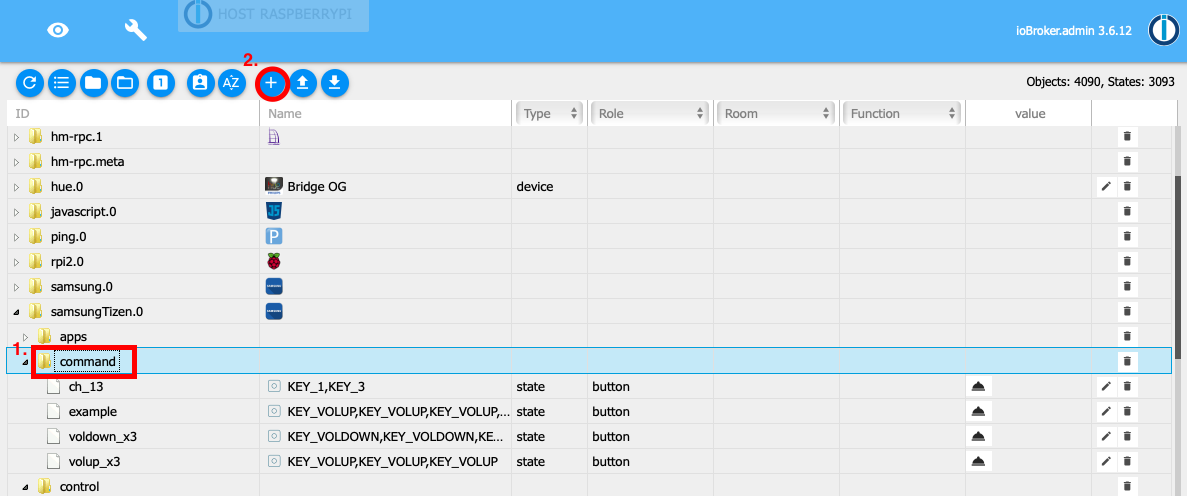
Go to the objects tab and open
samsung_tizen.0.command. -
Click the + icon to create a new object.
-
Check that the parent object is
samsung_tizen.0.command. -
Enter a name for your command and check that the type is
datapointandstateTypeisboolean.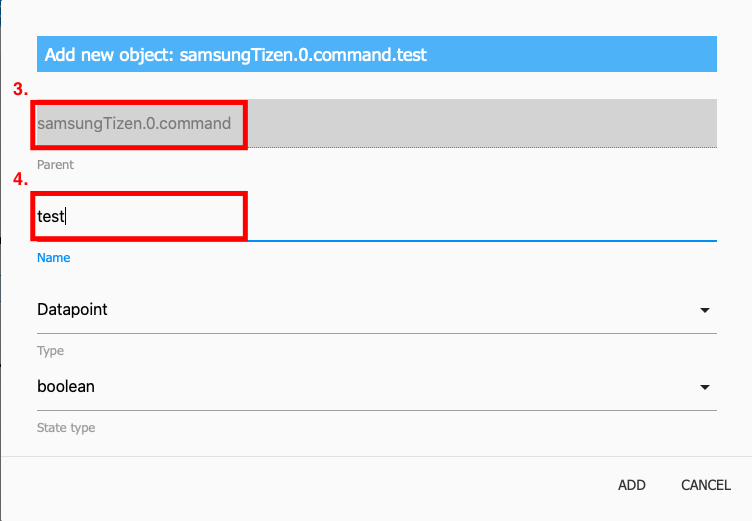
-
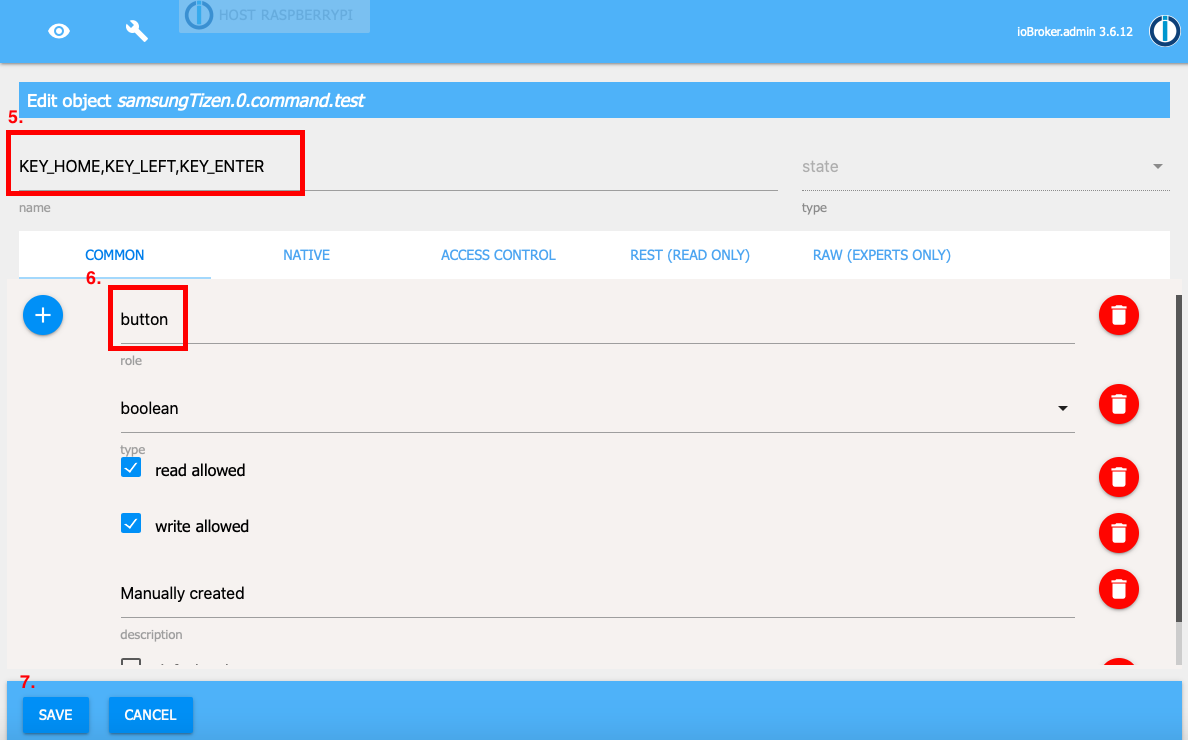
Under name, enter the keys you want to send.
-
The role must be
button. -
Save the object.
-
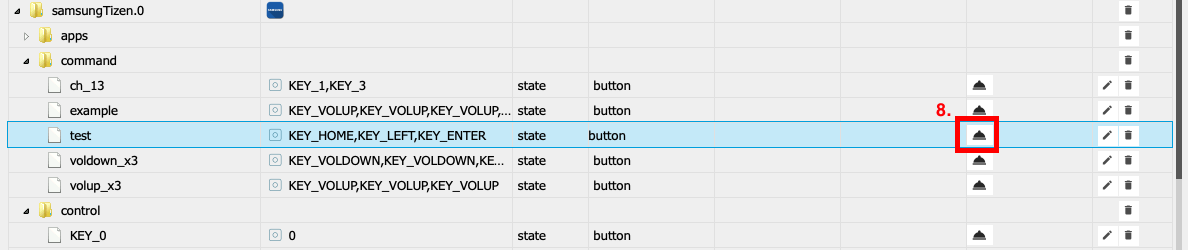
Now you can send your command with the newly created object.
Credits
The first generation of this adapter was developed by Stefan0875 (https://github.com/Stefan0875). It was then adapted and maintained by Highpressure (https://github.com/Highpressure) and finally by dahuby (https://github.com/dahuby). Thanks a lot for their work and for granting a public license.
Changelog
2.0.2 (2026-09-04)
- (mcm1957) BREAKING: enhanced security (added encryption) requires that you enter the access token one more time
- (copilot) Adapter requires node.js >= 22 now
- (copilot) Adapter requires admin >= 7.7.22 now
- (copilot) Adapter requires js-controller >= 6.0.11 now
- (AlanSRU) Fixed the installed-app message handlers, which stayed attached to the shared websocket: they piled up with every call and made the adapter crash with "Cannot read properties of undefined (reading 'length')" as soon as another message arrived (#302)
- (AlanSRU) Synced
engines.nodein package-lock.json with package.json (#301) - (GermanBluefox) The adapter was refactored to TypeScript.
- (GermanBluefox) The configuration dialog was migrated from the old HTML admin page to JsonConfig
- (GermanBluefox) The states created by the adapter now carry explicit
common.read/common.writeflags - (GermanBluefox) The adapter can only be installed from npm now, no longer directly from GitHub (
common.nogit)
1.1.0 (2024-04-26)
- (mcm1957) Adapter requires node.js >= 18 and js-controller >= 5 now
- (mcm1957) Dependencies have been updated
1.0.0 (2023-09-30)
- (mcm1957) An official release has been created
1.0.0-alpha.2 (2023-09-24)
- (mcm1957) Dependencies have been updated
1.0.0-alpha.1 (2023-09-24)
- (mcm1957) Adapter requires node 16 or newer now.
- (mcm1957) Adapter has been moved to iobroker-community-adapters organization.
License
MIT License
Copyright (c) 2023-2026 iobroker-community-adapters iobroker-community-adapters@gmx.de
Copyright (c) 2020 dahuby
Permission is hereby granted, free of charge, to any person obtaining a copy of this software and associated documentation files (the "Software"), to deal in the Software without restriction, including without limitation the rights to use, copy, modify, merge, publish, distribute, sublicense, and/or sell copies of the Software, and to permit persons to whom the Software is furnished to do so, subject to the following conditions:
The above copyright notice and this permission notice shall be included in all copies or substantial portions of the Software.
THE SOFTWARE IS PROVIDED "AS IS", WITHOUT WARRANTY OF ANY KIND, EXPRESS OR IMPLIED, INCLUDING BUT NOT LIMITED TO THE WARRANTIES OF MERCHANTABILITY, FITNESS FOR A PARTICULAR PURPOSE AND NONINFRINGEMENT. IN NO EVENT SHALL THE AUTHORS OR COPYRIGHT HOLDERS BE LIABLE FOR ANY CLAIM, DAMAGES OR OTHER LIABILITY, WHETHER IN AN ACTION OF CONTRACT, TORT OR OTHERWISE, ARISING FROM, OUT OF OR IN CONNECTION WITH THE SOFTWARE OR THE USE OR OTHER DEALINGS IN THE SOFTWARE.