Introduction
The adapter creates all data points with the template from the data point modelJsonUri (deviation for devices) and uses the translation with the template from the data point langPackModelUri (deviation for devices). It is therefore possible that data points are created under REMOTE that have no function or are not available for the device.
Summary
- Instance Settings
- States
Instance Settings
Instance Setting LG-Thinq
-
LG ThinQ Email: Enter APP email -
LG ThinQ Password: Enter APP password -
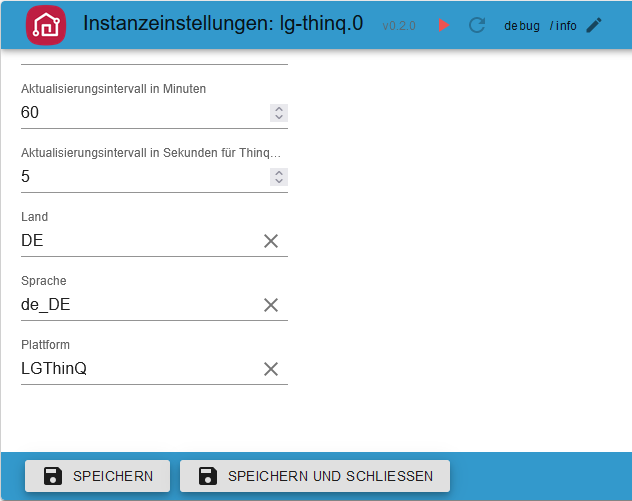
Update interval in minutes: Recommended: At 60 minutes. If interval thinq1 is set to 0 then here is 0.5/1 minute -
Update interval in seconds for Thinq1 (per device 1 Second): Interval for thinq1 users -
Country: Enter country - default DE -
Language: Enter language - default de_DE -
Platform: Enter platform - default LGThinQ -
Delete session data: If there are problems with the login, please delete the session data (lg-thinq.0.session wird geleert)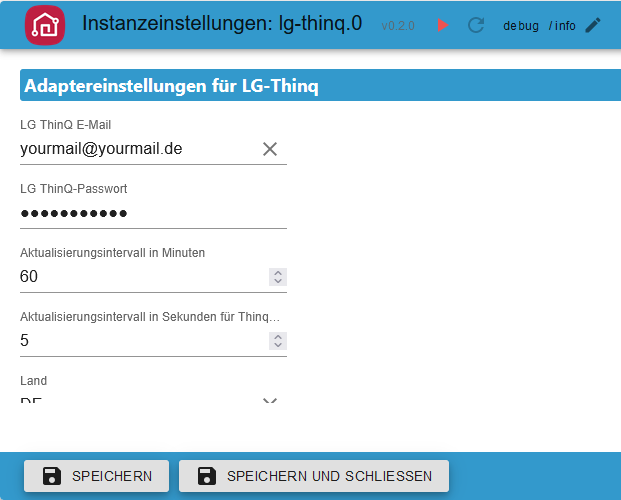
Interval thinq1 LG-Thinq
-
interval.activeHow many devices are currently receiving updates -
interval.inactiveHow many devices are currently not receiving updates -
interval.intervalChange interval from instance setting. After an adapter restart, the instance setting is applied. -
interval.last_updateLatest update -
interval.status_devicesOKInterval OKFail - 0100Request fail - WorkID is recreatedFail - 0106Not conneted device - WorkID is recreatedErrorError WorkID - WorkID is recreatedError <code>Unknown error - WorkID is recreatedResult ErrorReceive error - WorkID is recreatedParse errorParse error - WorkID is recreatedUnknownUnknown error - WorkID is recreatedRequestReceive is unknwon - WorkID is recreated{}Unknown - WorkID is recreated

States
Device 101 Refrigerator/Freezer thinq1 & thinq2
101 All Folders thinq1 & thinq2

101 Remote Folder thinq1 & thinq2
101 Remote Statistic thinq2
-
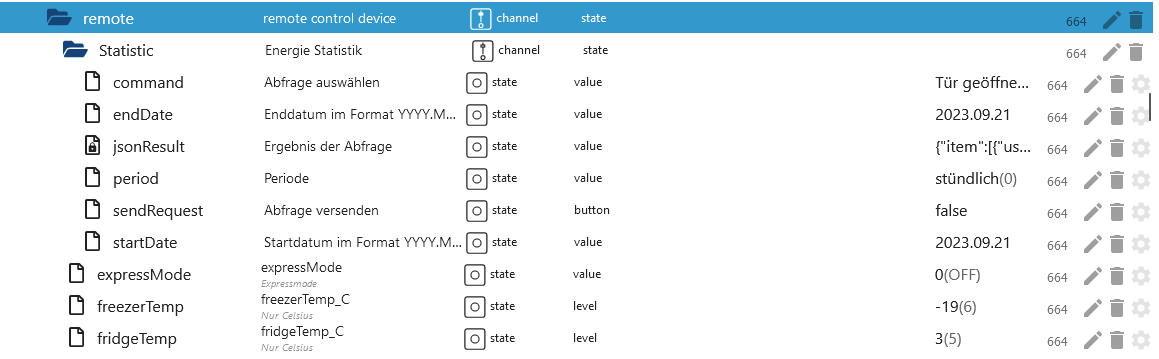
remote.Statistic.commandWhich history should be loaded -
hourly
-
remote.Statistic.endDateEnter the date for hourly, end and start must be the same Format: 2023.12.01 -
remote.Statistic.startDateEnter the date for hourly, end and start must be the same Format: 2023.12.01 -
Or daily
-
remote.Statistic.endDateEnter date daily - Format: 2023.12.06 -
remote.Statistic.startDateEnter date daily - Format: 2023.12.01 -
Or monthly
-
remote.Statistic.endDateEnter date monthly - Format: 2023.12.01 -
remote.Statistic.startDateEnter date monthly - Format: 2023.10.01 -
remote.Statistic.periodSelect period -
remote.Statistic.sendRequestSend selection -
remote.Statistic.jsonResultStatistics as JSON. If the attributes are empty then your device does not support them or an incorrect date was specified.
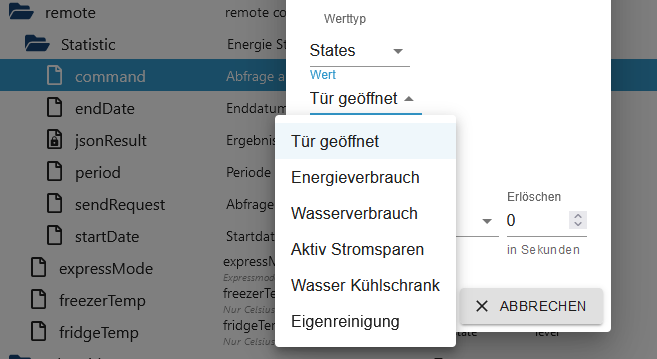
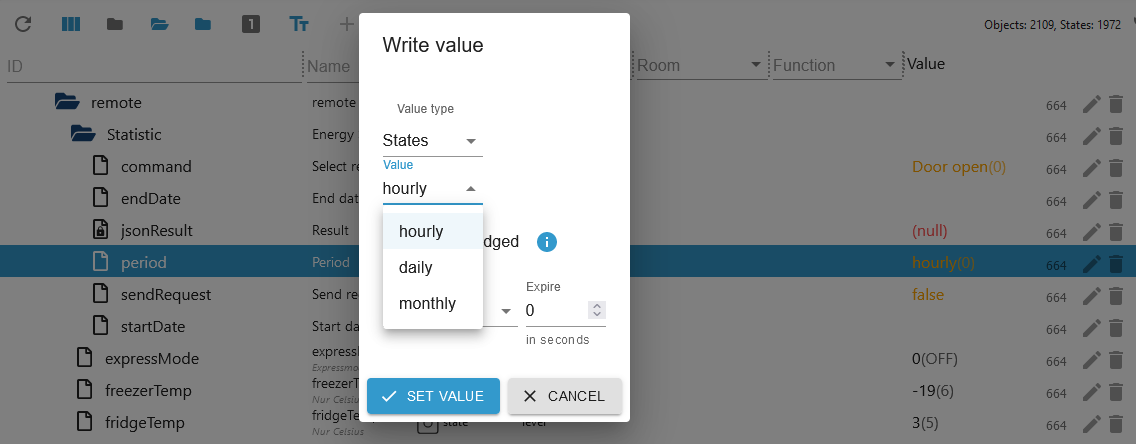
Example JSON Door open
{
    "item": [
        {
            "usedDate": "2023-11",
            "doorType": "DID_DOOR",
            "openCount": "0",
            "openTime": "0"
        },
        {
            "usedDate": "2023-12",
            "doorType": "DID_DOOR",
            "openCount": "0",
            "openTime": "0"
        },
        {
            "usedDate": "2023-11",
            "doorType": "FREEZER_DOOR",
            "openCount": "62",
            "openTime": "713937"
        },
        {
            "usedDate": "2023-12",
            "doorType": "FREEZER_DOOR",
            "openCount": "0",
            "openTime": "0"
        },
        {
            "usedDate": "2023-11",
            "doorType": "FRIDGE_DOOR",
            "openCount": "1037",
            "openTime": "12421700"
        },
        {
            "usedDate": "2023-12",
            "doorType": "FRIDGE_DOOR",
            "openCount": "27",
            "openTime": "304857"
        },
        {
            "usedDate": "2023-11",
            "doorType": "CONVERTIBLE_DOOR",
            "openCount": "0",
            "openTime": "0"
        },
        {
            "usedDate": "2023-12",
            "doorType": "CONVERTIBLE_DOOR",
            "openCount": "0",
            "openTime": "0"
        },
        {
            "usedDate": "2023-11",
            "doorType": "ONE_DOOR",
            "openCount": "0",
            "openTime": "0"
        },
        {
            "usedDate": "2023-12",
            "doorType": "ONE_DOOR",
            "openCount": "0",
            "openTime": "0"
        }
    ]
}
101 Remote Control thinq1 & thinq2
remote.expressModeExpress Mode on/off/rapid on -> thinq1 state snapshot.IcePlusremote.freezerTempChange the temperature of the freezer (Celsius only)remote.fridgeTempChange the temperature of the refrigerator (Celsius only)
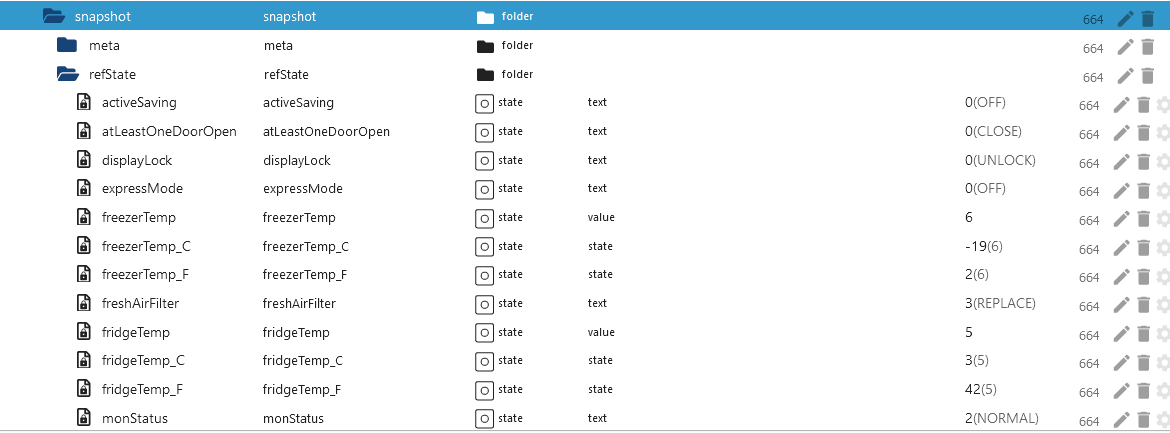
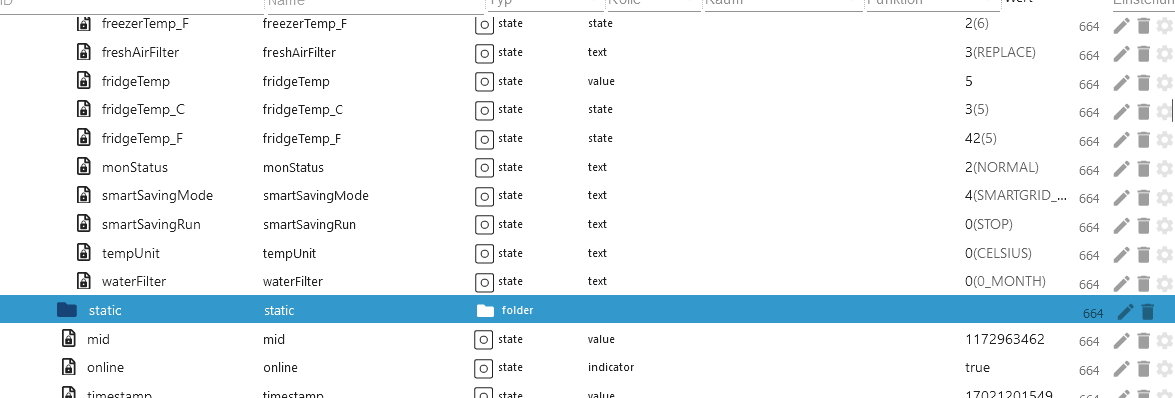
101 Snapshot thinq1 & thinq2
Device 201 Washer Signature thinq2
201 Remote Control Signature thinq2
- Can be controlled like the 201. However, the following values must be set in the
Coursefolder. - In the course folder: initialBit on INITIAL_BIT_ON
- In the course folder: remoteStart on REMOTE_START_ON
Device 201 Washer thinq1 & thinq2
201 All Folders thinq1 & thinq2
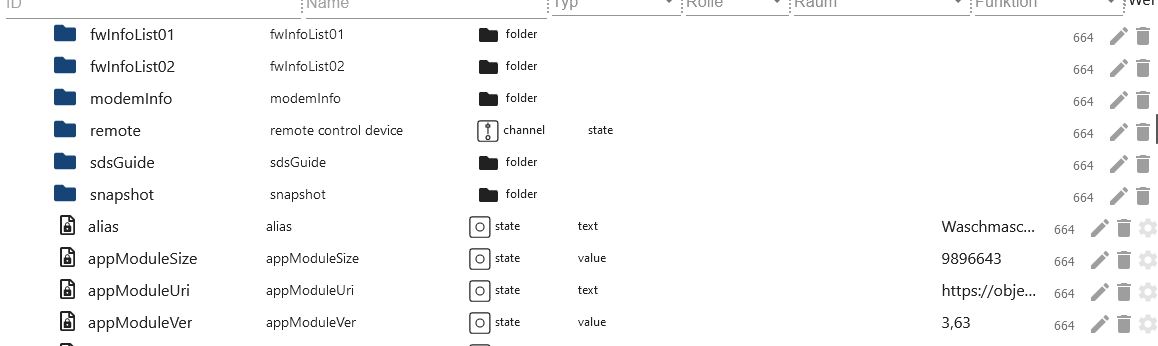
201 Remote Folder thinq1 & thinq2
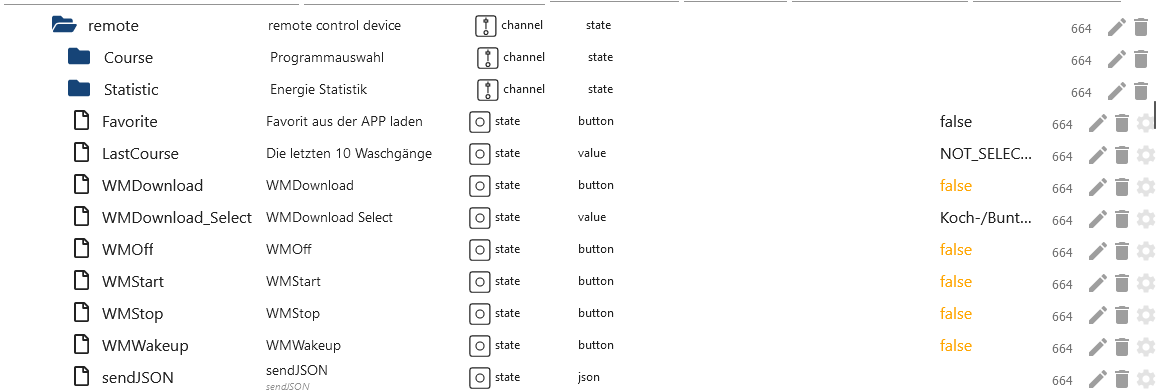
201 Remote Statistic thinq2
-
hourly
-
remote.Statistic.endDateEnter the date for hourly, end and start must be the same Format: 2023.12.01 -
remote.Statistic.startDateEnter the date for hourly, end and start must be the same Format: 2023.12.01 -
Or daily
-
remote.Statistic.endDateEnter date daily - Format: 2023.12.06 -
remote.Statistic.startDateEnter date daily - Format: 2023.12.01 -
Or monthly
-
remote.Statistic.endDateEnter date monthly - Format: 2023.12.01 -
remote.Statistic.startDateEnter date monthly - Format: 2023.10.01 -
remote.Statistic.periodSelect period -
remote.Statistic.sendRequestSend selection -
remote.Statistic.jsonResultStatistics as JSON. If the attributes are empty then your device does not support them or an incorrect date was specified.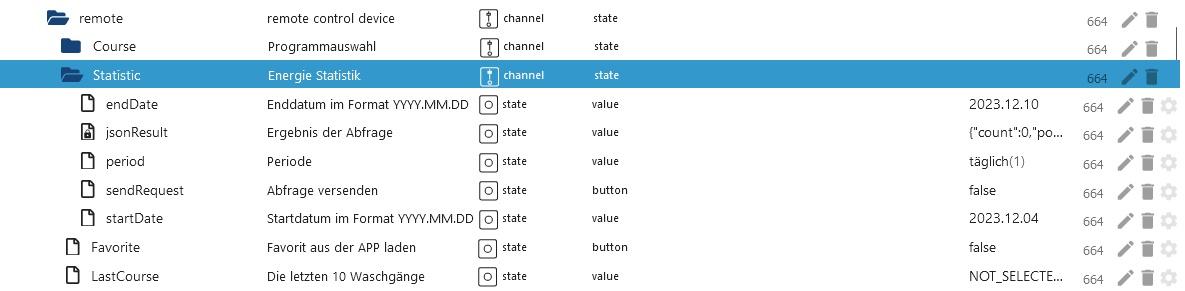
{
    "count": 0,
    "power": 0,
    "energyWater": 0,
    "energyDetergent": 0,
    "energySoftener": 0,
    "powerWh": 0,
    "periodicEnergyData": 0,
    "item": [
        {
            "usedDate": "2023-12-04",
            "count": 0,
            "power": 0,
            "energyWater": 0,
            "energyDetergent": 0,
            "energySoftener": 0,
            "powerWh": 0,
            "periodicEnergyData": 0
        },
        {
            "usedDate": "2023-12-05",
            "count": 0,
            "power": 0,
            "energyWater": 0,
            "energyDetergent": 0,
            "energySoftener": 0,
            "powerWh": 0,
            "periodicEnergyData": 0
        },
        {
            "usedDate": "2023-12-06",
            "count": 2,
            "power": 2,
            "energyWater": 0,
            "energyDetergent": 0,
            "energySoftener": 0,
            "powerWh": 0,
            "periodicEnergyData": 2
        },
        {
            "usedDate": "2023-12-07",
            "count": 2,
            "power": 2,
            "energyWater": 0,
            "energyDetergent": 0,
            "energySoftener": 0,
            "powerWh": 0,
            "periodicEnergyData": 2
        },
        {
            "usedDate": "2023-12-08",
            "count": 5,
            "power": 5,
            "energyWater": 0,
            "energyDetergent": 0,
            "energySoftener": 0,
            "powerWh": 0,
            "periodicEnergyData": 5
        },
        {
            "usedDate": "2023-12-09",
            "count": 0,
            "power": 0,
            "energyWater": 0,
            "energyDetergent": 0,
            "energySoftener": 0,
            "powerWh": 0,
            "periodicEnergyData": 0
        },
        {
            "usedDate": "2023-12-10",
            "count": 0,
            "power": 0,
            "energyWater": 0,
            "energyDetergent": 0,
            "energySoftener": 0,
            "powerWh": 0,
            "periodicEnergyData": 0
        }
    ]
}
201 Remote Control thinq1 & thinq2
-
remote.FavoriteOnly works when a favorite has been selected in the APP and when the machine is turned on. -
remote.LastCourseThe last 10 programs can be selected. -
remote.WMDownload_SelectSelection of all available programs (STD=Standard/DL=Download programs) When one of the 3 data points is filled, the selected program is written to the Course folder. You can then make adjustments here. However, not all data points in theCoursefolder can be changed. Please test for yourself which data the washing machine accepts. -
remote.WMDownloadBy pressing, the program in the 'Course' folder is transferred to the washing machine and shown on the display (washing machine must be on). -
remote.WMStartStart washer -
remote.WMStopStop washer -
remote.WMWakeupWake up washer
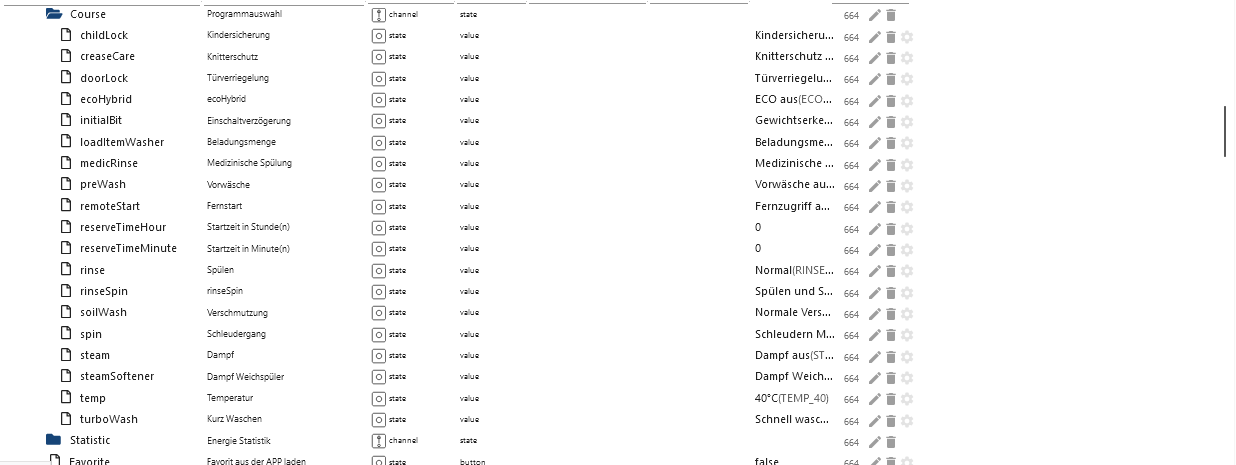
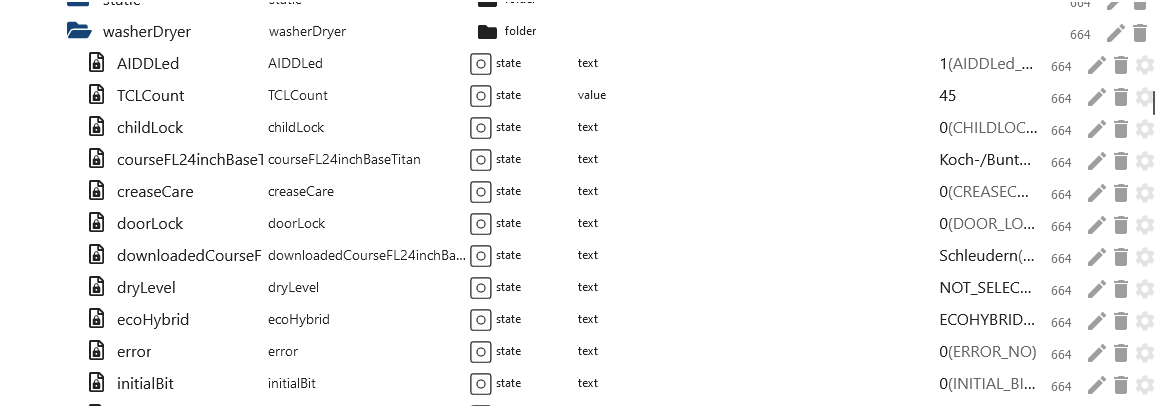
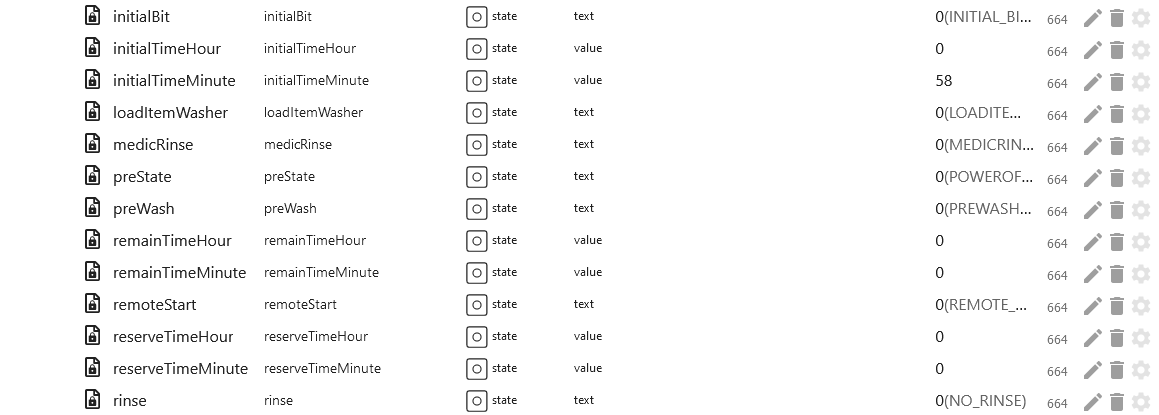
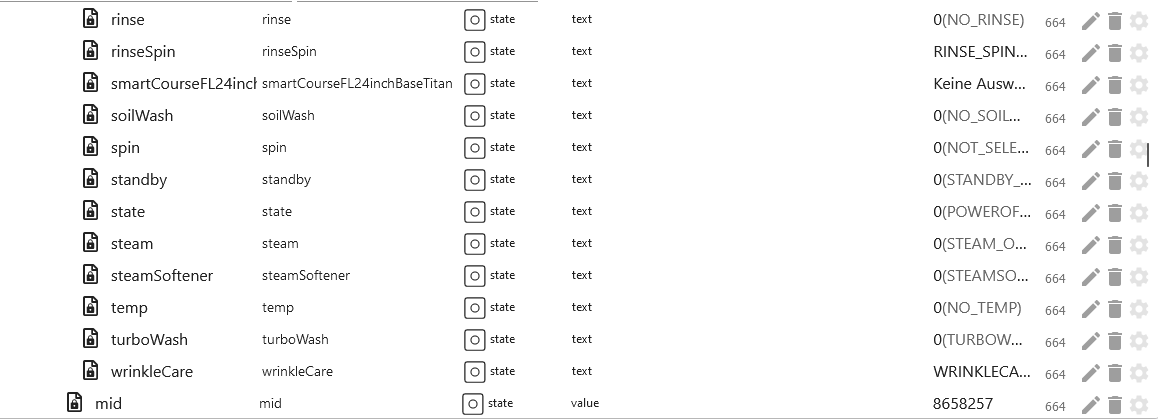
201 Snapshot thinq1 & thinq2
Device 202 Dryer thinq1 & thinq2
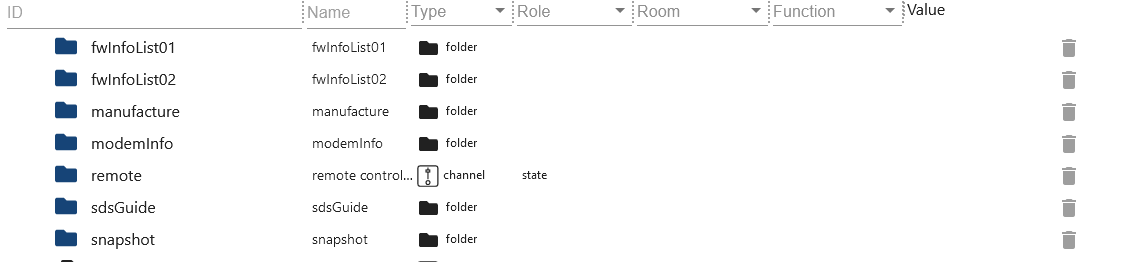
202 All Folders thinq1 & thinq2
202 Remote Folder thinq1 & thinq2
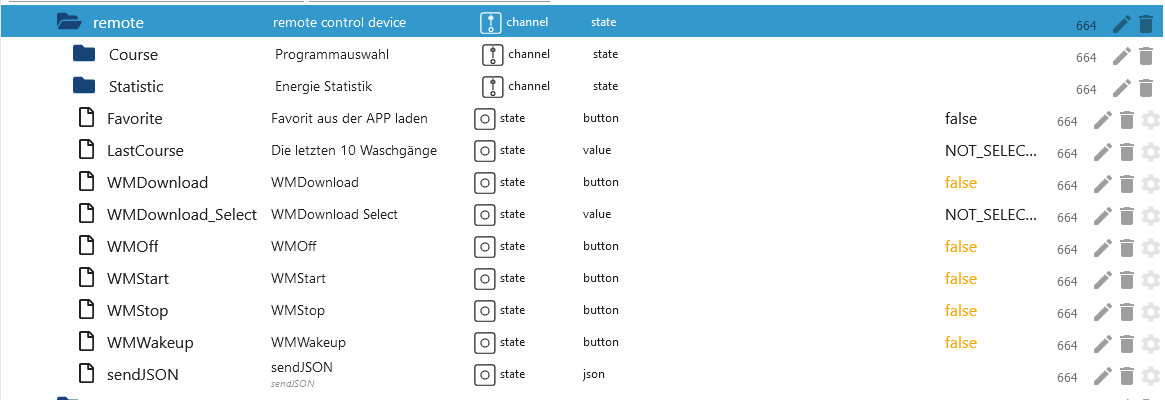
202 Remote Statistic thinq2
-
hourly
-
remote.Statistic.endDateEnter the date for hourly, end and start must be the same Format: 2023.12.01 -
remote.Statistic.startDateEnter the date for hourly, end and start must be the same Format: 2023.12.01 -
Or daily
-
remote.Statistic.endDateEnter date daily - Format: 2023.12.06 -
remote.Statistic.startDateEnter date daily - Format: 2023.12.01 -
Or monthly
-
remote.Statistic.endDateEnter date monthly - Format: 2023.12.01 -
remote.Statistic.startDateEnter date monthly - Format: 2023.10.01 -
remote.Statistic.periodSelect period -
remote.Statistic.sendRequestSend selection -
remote.Statistic.jsonResultStatistics as JSON. If the attributes are empty then your device does not support them or an incorrect date was specified.
{
    "count": 0,
    "power": 0,
    "energyWater": 0,
    "energyDetergent": 0,
    "energySoftener": 0,
    "powerWh": 0,
    "periodicEnergyData": 0,
    "item": [
        {
            "usedDate": "2023-12-08",
            "count": 5,
            "power": 2587, // 2587 / 1000 kwh
            "energyWater": 0,
            "energyDetergent": 0,
            "energySoftener": 0,
            "powerWh": 0,
            "periodicEnergyData": 2587
        }
    ]
}
202 Remote Control thinq1 & thinq2
-
remote.FavoriteOnly works when a favorite has been selected in the APP and when the machine is turned on. -
remote.LastCourseThe last 10 programs can be selected. -
remote.WMDownload_SelectSelection of all available programs (STD=Standard/DL=Download programs) When one of the 3 data points is filled, the selected program is written to the Course folder. You can then make adjustments here. However, not all data points in theCoursefolder can be changed. Please test for yourself which data the dryer accepts. -
remote.WMDownloadNo function -
remote.WMStartBy pressing, the program in the 'Course' folder is transferred to the dryer and shown on the display (dryer must be on). -
remote.WMStopStop Dryer -
remote.WMWakeupWake up Dryer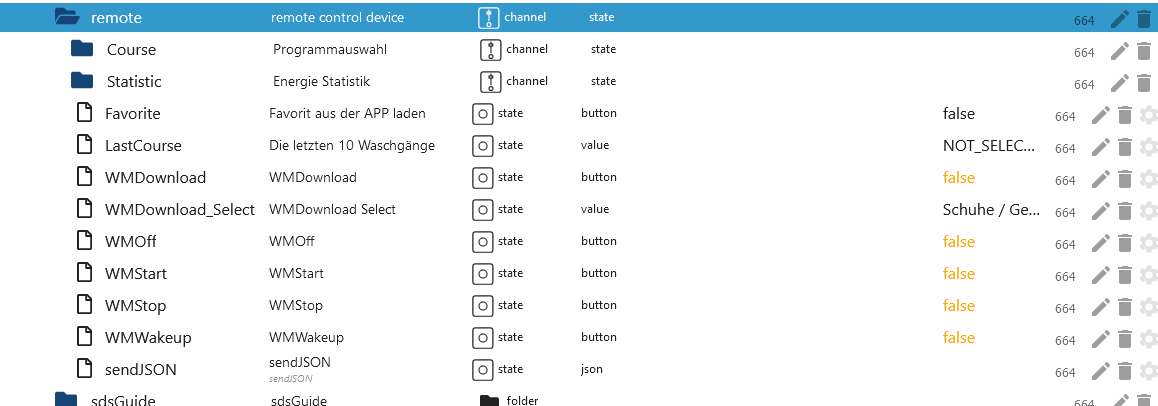
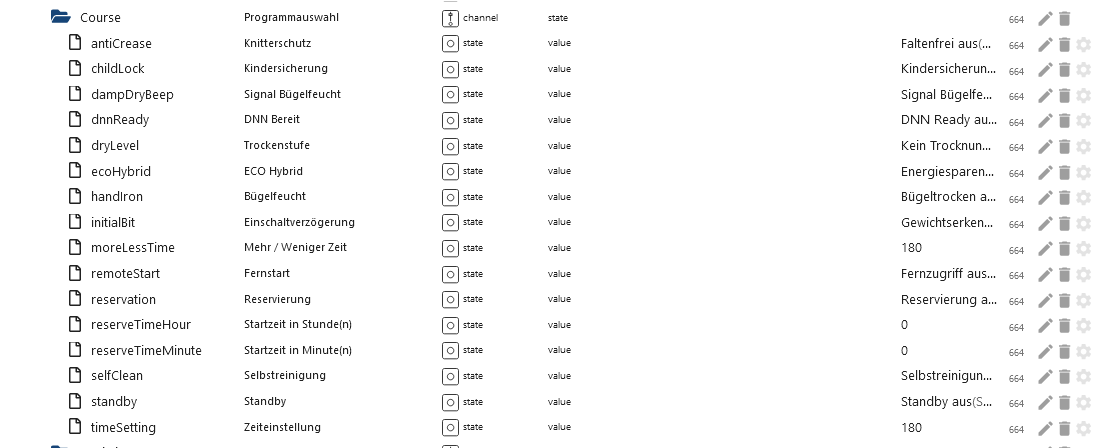
202 Snapshot thinq1 & thinq2
Device 401 Air conditioner thinq2
401 All Folders thinq2
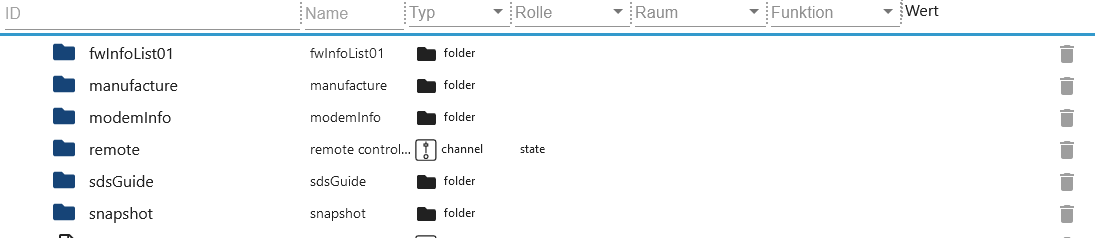
401 Remote Folder thinq2
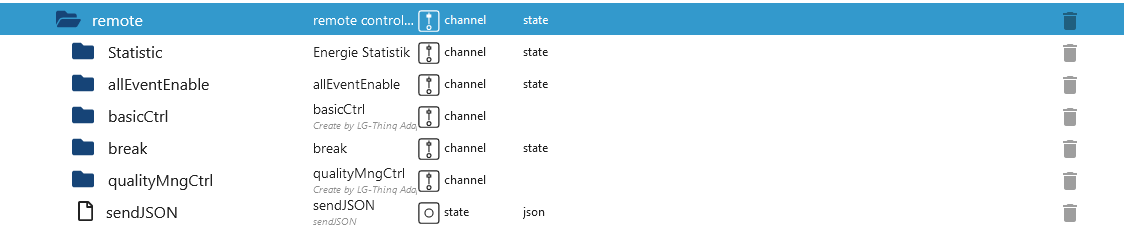
401 Remote Statistic thinq2
-
remote.Statistic.commandWhich history should be loaded -
hourly
-
remote.Statistic.endDateEnter the date for hourly, end and start must be the same Format: 2023.12.01 -
remote.Statistic.startDateEnter the date for hourly, end and start must be the same Format: 2023.12.01 -
Or daily
-
remote.Statistic.endDateEnter date daily - Format: 2023.12.06 -
remote.Statistic.startDateEnter date daily - Format: 2023.12.01 -
Or monthly
-
remote.Statistic.endDateEnter date monthly - Format: 2023.12.01 -
remote.Statistic.startDateEnter date monthly - Format: 2023.10.01 -
remote.Statistic.periodSelect period -
remote.Statistic.sendRequestSend selection -
remote.Statistic.jsonResultStatistics as JSON. If the attributes are empty then your device does not support them or an incorrect date was specified.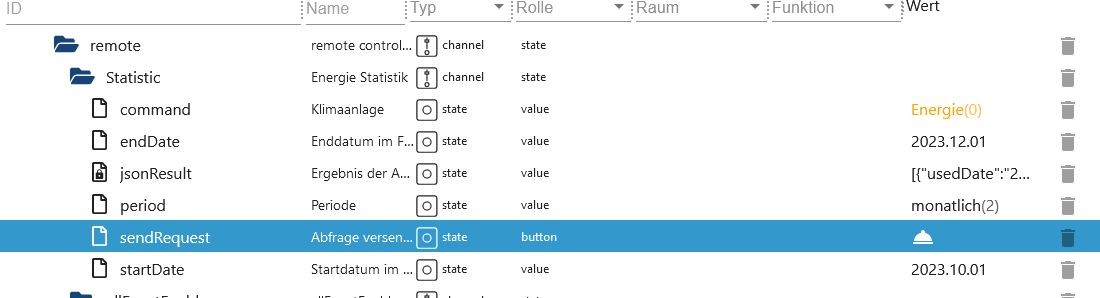
[
    {
        "usedDate": "2023-04",
        "energyData": "0",
        "operationTime": "0"
    },
    {
        "usedDate": "2023-05",
        "energyData": "0",
        "operationTime": "0"
    },
    {
        "usedDate": "2023-06",
        "energyData": "3800",
        "operationTime": "13873"
    }
]
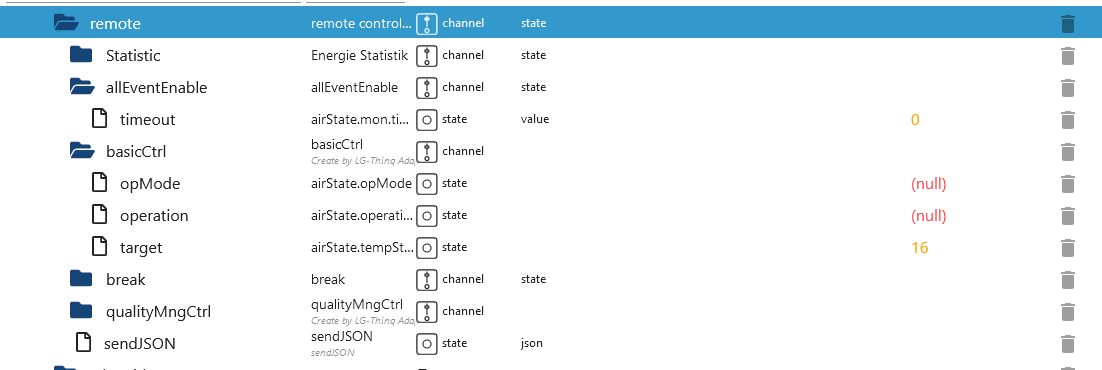
401 Remote Control thinq2
-
remote.basicCtrl.operation0 for off and 1 for on -
remote.basicCtrl.opMode0 for off and 4 for on -
remote.basicCtrl.hotWater0 for off and 1 for on -
remote.basicCtrl.hotWaterTargetdesired temperature -
remote.basicCtrl.powerHotWaterBoost 0 for off and 1 for on -
remote.basicCtrl.targetdesired temperature -
If the error message 400 appears in the log, then this data point is not compatible with the device.

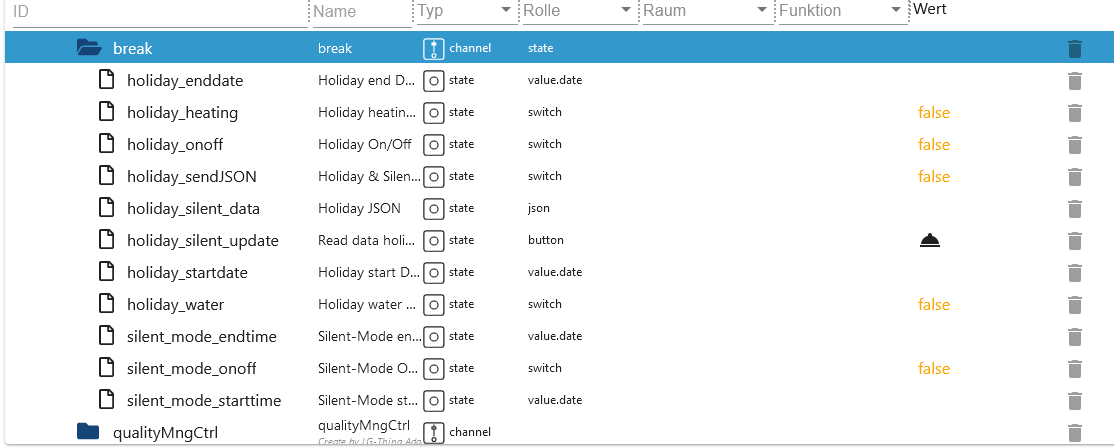
401 Remote Holiday thinq2
remote.break.holiday_silent_updateThe current data must always be loaded from the cloud first.remote.break.holiday_silent_dataCurrent schedule from the cloud.remote.break.holiday_startdateEnter the start date for vacation mode here. The date cannot be in the past (Format DD.MM.YY HH:MM)remote.break.holiday_enddateEnter the end date for vacation mode here. The date cannot be in the past and must be greater than the start date (Format DD.MM.YY HH:MM)remote.break.holiday_heatingHeating on/off (as in the APP)remote.break.holiday_waterHot water on/off (as in the APP)remote.break.holiday_onoffOnly the above mentioned Fill data points and then activate/deactivate vacation mode hereremote.break.silent_mode_starttimeEnter the start time for the low-noise mode here. (Format HH:MM)remote.break.silent_mode_endtimeEnter the end time for quiet mode here. Of course it should be larger than the start date. (Format HH:MM)remote.break.silent_mode_onoffEnable/disable quiet moderemote.break.holiday_sendJSONIntended for experts only. The JSON has an array consisting of JSON Type 1, 2 and 3. 1 stands for the runtimes, 2 for vacation mode and type 3 for quiet mode. You could now add additional JSONs to Type 1 and thus generate more switching times.
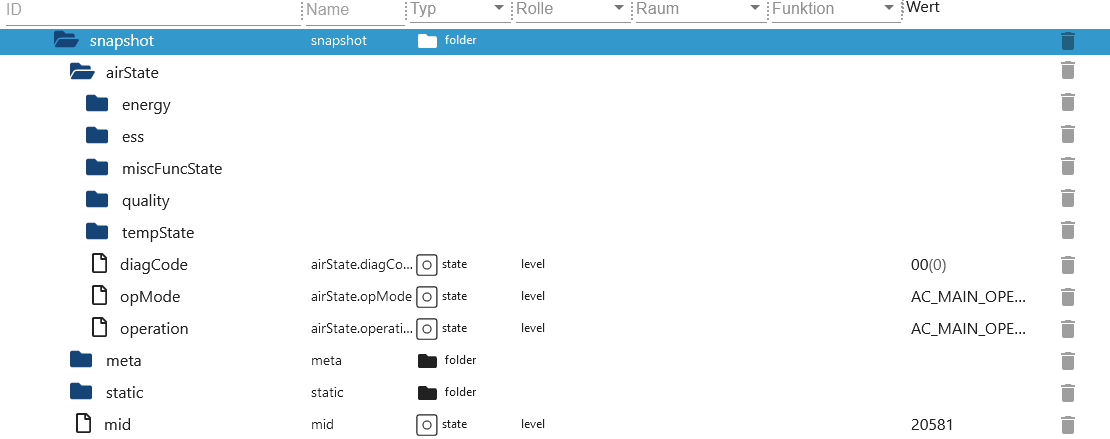
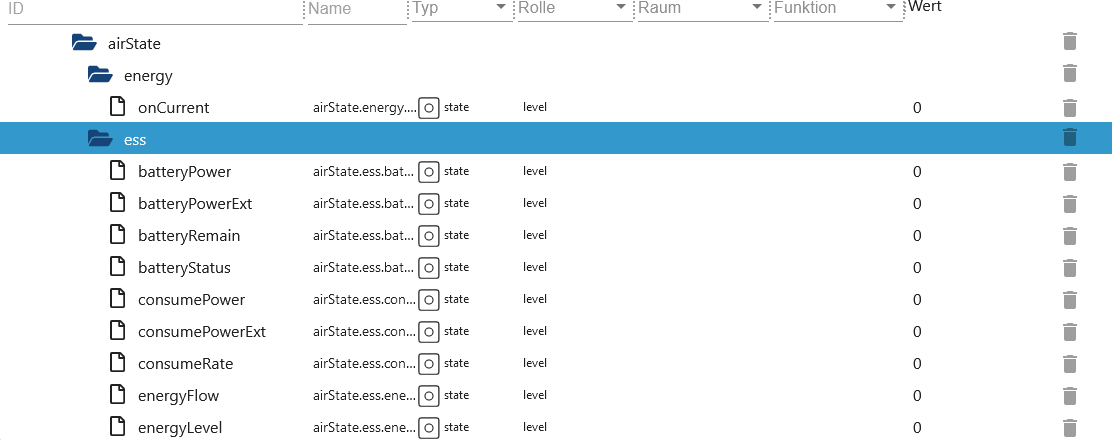
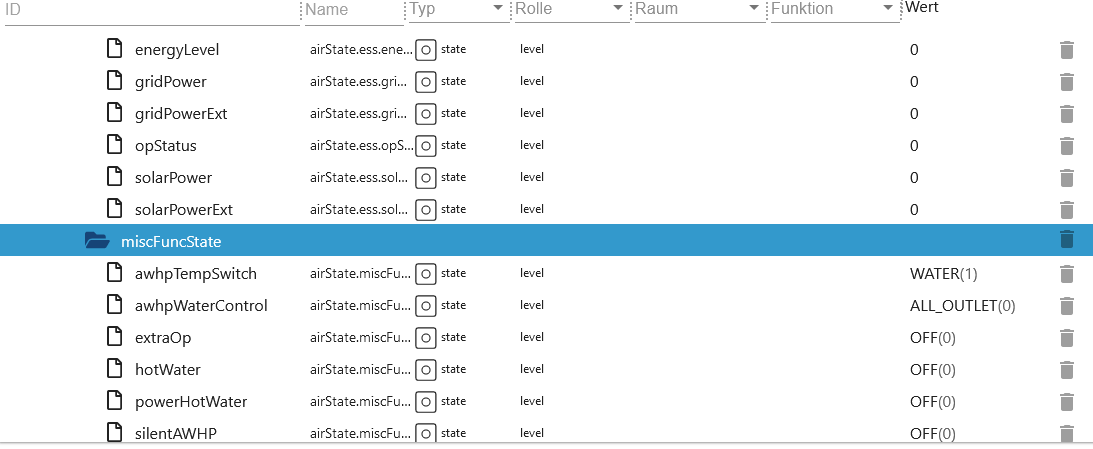
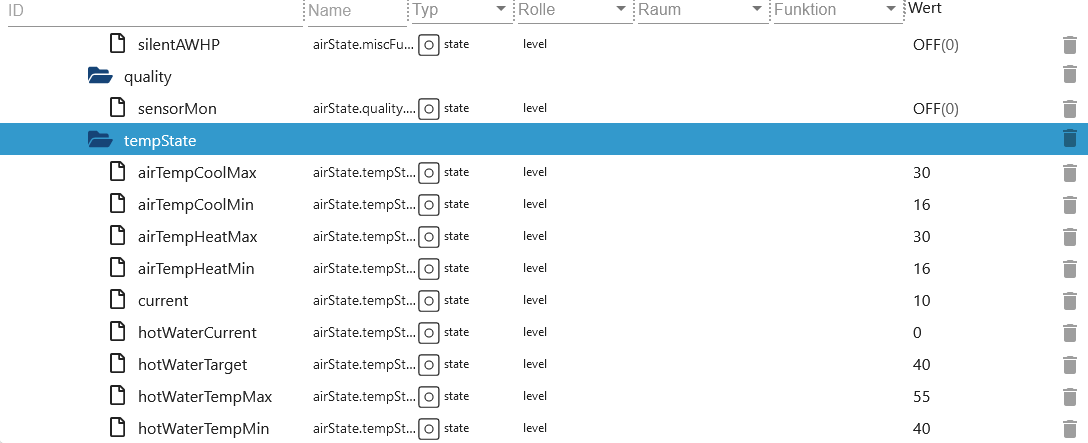
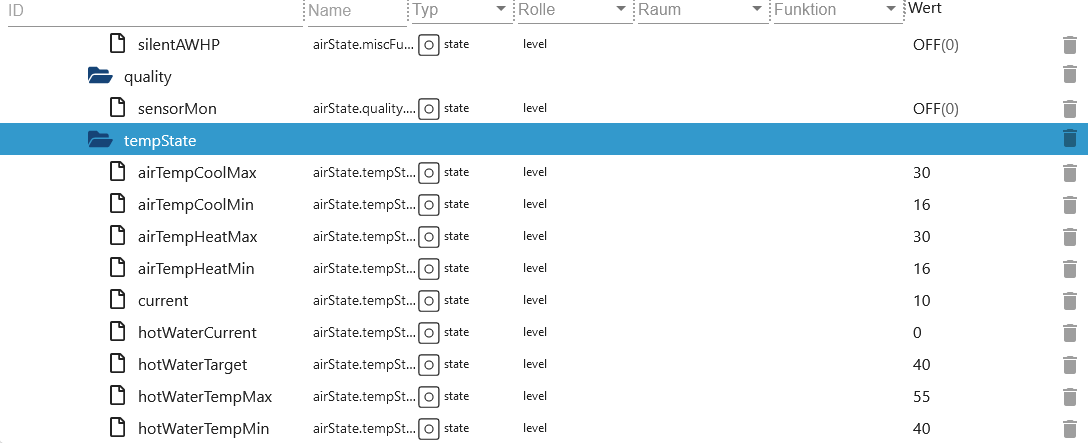
401 Snapshot thinq2
Device 401 Air conditioner thinq1
401 Remote Statistic thinq1
-
hourly
-
remote.Statistic.endDateEnter the date for hourly, end and start must be the same Format: 2023.12.01 -
remote.Statistic.startDateEnter the date for hourly, end and start must be the same Format: 2023.12.01 -
Or daily
-
remote.Statistic.endDateEnter date daily - Format: 2023.12.06 -
remote.Statistic.startDateEnter date daily - Format: 2023.12.01 -
Or monthly
-
remote.Statistic.endDateEnter date monthly - Format: 2023.12.01 -
remote.Statistic.startDateEnter date monthly - Format: 2023.10.01 -
remote.Statistic.periodSelect period -
remote.Statistic.sendRequestSend selection -
remote.Statistic.jsonResultStatistics as JSON. If the attributes are empty then your device does not support them or an incorrect date was specified. -
remote.Statistic.ownrequestOwn query of data. Open the file from themodelJsonUrilink and apply cmd, cmdOpt and value. -
remote.Statistic.ownresponseResult ofremote.Statistic.ownrequest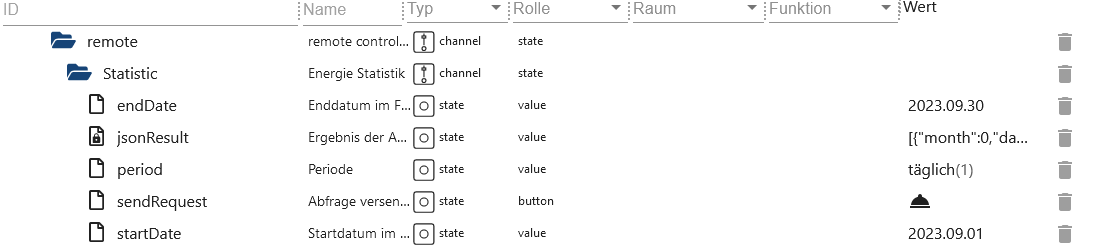
[
    {
        "month": 0,
        "day": "03",
        "hour": 0,
        "min": "16",
        "kwh": 0.1
    },
    {
        "month": 0,
        "day": "04",
        "hour": 0,
        "min": "59",
        "kwh": 0.2
    },
    {
        "month": 0,
        "day": "06",
        "hour": 0,
        "min": "15",
        "kwh": 0.1
    },
    {
        "month": 0,
        "day": "07",
        "hour": 0,
        "min": "40",
        "kwh": 0.1
    },
    {
        "month": 0,
        "day": "09",
        "hour": 0,
        "min": "35",
        "kwh": 0.2
    },
    {
        "month": 0,
        "day": "10",
        "hour": 0,
        "min": "60",
        "kwh": 0.2
    },
    {
        "month": 0,
        "day": "11",
        "hour": 0,
        "min": "60",
        "kwh": 0.2
    },
    {
        "month": 0,
        "day": "12",
        "hour": 0,
        "min": "90",
        "kwh": 0.3
    }
]
ownrequest JSON
{
    "method": "POST", // POST or GET Axios Request
    "url": "rti/rtiControl", // URL
    "data": {
        "lgedmRoot": {
            "deviceId": null, // Adapter replaces null
            "workId": null, // Adapter replaces null
            "cmd": "Config", // Change possible
            "cmdOpt": "Get", // Change possible
            "value": "InOutInstantPower", // Change possible
            "isControlFree": "Y" // DO NOT change
        }
    }
}
401 Remote Control thinq1

Which data points belong to set... data points is stated in the name of the data point.
lg-thinq.0.xxx.remote.SetWDirLeftRight -> {"WDirLeftRight":"{{WDirLeftRight}}","WDirUpDown":"0"}
-
Turn on example:
-
remote.settings.Operationset to 1 -
remote.SetOperationthen set this data point to true -
Turn off example:
-
remote.settings.Operationset to 0 -
remote.SetOperationthen set this data point to true -
Example changing temperature:
-
remote.settings.TempCfgEnter temperature -
remote.SetTempCfgthen set this data point to true -
Other example:
-
remote.settings.WDirUpDownset to 0 -
remote.settings.WDirLeftRight0 or 1 -
remote.SetWDirLeftRightthen set this data point to true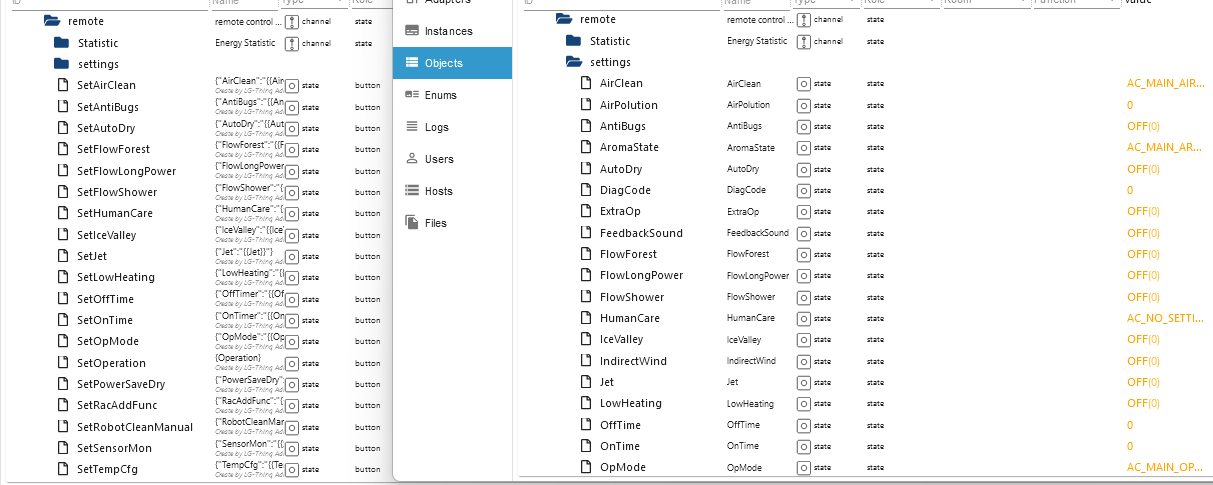
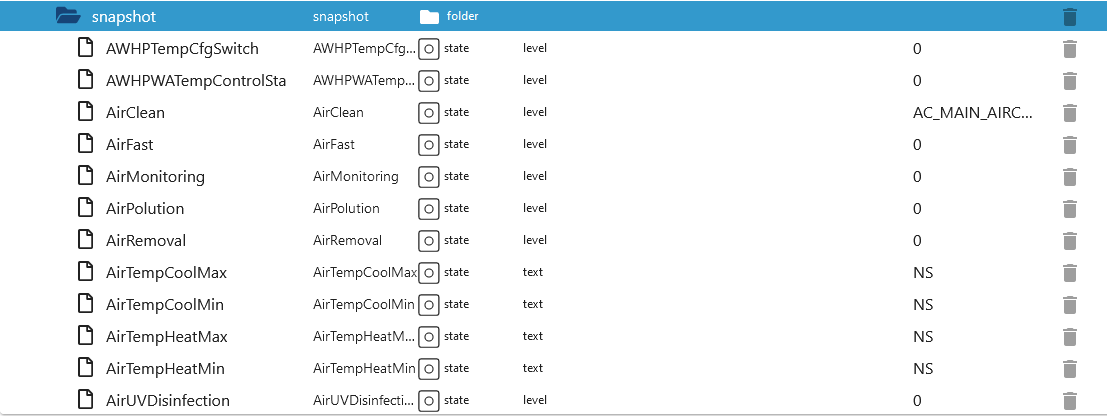
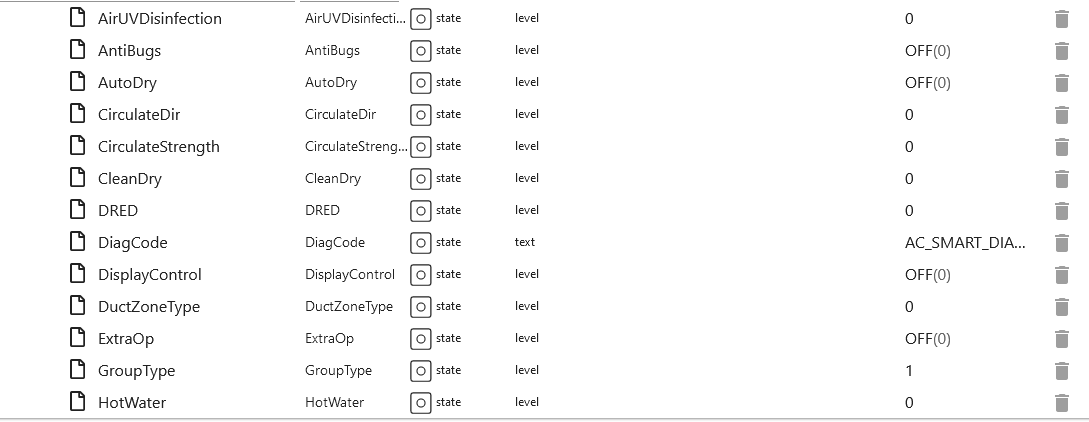
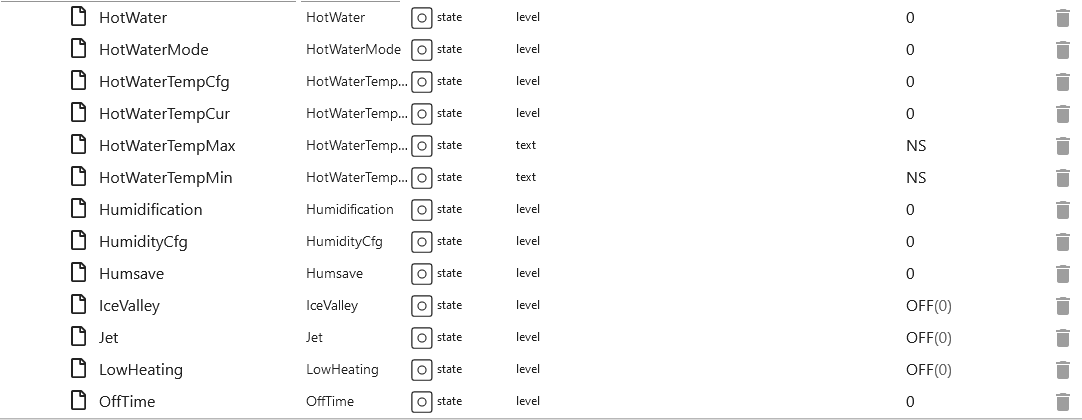
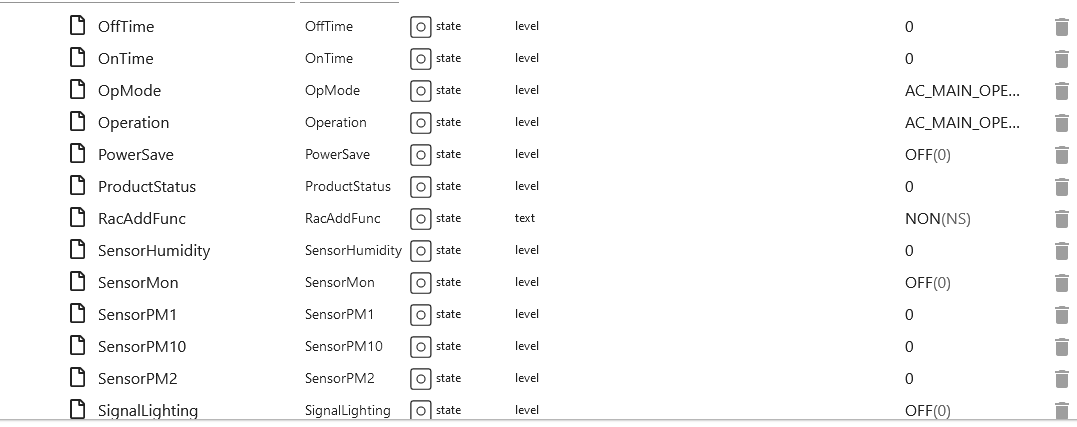
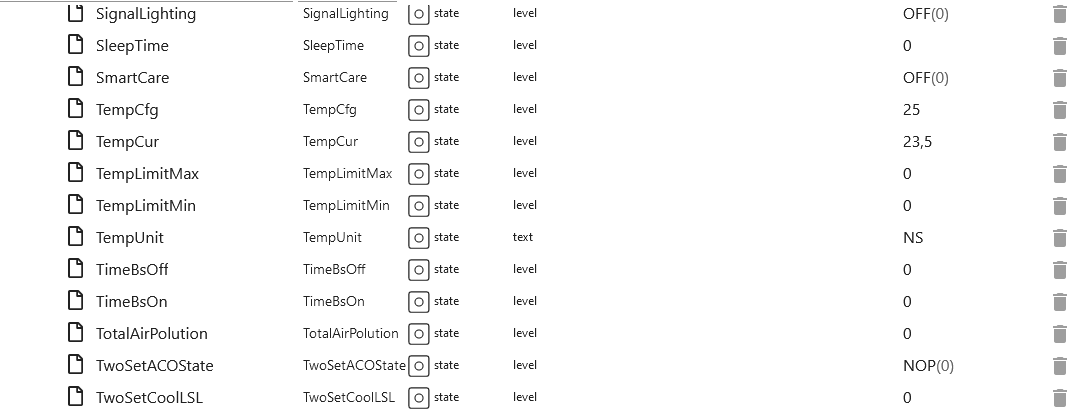
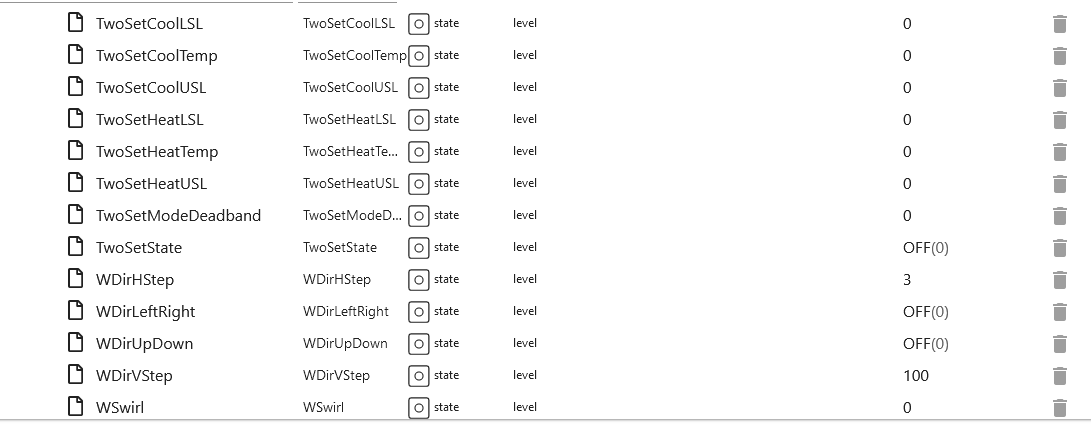
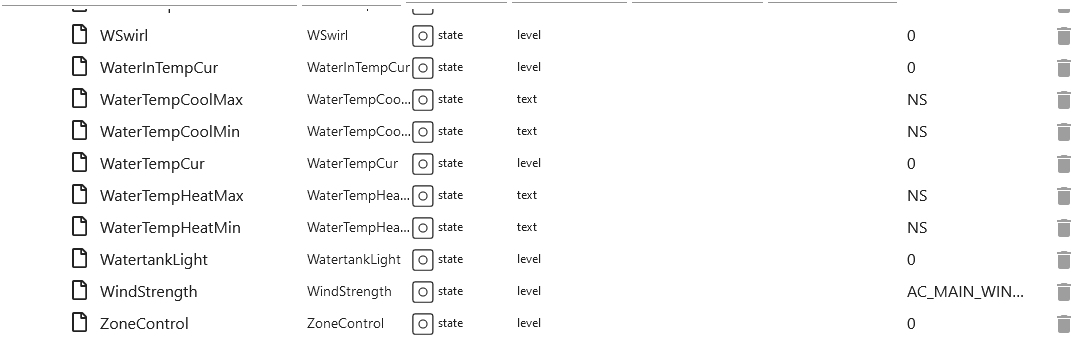
401 Snapshot thinq1
Device 406 Heat pump thinq2
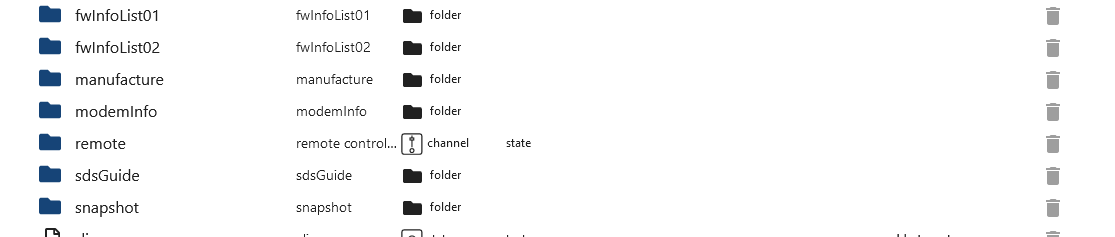
406 All Folders thinq2
406 Remote Folder thinq2
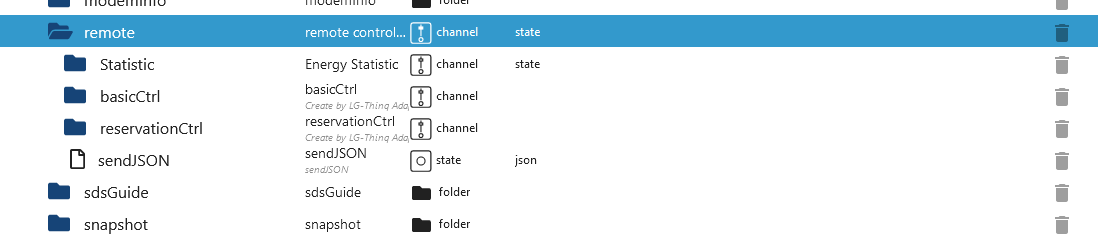
406 Remote Statistic thinq2
-
remote.Statistic.commandWhich history should be loaded -
hourly
-
remote.Statistic.endDateEnter the date for hourly, end and start must be the same Format: 2023.12.01 -
remote.Statistic.startDateEnter the date for hourly, end and start must be the same Format: 2023.12.01 -
Or daily
-
remote.Statistic.endDateEnter date daily - Format: 2023.12.06 -
remote.Statistic.startDateEnter date daily - Format: 2023.12.01 -
Or monthly
-
remote.Statistic.endDateEnter date monthly - Format: 2023.12.01 -
remote.Statistic.startDateEnter date monthly - Format: 2023.10.01 -
remote.Statistic.periodSelect period -
remote.Statistic.sendRequestSend selection -
remote.Statistic.jsonResultStatistics as JSON. If the attributes are empty then your device does not support them or an incorrect date was specified.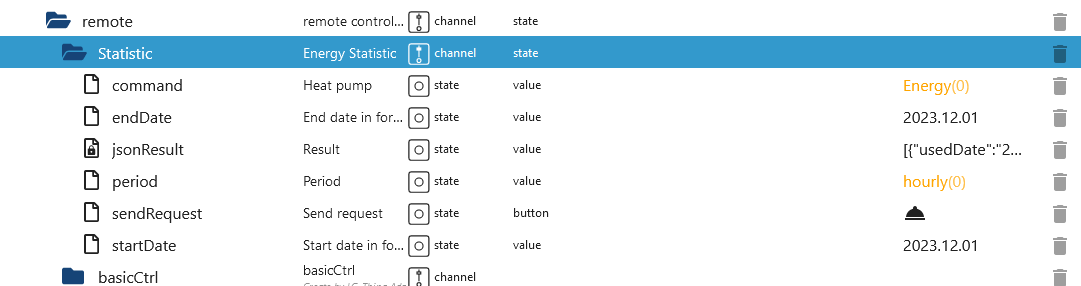
406 Remote basicCtrl thinq2
-
remote.basicCtrl.hotWaterTargetSetting the temperature -
remote.basicCtrl.opModeSet mode
406 Remote reservationCtrl thinq2
-
remote.reservationCtrl.add_new_scheduleCreate a new schedule. 3 new data points will then be created that must be filled out. Then presssend_new_scheduleto save the new slot. If it is not sent, these new data points will be deleted after a restart. -
remote.reservationCtrl.del_new_scheduleDelete a slot again. Then presssend_new_scheduleagain so that the data is saved. -
remote.reservationCtrl.send_new_schedulePress to save changes. -
remote.reservationCtrl.01_end EnddatumExample 22:30. -
remote.reservationCtrl.01_start StartdatumExample 21:30. -
remote.reservationCtrl.01_stateEnable/Disable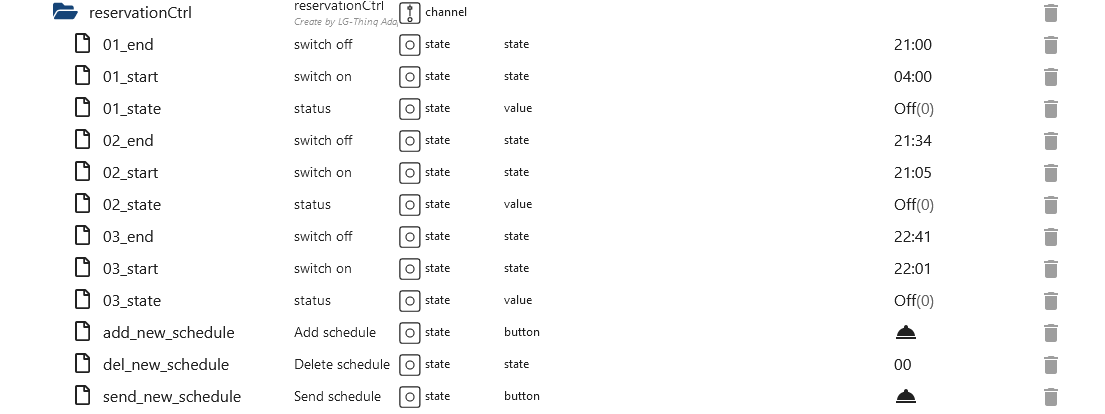
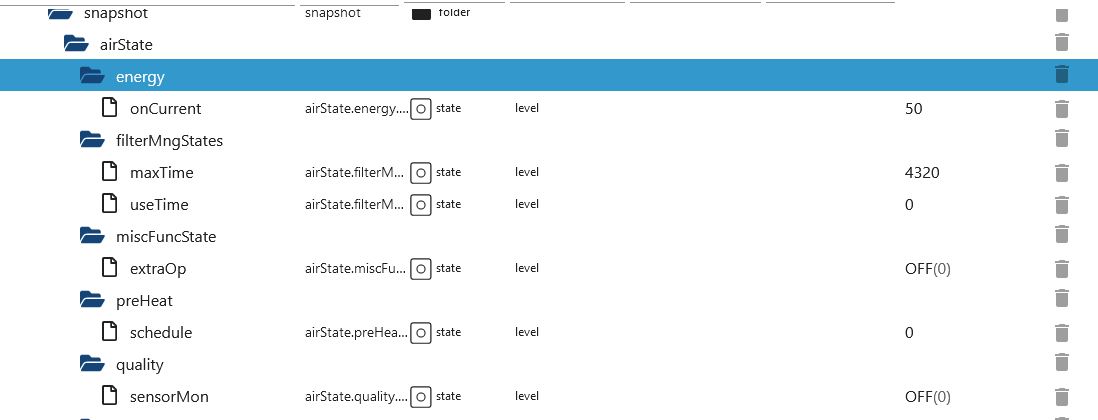
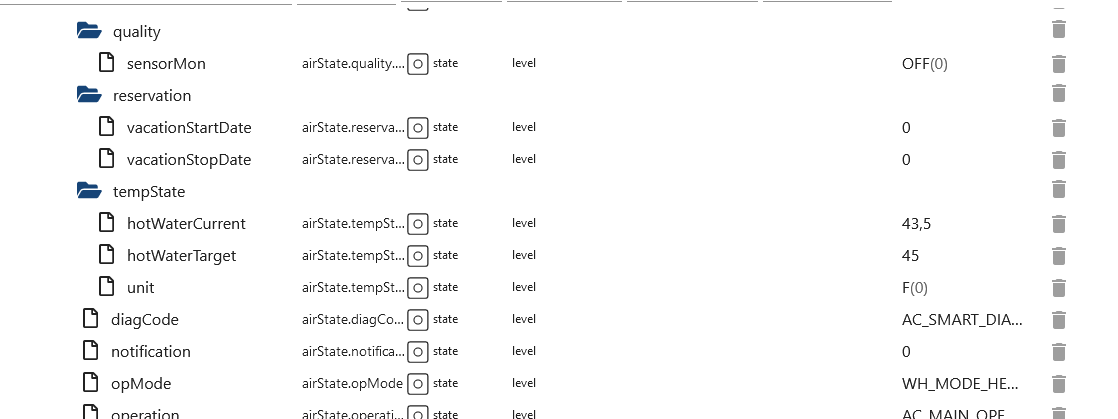
406 Snapshot thinq2
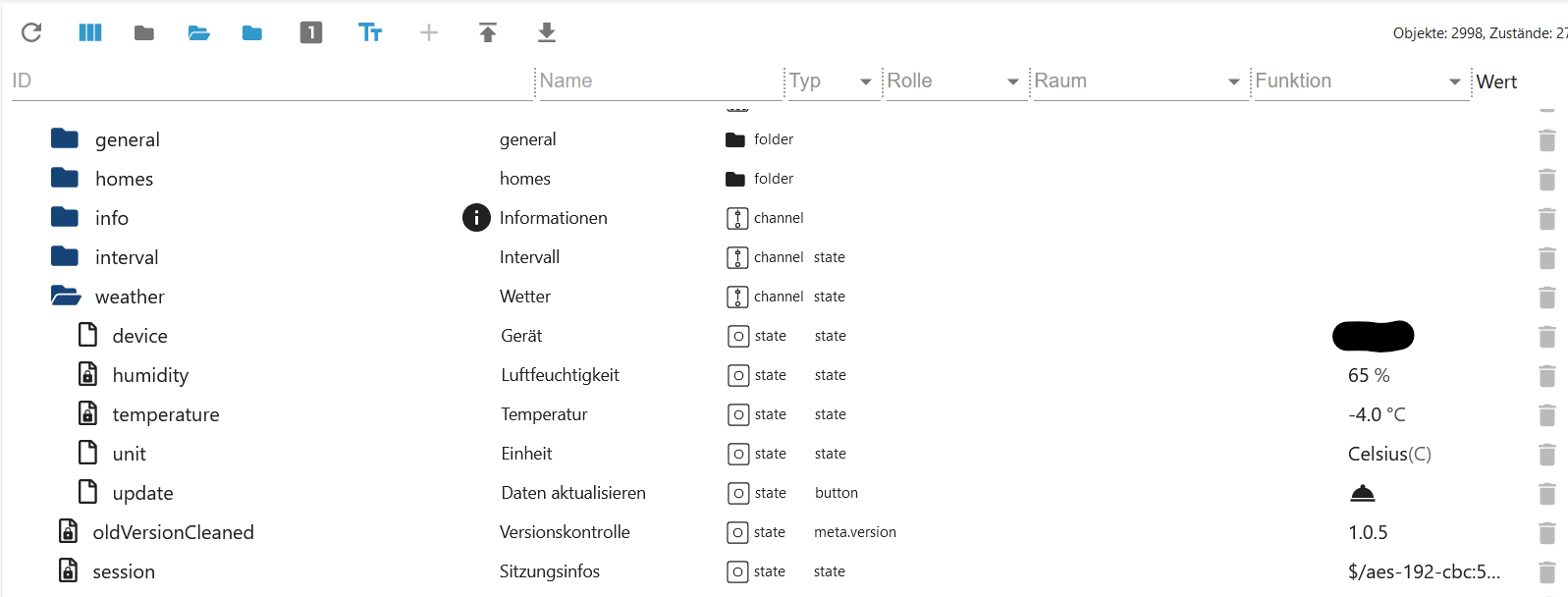
Weather
lg-thinq.0.xxx.area must be filled!
-
weather.deviceChoose area. If all devices have the same area, only one device is displayed. -
weather.humidityHumidity -
weather.temperatureTemperature -
weather.unitSelect Celsius or Fahrenheit -
weather.updateRequest an LG senden (device und unit müssen gefüllt sein!)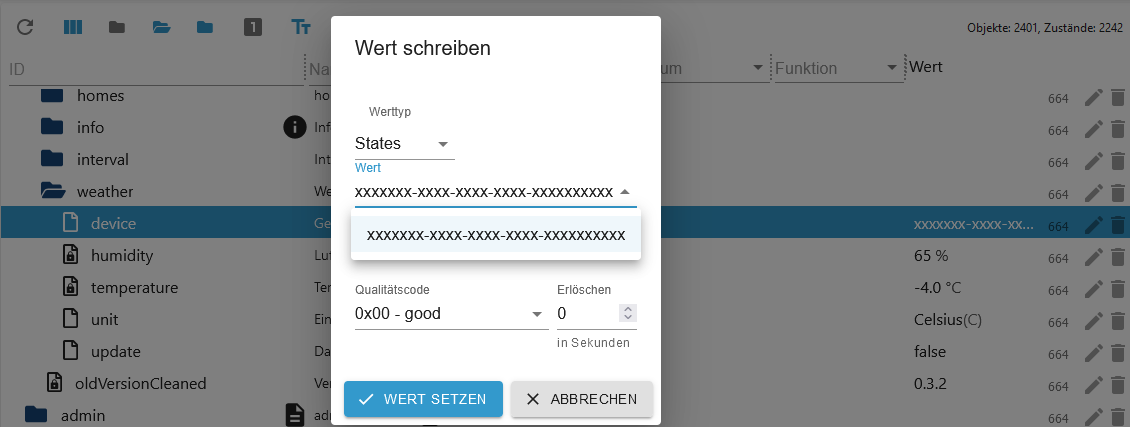
Changelog
1.2.2 (2026-08-22)
- (Lucky-ESA) Added default header for login
1.2.1 (2026-08-14)
- (Lucky-ESA) Issue missing privKey fixed
1.2.0 (2026-05-31)
- (copilot) Adapter requires node.js >= 22 now
- (Lucky-ESA) Adapter requires admin >= 7.8.23 now
- (Lucky-ESA) Added translate for device 201
1.1.6 (2025-12-17)
- (Lucky-ESA) Fixed: Address Root-CA certificate has changed
1.1.5 (2025-12-15)
- (Lucky-ESA) Fixed adapter crash (thinq1 only)
- (Lucky-ESA) Fixed: Address Root-CA certificate has changed
License
MIT License
Copyright (c) 2021-2026 TA2k tombox2020@gmail.com
Permission is hereby granted, free of charge, to any person obtaining a copy of this software and associated documentation files (the "Software"), to deal in the Software without restriction, including without limitation the rights to use, copy, modify, merge, publish, distribute, sublicense, and/or sell copies of the Software, and to permit persons to whom the Software is furnished to do so, subject to the following conditions:
The above copyright notice and this permission notice shall be included in all copies or substantial portions of the Software.
THE SOFTWARE IS PROVIDED "AS IS", WITHOUT WARRANTY OF ANY KIND, EXPRESS OR IMPLIED, INCLUDING BUT NOT LIMITED TO THE WARRANTIES OF MERCHANTABILITY, FITNESS FOR A PARTICULAR PURPOSE AND NONINFRINGEMENT. IN NO EVENT SHALL THE AUTHORS OR COPYRIGHT HOLDERS BE LIABLE FOR ANY CLAIM, DAMAGES OR OTHER LIABILITY, WHETHER IN AN ACTION OF CONTRACT, TORT OR OTHERWISE, ARISING FROM, OUT OF OR IN CONNECTION WITH THE SOFTWARE OR THE USE OR OTHER DEALINGS IN THE SOFTWARE.