Contribution
There are various ways you can contribute to the development of ioBroker. We have summarized the most important options in this chapter.
documentation
The documentation is an important part of ioBroker. It is the first point of contact for new users who want to learn about ioBroker.
The documentation can be found in this GitHub repository, and for example this text can be edited here: docs/en/faq_040_contribution/README.md .
The documentation can be written in one of three languages: English (preferred), German and Russian.
The texts and pages are written in Markdown and can be edited with any text editor, or directly in the browser on GitHub.
You can use the language you prefer. If you don't speak a language, you can also use Google Translate. We will then proofread the texts. The most important thing is that the texts are understandable and that your ideas are not only stored in your head but also on paper (on GitHub).
Pay attention to the language in which an existing document is written. If it's at the very top...translatedFrom: XX If this option is selected, the document will be translated from another language and all your changes will be overwritten. If you wish to edit the document in this specific language, please delete the option.translatedFrom Enter this information to prevent the document from being translated again.
However, it is better to edit the original language, as this makes synchronization between languages easier.
Report a bug
If you find a bug in ioBroker, you can report it to the relevant adapter on GutHub.
You will need a free GitHub account. If you don't already have one, you can register here: github.com . Registration only takes a few seconds, but it will greatly help us maintain and fix bugs.
Please remember that the developer cannot read your mind. When reporting a bug, please describe exactly what you did, what happened, and what you expected. Attaching error logs is very helpful. Screenshots are also extremely useful.
Please don't forget the adapter version number and the version ofioBroker.js-controller to mention.
Instructions on how to report graphical errors (which occur in the browser) can be found here .
Please remember that ioBroker logs can also be viewed in the CLI:
iob logsto display the last 100 lines of the logs,iob logs --wto display the logs in real time.
Development
It may happen that you want to develop your own adapter or even contribute to the ioBroker Core.
Both are possible. :)
There are instructions for developing an adapter.
Answering questions on the ioBroker forum
You can also help by answering questions on the ioBroker forum. New users join every day and they have questions because the documentation is insufficient or unclear.
Contribute ideas
If you have an idea for how ioBroker can be improved, you can discuss it on the ioBroker forum or submit a request here . If your idea receives enough support, it will be included in the roadmap.
Report errors in the graphical interface
ioBroker has many graphical interfaces written in JavaScript.
Currently, many interfaces are developed with ReactJS. If an error occurs in such an interface, or the reaction freezes or the page behaves unexpectedly, then you can and should report the error.
To do this, you have to open the browser console and find the error messages there. The browser console is different in every browser, but most browsers have the console in the developer view and the developer view is usually accessible with F12 (Chrome, Firefox, Edge).
It is important to *first open the browser console, then reload the page (F5) and then perform the actions that are causing the error.
This is what the browser console looks like in Chrome: 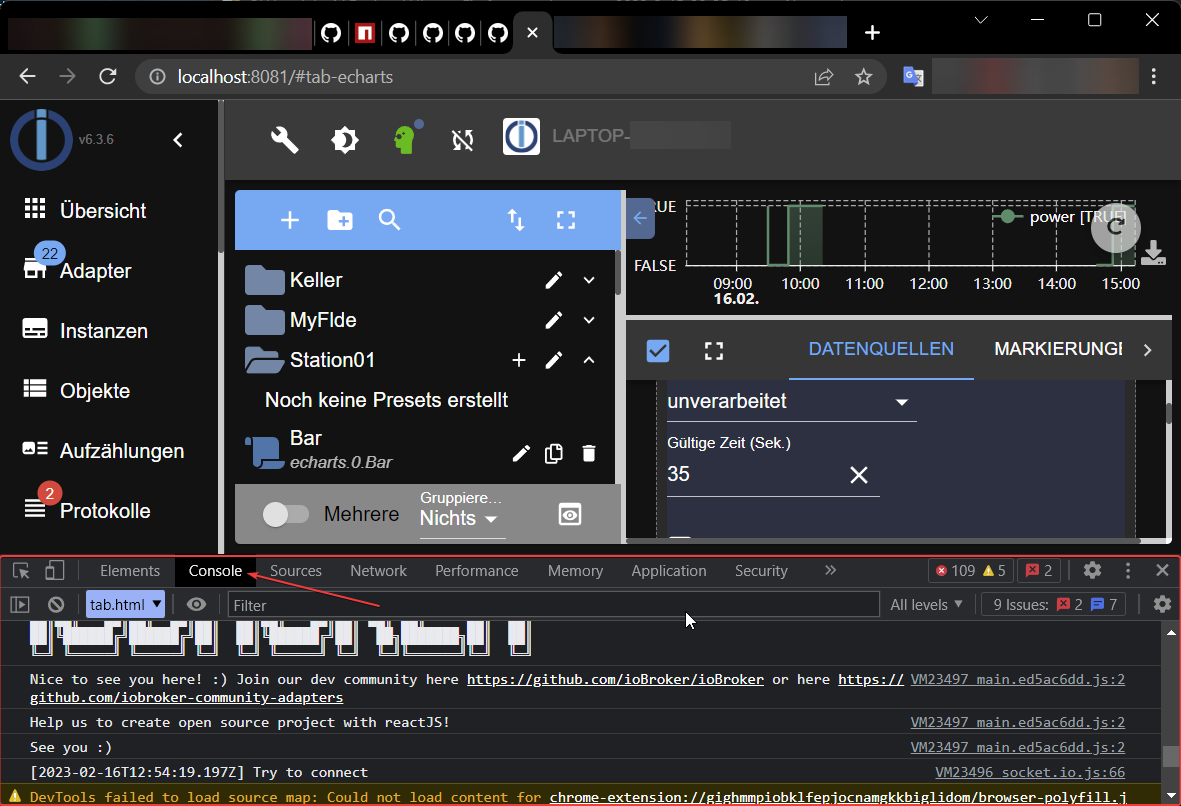
This is what an error message looks like if the console is opened after the page has loaded: 
And so, if the console is opened before the page loads: 
As you can see, it shows the file name and line number where the error occurs.
With this information (along with the adapter version number) we can reproduce or fix the error.