Crash reports
When an adapter crashes, an error message is logged. The developer only sees it if someone reports it. This is precisely the gap that crash reports close: a crashed adapter automatically sends the error to its developer without anyone having to create an issue.
This is powered by Sentry , a widely used bug tracking service. ioBroker uses its own plugin for this, which can incorporate an adapter. Not every adapter does this.
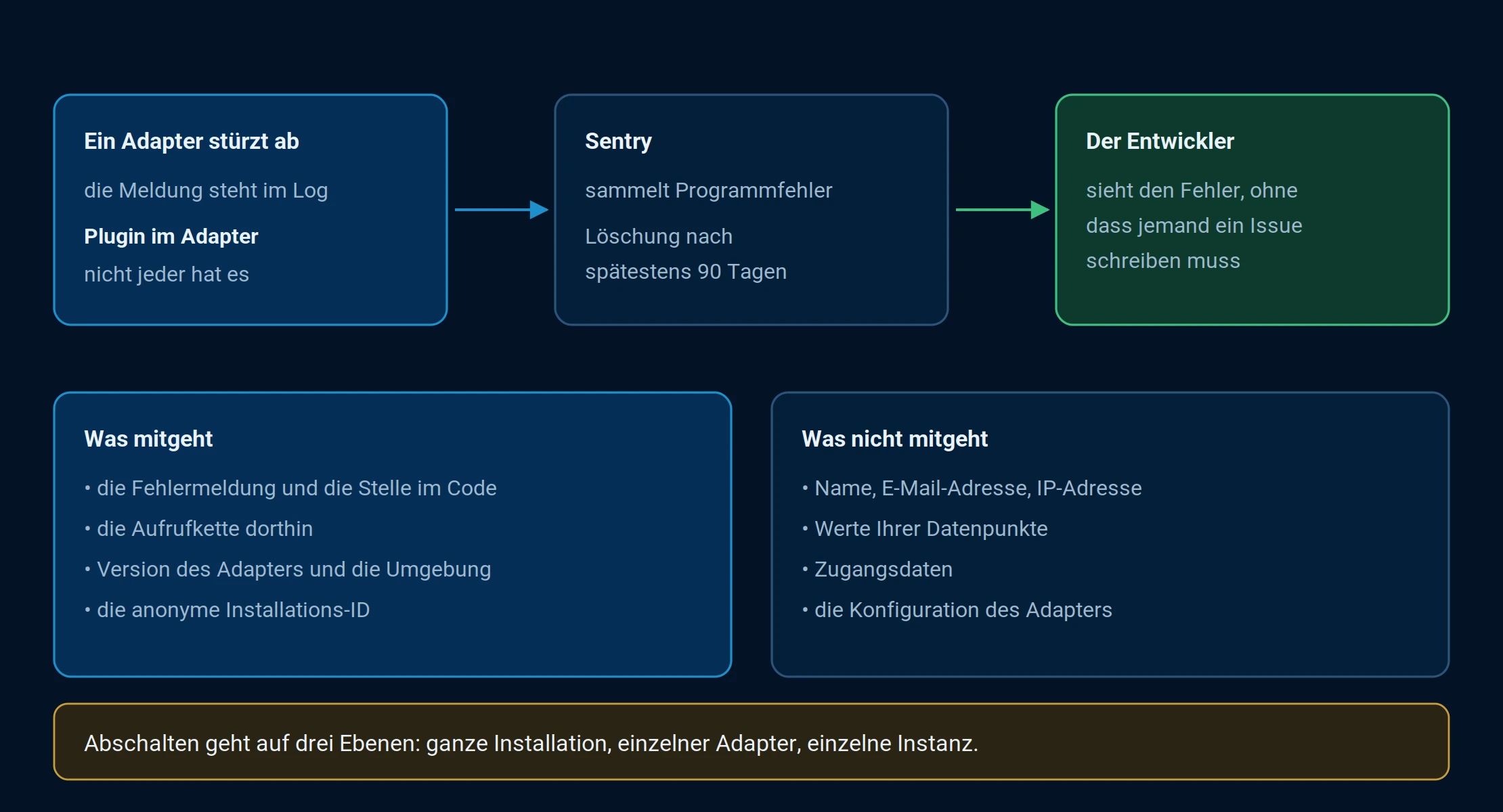
The program error is transmitted, not the state of your system.
What is being transmitted
A crash report contains the error itself: the message, the location in the program code, the call chain leading to it, the adapter version, and the environment in which it was running. It also includes the anonymous installation ID, so the developer can identify whether a hundred reports originate from a hundred different systems or from the same system.
Your name, email address, or IP address will not be transmitted. The messages will be deleted after a maximum of 90 days.
What a crash doesn't send along is your data: no object values, no access data, no adapter configuration. What's transmitted is the program error, not the state of your system.
Which adapters can do that?
In the adapter list, adapters that report crashes have a special symbol: green mountains . This allows you to see at a glance on an adapter's tile whether the developer is even aware of a crash.
The same information is available in the instance list in the column overview: there, a symbol per instance indicates whether that instance reports crashes.
Switch off
There are three levels, and they operate independently of each other.
The entire installation is configured via System Preferences, Statistics tab. If no option is selected there, according to the dialog's message, neither usage statistics nor crash reports will be transmitted. This is the setting for those who do not want to send anything at all. Details about the tab's appearance can be found under Usage Statistics .
To use a single host or instance via the command line:
iobroker plugin disable sentry
iobroker plugin disable sentry --instance adaptername.0
The first command applies to the host on which it is executed, the second only to the specified instance.enable instead ofdisable It will be switched on again.
In the object tree , if you're already there. The switch is located insystem.host.NAME.plugins.sentry.enabled for a host and insystem.adapter.NAME.INSTANCE.plugins.sentry.enabled for one instance. This is the same setting that the command line sets, only manually.
For developers
An adapter receives crash reports via plugin-sentry . This is logged in theio-package.json undercommon.plugins.sentry , with thedsn The name of your own Sentry project is mandatory. Optionally, paths and error types can be included or excluded to prevent every irrelevant exception from ending up in your inbox.
Anyone who wants to prevent reporting for an instance altogether setscommon.disableDataReporting in the instance object. The fields are described under Object Schema .