Log parser adapter for parsing (filtering) of ioBroker logs
With this adapter the ioBroker logs of all adapters can be parsed, i.e. filtered, accordingly.
Configuration
Tab "Parser Rules (Filter)"
For each set filter (rule), states are created under logparser.[instance].filters.
| Column | Description |
|---|---|
| Active | Activate/deactivate filters |
| Name | Any name (spaces and special characters are automatically removed), used as state under 'filters' |
| Whitelist: AND | All these expressions must be present. If you enter wildcard *, or leave it empty, this rule is being skipped. |
| Whitelist: OR | At least one of these expressions must occur. If you enter wildcard *, or leave it empty, this rule is being skipped. |
| Blacklist | As soon as one of these expressions is present, the log is not taken over, no matter what other filters are defined. |
| Debug/Info/Warn/Error | Which log levels should be considered? |
| Clean | Remove unwanted strings from log line. |
| Max | Maximum number of characters of the log line, everything longer than this will be truncated. Leave empty if not used. |
| Merge | This merges log entries with the same content and precedes them with a counter. Without Merge: 2019-08-17 20:00:00 - Retrieve weather data.2019-08-17 20:15:00 - Retrieve weather data.2019-08-17 20:30:00 - Retrieve weather data.Merge activated: 2019-08-17 20:30:00 - [3 Entries] Retrieve weather data. |
| Date format | YYYY = year 4-digit, YY = year 2-digit, MM = month, DD = day, hh = hour, mm = minute, ss = second. Parts within # characters are replaced by "Today" or "Yesterday". |
String / Regex
In the columns Whitelist AND, Whitelist OR, Blacklist, and Clean, both normal text (string) and regex are allowed. Separate multiple expressions with commas. Please place regex between / and /, so that the adapter recognizes if it is a regexp. If String: it is always checked for partial matches. To ignore/disable: leave empty.
Tab "Further Settings"
-
Remove PID: JS controller version 2.0 or greater adds the PID in brackets to the front of logs, e.g.
(12234) Terminated: Without reason. If activated, the PIDs including brackets, like (1234), are removed from the log lines. -
Replace date with "today" / "yesterday": In the filters, you can replace today's or yesterday's date with 'Today' or 'Yesterday' in the date format column by using hash characters (#). In these fields, other terms instead of "Today"/"Yesterday" can be defined.
-
Text for "Merge" This text is placed in front of each log line if Merge is activated. The # character is then replaced by the number of logs with the same content. Special characters like
[](){}/\etc. are allowed. Examples (without quotation marks): "[# entries]", "(#)", "# entries:"
Tab "Visualization"
-
Number of JSON tables used in VIS: This option adds additional states for better Visualization in VIS. You will then be able to select certain filters, which are then shown accordingly in the JSON table (e.g. 'Homematic', 'Warnings', 'Errors' etc.).
Specify the number of different JSON tables you need. The states of these are being created under 'visualization.table0', 'visualization.table1', etc. Enter 0 to deactivate. -
Column order for JSON table: Here you can change the order of the columns. As additional column ts (timestamp) is always added. In VIS etc. simply hide it if necessary.
If you need less than 4 columns: Simply select one entry of the first columns you need and then hide the rest with the VIS JSON table widget (or similar). -
Sorting: If activated: sorts the log entries in descending order, newest at the top. If deactivated: Sorts the log entries in ascending order, i.e. oldest on top. Sorting in descending order is recommended, so activate this option.
Tab "Global Blacklist"
If one of these phrases/terms is contained in a log line, then the log entry is ignored by this adapter, regardless of what is set in the parser rules (filter). Both string and regex are allowed. If string: it is checked for partial match, i.e. if you enter e.g. "echo", then every log line containing "echo" will be filtered out, also e.g. "Command sent to echo in kitchen".
Please place regex between / and /, so that the adapter recognizes if it is a regexp.
In the column "Comment" you can comment/explain the respective entry as you like, for example so that you can later understand why you have set this blacklist entry.
Tab "Expert Settings"
-
Interval for updating states: New incoming log entries are collected and regularly written to the data points. Hereby the interval can be defined. Note: The states are only updated if there has been a change. However, from a performance point of view, it does not make sense to set an interval that is too short here. Less than 2 seconds is not allowed.
-
Maximum number of log entries: The maximum number of log entries that are retained in the states (older entries are removed). Please do not set a too large number, the larger the number, the more load for the adapter and thus your ioBroker server. A number of 100 has proven to be good.
Visualization (Showing logs in VIS)
This is an example of a VIS project, which you can import in VIS: vis-project-ex_logparser-adapter.zip.
Just download this zip file. Then, in VIS, navigate to menu Setup > Projekt-Export/Import > Import and select this zip file accordingly.
Please note that you will also need the Material Design Widgets to use this project.
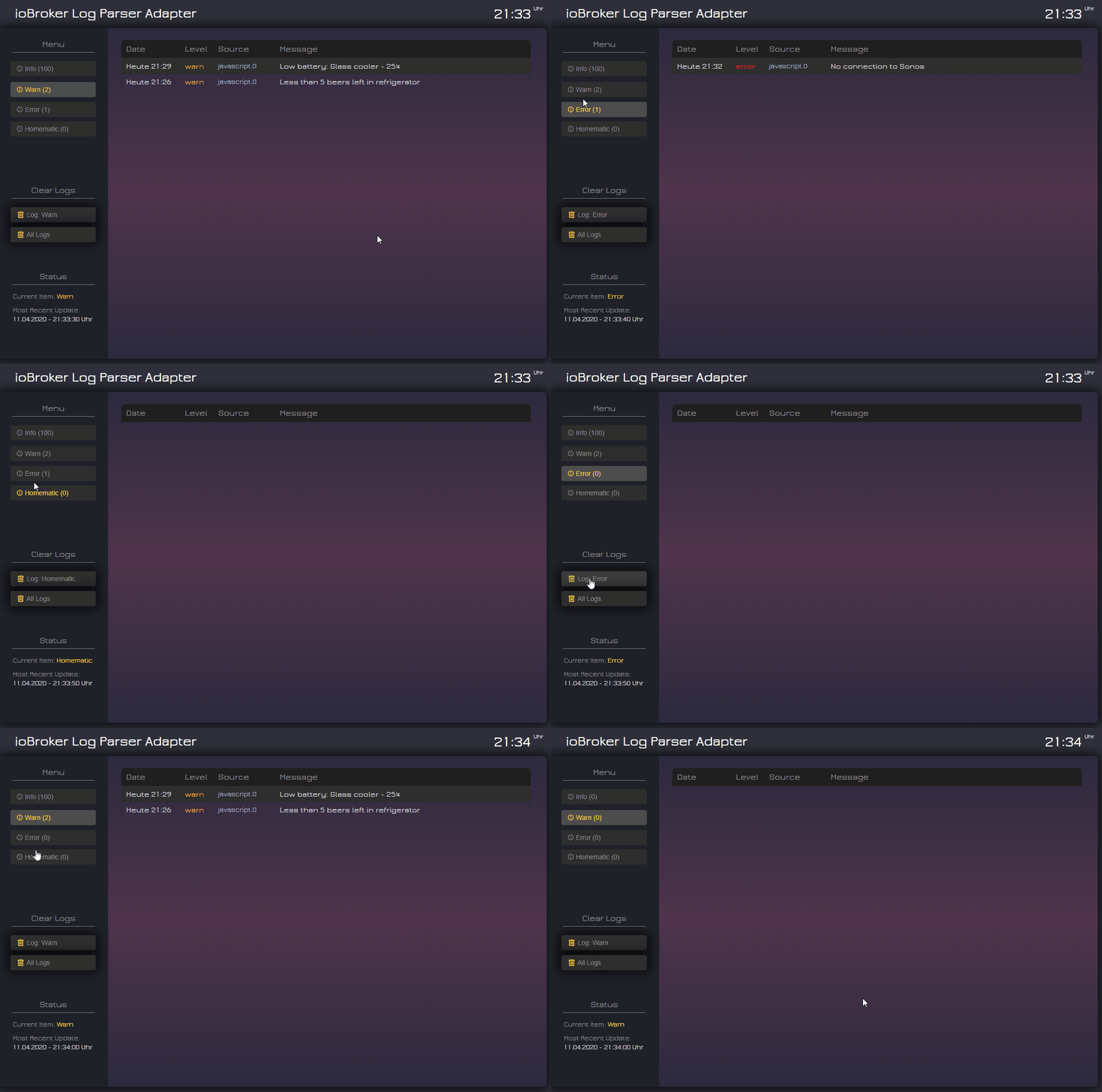
Further functions
Manipulation of the JSON column contents by log
This adapter provides the possibility to use JavaScript, Blockly, etc. and influence which content is placed in the log columns 'date', 'severity', 'from', 'message' of the JSON tables.
Example:
The following command is executed in a JavaScript:
log('[Alexa-Log-Script] ##{"message":"' + 'Command [Turn on music].' + '", "from":"' + 'Alexa Kitchen' + '"}##');
The part ##{"message":"' + 'Command [Turn on music].' + '", "from":"' + 'Alexa Kitchen' + '"}## will be extracted, and log message will become 'Command [Turn on music].', and source will be 'Alexa Kitchen' (instead of javascript.0).
Syntax:
Add the following to the log line: ##{"date":"", "severity":"", "from":"", "message":""}##
Individual parameters can be removed, e.g. just to change the log text (message), take ##{"message": "text comes here."}##
Changelog
2.5.0 (2026-05-09)
- (iobroker-community-adapters) ENHANCED: Migrated linting to shared
@iobroker/eslint-configbase configuration - (copilot) Adapter requires node.js >= 22 now
- (copilot) Adapter requires admin >= 7.7.22 now
- (copilot) Adapter requires js-controller >= 6.0.11 now
- (copilot) Adapter requires admin >= 7.6.17 now
2.4.0 (2025-06-09)
- (arteck) Adapter requires admin 7 now.
- (arteck) Today/yesterday problem has been fixed (check new settings)
- (arteck) Switched to ESLint 9
- (arteck) Dependencies have been updated.
2.3.0 (2025-03-02)
- (mcm1957) Adapter requires node.js 20, js-controller 5 and admin 6 now.
- (mcm1957) Missing dependencies for node-schedule has been added.
- (simatec) Admin-UI has been adapted for small displays.
- (mcm1957) Dependencies have been updated.
2.2.2 (2024-01-20)
- (ciddi89) Fixed: missing space in one entry of global blacklist #145
2.2.1 (2023-12-22)
- (ciddi89) Fixed: Visualization tables was not working correctly #97
- (ciddi89) Updated: Dependencies
License
MIT License
Copyright (c) 2025-2026 iobroker-community-adapters iobroker-community-adapters@gmx.de
Copyright (c) 2020 - 2024 Mic-M, McM1957 mcm57@gmx.at, ciddi89 mail@christian-behrends.de, ioBroker Community Developers
Permission is hereby granted, free of charge, to any person obtaining a copy of this software and associated documentation files (the "Software"), to deal in the Software without restriction, including without limitation the rights to use, copy, modify, merge, publish, distribute, sublicense, and/or sell copies of the Software, and to permit persons to whom the Software is furnished to do so, subject to the following conditions:
The above copyright notice and this permission notice shall be included in all copies or substantial portions of the Software.
THE SOFTWARE IS PROVIDED "AS IS", WITHOUT WARRANTY OF ANY KIND, EXPRESS OR IMPLIED, INCLUDING BUT NOT LIMITED TO THE WARRANTIES OF MERCHANTABILITY, FITNESS FOR A PARTICULAR PURPOSE AND NONINFRINGEMENT. IN NO EVENT SHALL THE AUTHORS OR COPYRIGHT HOLDERS BE LIABLE FOR ANY CLAIM, DAMAGES OR OTHER LIABILITY, WHETHER IN AN ACTION OF CONTRACT, TORT OR OTHERWISE, ARISING FROM, OUT OF OR IN CONNECTION WITH THE SOFTWARE OR THE USE OR OTHER DEALINGS IN THE SOFTWARE.