Updated for EU users with modern token-based authentication.
Disclaimer: This is an unofficial, community-developed adapter. It is not affiliated with or endorsed by Life360, Inc. Provided free of charge for personal, non-commercial home automation use. Use at your own risk. Life360 may disable or change their API at any time without notice.
Privacy: All data retrieved from Life360 is stored exclusively on your local ioBroker system. This adapter does not transmit any data to third parties or external cloud services beyond the Life360 API itself.
Description
This adapter connects to the Life360 cloud services to track people and detect presence at defined places. It retrieves circles, members and places data and persists it as ioBroker states, updated at a configurable interval.
Documentation
- 🇺🇸 Documentation
- 🇩🇪 Dokumentation
Configuration
Bearer Token (required for EU users)
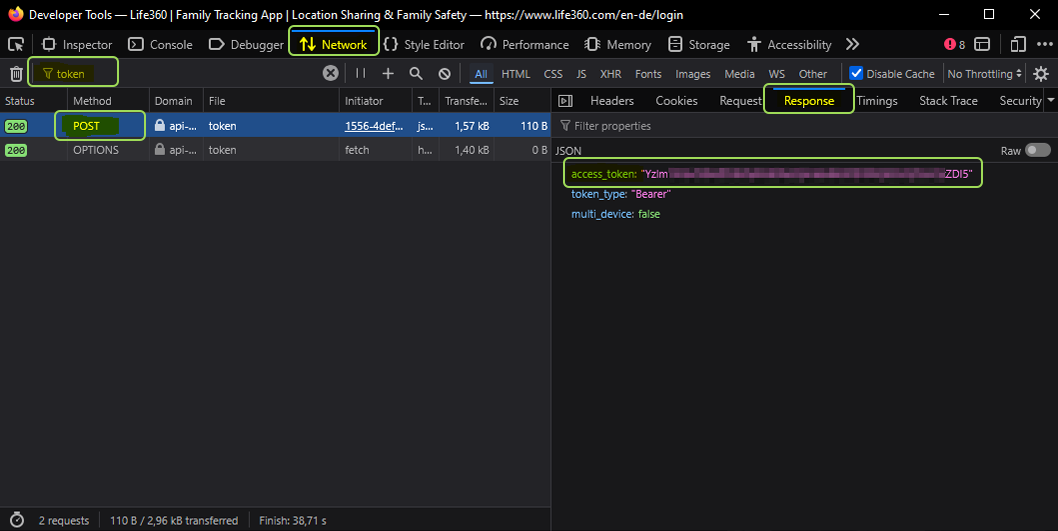
Life360 has disabled password-based login for EU users. Obtain a Bearer token manually:
- Open https://life360.com/login in your browser.
- Open browser DevTools (F12) and switch to the Network tab.
- Enter your email address and click Continue.
- Enter the one-time code sent to your email.
- Find the POST request named
token(ignore OPTIONS). - In Preview / Response, copy the value of
access_token. - Paste it into the Bearer token field in the adapter configuration.
Note: Enter the token WITHOUT the word 'Bearer', WITHOUT spaces and WITHOUT quotation marks!!
Note: Tokens are long-lived (typically months). When expired, the adapter log will show a connection error — repeat the steps above to get a new token.
My Places
Add private places not visible to Life360 cloud services. The adapter checks presence at your custom places on every poll.
- Define a Name for the place.
- Set the geo-position (latitude and longitude).
- Set the radius in meters.
Integration
Choose which Life360 data to process: circles, places, people.
Location-Tracking
Enable location-tracking to add geo-positioning details (latitude, longitude, locationName) to the people data points.
Migration / Upgrade Notes
Upgrading from 1.0.x to 1.1.0
The internal object hierarchy has been restructured to comply with ioBroker's object type rules.
Please perform the following steps after updating:
- Stop the adapter instance
- Delete all objects of the adapter (in ioBroker Admin: Objects → life360ng.0 → Delete all)
- Start the adapter instance again
- All datapoints will be recreated automatically
⚠️ Your existing scripts and automations do not need to be changed – all datapoint IDs remain the same.
States
circles
Life360 circles with their associated places and member presence.
| State | Type | Description |
|---|---|---|
circles.<id>.name | text | Circle name (e.g. Family skvarel) |
circles.<id>.id | text | Circle UUID |
circles.<id>.memberCount | value | Number of circle members (may be null) |
circles.<id>.createdAt | date | Circle creation date |
circles.<id>.timestamp | date | Last data update |
circles.<id>.places.<placeId>.<memberId>.isPresent | indicator | Member is present at this place |
circles.<id>.places.<placeId>.membersPresent | value | Number of members currently at this place |
info
| State | Type | Description |
|---|---|---|
info.connection | boolean | true when connected to Life360 cloud |
myplaces
Custom places defined in the adapter configuration (not synced to Life360 cloud).
Structure: myplaces.<placeName>.<memberName>.*
| State | Type | Description |
|---|---|---|
myplaces.<place>.<member>.distance | value.distance | Distance to place center in meters |
myplaces.<place>.<member>.isPresent | indicator | Member is within the place radius |
myplaces.<place>.<member>.startTimestamp | date | Timestamp when member entered the place |
myplaces.<place>.<member>.timestamp | date | Last check timestamp |
myplaces.<place>.gps-coordinates | value.gps | Place center as JSON {"lat":..,"lng":..} |
myplaces.<place>.latitude | value.gps.latitude | Place center latitude |
myplaces.<place>.longitude | value.gps.longitude | Place center longitude |
myplaces.<place>.members | list | All members checked against this place |
myplaces.<place>.membersCount | value | Total number of tracked members |
myplaces.<place>.membersPresent | list | Names of members currently present |
myplaces.<place>.membersPresentCount | value | Number of members currently present |
myplaces.<place>.radius | value | Configured radius in meters |
myplaces.<place>.timestamp | date | Last data update |
myplaces.<place>.urlMap | text.url | OpenStreetMap link to place |
myplaces.<place>.urlMapIframe | text.url | Google Maps embeddable URL |
people
Each Life360 circle member gets their own channel under people.<id>,
where <id> is the member's Life360 UUID.
| State | Type | Description |
|---|---|---|
people.<id>.avatar | text.url | Profile picture URL |
people.<id>.battery | value.battery | Battery level in % |
people.<id>.createdAt | date | Account creation date |
people.<id>.disconnected | indicator | App is explicitly disconnected |
people.<id>.firstName | text | First name |
people.<id>.gps-coordinates | value.gps | GPS position as JSON {"lat":..,"lng":..} |
people.<id>.id | text | Life360 member UUID |
people.<id>.isConnected | indicator.reachable | App is connected and reachable |
people.<id>.isSharingLocation | indicator | Location sharing is active |
people.<id>.lastName | text | Last name |
people.<id>.lastPositionAt | date | Timestamp of last position update |
people.<id>.latitude | value.gps.latitude | Current latitude |
people.<id>.locationName | text | Current place name (e.g. Home) |
people.<id>.longitude | value.gps.longitude | Current longitude |
people.<id>.status | text | Connection status (e.g. Ok) |
people.<id>.timestamp | date | Timestamp of last data update |
people.<id>.urlMap | text.url | OpenStreetMap link to current position |
people.<id>.urlMapIframe | text.url | Google Maps embeddable URL |
people.<id>.urlMapOsmIframe | text.url | OpenStreetMap embeddable URL (iFrame) |
Note:
isConnectedreflects whether the Life360 app is reachable, whiledisconnectedindicates an explicit disconnect state. Both can befalsesimultaneously during a connection loss.
places
Life360 places synced directly from the Life360 cloud (defined in the Life360 app). These are read-only and cannot be configured in the adapter.
| State | Type | Description |
|---|---|---|
places.<id>.name | text | Place name (e.g. Refugium) |
places.<id>.id | text | Life360 place UUID |
places.<id>.circleId | text | UUID of the circle this place belongs to |
places.<id>.ownerId | text | UUID of the place owner |
places.<id>.gps-coordinates | value.gps | Place center as JSON {"lat":..,"lng":..} |
places.<id>.latitude | value.gps.latitude | Place center latitude |
places.<id>.longitude | value.gps.longitude | Place center longitude |
places.<id>.radius | value | Radius in meters |
places.<id>.timestamp | date | Last data update |
places.<id>.urlMap | text.url | OpenStreetMap link to place |
places.<id>.urlMapIframe | text.url | Google Maps embeddable URL |
Note: For custom places with presence detection, see myplaces.
Life360 Places not available? Life360 has restricted API access to cloud places for some accounts (particularly EU free-tier accounts). If the adapter log shows
All place sources returned 0 places, the Life360 API is no longer returning place data for your account. Workaround: Define your places in the My Places tab — they work independently of the Life360 cloud and provide the same presence detection.
tracker
The adapter includes an optional GPS route logger that records the movements of each Life360 member and generates interactive Leaflet maps — accessible directly via URL in any browser, ioBroker Vis, or Jarvis dashboard.
How it works
On every GPS position update, the tracker checks whether the new position is at least minDistance meters away from the last recorded point. If so, the point is appended to a GeoJSON LineString for the current day. The full history is stored in allTime.geojson and monthly backups are written to currentYear.MM.geojson.
An HTML map is automatically (re-)generated after each update and written to the ioBroker file system. It is immediately accessible via HTTP.
Enabling the Tracker
- Open the adapter configuration.
- Under Tracker / Route logger, enable tracking for each person.
- Optionally enable Family map for each person to include them in the combined family view.
- Set the minimum distance (default: 20 m) to filter out GPS noise.
- Save and restart the adapter.
Map URLs
Each person and the family group gets a dedicated map URL, stored as an ioBroker state:
| State | Description |
|---|---|
tracker.<Name>.url | Relative URL of the person's individual map |
tracker.<Name>.urlLocal | Full URL with ioBroker server IP and web adapter port |
tracker.circle.url | Relative URL of the combined circle map |
tracker.circle.urlLocal | Full URL with ioBroker server IP and web adapter port |
The URL format is:
/<namespace>/tracker/<name>.html
Open this URL in any browser. The map auto-refreshes at the configured polling interval.
Note: The tracker maps are served by the ioBroker web adapter. Make sure it is installed and running. The
urlLocalstate is automatically built from the server's IP address and the web adapter port (default: 8082).The generated HTML, CSS, and JS files are stored in the ioBroker file system and can be viewed under Admin → Files →
life360ng.<instance>/tracker/.
Map Features
- Interactive Leaflet map — pan and zoom, based on OpenStreetMap
- Date picker — navigate between all recorded days (full history, no limit)
- Color-coded routes — each person has their own configurable route color
- Start / end markers — clearly marks the first and last position of the day
- Auto-refresh — the page reloads automatically (polling interval + 10 s)
- Family map — all enabled persons on one combined map with legend
- Flag markers — Life360 places and own custom places (My Places) can be shown as flag markers on the map, each with configurable color, size, and opacity (0.0 = invisible, 1.0 = fully visible)
Single Map Features
- Route-Checkbox: Each single-person map has a "Route" checkbox to toggle route display for the selected period. The state is saved per person in the browser and persists across reloads.
- Dynamic Datepicker: The date range pickers are only shown when the route is enabled. If the route is disabled, only the last known point is displayed.
- Personalized Colors: The checkbox color matches the person's color.
- Consistent Header: The header height remains consistent regardless of the checkbox state.
Tracker States
Configuration (tracker.config.*)
All color and behavior settings can be changed at runtime — the maps are re-rendered immediately without restarting the adapter.
| State | Type | Description |
|---|---|---|
tracker.config.enabled | boolean | Enable / disable the route logger |
Per-Person Data (tracker.<Name>.*)
| State | Type | Description |
|---|---|---|
tracker.<Name>.allTime.geojson | string (JSON) | Full GeoJSON history (all days) |
tracker.<Name>.currentYear.MM.geojson | string (JSON) | Monthly GeoJSON backup |
tracker.<Name>.mapSize | number (KB) | File size of the generated HTML map |
tracker.<Name>.url | text.url | HTTP URL of the person's map |
tracker.<Name>.urlLocal | text.url | HTTP URL with the ioBroker server IP and web adapter port |
Circle Map (tracker.circle.*)
| State | Type | Description |
|---|---|---|
tracker.circle.allTime.geojson | string (JSON) | Merged GeoJSON of all circle members |
tracker.circle.currentYear.MM.geojson | string (JSON) | Monthly GeoJSON backup |
tracker.circle.mapSize | number (KB) | File size of the generated HTML map |
tracker.circle.url | text.url | HTTP URL of the combined circle map |
tracker.circle.urlLocal | text.url | HTTP URL with the ioBroker server IP and web adapter port |
Embedding in Vis / Jarvis
Use the map URL in an iFrame widget (Vis) or a URL tile (Jarvis):
/life360ng.0/tracker/<name>.html
The map refreshes itself — no additional configuration needed.
Note:
- The full route history (
allTime.geojson) grows continuously. At a 60 s poll interval and 20 m minimum distance, expect roughly 1 MB per person per year — well within ioBroker's file storage limits.- Use Retention (days) in the adapter config to automatically remove data older than a given number of days (0 = keep forever). Purging runs on every adapter start and once per day.
- To manually clear a person's recorded route data, enable the "Clear rec." checkbox in the persons table and save the config. The person's
allTime.geojsonis reduced to the last known point. Since the family map is built from the individual person data, it is automatically updated as well. The monthly GeoJSON files (currentYear.MM) are never affected.- Route colors per person are configured in the adapter settings (Tracker tab).
Support
If you like our work and would like to support us, we appreciate any donation. (This link leads to our PayPal account and is not affiliated with ioBroker.)

Credits
This adapter is based on the original work by MiGoller.
Many thanks for the initial implementation and idea!
This repository contains optimizations and further development.
Note: The original repository is archived and no longer maintained.
Changelog
1.11.4 (2026-07-02)
- (skvarel) Fixed issue detected by repository checker #31
1.11.3 (2026-06-10)
- (skvarel) Added meta object types for adapter and instance namespace
1.11.2 (2026-06-05)
- (skvarel) Updated @alcalzone/release-script to minimum required version 5.2.1
- (skvarel) Replaced plain setTimeout/clearTimeout with adapter.setTimeout/clearTimeout in life360DbConnector
1.11.1 (2026-06-03)
- (skvarel) Migrated project rules from GitHub Copilot to Cursor rules
1.11.0 (2026-05-28)
- (skvarel) Added "Enable datapoint notifications" checkbox in the Notifications tab; when enabled, the general notification settings panel is shown even without Telegram or Alexa configured
- (skvarel) Updated geolocation-utils dependency from 1.2.5 to 1.2.6
License
MIT License
Copyright (c) 2026 skvarel sk@inventwo.com
Permission is hereby granted, free of charge, to any person obtaining a copy of this software and associated documentation files (the "Software"), to deal in the Software without restriction, including without limitation the rights to use, copy, modify, merge, publish, distribute, sublicense, and/or sell copies of the Software, and to permit persons to whom the Software is furnished to do so, subject to the following conditions:
The above copyright notice and this permission notice shall be included in all copies or substantial portions of the Software.
THE SOFTWARE IS PROVIDED "AS IS", WITHOUT WARRANTY OF ANY KIND, EXPRESS OR IMPLIED, INCLUDING BUT NOT LIMITED TO THE WARRANTIES OF MERCHANTABILITY, FITNESS FOR A PARTICULAR PURPOSE AND NONINFRINGEMENT. IN NO EVENT SHALL THE AUTHORS OR COPYRIGHT HOLDERS BE LIABLE FOR ANY CLAIM, DAMAGES OR OTHER LIABILITY, WHETHER IN AN ACTION OF CONTRACT, TORT OR OTHERWISE, ARISING FROM, OUT OF OR IN CONNECTION WITH THE SOFTWARE OR THE USE OR OTHER DEALINGS IN THE SOFTWARE.