Spring brings a breath of fresh air to the ioBroker ecosystem! In March and April 2026, 13 new adapters were added to the latest repository, ranging from underfloor heating and aurora nowcasting to flight simulator hardware in the smart home.
The nmea adapter has also been upgraded to version stable.
But that's not all: The JavaScript adapter now includes an AI chat panel, the Devices adapter has received a completely new visualization, the Admin adapter has been improved with a device manager and new JsonConfig features, and the xterm adapter now feels like a true terminal.
Core Updates
In addition to the new adapters, there were also important updates to the core components of ioBroker.
Js-controller 7.1.1 “Milla” (04/06/2026)
The js-controller has received a new minor release:
- Enhanced container support: In addition to Docker, Podman and CRI-O are now also recognized. Important for users who rely on alternative container runtimes.
- Modernization of the test framework (internal, not user-relevant)
🔗 js-controller changelog on GitHub
Admin 7.8.x
The admin adapter received several updates in March 2026 that significantly improve daily work with ioBroker:
- Device Manager revised (v7.8.17–v7.8.20) – Device management in the Admin has been extensively improved and now offers a clearer interface.
- OAuth2 process for Spotify (v7.8.9) – In the JsonConfig, an OAuth2 flow for Spotify can now be executed directly without external tools.
- Upload adapters via file (v7.8.7/v7.8.8) – New way to install adapters directly from a local file. Useful for developers and testers.
Vis-2 2.13.x
The visualization platform vis-2 received minor bug fixes:
- Correction of umlaut processing in Patterns
- Fixed an issue with JSON command transmission via the control interface
Important Adapter Updates
In addition to the core components, numerous popular adapters have also received important updates.
IoBroker.javascript v9.2.0 (beta phase)
Probably the biggest update during this period:
- AI Chat Panel with multi-provider support and Smart-Apply
- Support for Ollama, LM Studio, Google Gemini, DeepSeek, OpenRouter (v9.1.1, 19.03.)
- Configurable API base URL, dynamic model retrieval, "Test API" button
- OID display modes in the Blockly editor (Name, Name path, State ID, Full ID)
- Checking if a script has been modified by another user/window
IoBroker.devices v2.0.x (beta phase)
The Devices adapter is taking the next big step! If you haven't seen our video on alias and category management yet, you should check it out here:

After learning how to easily create devices and aliases, the next logical step is automatic visualization.
From version v2.0.3 onwards, devices created in the adapter can be visualized with just a few clicks, without any manual widget assembly. The adapter automatically generates a clear and user-friendly interface from the existing device definitions.
Whether it's a light, thermostat, blind, or sensor, the appropriate widgets are provided directly.
A video tutorial on the new visualization function is already in preparation.
IoBroker.cloud v6.0.1
- QR code for ioBroker.visu app – easy connection of the new visualization app
- Communication with the new Android app
- Node 18 is no longer supported
IoBroker.iot v6.0.1
- Alexa 2 support discontinued – Users should switch to the current Alexa integration
- Alisa: Fixes for color control and motion sensors
- Added Discovery Response Validation
IoBroker.zwavews v0.1.0 - v0.1.3
- Device Manager functionality added
- Breaking Change: DP names now use underscores instead of periods.
- Improved scene handling and debug information
IoBroker.frigate v2.1.0 - v2.3.1
The Frigate adapter for AI-based video surveillance was particularly active:
- External MQTT broker configurable
- Frigate API authentication (port 8971) with automatic token refresh
- Notification detection thresholds are configurable
IoBroker.xterm v3.0.0
The terminal adapter has undergone a major version upgrade – and it shows! With version 3.0.0, the entire codebase has been migrated to TypeScript, and support for multiple simultaneous terminal sessions has been introduced.
The terminal now feels like a real terminal: all keys function correctly.
Anyone who has previously relied on an external SSH tool should definitely give the new xterm adapter a try.
New adapters in latest
These adapters welcome testers, bug reports, and suggestions for improvement before they may be released as stable versions.
IoBroker.schlueter-thermostat
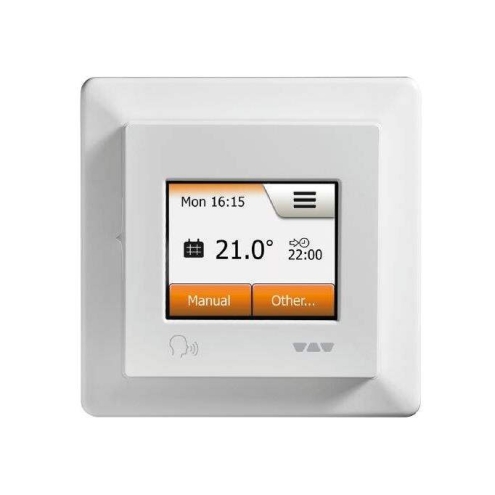
Category: Climate Control Developer: patricknitsch
This adapter connects Schlüter/OJ Microline OWD5 thermostats to ioBroker via the official cloud API. The OWD5 thermostats are frequently used for underfloor heating systems and are known under the brand name Schlüter DITRA-HEAT.
Supported functions:
- Modes: Schedule, Comfort, Manual, Boost, Eco, Frost Protection and Holiday
- Energy consumption data (kWh) per day
- Automatic token update in case of API errors
- Intelligent polling with backoff strategy (up to 1 hour for offline devices)
- Multiple thermostats in one instance
- Encrypted storage of access data
IoBroker.open-meteo-weather
Category: Weather Developer: H5N1v2
This adapter provides comprehensive weather, air quality, and pollen data via the free service Open-Meteo.com. No API key required.
Data points recorded:
- Temperature, humidity, air pressure, wind and gusts
- Forecasts up to 16 days with hourly resolution
- Air quality: PM2.5, PM10, ozone – as daily peak values with readable categories
- Pollen count data (optionally activatable)
- Moon phase icons and dynamic day/night weather icons
Special features:
- No API key required
- Supports multiple locations simultaneously
- Automatic cleanup when settings are changed
- Diverse icons for vis, iQontrol, Jarvis, etc.
- Configurable update interval (default: 30 min.)
IoBroker.aurora-nowcast

Category: Weather / Space Weather Developer: chrmenne
An adapter for all aurora enthusiasts! It provides real-time data on aurora visibility based on the NOAA OVATION model. For the Northern and Southern Hemispheres.
Data points recorded:
probability– Visibility probability at the configured location (%)observation_time– Timestamp of the solar wind measurement (UTC)forecast_time– Timestamp of the calculated geomagnetic response (UTC)
Special features:
- Data from the NOAA Space Weather Prediction Center
- No API key required
- Ideal for automation: e.g., activating the camera or sending a notification when there is a high probability of seeing the Northern Lights.
- Location via ioBroker system settings or manual coordinates
IoBroker.nextcloud monitoring
Category: Network / Monitoring Developer: H5N1v2
Anyone running a Nextcloud instance can now monitor it directly in ioBroker.
The adapter uses the official OCS API and provides comprehensive system and usage data.
Monitored data:
- CPU load, RAM usage, storage space
- Active users (5 min / 1 hr / 24 hr), files and storage statistics
- Sharing metrics: links, talk rooms, federated shares
- PHP version, OPcache efficiency, FPM process details
- Optional app list filtering
Special features:
- Supports multiple Nextcloud instances simultaneously
- Configurable update interval (default: 10 min.)
- Separate VIS2 widget available
- Token-based authentication via OCS API
IoBroker.mcdu
Category: Hardware Developer: Flixhummel
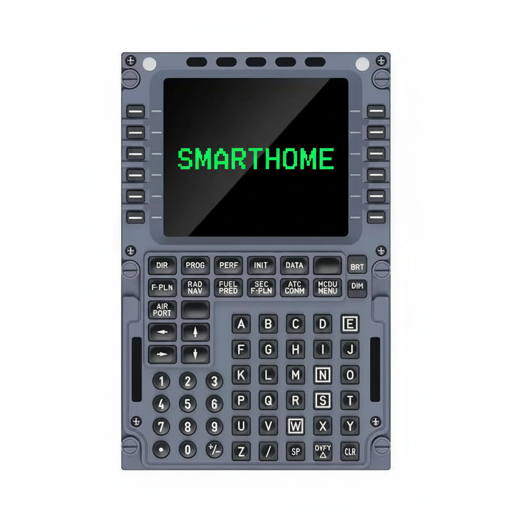
An extraordinary adapter: It transforms the WINWING MCDU-32-CAPTAIN – a cockpit display from the flight simulator sector – into a smart home control panel! Connection is via MQTT.
Features:
- 14×24 character display with 8 colors
- 73 keys including 12 line select keys and numeric keypad
- 11 controllable LEDs
- Aviation-style scratchpad input
- Configurable page system with automatic pagination
- Multi-stage input validation and confirmation dialogs
Special features:
- Ideal for users looking for a physical control panel for ioBroker
- Supports Raspberry Pi 3B+, 4, 5 and Zero 2W
- 32 automation states for LED control
- Buttons can be used as triggers in ioBroker scripts
IoBroker.pv notifications
Category: Energy / Notifications Developer: sadam6752-tech
This adapter sends Telegram notifications about the status of the PV battery and provides regular statistics on generation, consumption and feed-in.
Features:
- Notifications when the battery is full (100%), empty (0%) and intermediate levels (20%, 40%, 60%, 80%)
- Night Mode (11 PM–6 AM): suppresses notifications except critical ones
- Quiet Mode (12:00–15:00): silent phase without notifications
- Daily, weekly and monthly summaries
- Weather forecast integration (openweathermap or daswetter)
Special features:
- Requires Telegram adapter and sourceanalytix for consumption data
- Automatic recording of charging cycles
- Configurable minimum interval between notifications
- Ideal for PV system owners who want to keep an eye on their storage capacity.
IoBroker.zwift
Category: Health / Sports Developer: Flixhummel
For all indoor cyclists: This adapter brings live training data from Zwift directly into ioBroker – for automation around training.
Data points recorded:
- Power (watts), heart rate, cadence, speed
- Distance, altitude, elevation gain, calorie consumption
- Automatic calculation of Coggan performance zones based on FTP
- Profile data: Level, experience, statistics, jerseys
Special features:
- Polling interval configurable (3–300 seconds, standard: 5 s)
- Encrypted storage of access data
- Automatic token update
- Ideal for smart home automation: adjust lighting to heart rate zones, control fan speed according to performance, notification at the end of training
IoBroker.brunner-eas3
Category: IoT Systems / Heating Developer: JR-Home
This adapter reads data from the Brunner EAS 3 combustion control system via WLAN broadcast messages. Brunner is a renowned manufacturer of tiled stoves, wood-burning stoves, and heating cassettes.
Data points recorded:
- Combustion temperature
- 7 operating states: Door open, Ignition phase, Secondary fire, Shutdown phase, Error/Timeout, Connection loss
Special features:
- Receives data via Wi-Fi broadcast – no cloud service required
- Automatic connection status detection
- Ideal for wood stove owners who want to monitor the combustion process and control automation.
IoBroker.ultrahuman
Category: Health / Wearables Developer: SmarterPapa
The adapter retrieves health data from the Ultrahuman Ring via the partner API and makes it available as ioBroker states.
Recorded health data:
- Sleep: Sleep time, efficiency, score, REM/deep/light sleep phases, cycles
- Heart Rate: Resting heart rate, night heart rate, current heart rate, trends
- HRV: Average, Sleep HRV, Min/Max, Trend Analysis
- SpO2: Oxygen saturation (average, min, max)
- Temperature: Skin temperature measurements
- Activity: Steps, active minutes, movement index, VO2max
Special features:
- Requires API access via Ultrahuman (email feedback@ultrahuman.com)
- Configurable polling interval (recommended: 30 min.)
- Ideal for health dashboards and sleep-based automations
IoBroker.vis-2-widgets-sigenergy

Category: Visualization / Widgets Developer: ssbingo
A comprehensive VIS-2 widget set for Sigenergy storage systems with 8 specialized widgets.
Widgets included:
- Energy Flow Diagram – animated SVG showing energy flow between PV, battery, grid and consumption
- Battery Status & Forecasts – SoC, SoH, charging forecasts and autonomy rate
- Real-Time Power – compact performance overview with color-coded symbols
- Energy Statistics – Daily overview with autonomy and consumption
- AC Charger Control – Control of the Sigenergy wallbox (6–32 A charging current)
- DC Charger Monitoring – Vehicle Charging Monitoring
- Inverter Management – Tabs for power, battery, grid, alarms
- SigenMicro Overview – Microinverter topology with up to 20 devices
Special features:
- Light and dark mode for all widgets
- Requires the signedness adapter
- Animated energy flow representation
IoBroker.hueemu

Category: Lighting / Integration Developer: krobipd
This adapter emulates a Philips Hue Bridge (v2) directly in ioBroker, allowing devices to be controlled via Alexa, Google Home, Logitech Harmony Hub and other Hue-compatible systems.
Supported device types:
- On/Off – Simple switching
- Dimmable – Brightness control
- Color temperature – Brightness + Warm white/Cool white
- Color Light – Full RGB with hue, saturation and XY coordinates
Special features:
- Full Hue API v1 compatibility
- Automatic detection via UPnP/SSDP Discovery
- No actual Hue Bridge required
- Ideal for making any ioBroker device accessible to Alexa/Google Home
- Configurable HTTP port (default: 8080)
IoBroker.enpal

Category: Energy / Solar Developer: inventwo
This adapter reads energy data directly from the local InfluxDB 2.x database of Enpal solar systems and provides it as individual data points.
Data points recorded:
- PV generation (watts)
- Daily energy production (Wh)
- Battery charge level (%)
- Grid consumption and feed-in (watts)
- Connection status
Special features:
- Fully local – no cloud dependency
- Automatic detection of all measurements, devices and fields
- Encrypted storage of the API token
- Configurable polling interval (default: 60 s)
- Dynamic state creation according to the pattern
enpal.0.<measurement>.<device>.<field>
New adapter in stable
IoBroker.nmea

Category: Protocols / Marine Developer: Bluefox
The nmea adapter connects the NMEA 2000 yacht bus to ioBroker and has now been updated to version stable.
This allows navigation data, environmental sensors, and autopilot systems from boats to be directly integrated into ioBroker.
Supported Hardware:
- Actisense NGT-1 and NGX1-USB (USB converter)
- Raspberry Pi with PiCAN-M CAN bus hat
- Yacht Devices YDWG-02/03 (WiFi gateway)
- Yacht Devices YDEN-02/03 (Ethernet gateway)
Supported data:
- GPS coordinates, temperature, humidity, air pressure
- Autopilot support (Raymarine)
- AIS – Automatic Ship Detection
- Data simulation for testing possible
- Bidirectional communication
Community: Share your thoughts!
Did you know that ioBroker has an active Discord server in addition to its forum? There you'll find channels organized by topic for discussions, questions, ideas, and mutual support.
Especially useful: There's a dedicated beta adapter testing and feedback section with channels for many individual adapters, where you can talk directly to the developers and test new versions.
For those who prefer to use Telegram: Some ioBroker Telegram groups are synchronized with Discord. So it doesn't matter which platform you use to write messages; they will arrive everywhere.
In addition, an online meetup takes place every first Monday of the month at 8:30 PM on Discord. Everyone is welcome to drop in, listen, or join the discussion.
A great opportunity to get to know the community personally!
Every third Wednesday of the month there is also a developer meeting.
This is primarily aimed at adapter developers, but anyone who is curious is also welcome to drop by and experience the development firsthand.
Whether you're a beginner or a pro – drop by, ask questions, share your projects and help others in the community!
Join Discord: https://discord.gg/HwUCwsH
Online meet-up (every 1st Monday of the month): https://discord.gg/yC65zjr5uq
Developer Meeting (every 3rd Wednesday of the month): https://forum.iobroker.net/category/119/entwickler-meetings
Facebook Group: https://www.facebook.com/groups/440499112958264
Forum: https://forum.iobroker.net
Thank you for your support
Spring 2026 once again showcases the impressive diversity of the ioBroker ecosystem.
From aurora monitoring and underfloor heating control to fireplace monitoring, Hue Bridge emulation, and flight simulator hardware as a smart home panel.
The community brings the most creative ideas to life as working adapters.
And there's plenty happening under the hood, too: The admin adapter is becoming increasingly user-friendly, and the js-controller now supports additional container runtimes.
A heartfelt thank you to all the developers who continue to advance ioBroker with their dedication and creativity.
Since ioBroker is a completely open-source project, we rely on your support.
If you like ioBroker and would like to support its further development, we would appreciate a donation. Every contribution goes directly towards infrastructure, development, and community work.
Our donation link: https://www.paypal.com/donate?campaign_id=MJBDJ9TGBQ7GN
Stay smart!
Your ioBroker Team