The year is drawing to a close, but the ioBroker ecosystem has been busy developing, integrating, and optimizing over the past few months.
In this monthly review, we're introducing numerous new adapters.
From BMW and Unraid to GPS-Tracking and OpenMediaVault.
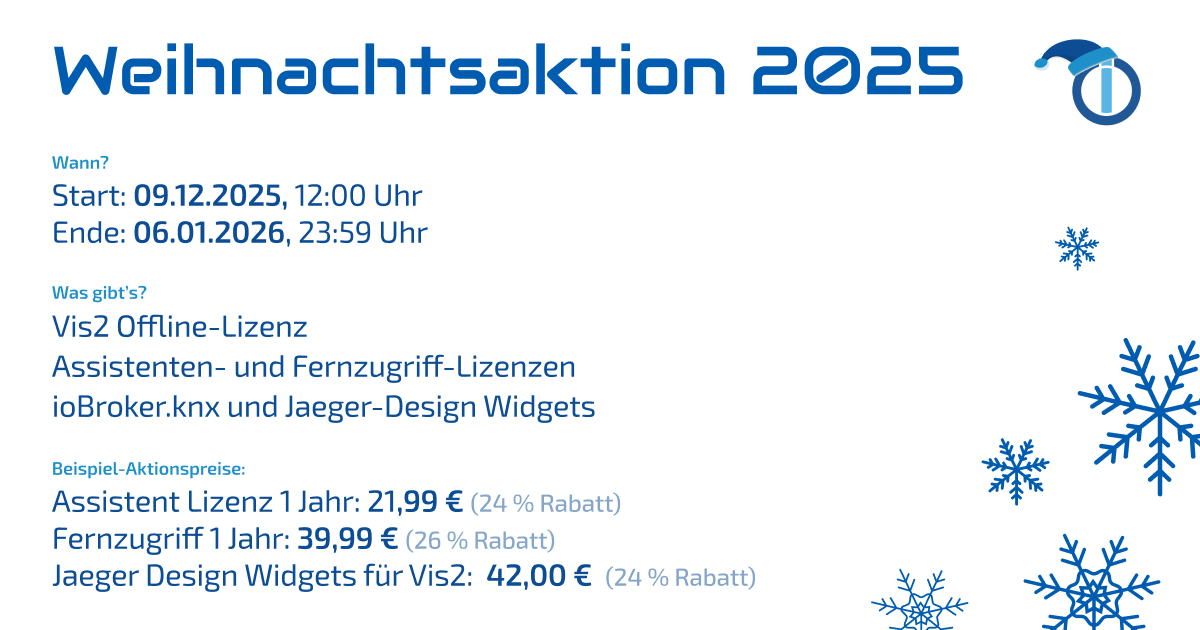
The Christmas Promotion 2025 is also currently underway.
Perfect for getting licenses at a discount.
🎁 Christmas promotion 2025 – save now!
This year, the popular Christmas promotion is back again, offering attractive discounts on selected licenses.
All details about the promotion (period, prices, products, price increase in the new year) can be found clearly in the forum:
Go to the forum post with all the information Discussion, feedback and questions about the campaign
Now is the ideal time to renew licenses or secure new ones!
New adapters in latest
IoBroker.teltonika

Category: Network Developer: Bluefox
This adapter enables the connection of Teltonika routers to ioBroker via efficient MQTT communication.
Teltonika routers are frequently used in professional and semi-professional environments, for example, for LTE/5G backups, site networking, remote maintenance, or edge IoT applications.
This adapter allows the status and telemetry data provided by the router to be seamlessly integrated into ioBroker dashboards, monitoring setups, or automations.
The adapter supports a wide variety of router models, including series such as RUT, TRB, OTD, RUTM and RUTC, and provides extensive device data as states.
Data points captured (model dependent):
- Temperature (
RUT2,RUT9,RUTX,RUT3,RUT1,TRB2,TRB5,OTD,RUTM,RUTC) - Signal strength & mobile network provider
- Network status & connection type (2G/3G/4G)
- WAN IP address
- Uptime
- Device name
- Digital inputs (
RUT9: Input 1/2) - Analog inputs (
RUT9,TRB2,TRB141) - Pin status (Pin 2, 3, 4 – model dependent)
Special features:
- MQTT-based for fast, resource-efficient communication
- Uses the dedicated port 1885 to avoid conflicts with other MQTT instances
- Easy start: Simply activate MQTT in the router and point it to the ioBroker broker.
- Tested with RUTC series devices, compatible with all devices that support MQTT
- Sentry integration for automatic error detection (from js-controller 3.0 onwards)
- Ideal for network monitoring, logging, alerts and automation scenarios
IoBroker.serial-gps

Developer: Bluefox Category: Utility
This adapter reads GPS data from a GPS mouse connected via USB or serial interface. This allows position data – for example, for vehicle, outdoor, or mobile smart home installations – to be integrated directly into ioBroker. The adapter is particularly suitable for scenarios such as geofence automation, location tracking, motion analysis, or time/location-based actions.
Typical GPS receivers that deliver standardized NMEA data sets, as output by many GPS modules, USB antennas or portable receivers, are supported.
Data recorded:
The adapter processes, among other things, the following GPS information:
- Latitude and longitude
- Speed
- Height
- Satellite information
- Course / Heading
- UTC time
- Accuracy values (model-dependent)
The data is continuously read in and is available in the object tree as clearly structured GPS states.
Special features:
- Supports USB and serial GPS receivers that provide NMEA sentences
- Works on many platforms, including Raspberry Pi and Linux-based systems
- Ideal for mobile projects or setups with location analysis
- Requires no internet connection – purely local GPS
- Provides continuous position updates, depending on the device clock speed
- Very easy to get started: Select COM port/USB port and get started immediately.
- Includes Sentry integration for error analysis (from js-controller 3.0 onwards)
IoBroker.danfoss-ally 
Category: Climate / Heating Developer: Stefan Koch
The adapter connects ioBroker to the Danfoss Ally System, a cloud-based smart heating system from Danfoss.
It consists of smart radiator thermostats, a Zigbee gateway, and an app that allows you to control temperatures, heating profiles, and energy optimizations.
The adapter makes it easy to integrate and automate these functions within ioBroker.
The adapter uses the official Danfoss Ally Cloud API and enables both reading and setting heating parameters directly from ioBroker.
Supported functions:
- Reading target and actual temperatures
- Setting the target temperature
- Retrieving the valve status
- Control of the heating mode (e.g. Normal / Eco / Off)
- Device and room status information
- Automatic synchronization with the Danfoss Ally Cloud
Special features:
- Use of the official Cloud API – no local hacks necessary
- Supports multiple devices per Danfoss account
- Very easy setup (only login details required)
- Clearly structured data points
- Configurable update intervals
- Sentry integration for error analysis (from js-controller 3.0 onwards)
IoBroker.unraid 
Category: Infrastructure Developer: ingel81
The adapter enables monitoring of an Unraid server installation directly within ioBroker.
Unraid is a flexible NAS and server operating system that is particularly popular in the home server and home lab sectors.
It combines features from NAS, Docker container management, and virtualization in an easy-to-use web interface. Typical use cases include: media servers (e.g., Plex, Jellyfin), backup servers, virtual machines, smart home hubs, or all-in-one home servers.
This adapter allows you to read key system parameters of the Unraid host and use them for monitoring, dashboards or automation.
Supported functions & data:
- CPU usage
- RAM allocation
- System uptime
- Server status
- Unraid version
- Device and system information
- Temperature specifications (model dependent)
All values are stored as structured states in ioBroker and updated automatically.
Special features:
- Easy integration for homelab and server monitoring
- Ideal for users who run containers, VMs or storage via Unraid
- Access via the Unraid API
- Low system load
- Clear state structure
- Ideal for homelab fans!
IoBroker.docker-manager

Category: Infrastructure / System Developer: Bluefox
The adapter integrates the Docker engine into ioBroker, enabling the management of containers directly via objects and states.
Instead of logging into the host via the console, Docker containers can be conveniently monitored and controlled from within ioBroker.
This adapter allows container states to be visualized and administrative tasks to be integrated into automations – for example, the automatic restart of a crashed container.
Functions:
- List of all existing containers and images
- Container control: Start, Stop, Restart, Pause
- Monitoring of container status (online/offline, uptime)
- Reading system information from the containers
- Detection of container updates (depending on configuration)
New adapters in stable
New adapters in stable
IoBroker.hydrop 
Category: Metering Developer: simatec
The adapter enables the connection of a hydrometer to ioBroker for detailed monitoring and analysis of water consumption. It reads the device's measurement data and provides it as structured states. This makes the adapter ideal for energy management, consumption analysis, or automatic notifications in case of unusually high water consumption.
The aim of the project is to provide a simple way to make water consumption data transparent and automatable in the smart home.
The specific data points available depend on the respective hydrometer implementation. The adapter automatically places all relevant measured values in the object tree.
Special features:
- Quick and easy integration of the hydrometer into ioBroker
- Ideal for monitoring, long-term analysis and automatic alerts
IoBroker.sbms

Category: Energy / Battery Management Developer: buffoletti
This adapter integrates the Electrodacus SBMS (Smart Battery Management System) into ioBroker.
An SBMS is a high-precision battery management system primarily used in DIY solar systems, lithium-ion battery storage systems, and off-grid systems. It monitors charge levels, currents, and temperatures, and protects the battery from critical conditions. The Electrodacus SBMS is particularly popular in the DIY solar community.
The adapter provides the SBMS data as ioBroker states and can read them via MQTT, the rawData HTML page, or the serial port.
This allows battery status, energy flows, or temperature values to be easily visualized and integrated into automations.
Supported data & functions:
- Cell voltages
- Total battery voltage
- Charging and discharging currents
- Temperature values (cells / environment)
- System status information
- Further data depends on the specific SBMS model
The data points are structured and placed in the object tree, and are updated regularly.
Special features:
- Three possible data sources: MQTT, HTML rawData or Serial Port
- Highly flexible and suitable for various SBMS systems
- Ideal for off-grid, solar, or DIY battery storage projects
- Provides precise values for energy monitoring and automation
- No complex configuration required: simply select and start the data source.
IoBroker.bmw

Category: Vehicle Data / Mobility Developer: TA2k
The adapter integrates BMW vehicles into ioBroker.
Communication takes place via the newer BMW CarData API, which enables a modern, secure connection via OAuth2.
In addition, the adapter uses MQTT-based streaming to retrieve vehicle data in near real-time.
The BMW CarData API is an official online interface that allows authorized applications to access vehicle information – such as location, fuel level, battery status, locking status, doors, maintenance data, and much more. This data is provided by the vehicle via the BMW Cloud.
This adapter allows vehicle information to be visualized, evaluated and integrated into automations (e.g. opening the garage door when the car arrives).
Supported data & functions:
The adapter provides numerous data points, including:
- Vehicle position
- Mileage
- Fuel level / Battery status
- Charge status and charging processes (for electric/hybrid models)
- Status of doors, windows, tailgate
- Locking status
- Maintenance and service information
- Outside temperatures
- Vehicle type, VIN and model designation
- Live events via MQTT (model & API dependent)
Special features:
- Use of the official BMW CarData API
- Modern OAuth2 authentication
- MQTT Live Streaming for real-time data
- Supports multiple vehicles in the same account
- Ideal for location automation (“geofence”), smart charging or home integration
- All data points are cleanly structured in the ioBroker object tree
Notes according to README:
- A BMW account with linked vehicles is required.
- API behavior may vary depending on the vehicle model and online package.
- The adapter regularly retrieves data and supplements it with live streams if necessary.
IoBroker.openmediavault 
Category: Infrastructure / NAS Developer: Scrounger
The adapter connects ioBroker to an OpenMediaVault system.
OpenMediaVault (OMV) is a widely used, Debian-based NAS operating system, primarily used in home and small server environments.
It offers features such as file sharing (SMB/NFS), SMART monitoring, user management, RAID, Docker via plugins, and a comprehensive web interface for system administration.
The adapter enables you to read key system information via OpenMediaVault's RPC (Remote Procedure Call) interface and display it in ioBroker.
This allows you to conveniently monitor the NAS's status, for example, for storage monitoring, temperature monitoring, or automated notifications.
Supported data & functions:
- System information of the OMV server
- Drive and file system status
- SMART information (model dependent)
- CPU, RAM and general system data
- Status of services (depending on OMV configuration)
- Automatic structural mapping of data points in the object tree
Special features:
- Connection via the native RPC API of OpenMediaVault
- No additional software or plugins are required on OMV
- Ideal for centrally monitoring a NAS or homelab server
- Supports OMV 5/6 (depending on API compatibility)
- Clear data structure for dashboards & analyses
IoBroker.weatherflow-tempest-api

Category: Weather / Sensors Developer: Scrounger
The adapter integrates data from the WeatherFlow Tempest Weather Station via the official WeatherFlow Tempest API.
The Tempest Weather Station is a state-of-the-art, completely wireless measurement system that provides real-time weather data such as wind, rain, temperature, lightning, UV radiation, and much more.
It is considered one of the most accurate consumer weather systems and is frequently used for smart home integrations, weather automation, and microclimate analysis.
The adapter retrieves sensor values and system data via the cloud API and makes them available in a structured manner in the ioBroker object tree.
Supported data & functions:
The adapter provides, among other things, the following information:
- Temperature
- Humidity
- Air pressure
- Wind speed and direction
- Rainfall amount / rainfall rate
- UV index
- Brightness & solar radiation
- Lightning detection (distance & number)
- Battery status of the station
- System and device data
The data sets are based on the WeatherFlow interfaces and are updated automatically.
Special features:
- Use of the official WeatherFlow Tempest Cloud API
- Detailed, high-frequency weather data ideal for automation
- Easy setup: only an API key is required.
- Supports multiple Tempest devices (if present in the account)
- Clear structure of the data points
- Provides both live values and aggregated measurement data
IoBroker.unifi-network 
Category: Network Developer: Scrounger
The adapter integrates Ubiquiti's UniFi Network System into ioBroker.
UniFi Network is a professional networking platform for access points, switches, routers (USG/UDM), WLAN management, statistics, and network monitoring.
It is used in both home and business environments and offers centralized management of all network devices via its controller software.
The adapter connects via the UniFi Network Controller's WebSocket interface and thus receives real-time data about network events, clients, connections, and devices.
This makes it ideal for monitoring, automation, and status displays in smart homes.
Supported data & functions:
The adapter provides, among other things, the following information:
- Connected clients (name, MAC, IP, status, transmission rate, signal)
- Access Points & Router Status
- Live events from the Network Controller
- WLAN information (SSID, frequency band, signal strength)
- Statistics on uplink/downlink and connection quality
- Controller system information
The data is continuously updated and clearly presented as states in the object tree.
Special features:
- Real-time transmission via WebSocket
- No polling delays – changes are visible immediately
- Ideal for network monitoring, presence detection or automation
- Works with UniFi Network from version unifi-os onwards
- Supports multiple devices and clients simultaneously
- Very low load and high data quality
IoBroker.srm

Category: Network / Router Developer: iobroker-community-adapters
The adapter integrates Synology routers into ioBroker via the official SRM API (Synology Router Manager).
SRM is the operating system of Synology routers such as the RT6600ax, RT2600ac, and MR2200ac. It offers professional networking features like VLANs, parental controls, traffic analyzer, VPN server, Wi-Fi mesh, and much more – all managed through a modern web interface, similar to Synology's DSM NAS operating system.
The adapter enables the retrieval of key system data from a Synology router and presents it in a structured manner within the ioBroker object tree. This makes it ideal for monitoring home networks or for automations that react to network status or client activity.
Supported data & functions:
According to the README, the following information is provided, among other things:
- Router model & firmware version
- System information (CPU load, RAM usage)
- Network status
- WAN/LAN information
- Connected clients
- Wi-Fi status
- Additional API-based system data depending on the router model
The adapter was explicitly tested with SRM version 1.3.1 and the RT6600ax, but is compatible with other SRM devices as long as their API provides the same functions.
Special features:
- Use of the official Synology SRM API for reliable data
- No unofficial hacks or HTML scraping
- Ideal for network monitoring, presence detection and automation
- Clear structuring of all states
- Supports various Synology router models
- Sentry integration for error analysis (from js-controller 3.0 onwards)
- Very simple setup: IP address, login details, done.
IoBroker.refoss
Category: Smart Home / Devices Developer: Refoss
The ioBroker.refoss adapter integrates smart devices from the Refoss brand into ioBroker.
Refoss is a manufacturer of smart home products such as Wi-Fi sockets, switches, sensors, and lights, which mostly operate via Wi-Fi and are often used as cost-effective alternatives to well-known brands. Many devices use cloud functions or local interfaces, which can be integrated via this adapter.
The adapter allows compatible Refoss devices to be controlled directly from within ioBroker, their states to be read, and their integration into automations. This makes it possible, for example, to switch power outlets, monitor energy consumption, or query sensor data.
Supported functions:
- Control of Refoss devices (e.g., on/off)
- Reading out states such as switching status and energy consumption (model dependent)
- Automatic device detection according to README
- Structured data points for easy integration into automations
The scope of available data points depends on the specific device type, as Refoss offers different product lines.
Special features:
- Supports various Refoss WiFi devices
- Easy setup without complex configuration
- Ideal for beginners and cost-effective smart home expansions
- Can be used as an alternative to Tuya/Meross-based products
IoBroker.freeair 
Category: Hardware / Ventilation Developer: Scrounger
The adapter enables the local integration of a BluMartin FreeAir 100 ventilation system into ioBroker.
The FreeAir 100 is a decentralized residential ventilation unit with heat recovery, commonly used in energy-efficient houses and apartments.
It measures air quality, humidity, and temperature and can automatically control the ventilation level to ensure an optimal indoor climate.
This adapter allows the FreeAir system to be controlled directly via the local network, without the cloud, and its sensor and status values can be used for automation or climate control.
Supported data & functions:
The adapter provides various data from the FreeAir device, including:
- Temperature values
- Humidity
- CO₂ values (model-dependent)
- Ventilation levels
- Device status
- Filter status
- Other sensor values depend on the device and its firmware
The adapter retrieves the data locally and stores all available values in a structured manner in the object tree.
Special features:
- Local connection – no cloud access required
- Direct control options for ventilation levels (model dependent)
- Ideal for improving indoor climate or for automation based on air quality
- Works exclusively with the BluMartin FreeAir 100 (according to the README)
- Easy setup: The device's IP address is sufficient.
Adapter Updates and Features
IoBroker.ping – new feature: TCP port check

The popular ioBroker.ping adapter has been enhanced and can now check TCP ports in addition to classic ICMP pings.
This allows you to determine not only whether a device is reachable, but also whether a specific service is running on the target system – for example, a web server, an MQTT broker, or an SSH service.
What is the benefit of TCP port checking?
With this new feature, the adapter can now:
- Check if a specific port is open or closed
- To determine whether a service is available or out of service
- Make network-dependent automations more reliable
- Provides more precise status updates than a classic ping
Example: A host responds to ping, but port 1883 (MQTT) is closed → indication of a service problem.
Typical use cases:
- Check if the ioBroker port of a remote system is reachable
- Monitoring of web servers (port 80/443)
- Monitoring of SSH (Port 22)
- Availability checks for databases, gateways, smart home devices
- Triggering actions when services fail
Special features:
- Works in addition to the normal ping – both can be used simultaneously.
- Very low system load
- Simple configuration: Enter IP/hostname + port
- Ideal for home networks, servers, NAS and smart home infrastructures
🔗 GitHub
Update: js-controller 7.1 in the beta repository
A new update for js-controller is available in the beta repository: version 7.1.
While the changes are relatively minor, as always with beta versions, we welcome your feedback.
The developers don't anticipate any major issues, as this release focuses primarily on optimizations, bug fixes, and improvements for developers.
Important changes and improvements:
- Correction of adminUI, adminTab and adminColumns configurations when uploading adapters (copilot)
- Added object warning limit per instance (foxriver76)
- setState validation tightened:
tsandlcnow only accept numeric values (Apollon77) - The adapter's stopTimeout is now correctly taken into account in all cases, instead of a fixed fallback (Apollon77)
- Update of the adapter-core override library to version 3.3.2 (Apollon77)
- JavaScript password generation integrated for encrypting vendor scripts (GermanBluefox)
- Updates to the plugin and Sentry components (Apollon77)
Improvements for developers:
In the background, there were numerous typing optimizations that are particularly interesting for adapter developers:
- New typings for visIconSets, smartName, supportsLoadingMessage, docker-api, findForeignObject,
- Extended typing for vis/vis-2 widgets
- Additional typing for json in
adminUI.tab - Typings for UserCommon regarding external authentication
Installation:
If you have any questions or problems, the developers are available as always in forum.
Thank you for your support
As we draw to a close in 2025, we look back on a very active and successful period in the ioBroker community. Many new adapters, helpful extensions, and continuous improvements demonstrate the vibrancy and dedication of the entire project. A huge thank you goes to all the developers, testers, and users who continually drive ioBroker forward with their commitment.
Since ioBroker is a completely open-source project, we rely on your support.
If you like ioBroker and would like to support its further development, we would be delighted to receive a donation – every contribution goes directly towards infrastructure, development, and community work.
Our donation link: https://www.paypal.com/donate?campaign_id=MJBDJ9TGBQ7GN
Thank you so much for your support and loyalty to ioBroker.
We wish you a wonderful and relaxing Christmas season and hope you can enjoy the holidays with your loved ones.
Stay smart!
Your ioBroker Team