Summer is coming to an end, and there's been a lot going on in the ioBroker world over the past few months.
Numerous new adapters have been released; some have already made it into the stable repository, and others are available in the latest repository, waiting for you to test them.
Let's take a detailed look at the highlights in September 2025.
New adapters in stable
ioBroker.vis-2-widgets-icontwo

Category: Visualization / Icons
Developer: skvarel
This package adds an icon set from inventwo to VIS 2.
The icons are specifically optimized for smart home scenarios and offer a quick way to visually enhance visualizations.
What's new is that these icons are now directly available in the VIS-2 icon selector, making them particularly easy to insert into dashboards. Only VIS-2 versions 2.13.x and later are supported.
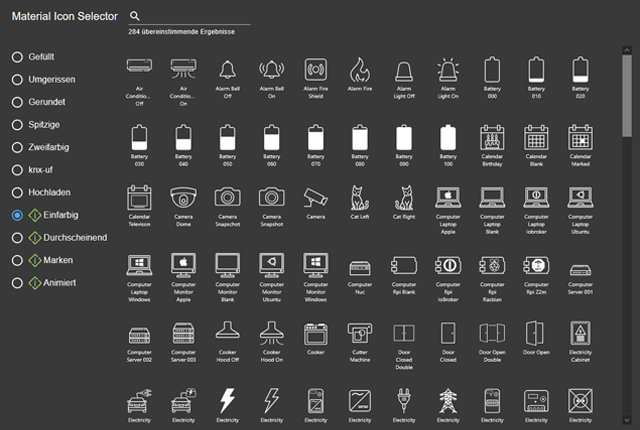
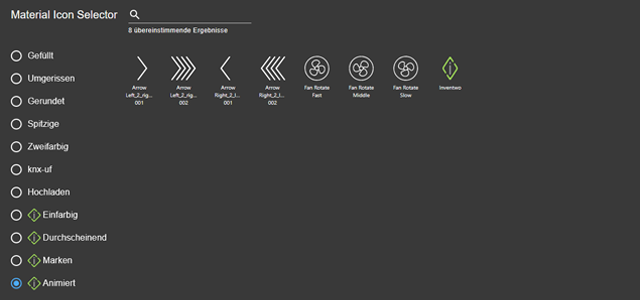
Recent versions have added many new symbols, including those for water (sprinkler, waterfall), doors and windows, battery storage, weather directions, maps and people.
Tip: After installation, you should restart your computer and clear your browser cache so that all icons are displayed correctly.
Link to GitHub page of the adapter
ioBroker.brightsky

Category: Weather
Developer: ticaki
The Brightsky adapter integrates the Bright Sky weather service into ioBroker.
The API provides weather data from the German Meteorological Service (DWD), prepared in an easy-to-use JSON format.
Special features:
- The data is updated every 30 minutes and always comes from the nearest DWD weather station.
- If a station does not provide any values, the adapter automatically falls back to the next nearest station or further stations (fallback system).
- In addition to classic weather data such as temperature, precipitation, humidity and wind, the API also offers radiation values (solar), which are particularly interesting for PV operators.
- The API is freely accessible, requires no API key, and is entirely based on open source.
Link to GitHub page of the adapter
ioBroker.pirate-weather

Category: Weather
Developer: ticaki
Pirate Weather is an open-source weather API developed as a replacement for the discontinued Dark Sky and is based on NOAA data.
The adapter brings the data directly into ioBroker. Perfect for users who want to feed their automations with reliable weather information.
Details from GitHub:
- An API token is required for use, which can be obtained via
docs.pirateweather.net. - The adapter supports the Pirate-Weather API v2 and provides data on temperature, humidity, precipitation, wind and moon phases.
Values such as
humidity,cloudCover,precipProbabilityandmoonPhaseare directly output as percentage values. - Texts such as wind directions or summaries automatically adapt to the system language of ioBroker.
- The polling interval is configurable in minutes. Errors are caught, and the adapter then restarts according to a fixed schedule, without causing continuous loops in the log.
Link to GitHub page of the adapter
ioBroker.pi-hole2

Category: Network
Developer: weweitman
The adapter enables the integration of a Pi-hole installation (version 6 and later) into ioBroker.
This allows you to monitor ad blocker statistics, requests, and blocking rates, and use them for automation.
Special features:
- Support specifically for Pi-hole v6 (for older versions, continue to use the ioBroker.pi-hole adapter).
- Domains can be directly blocked or unblocked via ioBroker, including automatic reactivation after a defined time.
- Detailed information on statistics and versions is stored as data points and can be optionally enabled/disabled.
- The query intervals are freely configurable – from 1 second to 24 hours.
- Commands can be sent directly to Pi-hole via the sendTo() function.
This means the adapter is suitable not only for monitoring, but also for actively controlling Pi-hole via automations.
Link to GitHub page of the adapter
ioBroker.energy-tracker
Category: Energy Management
Developer: Energy Tracker
This adapter allows meter readings to be automatically transmitted to the Energy Tracker platform.
This significantly simplifies the documentation of energy consumption or feed-in.
Details from GitHub:
- To use this service, an Energy Tracker account and the creation of a Personal Access Token are required.
- Any ioBroker state can be defined as a source (e.g., electricity, gas or water meters).
- The values are transferred to the respective device IDs via the platform's public REST API. Values can optionally be rounded before being sent.
- The adapter operates in schedule mode: a schedule must be configured in ioBroker to specify when data should be transferred. Without a schedule, no values will be sent.
- The token is stored encrypted, communication is one-way – only values are transmitted to the platform, no data is read back.
Link to GitHub page of the adapter
ioBroker.onlycat

Category: IoT Systems / Smart Home
Developer: Sickboy78
This adapter is specifically designed for OnlyCat® cat flaps with prey detection. It allows you to control and analyze the flap directly in ioBroker – including the exciting feature of seeing if your cat has just brought home any "gifts." 🐱
Details from GitHub:
- The adapter transmits events from the cat flap: entries and exits as well as prey detection.
- A device token from the OnlyCat app is stored in the settings.
- Transit policies can be set (controlling when cats are allowed in or out).
- The adapter also provides information on connectivity and firmware version.
- From version 0.2.0 onwards, pet names are taken from the RFID profiles.
- Requires Node.js 20 or newer.
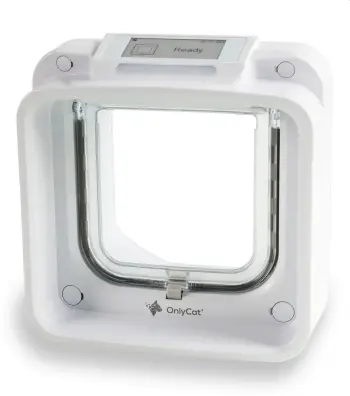
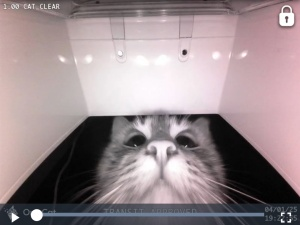
This adapter offers direct integration of OnlyCat into ioBroker, making the cat flap an integral part of smart automations.
Link to GitHub page of the adapter
New adapters in latest
These adapters are still in the testing phase. They can already be tried out. Feedback from the community, such as tests, reported issues, or suggestions for improvement, contributes significantly to increasing their quality and stability.
ioBroker.smartloadmanager
Category: Logic / Energy Management
Developer: quorle
The adapter is used for the dynamic control of loads based on PV surplus. The aim is to consume excess energy locally and to avoid or completely prevent feeding it into the public grid.
Details from GitHub:
- Supports both devices that can be switched on/off and those that can be controlled by a percentage (e.g., heat pumps, chargers). Battery storage systems can also be integrated.
- Control is based on the current feed-in value; this allows consumers to be automatically switched on as soon as sufficient PV power is available. Flexible timeouts and schedules ensure that devices are not constantly switched on and off.
- In the current versions (0.0.7), bugs in the timeout functions have been fixed and the configuration has been improved.
Link to GitHub page of the adapter
ioBroker.vis-jsontemplate

Category: Visualization / Widgets
Developer: weweitman
This adapter allows you to display JSON data and other content in VIS or VIS 2. It provides a flexible template system that allows you to freely combine HTML, CSS, and JavaScript.
Details from GitHub:
- Originally, the widget was part of rssfeed (vis1) and
vis-2-widgets-ovarious– now it is available as a standalone adapter. - The JSON Template Widget allows any JSON objects to be visualized in freely designed layouts.
- Async calls with await are also supported, enabling complex data queries.
- There is no separate configuration dialog – adjustments are made exclusively via the templates.
- After updates or installations, you may need to run
iobroker upload jsontemplateso that new widgets become visible in the VIS editor.
This makes the adapter suitable for users who want to create highly customized visualizations based on external data or complex JSON structures.
Link to GitHub page of the adapter
ioBroker.sofarcloud

Category: Energy Management / Photovoltaics
Developer: Itspicer / Daniel Luginbühl
The adapter reads data from the SofarCloud server and integrates it into ioBroker. SofarCloud is SofarSolar's official online platform, allowing owners of Sofar inverters to monitor their PV systems. This adapter now makes this data accessible in smart home applications.
Details from GitHub:
- Registration with email and password from the SofarCloud app is required.
- The data points include, among other things, power, energy yields and status values of the inverters.
- Optionally, the data can also be forwarded to other systems via MQTT.
- Received values can also be saved as a JSON file (sofar_realtime.json).
- Security: Passwords are stored encrypted; after 3 failed logins, the adapter stops automatically.
- Newer versions improve login handling, error handling and data quality (e.g. normalized values, more precise roles & types).
- This makes
sofarclouda practical link between Sofar Cloud accounts and the smart home.
Link to GitHub page of the adapter
ioBroker.p2pool

Category: Other / Cryptocurrencies
Developer: oelison / Christian Oelschlegel
This adapter allows you to integrate Monero mining data from P2Pool into ioBroker.
P2Pool is a decentralized mining pool that operates without a central operator and is organized directly among the participants.
Details from GitHub:
- You simply register your public Monero mining address.
- The adapter then retrieves the mining results from the P2Pool website and makes them available as data points in ioBroker. Typical values include hashrate, shares, or mining yields.
- The current version 1.1.0 contains revisions to the process and the Readme.
This allows mining setups to be directly monitored and integrated into automations – e.g. to log mining yields or to optimize energy use.
Link to GitHub page of the adapter
ioBroker.nextcloudtalk

Category: Messaging
Developer: Rello
The adapter integrates Nextcloud Talk into ioBroker. This allows messages to be sent directly from scripts or automations to Talk rooms. A privacy-friendly alternative to commercial messengers.
A Talk Room is a chat or conference room within Nextcloud Talk where messages and conversations take place.
Details from GitHub:
- Configuration via the server URL, a username and an app token from Nextcloud.
- Messages are sent to a configured talk room (roomID).
- To send, simply set the state text in the adapter – the content will then be automatically posted as a message.
- Communication takes place via the official Nextcloud Talk API (/ocs/v2.php/apps/spreed/api/v1/chat/{token}).
This allows system messages, alarms, or status information to be conveniently distributed via Nextcloud.
Link to GitHub page of the adapter
ioBroker.xsense

Category: IoT Systems / Security
Developer: arteck
The adapter integrates X-Sense devices (including smoke, CO, heat, and water detectors, as well as hygrometers) into ioBroker. Communication takes place via the X-Sense cloud; an X-Sense Bridge SBS50 and an X-Sense account are required.
Good to know:
- Note on usage: Frequent polling (default 5 min) actively wakes the devices and can shorten battery life; the adapter is not intended as an alarm system, primarily for status/battery monitoring.
- Login limit: The app and third-party software cannot be logged in simultaneously. A second account is recommended, to which devices from the main account are shared; these login credentials are entered into the adapter.
- Python required: The adapter uses a Python environment (automatically under Linux/Docker, install Python under Windows and specify the path if necessary). Troubleshooting information is documented in the README.
- Convenience: "forceRefresh" button for manual updates; various fixes/improvements in the releases (e.g., roles, time state).
Link to GitHub page of the adapter
ioBroker.weathersense

Category: Weather / Measurement Systems
Developer: Ltspicer / Daniel Luginbühl
The adapter reads data from the WeatherSense Cloud, which is used by various WiFi weather stations (e.g., models from Ideoon/Pearl). This allows measurement data to be directly integrated into ioBroker.
Details:
- Log in using the email address and password of your WeatherSense account.
- All measured values (temperature, humidity, air pressure, rain, wind, etc.) are stored in a central data point.
- The data can optionally also be forwarded to other systems via MQTT. Newer versions (3.0.x) include protected password storage, improved data types and sorting, and additional sensor values (e.g., hPa).
This makes the adapter well suited for integrating inexpensive WiFi weather stations directly into the smart home.
Link to GitHub page of the adapter
ioBroker.hoymiles-ms

Category: Hardware / Photovoltaics
Developer: mcm1957
The adapter integrates Hoymiles Micro Storage systems – currently the MS-A2 model – into ioBroker. These compact devices combine a microinverter with integrated battery storage and are specifically designed for balcony power plants and small PV systems. This allows excess energy to be stored and used later in the household, instead of being fed directly into the grid.
Details from GitHub:
- The adapter works as an MQTT server (client mode is planned, but not yet implemented).
- Configuration via network address and port, which are set for the local MQTT service.
- Uses Sentry for automatic error detection (from js-controller 3.0 onwards). Documentation and setup instructions are available in German and English.
This allows owners of Hoymiles MS-A2 systems to integrate their storage solutions directly into the smart home – e.g., for monitoring status and charging/discharging processes.
Link to GitHub page of the adapter
ioBroker.n8n

Category: Logic / Workflows
Developer: bluefox
The adapter allows n8n workflows to be edited and executed directly in ioBroker. This enables automations to be implemented far beyond classic smart home scenarios – from data processing and API integrations to complex process chains.
Details from GitHub:
Workflows can be edited and started in the ioBroker admin.
- Supports, among other things, file operations (read/write), device access, and log output.
- Latest version (0.3.0): configurable ports and HTTPS settings.
- Previous updates: File selector for trigger/read/write, linking of instances to n8n, extended device descriptions.
This adapter offers plenty of scope to develop your own automation ideas and seamlessly connect ioBroker with external services and processes.
Link to GitHub page of the adapter
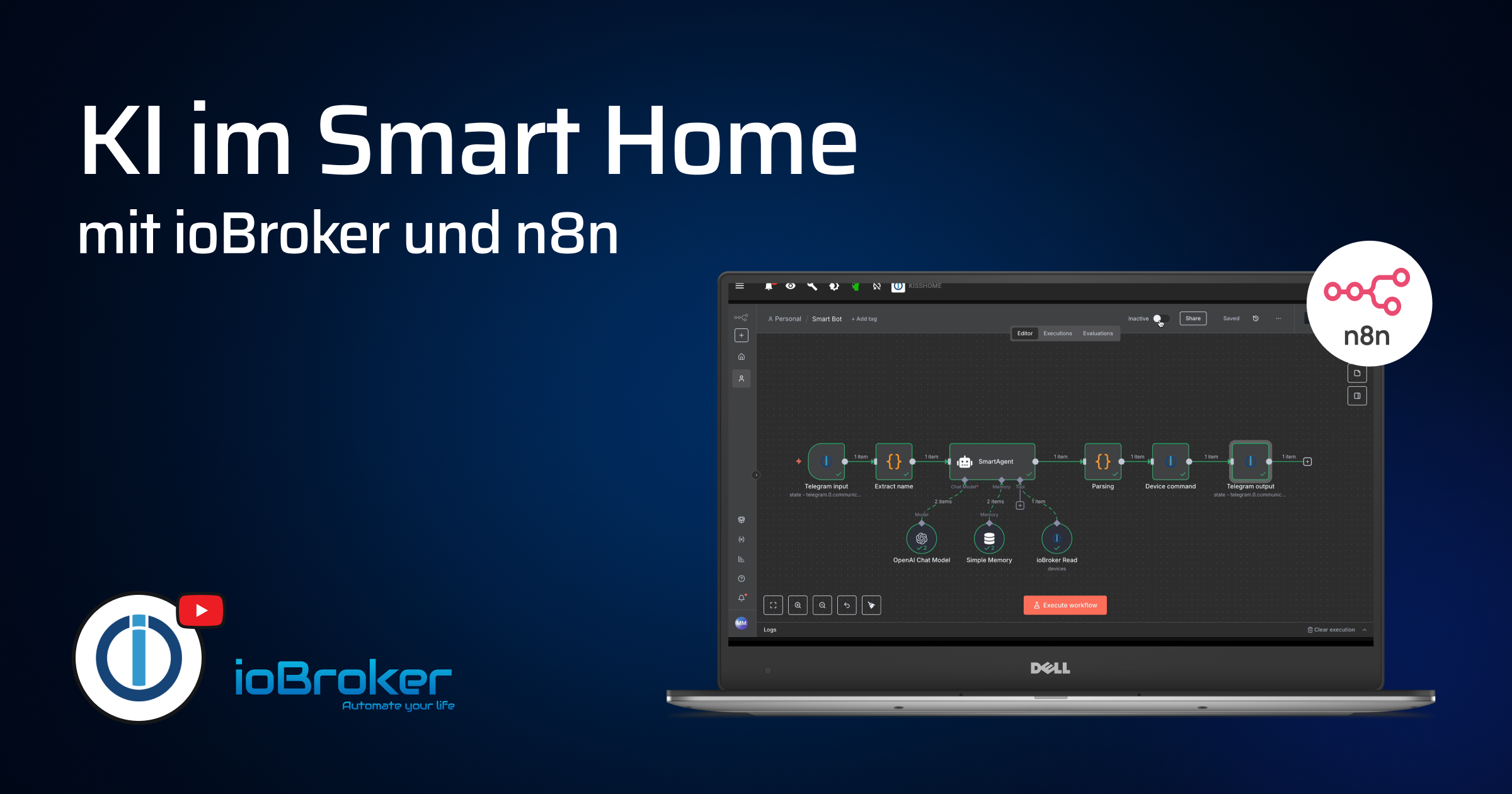
🎥 We've also made a video about this adapter. In it, we build a workflow where you can send free-form commands to your smart home via Telegram. An AI agent understands this free text, converts it into concrete control commands for ioBroker, and you receive feedback directly via Telegram.
Link to the video: https://youtu.be/FSDocYOAkSM
ioBroker.steam

Category: Multimedia / Gaming
Developer: bloop16 / Martin Rauscher
The adapter integrates information from the Steam API into ioBroker.
This allows you to monitor profiles and games and use them for automation.
Features:
- Profile information: Player name, avatar, status (online, ingame, away), SteamID64.
- Game monitoring:
- List of games definable, including app ID.
- Automatic detection of played titles.
- Import all your own Steam games with one click.
- Display of game icons, logos, community links, and game time statistics.
- News about games is updated every 6 hours.
- Tip function: in case of typos, the adapter suggests up to 5 similar games from the Steam database.
- API management:
- Interval for player queries freely adjustable (min. 15s, standard 60s).
- A limit of max. 10,000 API requests per day is automatically monitored. Queries are optimized to avoid duplicate requests.
This allows gamers to view their Steam activity or game statistics directly in their smart home. For example, to set up "online now" notifications or to log gaming time.
Link to GitHub page of the adapter
New video on YouTube

In this video, we'll show you how to build a sustainable and low-maintenance ioBroker system using aliases, categories, and virtual devices.
The goal: a stable structure that works regardless of the hardware used. This saves you a lot of time and effort if you need to replace a device, as scripts and visualizations don't need to be adjusted.
Link to the video: https://youtu.be/0Aecm5YAk7M
Conclusion
With the end of summer, ioBroker has gained a whole range of new adapters: from energy and weather services to communication, cat flaps and gaming.
A heartfelt thank you to all the developers who are driving these projects forward! If you're already testing the new adapters: please share your feedback in the forum or on GitHub so we can work together to further improve the quality.
Until next month's review. Stay smart and curious!