webui for ioBroker
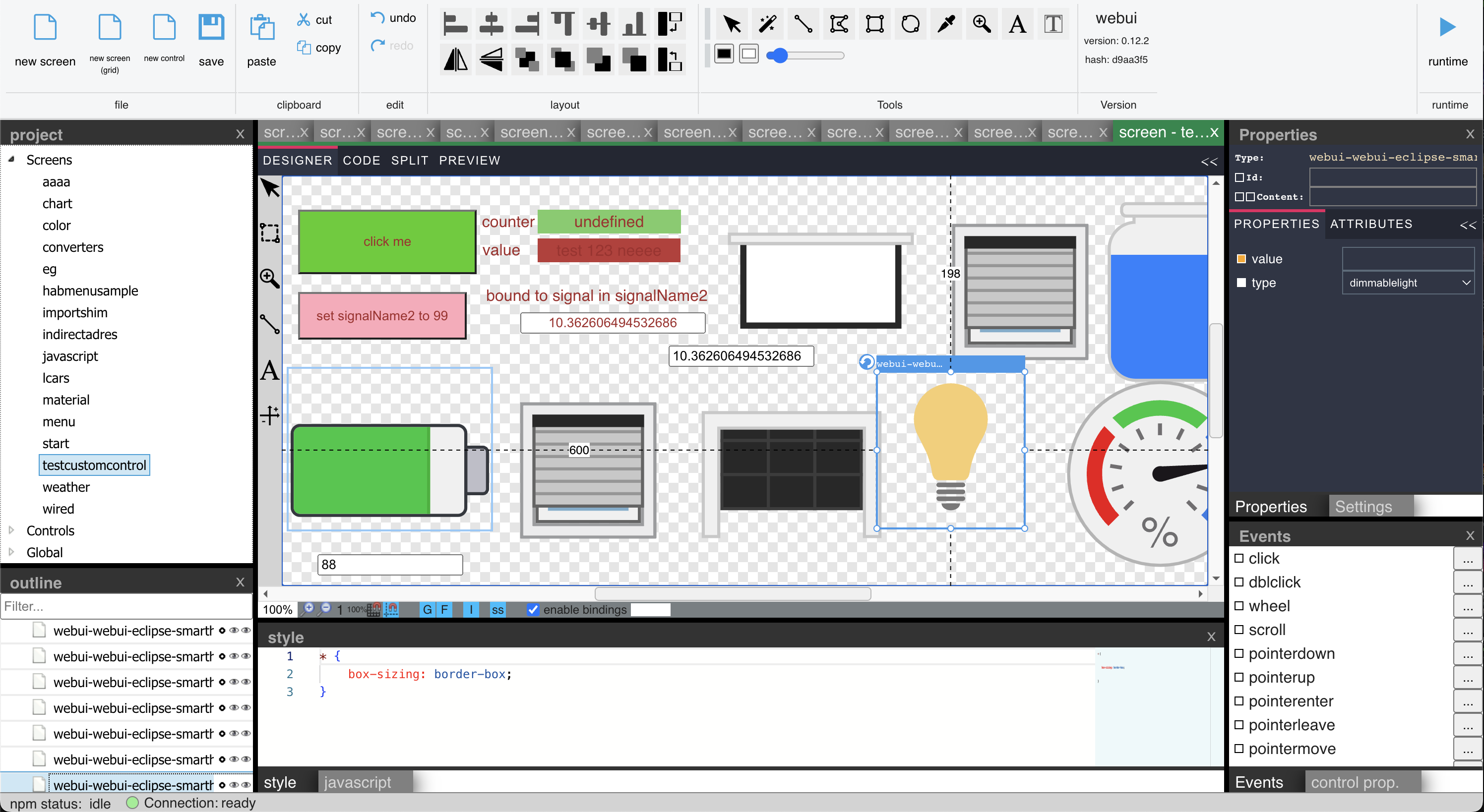
Tutorial Videos (atm. in german only)
https://www.youtube.com/@jogibear9988
Description
This is a complete visualization system for ioBroker.
It includes features like:
- simple scripting language
- binding to ioBroker objects including converters & javascript expressions
- pasting of images from clipboard
- drag&drop of external images
- drag&drop of ioBroker objects to automaticy create bindings
- drag&drop of ioBroker objects to Properties to create Bindings to them
- relative signal paths to ioBroker objects in screens (the full path can be handed over from outside into the screen)
- split view editing of layout and html code
- global stylesheet support
- usage of npm packages containing webcomponents
- screens inside of screens
- use all icon packages from ioBroker
- use charts from ioBroker
- use combined signals object id's e.g. "webui.0.test3.{webui.0.test3.select}" -> this will use the value from webui.0.test3.select for the signal name
There is more information about specific topics in the wiki (the German section has a few more articles than the English one).
Installation
Dependecies
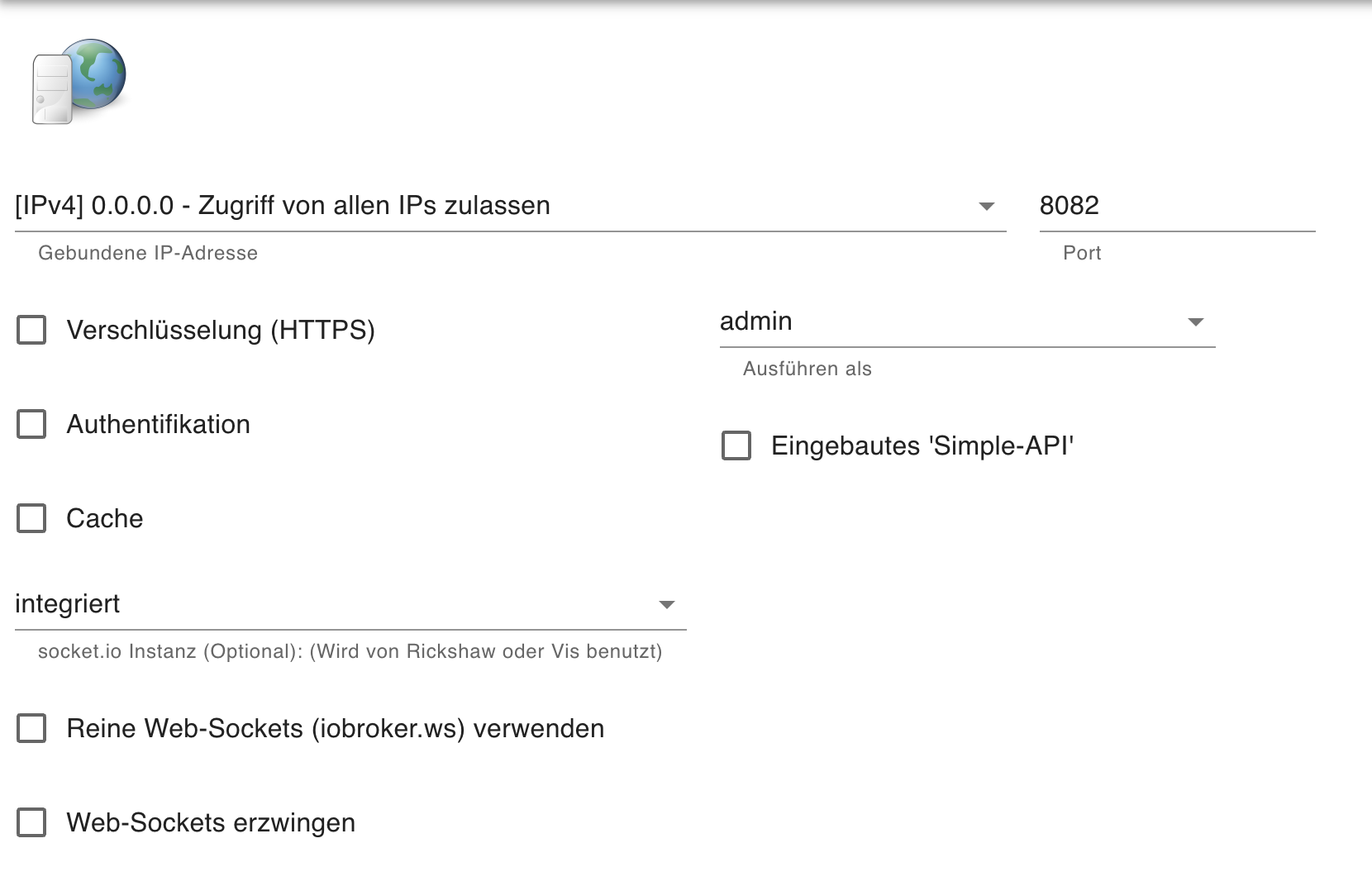
- You need the Web Adapter installed. It works with the following settings:
Concepts
Description
The Designer uses Web Components, so the HTML you design is inside of a Shadowroot of a Webcomponent. This means, you cannot style or inside of the Stylesheet. To style the outer Layout, use the ":host" selector. This also means, you cannot use "on..." eventhandlers. Use the "@..." event assignment.
Custom Controls in WebUI
You can create your own reusable CustomControls in WebUI, each of which can have its own Javascript, Properties and a template.
You can use Double-Bracket Syntax and Double-Curly-Bracket Syntax of the "BaseCustomWebcomponent" to create bindings from the Template to the properties defined in the Designer. Curylbrackets create two way Bindings. If you use the Bindings Dialog, you can Bind to a Property with ??Propertyname and to IoBroker Object in the Property via ?Propertyname. In Scripts you can also write to Signals defined in Custom Properties.
You can include Javascript in your CustomControl or Screen.
In addition, you can export a function init(instance) wich will be called when your CustomControl will be instantiated.
Finally, connected() and disconnected() functions can be defined to be called when ...
Sponsoring
If you want to help the development, sponsor this project at https://github.com/sponsors/jogibear9988
Developing
-
Install Repository as Adapter in IOBroker
-
Download the Repository to an extra "dev" directory, do not develop inside the ioBroker Node_modules directory.
-
Do the following steps inside of the "dev" dirctory.
-
Install dependencies
$ npm install
- Compile Typescript after doing changes (or press Ctrl + Shift + B in VsCode and select "tsc watch")
$ npm run tsc
- Adjust 'config.js' to match you ip-adress and port for your iobroker (The config.js in the repository root will be replaced with the one in '/config' when running 'npm build')
    window.iobrokerHost = '192.168.1.2';
    window.iobrokerPort = '8082';
    window.iobrokerSocketScriptUrl = 'http://' + window.iobrokerHost + ':' + window.iobrokerPort + '/lib/js/socket.io.js';
- Run the app in a local server
$ npm start
- Navigate Chrome to localhost:8000 to see the app.
More about Development
- Run
$ npm run reflection
to recreate reflection files for Scripting wich are used for the property grid
- Run
$ npm run build
to copy compiled files and node_modules to www folder so adapter is installable via github
- Run
  $ npm run release
  $ npm publish
to create correct release commit for iobroker, Be carefull this also pushes to git repo. Be sure to edit "CHANGELOG.md" before, the text in "## WORK IN PROGRESS" in README.Md will be used for version info
Info about the Adapter.
The Adapter is based on the following Designer component: https://github.com/node-projects/web-component-designer
You need to create a screen "start", this is the first one called when you open runtime.html, but you can change this via query parameter: runtime.html?screenName=screen2
Changelog
2.0.3 (2026-08-21)
- fix help dlg pos
2.0.2 (2026-08-21)
- welcome screen array
2.0.1 (2026-08-21)
- fix node version
2.0.0 (2026-08-21)
- package updates
- code fixes
- fix of github issue
- fix monaco workers
- blockly update
1.47.0 (2026-05-20)
- package uprades
License
The MIT License (MIT)
Copyright (c) 2026 iobroker-community-adapters iobroker-community-adapters@gmx.de
Copyright (c) 2025 jogibear9988 jochen.kuehner@gmx.de
Permission is hereby granted, free of charge, to any person obtaining a copy of this software and associated documentation files (the "Software"), to deal in the Software without restriction, including without limitation the rights to use, copy, modify, merge, publish, distribute, sublicense, and/or sell copies of the Software, and to permit persons to whom the Software is furnished to do so, subject to the following conditions:
The above copyright notice and this permission notice shall be included in all copies or substantial portions of the Software.
THE SOFTWARE IS PROVIDED "AS IS", WITHOUT WARRANTY OF ANY KIND, EXPRESS OR IMPLIED, INCLUDING BUT NOT LIMITED TO THE WARRANTIES OF MERCHANTABILITY, FITNESS FOR A PARTICULAR PURPOSE AND NONINFRINGEMENT. IN NO EVENT SHALL THE AUTHORS OR COPYRIGHT HOLDERS BE LIABLE FOR ANY CLAIM, DAMAGES OR OTHER LIABILITY, WHETHER IN AN ACTION OF CONTRACT, TORT OR OTHERWISE, ARISING FROM, OUT OF OR IN CONNECTION WITH THE SOFTWARE OR THE USE OR OTHER DEALINGS IN THE SOFTWARE.