
ioBroker Teltonika
This adapter uses Sentry libraries to automatically report exceptions and code errors to the developers. For more details and for information how to disable the error reporting see Sentry-Plugin Documentation! Sentry reporting is used starting with js-controller 3.0.
This adapter reads data from Teltonika routers via MQTT and from Teltonika devices via SNMP.
Routers connect to the adapter themselves over MQTT. Devices without an MQTT publisher — the TSW managed switches, for example — are polled over SNMP instead; enter them under the SNMP tab, or let the network scan find them. A router that offers both is only ever read once, over SNMP.
Over MQTT it can read the following information:
- temperature ('RUT2', 'RUT9', 'RUTX', 'RUT3', 'RUT1', 'TRB2', 'TRB5', 'OTD', 'RUTM', 'RUTC')
- signal strength
- mobile operator
- network state
- connection type (2G/3G/4G/5G)
- wan IP address
- uptime
- name
- digital input 1 ('RUT9')
- digital input 2 ('RUT9')
- analog input ('RUT9', 'TRB2', 'TRB141')
- pin 2 status ('TRB2')
- pin 3 status ('RUT1', 'RUT2', 'RUT9', 'RUTX', 'RUT3', 'TRB1', 'TRB2', 'TRB5', 'RUTM')
- pin 4 status ('RUT1', 'RUT2', 'RUT9', 'RUTX', 'RUT3', 'TRB1', 'TRB2', 'TRB5', 'RUTM')
Usage
Steps:
- Start the instance first
- Go to your router and open MQTT settings
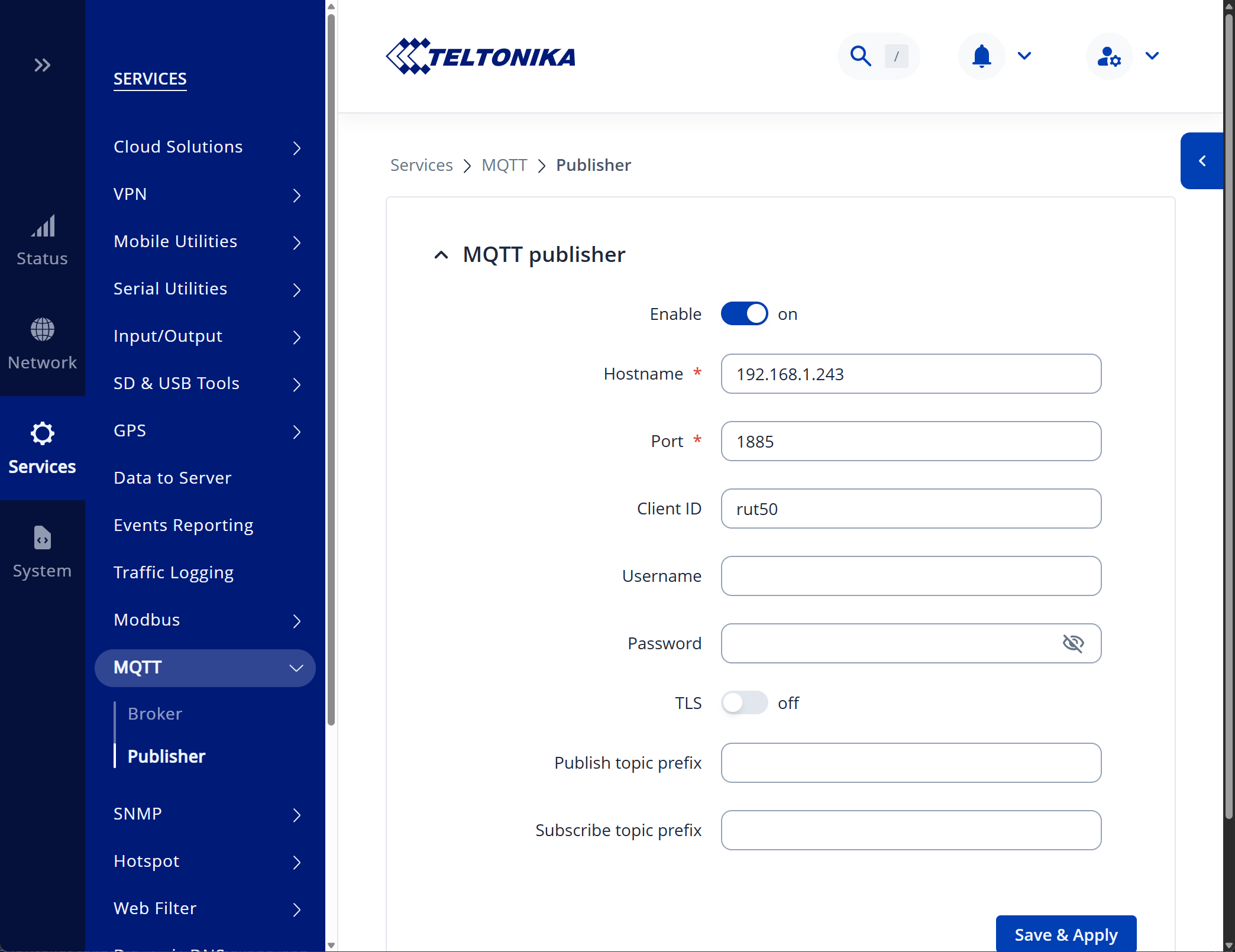
- Enable MQTT publisher
- Set the MQTT broker address to the address of your ioBroker instance
- Set the MQTT broker port. Important: the default port of this adapter is 1885 to not interfere with other MQTT adapters
- Save the settings
- Some routers need a restart to apply the settings
- After some time, the data points will be created in the adapter instance
Notice: tested is only with RUTC and TSW202 devices.
SNMP
Devices that offer no MQTT publisher are read over SNMP:
- Enable the SNMP agent on the device under Services → SNMP → SNMP Settings and set a read-only community
- In the adapter, open the SNMP tab, enter an address range and press Scan, or add the device by hand
- Supported today are the
RUTCandTSW2families. Other models fall back to the values every Teltonika device shares (serial, name, uptime, CPU); to read them fully, download the MIB from the device under SNMP System Summary, drop it intoMIBs/and runnpm run generate-oids
Beside the values listed above, SNMP also provides per-port statistics on switches (link, speed, duplex, transferred bytes and rates) and the named digital inputs and outputs of a router.
Three further branches are available but switched off by default, because they expose the location of the device and identifiable clients, and because they change on every poll:
- GPS position — latitude, longitude, accuracy, satellites and fix time
- Wi-Fi radios and networks — radio state and channel, and per SSID the encryption, mode and client count
- Hotspot sessions — the IP, user and authorisation state of each session
The per-client MAC table is not read at all, even with the Wi-Fi branch on: the client count per SSID carries the useful part without keeping a rolling list of everyone's hardware addresses in the object tree.
Switching ports
Fill in a write community for a device and its ports become switchable through <device>.ports.<name>.enabled.
Left empty, the adapter only reads and the state is created without the write flag.
The switch rides on ifAdminStatus of the standard IF-MIB, because the Teltonika MIB exposes nothing writable
at all. PoE cannot be controlled: these devices answer with no objects under the POWER-ETHERNET-MIB.
A port only becomes switchable when its name matches exactly one interface. On a TSW202 that covers every port,
since both tables say port1…port8. A RUTC reports four ports named LAN against interfaces lan1…lan4,
which cannot be paired with any certainty, so only its WAN port is switchable.
Widgets for the device manager
Two components are registered for the devices adapter:
- Teltonika devices — every router and switch of an instance as a tile: reachability, a strip showing the link state of each port, and for a router the operator, connection type and signal. Clicking opens the full detail with the front panel, the digital inputs and outputs, and the WAN addresses.
- Teltonika ports — the front panel of a single device on its own tile, with link, speed, duplex and transferred bytes per port. Ports are drawn the way they are printed on the hardware: odd numbers on the upper row, even below, fibre cages in their own group. The device is picked from a dropdown that the adapter fills, and clicking the tile opens the same detail dialog for that one device.
A router additionally shows its WAN interfaces as mwan3 tracks them: name, failover status (online,
standby, notracking), whether the interface is enabled, and for how long it has been up. Note that the
address column of the WebUI has no counterpart here — over SNMP mwan3 reports the hosts it pings to judge a
link, not the address the interface holds.
Where a write community is configured, a port can be switched from the panel. There is deliberately no PoE indicator — see above, these devices expose no PoE objects at all, so a bolt icon would stand in for data that does not exist.
The widgets discover devices from the object tree rather than the adapter configuration, because MQTT routers announce themselves and SNMP devices appear on their first poll.
Traps
The adapter can listen for SNMP traps. Enable it under the SNMP tab and point the device at this host under Services → SNMP → Trap Settings. Note that port 162 is privileged on Linux, so a higher port may be needed.
Each notification appears as <device>.traps.<name> holding the time it last arrived, and <device>.traps.last
names the most recent one. Most Teltonika notifications declare no payload — of the seven a RUTC defines, only
signalChangeNotification carries anything — so a trap is recorded and then triggers an immediate poll of that
device, which is where the actual values come from. A TSW202 defines no traps at all.
Changelog
1.0.0 (2026-08-10)
- (bluefox) Added SNMP support for devices without an MQTT publisher, such as the TSW switches
- (bluefox) Added a network scan that finds Teltonika devices and fills the device table
- (bluefox) Split the configuration into an MQTT and an SNMP tab
- (bluefox) Added optional SNMP branches for GPS, Wi-Fi and hotspot sessions, switched off by default
- (bluefox) Removed the router type setting, which was never evaluated
- (bluefox) Split the modem address:
wankeeps the IPv4 address,wanIPv6is added where the device has one - (bluefox) Added an SNMP trap receiver that records notifications and polls the device that sent one
- (bluefox) Community strings and SNMPv3 keys are now stored encrypted
- (bluefox) Ports can be switched through
ports.<name>.enabledwhen a write community is configured - (bluefox) Added two device manager widgets: an overview of all devices and a front panel view of the ports
- (bluefox)
info.connectionnow also lists the devices polled over SNMP, so an instance without MQTT clients no longer appears disconnected - (bluefox) Added the WAN interfaces of a router under
interfaces.<name>: status, enabled and uptime - (bluefox) A port state created before a write community was configured now becomes writable instead of staying read-only forever
0.1.0 (2025-12-07)
- (bluefox) Changed roles of the states
0.0.2 (2025-12-03)
- (bluefox) initial commit
License
The MIT License (MIT)
Copyright (c) 2025-2026, bluefox dogafox@gmail.com
Permission is hereby granted, free of charge, to any person obtaining a copy of this software and associated documentation files (the "Software"), to deal in the Software without restriction, including without limitation the rights to use, copy, modify, merge, publish, distribute, sublicense, and/or sell copies of the Software, and to permit persons to whom the Software is furnished to do so, subject to the following conditions:
The above copyright notice and this permission notice shall be included in all copies or substantial portions of the Software.
THE SOFTWARE IS PROVIDED "AS IS", WITHOUT WARRANTY OF ANY KIND, EXPRESS OR IMPLIED, INCLUDING BUT NOT LIMITED TO THE WARRANTIES OF MERCHANTABILITY, FITNESS FOR A PARTICULAR PURPOSE AND NONINFRINGEMENT. IN NO EVENT SHALL THE AUTHORS OR COPYRIGHT HOLDERS BE LIABLE FOR ANY CLAIM, DAMAGES OR OTHER LIABILITY, WHETHER IN AN ACTION OF CONTRACT, TORT OR OTHERWISE, ARISING FROM, OUT OF OR IN CONNECTION WITH THE SOFTWARE OR THE USE OR OTHER DEALINGS IN THE SOFTWARE.