Configuration
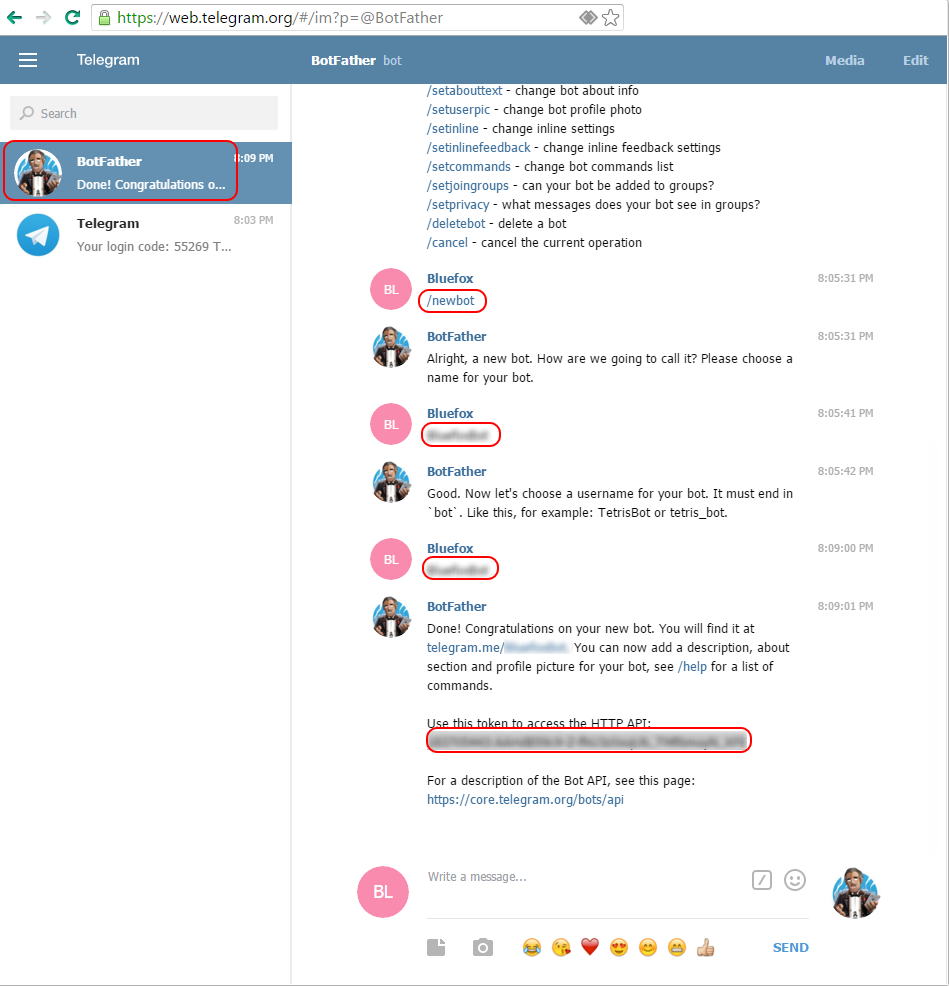
Ask @BotFather to create new bot /newbot.
You will be asked to enter the name of the bot and then the username. After that, you will get the Token.
You should set the password for communication in the configuration dialog. After this start the adapter.
To start a conversation with your bot, you need to authenticate user with /password phrase, where phrase is your configured password. So open a new conversation with your generated Bot in Telegram and then you need to enter the passwort as first command.
Note: you can use short form /p phrase.
To add nice avatar picture enter /setuserpic in BotFather chat and upload him desired picture (512x512 pixels), like this one logo.

You can send the message to all authenticated users over messageBox sendTo('telegram', 'Test message')
or to specific user sendTo('telegram', '@userName Test message').
User must be authenticated before.
You can specify a user in that way too:
sendTo('telegram', {user: 'UserName', text: 'Test message'}, function (res) {
    console.log('Sent to ' + res + ' users');
});
If you use the example above, be aware of that you have to replace 'UserName' with either the first name or the Public-Telegram-Username of the User you want to send the message to. (Depends on if the 'Store username not firstname' setting in the adapter settings is enabled or not) If the option is set and the user did not specify a public username in his telegram account, then the adapter will continue to use the firstname of the user. Keep in mind that if the user sets a public username later (after authenticating to your bot), the saved firstname will be replaced by the username the next time the user sends a message to the bot.
It is possible to specify more than one recipient (just separate the usernames by comma). For example, recipient: "User1,User4,User5"
You can send a message over state too, just set state "telegram.INSTANCE.communicate.response" with value "@userName Test message" or with a JSON object:
{
    "text": "Test message"
}
The JSON syntax also allows the adding options from the telegram bots API, as well as setting the user or chatId:
{
    "text": "Test message, but with *bold*",
    "parse_mode": "Markdown",
    "chatId": "1234567890",
    "user": "UserName"
}
You can set the parse_mode in the text too:
sendTo('telegram', {user: 'UserName', text: '<MarkdownV2>Test message, but with *bold*</MarkdownV2>'}, function (res) {
   console.log('Sent to ' + res + ' users');
});
or
setState('telegram.0.communicate.response', '<MarkdownV2>Test message, but with *bold*</MarkdownV2>');
In order to send messages to the groups, you have to invite the bot to the group you want the bot to post in.
By providing the chat_id to the JSON message payload you can actually send messages to those groups.
In order to find out the chat_id you have to set the adapter's log level to debug.
You can then just ping your bot in the groups you want the bot to send messages to.
Make sure you put a / in front of the message in order for the bot to see the message (if the bot privacy is turned on).
The iobroker log will then show you the chat id in the logs.
Usage
You can use a telegram with text2command adapter. There is a predefined communication schema, and you can command to you home in text form.
To send a photo, just send a path to file instead of text or URL: sendTo('telegram', 'absolute/path/file.png') or sendTo('telegram', 'https://telegram.org/img/t_logo.png').
Example how to send a screenshot from webcam to telegram:
function sendImage() {
    httpGet('https://raw.githubusercontent.com/ioBroker/ioBroker.javascript/master/admin/javascript.png', { responseType: 'arraybuffer' }, async (err, response) => {
        if (err) {
            console.error(err);
        } else {
            const tempFilePath = createTempFile('telegram-image.png', response.data);

            sendTo('telegram.0', 'send', {
                text: tempFilePath,
                caption: 'A wonderful adapter',
                user: 'yourUserName1,yourUserName2',
            });
        }
    });
}

on('0_userdata.0.someState', (obj) => {
    if (obj.state.val) {
        // send 4 images: immediately, in 5, 15 and 30 seconds
        sendImage();
        setTimeout(sendImage, 5000);
        setTimeout(sendImage, 15000);
        setTimeout(sendImage, 30000);
    }
});
The following messages are reserved for actions:
- typing - for text messages,
- upload_photo - for photos,
- upload_video - for videos,
- record_video - for videos,
- record_audio - for audio,
- upload_audio - for audio,
- upload_document - for documents,
- find_location - for location data
In this case, the action command will be sent.
The description for telegram API can be found here, and you can use all options defined in this api, just by including that into send object. E.g.:
sendTo('telegram.0', 'send', {
    text:                   '/tmp/snap.jpg',
    caption:                'Snapshot',
    disable_notification:   true
});
Possible options:
- disable_notification: Sends the message silently. The iOS users will not receive a notification, Android users will receive a notification with no sound. (all types)
- parse_mode: Send Markdown or HTML, if you want Telegram apps to show bold, italic, fixed-width text or inline URLs in your bot's message. Possible values: "Markdown", "MarkdownV2", "HTML" (message)
- disable_web_page_preview: Disables link previews for links in this message (message)
- caption: Caption for the document, photo or video, 0-200 characters (video, audio, photo, document)
- duration: Duration of sent video or audio in seconds (audio, video)
- performer: Performer of the audio file (audio)
- title: Track name of the audio file (audio)
- width: Video width (video)
- height: Video height (video)
Adapter tries to detect the type of message (photo, video, audio, document, sticker, action, location) depends on a text in the message if the text is a path to existing file, it will be sent as according to a type.
Location will be detected on attribute latitude and longitude:
sendTo('telegram.0', 'send', {
    latitude:               52.522430,
    longitude:              13.372234,
    disable_notification:   true
});
Venue will be detected on attribute latitude, longitude, title and address:
sendTo('telegram.0', 'send', {
    latitude:               52.51630462381893,
    longitude:              13.37770039691943,
    title:                  'Brandenburger Tor',
    address:                'Pariser Platz 8, 10117 Berlin',
});
Explicit types of messages
You have the possibility to define extra the type of the message in case you want to send the data as buffer.
The following types are possible: sticker, video, document, audio, photo.
sendTo('telegram.0', 'send', {
    text: fs.readFileSync('/opt/path/picture.png'),
    type: 'photo'
});
Sending files from the ioBroker file storage or from states (iob:// URIs)
Besides a local file path or a web URL, the text can be an ioBroker URI. The adapter resolves the URI, reads the content and sends it with the automatically detected media type (photo, video, audio, document, ...). This is especially useful when the file is stored in the ioBroker file storage behind Redis/jsonl, where it does not exist on the local filesystem, so a plain path would not work.
The following schemes are supported:
iobfile://<adapter.instance>/<path>— a file from the ioBroker file storage.iobstate://<state.id>— the value of a state (see below how the value is interpreted).iobobject://<object.id>/<path>— a value nested inside an ioBroker object (thepathnavigates into the object by/).
// send a snapshot that another adapter has written into the file storage
sendTo('telegram.0', 'send', {
    user: 'UserName',
    text: 'iobfile://cameras.0/snapshots/front_door.jpg',
    caption: 'Someone is at the front door',
});

// send a file whose full path is stored in a state
sendTo('telegram.0', 'send', {
    text: 'iobstate://0_userdata.0.lastReport',
});

// take a value out of an object
sendTo('telegram.0', 'send', {
    text: 'iobobject://0_userdata.0.myObject/native/document',
});
The media type is derived from the file extension (.jpg/.png → photo, .mp4 → video, .mp3/.ogg/.wav → audio, .gif → animation, .webp → sticker, .pdf/.csv/.docx/... → document). If the extension is unknown, the type is taken from the stored MIME type; as a fallback the content is sent as a document. You can still override it explicitly with the type option.
How a state/object value is interpreted (iobstate:// and iobobject://):
- a data URL (
data:image/png;base64,...) is decoded and sent as the corresponding media type; - a value that itself is an
iob*://URI or anhttp(s)://URL is resolved further (up to 5 levels of nesting); - any other string is treated as a file path / URL;
- numbers, booleans and objects are sent as text (objects are JSON-stringified).
Keyboard
You can show keyboard ReplyKeyboardMarkup in the client:
sendTo('telegram.0', 'send', {
    text: 'Press button',
    reply_markup: {
        keyboard: [
            ['Line 1, Button 1', 'Line 1, Button 2'],
            ['Line 2, Button 3', 'Line 2, Button 4']
        ],
        resize_keyboard:   true,
        one_time_keyboard: true
    }
});
You can read more here and here.
You can show keyboard InlineKeyboardMarkup in the client:
sendTo('telegram', 'send', {
    user: 'my_username;username2', // optional. Separator could be ";" or "," or space
    text: 'Click the button',
    reply_markup: {
        inline_keyboard: [
            [{ text: 'Button 1_1', callback_data: '1_1' }],
            [{ text: 'Button 1_2', callback_data: '1_2' }]
        ]
    }
});
You can read more here and here.
NOTE: After the user presses a callback button, Telegram clients will display a progress bar until you call answerCallbackQuery. It is, therefore, necessary to react by calling answerCallbackQuery even if no notification to the user is needed (e.g., without specifying any of the optional parameters).
answerCallbackQuery
Use this method to send answers to callback queries sent from inline keyboards. The answer will be displayed to the user as a notification at the top of the chat screen or as an alert. On success, True is returned.
if (command === '1_2') {
    sendTo('telegram', 'send', {
     user: 'my_username username2', // optional. Separator could be ";" or "," or space
        answerCallbackQuery: {
            text: 'Pressed!',
            showAlert: false, // Optional parameter
        },
   });
}
You can read more here.
Question
You can send to telegram the message, and the next answer will be returned in callback.
The answer timeout can be set in the instance configuration (default is 60 seconds). If the user does not
answer in time, the callback is called with the string '__timeout__' (so msg.data is undefined).
sendTo('telegram.0', 'ask', {
    user: user, // optional
    text: 'Are you sure?',
    reply_markup: {
        inline_keyboard: [
            // two buttons could be on one line too, but here they are on different
            [{ text: 'Yes!',  callback_data: '1' }], // first line
            [{ text: 'No...', callback_data: '0' }]  // second line
        ]
    }
}, msg => {
    if (msg === '__timeout__') {
        console.log('no answer within the configured timeout');
    } else if (msg.data === '1') {
        console.log('user pressed Yes');
    } else {
        console.log('user pressed No');
    }
});
Important – the caller has its own sendTo timeout: the adapter that sends the ask (e.g. the
JavaScript adapter) applies its own timeout to the sendTo callback, and in the JavaScript adapter this
defaults to about 20 seconds. If your configured answer timeout is longer than that, the callback is
fired early by the caller with a timeout result – which looks like the user answered "No". Increase the
caller's timeout so it is larger than the answer timeout, e.g. in the JavaScript adapter by passing it as
the last argument:
sendTo('telegram.0', 'ask', {
    text: 'Are you sure?',
    reply_markup: { inline_keyboard: [[{ text: 'Yes!', callback_data: '1' }], [{ text: 'No...', callback_data: '0' }]] }
}, msg => {
    // ... handle msg (see above)
}, { timeout: 65000 }); // must be > the configured answer timeout (here 60 s)
Chat ID
From version 0.4.0 you can use chat ID to send messages to chat.
sendTo('telegram.0', 'send', {
    text: 'Message to chat',
    chatId: 'SOME-CHAT-ID-123'
});
Thread ID
You can also set a thread id for super groups.
sendTo('telegram.0', 'send', {
    text: 'Message to chat',
    chatId: 'SOME-CHAT-ID-123',
    message_thread_id: 7,
});
Receiving a location
When a user shares a location with the bot (paperclip → location) or sends a venue, the coordinates are written to the state telegram.INSTANCE.communicate.requestLocation as a latitude;longitude string (role value.gps). The metadata states (requestChatId, requestMessageId, requestUserId) are updated as well, so you know who sent it.
on({ id: 'telegram.0.communicate.requestLocation', change: 'any' }, obj => {
    const [latitude, longitude] = obj.state.val.split(';').map(parseFloat);
    const user = getState('telegram.0.communicate.requestUserId').val;
    console.log(`User ${user} is at ${latitude}, ${longitude}`);
    // e.g. forward the coordinates to a map widget
});
Live locations (paperclip → location → "Share My Live Location") are supported as well: Telegram delivers every position update and requestLocation is updated each time. Three additional states describe the last received location:
communicate.requestLocationLive-truewhile the location is a live location that is still being shared. Telegram sends a final update without the live flag when the sharing is stopped or expires, so the state drops back tofalseat that point. For a normal (static) location or a venue it isfalse.communicate.requestLocationHeading- direction of movement in degrees (1-360). Only available for active live locations and only if the device reports it, otherwisenull.communicate.requestLocationAccuracy- radius of uncertainty of the position in meters (0-1500), if reported, otherwisenull.
on({ id: 'telegram.0.communicate.requestLocationLive', change: 'ne' }, obj => {
    if (!obj.state.val) {
        console.log('Live location sharing has ended');
    }
});
Receiving channel posts
If the bot is an administrator of a channel, posts published in that channel are received as well and written
to telegram.INSTANCE.communicate.request in the form [channel title]text (together with
communicate.requestChatId and communicate.requestMessageId). Channel posts are anonymous (they have no
sender user), so the authentication/command handling does not apply to them - they are only exposed as a
request. Any attached media is saved like for normal messages, and the channel is added to
communicate.chats.
Known chats and groups
Every chat or group the bot receives a message from is remembered in the state
telegram.INSTANCE.communicate.chats as a JSON object id => { title, type } (where type is one of
private, group, supergroup or channel). This is handy to look up a group's chat id (e.g. to let
another adapter pick a group to send to). Add the bot to the group and send one message so the group appears.
{
    "1234567": { "title": "John Doe", "type": "private" },
    "-1001234567890": { "title": "My smart home group", "type": "supergroup" }
}
The list is persisted, so it survives an adapter restart. Use the chat id as chatId when sending:
sendTo('telegram.0', 'send', { text: 'Hello group', chatId: '-1001234567890' });
Updating messages
The following methods allow you to change an existing message in the message history instead of sending a new one with a result of an action. This is most useful for messages with inline keyboards using callback queries, but can also help reduce clutter in conversations with regular chat bots.
editMessageText
Use this method to edit text sent by the bot or via the bot (for inline bots). On success, if an edited message is sent by the bot, the edited Message is returned; otherwise True is returned.
if (command === '1_2') {
    sendTo('telegram', {
        user: user,
        text: 'New text before buttons',
        editMessageText: {
            options: {
                chat_id: getState('telegram.0.communicate.requestChatId').val,
                message_id: getState('telegram.0.communicate.requestMessageId').val,
                reply_markup: {
                    inline_keyboard: [
                        [{ text: 'Button 1', callback_data: '2_1' }],
                        [{ text: 'Button 2', callback_data: '2_2' }]
                    ],
                }
            }
        }
    });
}
or new text for last message:
if (command === '1_2') {
    sendTo('telegram', {
        user: user,
        text: 'New text message',
        editMessageText: {
            options: {
                chat_id: getState('telegram.0.communicate.requestChatId').val,
                message_id: getState('telegram.0.communicate.requestMessageId').val,
            }
        }
    });
}
You can read more here.
editMessageCaption
Use this method to edit the caption of the message sent by the bot or via the bot (for inline bots). On success, if an edited message is sent by the bot, the edited Message is returned; otherwise True is returned.
if (command === '1_2') {
    sendTo('telegram', {
        user, // optional
        text: 'New caption',
        editMessageCaption: {
            options: {
                chat_id: getState('telegram.0.communicate.requestChatId').val,
                message_id: getState('telegram.0.communicate.requestMessageId').val
            }
        }
    });
}
You can read more here.
editMessageMedia
Use this method to edit picture of the message sent by the bot or via the bot (for inline bots). On success, if an edited message is sent by the bot, the edited Message is returned; otherwise True is returned.
if (command === '1_2') {
    sendTo('telegram', {
        user, // optional
        text: 'picture.jpg',
        editMessageMedia: {
            options: {
                chat_id: (await getStateAsync('telegram.0.communicate.botSendChatId')).val,
                message_id: (await getStateAsync('telegram.0.communicate.botSendMessageId')).val
            }
        }
    });
}
Supported are following media types: photo, animation, audio, document, video.
You can read more here.
editMessageReplyMarkup
Use this method to edit only the reply markup of messages sent by the bot or via the bot (for inline bots). On success, if an edited message is sent by the bot, the edited Message is returned; otherwise True is returned.
if (command === '1_2') {
    sendTo('telegram', {
        user: user,
        text: 'New text before buttons',
        editMessageReplyMarkup: {
            options: {
                chat_id: (await getStateAsync('telegram.0.communicate.botSendChatId')).val,
                message_id: (await getStateAsync('telegram.0.communicate.botSendMessageId')).val,
                reply_markup: {
                    inline_keyboard: [
                        [{ text: 'Button 1', callback_data: '2_1' }],
                        [{ text: 'Button 2', callback_data: '2_2' }]
                    ],
                }
            }
        }
    });
}
You can read more here.
deleteMessage
Use this method to delete a message, including service messages, with the following limitations:
- A message can only be deleted if it was sent less than 48 hours ago. Returns True on success.
if (command === 'delete') {
    sendTo('telegram', {
        user: user,
        deleteMessage: {
            options: {
                chat_id: getState('telegram.0.communicate.requestChatId').val,
                message_id: getState('telegram.0.communicate.requestMessageId').val
            }
        }
    });
}
You can read more here.
Reacting to user replies / messages
Suppose you are using only JavaScript without text2command.
You have already sent a message/question to your user using sendTo() as described above.
The user replies to that by pushing a button or writing a message.
You can extract the command and give feedback to your user, execute commands or switch states in iobroker.
- telegram.0 is your iobroker Telegram instance you want to use
- user is the user registered with you TelegramBot which sent the message
- command is the command your TelegramBot received
on({id: 'telegram.0.communicate.request', change: 'any'}, function (obj) {
    var stateval = getState('telegram.0.communicate.request').val;              // save Statevalue received from your Bot
    var user = stateval.substring(1,stateval.indexOf(']'));                 // extract user from the message
    var command = stateval.substring(stateval.indexOf(']') + 1,stateval.length);   // extract command/text from the message

    switch (command) {
        case '1_2':
            //... see example above ...
            break;
        case 'delete':
            //... see example above
            break;
        //.... and so on ...
    }
});
Special commands
/state stateName - read state value
You can request the value of state if you now the ID:
/state system.adapter.admin.0.memHeapTotal
> 56.45
/state stateName value - set state value
You can set the value of state if you now the ID:
/state hm-rpc.0.JEQ0ABCDE.3.STOP true
> Done
Proxy
If the ioBroker host cannot reach the telegram servers directly, enable Use proxy in the main settings and enter the proxy type (HTTP(S) or SOCKS5), host, port and - if the proxy requires authentication - login and password. All requests to telegram (API calls as well as media downloads) are routed through the proxy. An HTTPS proxy can be addressed by entering the host with its scheme, e.g. https://proxy.example.com. Note that SOCKS5 support of the underlying HTTP client (undici) is still marked as experimental; Node.js prints a corresponding warning at startup.
Polling or Server mode
If polling mode is used, the adapter keeps a long-poll request open to the telegram server (up to 30 seconds per request, then it is renewed). Updates are delivered immediately and almost no traffic is generated while nothing happens, so no polling interval has to be configured. Polling works behind NAT/firewalls without any port forwarding.
To use server mode you ioBroker instance must be reachable from internet (e.g., with noip.com dynamic DNS service).
Telegram can work only with HTTPS servers, but you can use let's encrypt certificates.
Following settings must be provided for server mode:
- URL - in form https://yourdomain.com:8443.
- IP - Ip address, where the server will be bound. Default 0.0.0.0. Do not change it if you are not sure.
- Port - actually only 443, 80, 88, 8443 ports are supported by telegram, but you can forward ports to anyone through your router.
- Public certificate - required, if let's encrypt is disabled.
- Private key - required, if let's encrypt is disabled.
- Chain certificate (optional)
- Let's encrypt options - It is very easy to set up let's encrypt certificates. Please read here about it.
Advanced security
The authentication of users could be disabled. So no one new can authenticate.
To create a list of trusted users, first disable the option, "Do not authenticate new users" and
authenticate all users that should be in the trusted list by sending the /password <PASSWORD> message.
The users that sent valid password will be stored in the trusted list.
After that, the option "Do not authenticate new users" could be activated and no new users can authenticate.
To use this option, the option "Remember authenticated users" must be activated.
Calls via telegram
Thanks to callmebot api, you can make a call to your telegram account, and some text will be read via TTS engine.
To do that from javascript adapter, just call:
sendTo('telegram.0', 'call', 'Some text');
or
sendTo('telegram.0', 'call', {
    text: 'Some text',
    user: '@Username', // optional and the call will be done to the first user in telegram.0.communicate.users.
    lang: 'de-DE-Standard-A', // optional and the system language will be taken
    repeats: 0, // number of repeats
});
or
sendTo('telegram.0', 'call', {
    text: 'Some text',
    users: ['@Username1', '+49xxxx'] // Array of `users' or telephone numbers.
});
or
sendTo('telegram.0', 'call', {
    file: 'url of mp3 file that is accessible from internet',
    users: ['@Username1', '@Username2'] // Array of `users' or telephone numbers.
});
Possible values for language:
ar-XA-Standard-A- Arabic (Female voice)ar-XA-Standard-B- Arabic (Male voice)ar-XA-Standard-C- Arabic (Male 2 voice)cs-CZ-Standard-A- Czech (Czech Republic) (Female voice)da-DK-Standard-A- Danish (Denmark) (Female voice)nl-NL-Standard-A- Dutch (Netherlands) (Female voice - will be used if system language is NL and no language was provided)nl-NL-Standard-B- Dutch (Netherlands) (Male voice)nl-NL-Standard-C- Dutch (Netherlands) (Male 2 voice)nl-NL-Standard-D- Dutch (Netherlands) (Female 2 voice)nl-NL-Standard-E- Dutch (Netherlands) (Female 3 voice)en-AU-Standard-A- English (Australia) (Female voice)en-AU-Standard-B- English (Australia) (Male voice)en-AU-Standard-C- English (Australia) (Female 2 voice)en-AU-Standard-D- English (Australia) (Male 2 voice)en-IN-Standard-A- English (India) (Female voice)en-IN-Standard-B- English (India) (Male voice)en-IN-Standard-C- English (India) (Male 2 voice)en-GB-Standard-A- English (UK) (Female voice - will be used if system language is EN and no language was provided)en-GB-Standard-B- English (UK) (Male voice)en-GB-Standard-C- English (UK) (Female 2 voice)en-GB-Standard-D- English (UK) (Male 2 voice)en-US-Standard-B- English (US) (Male voice)en-US-Standard-C- English (US) (Female voice)en-US-Standard-D- English (US) (Male 2 voice)en-US-Standard-E- English (US) (Female 2 voice)fil-PH-Standard-A- Filipino (Philippines) (Female voice)fi-FI-Standard-A- Finnish (Finland) (Female voice)fr-CA-Standard-A- French (Canada) (Female voice)fr-CA-Standard-B- French (Canada) (Male voice)fr-CA-Standard-C- French (Canada) (Female 2 voice)fr-CA-Standard-D- French (Canada) (Male 2 voice)fr-FR-Standard-A- French (France) (Female voice - will be used if system language is FR and no language was provided)fr-FR-Standard-B- French (France) (Male voice)fr-FR-Standard-C- French (France) (Female 2 voice)fr-FR-Standard-D- French (France) (Male 2 voice)de-DE-Standard-A- German (Germany) (Female voice - will be used if system language is DE and no language was provided)de-DE-Standard-B- German (Germany) (Male voice)el-GR-Standard-A- Greek (Greece) (Female voice)hi-IN-Standard-A- Hindi (India) (Female voice)hi-IN-Standard-B- Hindi (India) (Male voice)hi-IN-Standard-C- Hindi (India) (Male 2 voice)hu-HU-Standard-A- Hungarian (Hungary) (Female voice)id-ID-Standard-A- Indonesian (Indonesia) (Female voice)id-ID-Standard-B- Indonesian (Indonesia) (Male voice)id-ID-Standard-C- Indonesian (Indonesia) (Male 2 voice)it-IT-Standard-A- Italian (Italy) (Female voice - will be used if system language is IT and no language was provided)it-IT-Standard-B- Italian (Italy) (Female 2 voice)it-IT-Standard-C- Italian (Italy) (Male voice)it-IT-Standard-D- Italian (Italy) (Male 2 voice)ja-JP-Standard-A- Japanese (Japan) (Female voice)ja-JP-Standard-B- Japanese (Japan) (Female 2 voice)ja-JP-Standard-C- Japanese (Japan) (Male voice)ja-JP-Standard-D- Japanese (Japan) (Male 2 voice)ko-KR-Standard-A- Korean (South Korea) (Female voice)ko-KR-Standard-B- Korean (South Korea) (Female 2 voice)ko-KR-Standard-C- Korean (South Korea) (Male voice)ko-KR-Standard-D- Korean (South Korea) (Male 2 voice)cmn-CN-Standard-A- Mandarin Chinese (Female voice)cmn-CN-Standard-B- Mandarin Chinese (Male voice)cmn-CN-Standard-C- Mandarin Chinese (Male 2 voice)nb-NO-Standard-A- Norwegian (Norway) (Female voice)nb-NO-Standard-B- Norwegian (Norway) (Male voice)nb-NO-Standard-C- Norwegian (Norway) (Female 2 voice)nb-NO-Standard-D- Norwegian (Norway) (Male 2 voice)nb-no-Standard-E- Norwegian (Norway) (Female 3 voice)pl-PL-Standard-A- Polish (Poland) (Female voice - will be used if system language is PL and no language was provided)pl-PL-Standard-B- Polish (Poland) (Male voice)pl-PL-Standard-C- Polish (Poland) (Male 2 voice)pl-PL-Standard-D- Polish (Poland) (Female 2 voice)pl-PL-Standard-E- Polish (Poland) (Female 3 voice)pt-BR-Standard-A- Portuguese (Brazil) (Female voice - will be used if system language is PT and no language was provided)pt-PT-Standard-A- Portuguese (Portugal) (Female voice)pt-PT-Standard-B- Portuguese (Portugal) (Male voice)pt-PT-Standard-C- Portuguese (Portugal) (Male 2 voice)pt-PT-Standard-D- Portuguese (Portugal) (Female 2 voice)ru-RU-Standard-A- Russian (Russia) (Female voice - will be used if system language is RU and no language was provided)ru-RU-Standard-B- Russian (Russia) (Male voice)ru-RU-Standard-C- Russian (Russia) (Female 2 voice)ru-RU-Standard-D- Russian (Russia) (Male 2 voice)sk-SK-Standard-A- Slovak (Slovakia) (Female voice)es-ES-Standard-A- Spanish (Spain) (Female voice - will be used if system language is ES and no language was provided)sv-SE-Standard-A- Swedish (Sweden) (Female voice)tr-TR-Standard-A- Turkish (Turkey) (Female voice)tr-TR-Standard-B- Turkish (Turkey) (Male voice)tr-TR-Standard-C- Turkish (Turkey) (Female 2 voice)tr-TR-Standard-D- Turkish (Turkey) (Female 3 voice)tr-TR-Standard-E- Turkish (Turkey) (Male voice)uk-UA-Standard-A- Ukrainian (Ukraine) (Female voice)vi-VN-Standard-A- Vietnamese (Vietnam) (Female voice)vi-VN-Standard-B- Vietnamese (Vietnam) (Male voice)vi-VN-Standard-C- Vietnamese (Vietnam) (Female 2 voice)vi-VN-Standard-D- Vietnamese (Vietnam) (Male 2 voice)
TODO:
- venue
Auto-Inline keyboard based on settings in admin (Easy-Keyboard)
For every state, the additional settings could be enabled:
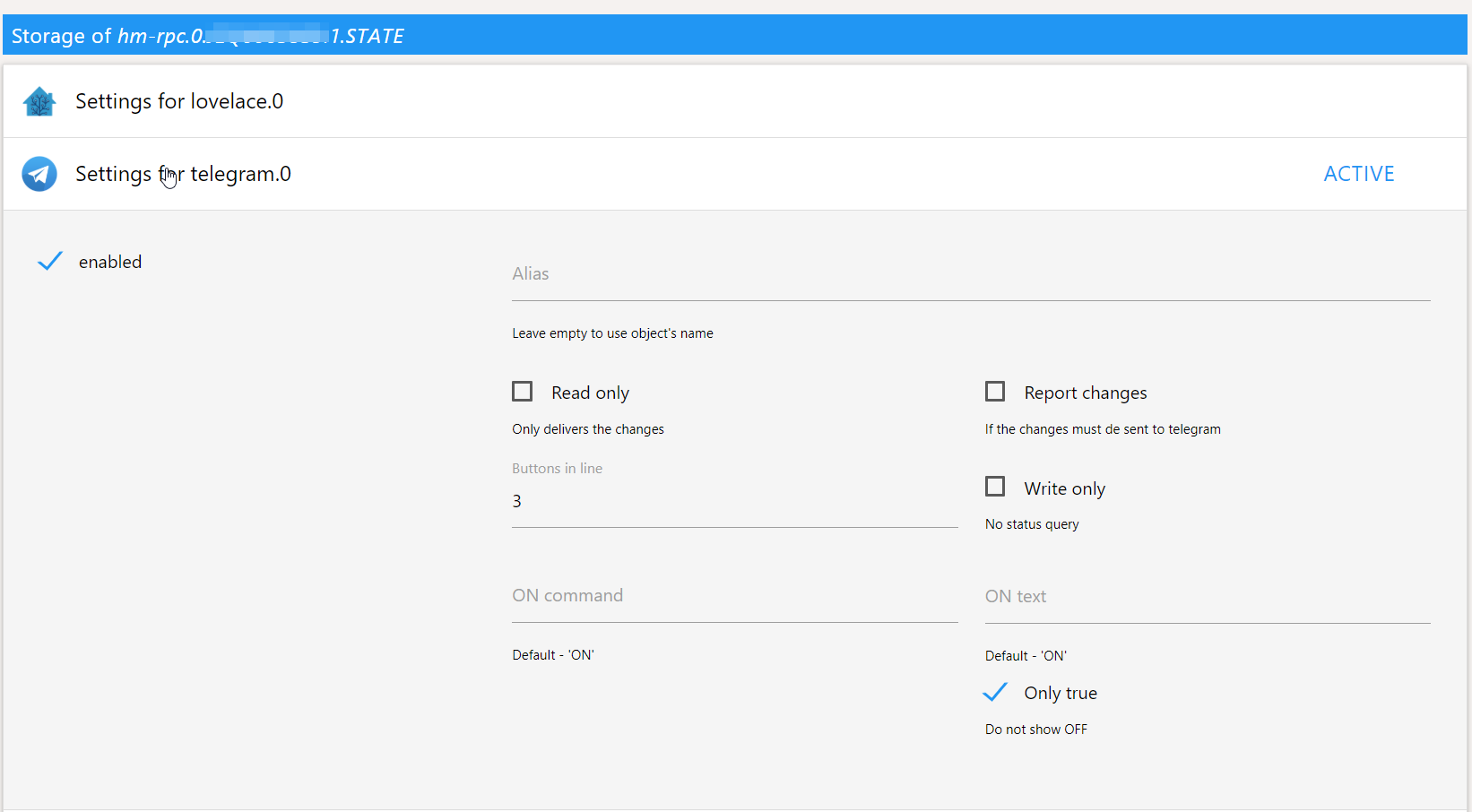
By entering /cmds the following keyboard will be displayed in telegram:
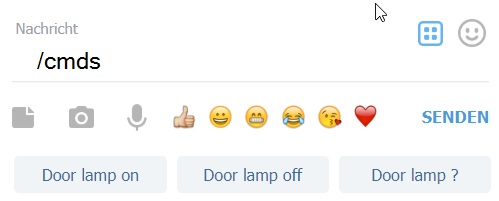
/cmds could be replaced by any text (e.g. "?") in the configuration dialog of telegram adapter.
If Use rooms in keyboard command option is enabled in the configuration dialog of telegram adapter, so in the first step the room list will be shown. Not yet implemented
Settings in the state
The first, the configuration must be enabled.
Alias
Name of the device. If the name is empty, the name will be taken from an object.
By entering "Door lamp" the following menu will be shown for boolean state.

You can switch the device ON, turn the device OFF or request the state.
If you Click Door lamp ?, you will get Door lamp => switched off.
Read-only
If activated, ON/OFF buttons will be not shown, just a Door lamp ?.
Report changes
If the status of the device changed (e.g., someone turned the lamp on physically), the new status will be delivered to telegram.
E.g. Door lamp => switched on.
Buttons in line
How many buttons must be shown in the line for one device. Because of the long name, maybe it is better to show only 2 (or even just one) buttons in the line.

Write-only
If activated, the status query (Door lamp ?) button will be not shown.

ON Command
Which text will be shown on ON button.
Like here:
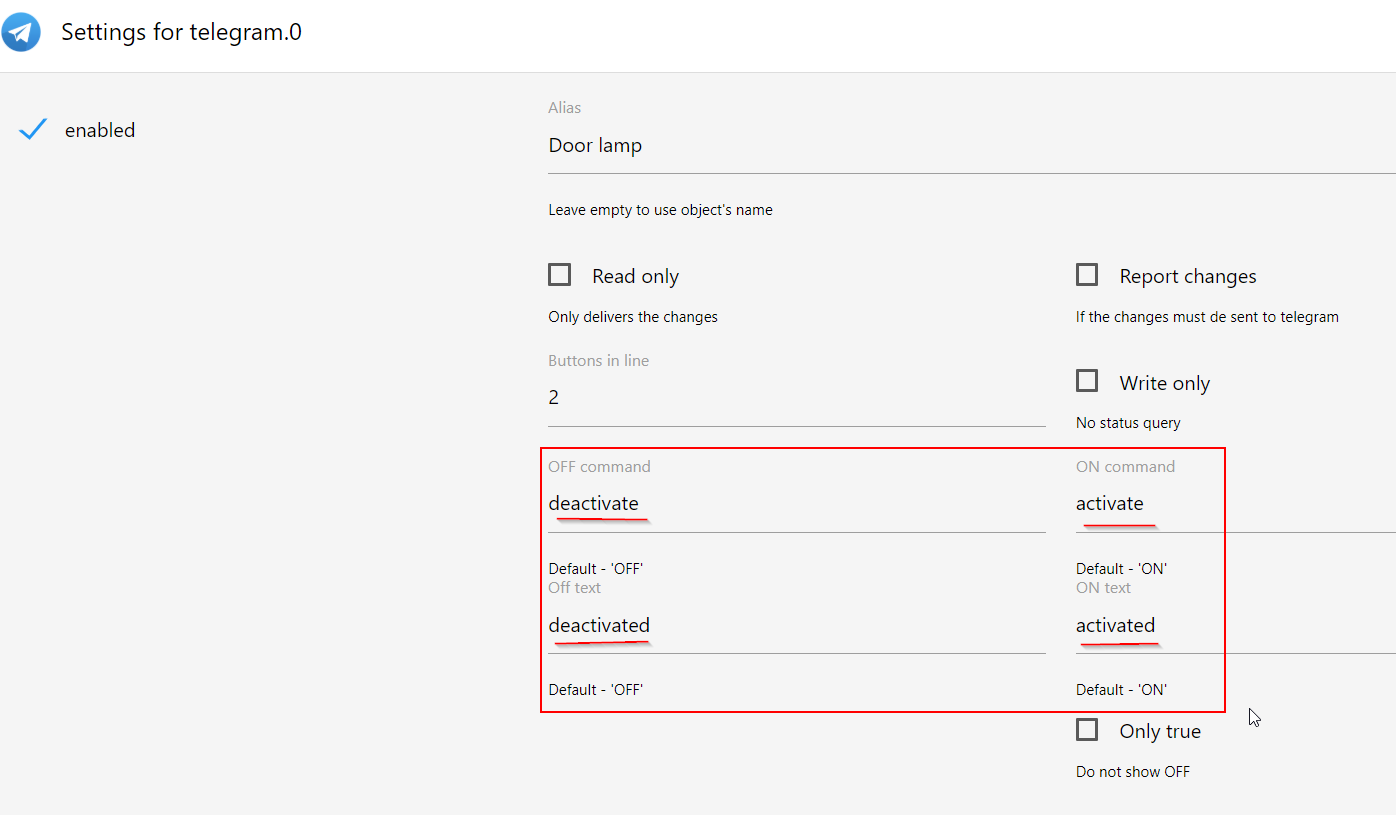
Will produce the following keyboard:

ON Text
The text, that will be shown by state report.
E.g. Door lamp => activated if the state of the device changed to true and the ON Text is activated
The ON/OFF Texts will be shown only if Report changes is activated.
OFF Command
Same as ON Command, but for OFF.
OFF Text
Same as ON Text, but for OFF.
E.g. Door lamp => deactivated if the state of the device changed to false and the OFF Text is deactivated
Only true
E.g., for buttons, they have no OFF state. In this case, the OFF button will be not shown.

How to receive messages in group chats using telegram adapter
If telegram bot receives messages sent by user to the bot in private chats, but not receives messages sent by users in group chats.
In this case you must talk to @botfather and disable the privacy mode.
BotFather chat:
You: /setprivacy

BotFather: Choose a bot to change group messages settings.

You: @your_name_bot

BotFather: 'Enable' - your bot will only receive messages that either start with the '/' symbol or mention the bot by username.

'Disable' - your bot will receive all messages that people send to groups.

Current status is: ENABLED

You: Disable

BotFather: Success! The new status is: DISABLED. /help
How to send messages via node-red
For simple text messages to all users, just put the text within the payload of the message and
send it to the ioBroker state telegram.INSTANCE.communicate.response.
If you want to set additional options, fill the payload with a JSON object, such as:
msg.payload = {
    // text is the only mandatory field here
    "text": "*bold _italic bold ~italic bold strikethrough~ __underline italic bold___ bold*",
    // optional chatId or user, the recipient of the message
    "chatId": "1234567890",
    // optional settings from the telegram bots API
    "parse_mode": "MarkdownV2"
}
Before sending it to telegram.INSTANCE.communicate.responseJson you need to stringify the object!
Changelog
6.0.2 (2026-09-12)
- (@GermanBluefox) Updated packages and improved the rules block
- (@patricknitsch) Retried getUpdates 409 conflicts quickly before falling back to a slow restartart
6.0.0 (2026-09-02)
- (@GermanBluefox) Adapter requires Node.js >= 22.19 now (required by undici 8)
- (@GermanBluefox) The connection to the telegram servers can be routed through an HTTP(S) or SOCKS5 proxy (new "Use proxy" settings; the old proxy fields had been without function for years)
- (@GermanBluefox) Migrated to
node-telegram-bot-apiv2. Updates are now received via long polling, so the "Polling interval" setting became obsolete and was removed from the configuration dialog. Errors thrown while processing an update are logged by the adapter instead of ending up on the console - (@GermanBluefox) An empty "API URL" field no longer breaks every API call with "EFATAL: Failed to parse URL" - the default
https://api.telegram.orgis used again (#1371) - (@GermanBluefox) A
text2command/assistantinstance stored in the long form (system.adapter.text2command.0, written by the config UI before v1.12.6) is migrated to the short form on startup, so the config dialog shows the selected instance again (#1365) - (@GermanBluefox) Added the states
communicate.requestLocationLive(live location is still being shared),communicate.requestLocationHeadingandcommunicate.requestLocationAccuracyfor received (live) locations
5.0.4 (2026-09-01)
- (@GermanBluefox) Blockly migrated to TypeScript
- (@bjoernjaeschke87-beep) Live location updates (delivered by Telegram as
edited_message) now updatecommunicate.requestLocationwhile the location is being shared
5.0.3 (2026-08-10)
- (@GermanBluefox) Fixed: the configured
text2command/assistantinstance may now also be stored in the long form (system.adapter.text2command.0) - the alive check no longer fails with "instance is not running"
5.0.2 (2026-08-03)
- (copilot) Adapter requires node.js >= 22 now
- (copilot) Adapter requires admin >= 8.0.0 now
- (@klein0r) admin 8.0.0 and js-controller 6.0.11 (or later) are required
- (@klein0r) Updated dependencies
License
The MIT License (MIT)
Copyright (c) 2024-2026 iobroker-community-adapters iobroker-community-adapters@gmx.de
Copyright (c) 2016-2023, bluefox dogafox@gmail.com
Permission is hereby granted, free of charge, to any person obtaining a copy of this software and associated documentation files (the "Software"), to deal in the Software without restriction, including without limitation the rights to use, copy, modify, merge, publish, distribute, sublicense, and/or sell copies of the Software, and to permit persons to whom the Software is furnished to do so, subject to the following conditions:
The above copyright notice and this permission notice shall be included in all copies or substantial portions of the Software.
THE SOFTWARE IS PROVIDED "AS IS", WITHOUT WARRANTY OF ANY KIND, EXPRESS OR IMPLIED, INCLUDING BUT NOT LIMITED TO THE WARRANTIES OF MERCHANTABILITY, FITNESS FOR A PARTICULAR PURPOSE AND NONINFRINGEMENT. IN NO EVENT SHALL THE AUTHORS OR COPYRIGHT HOLDERS BE LIABLE FOR ANY CLAIM, DAMAGES OR OTHER LIABILITY, WHETHER IN AN ACTION OF CONTRACT, TORT OR OTHERWISE, ARISING FROM, OUT OF OR IN CONNECTION WITH THE SOFTWARE OR THE USE OR OTHER DEALINGS IN THE SOFTWARE.