Konfiguration
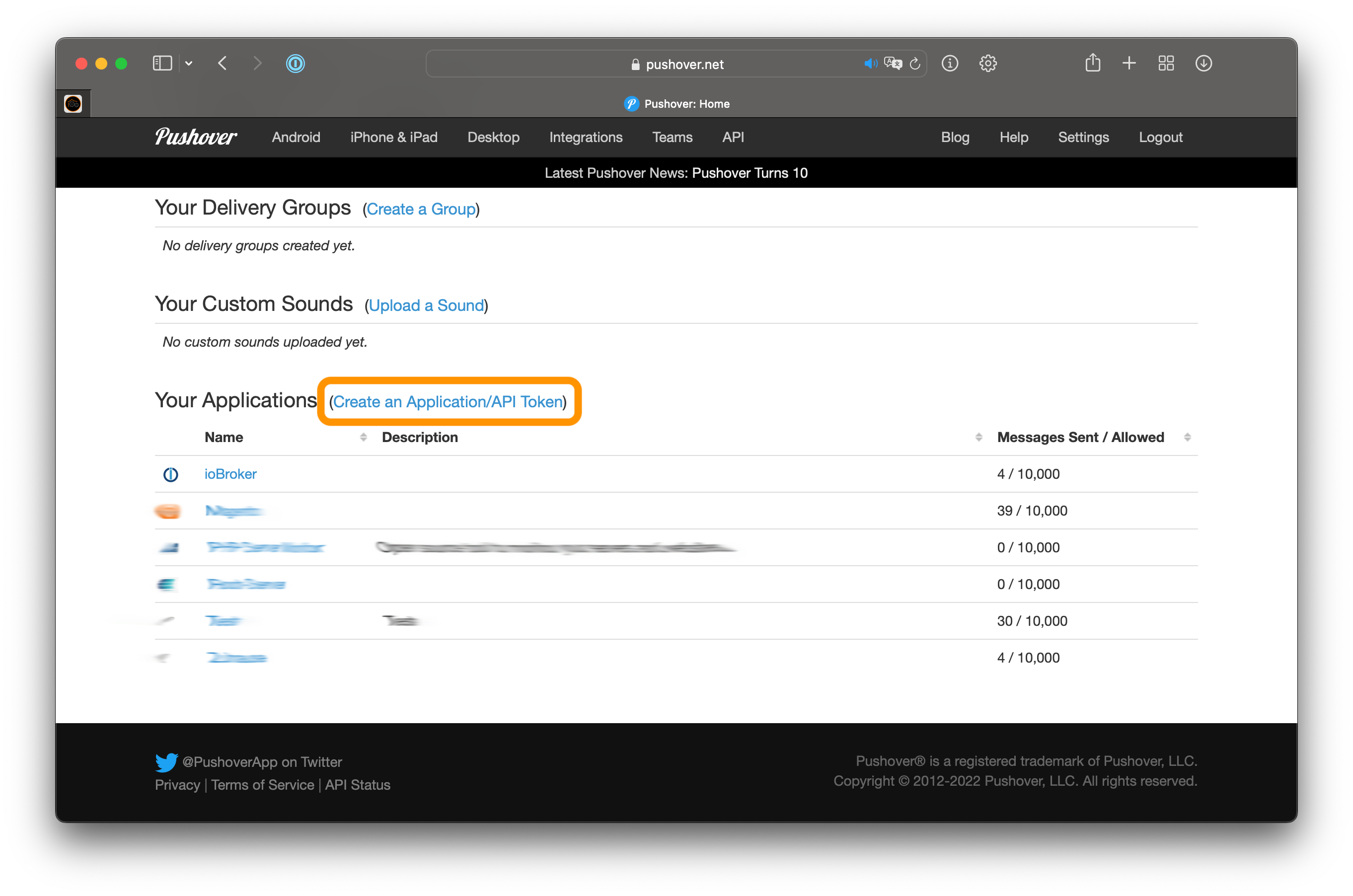
- Erstelle ein Konto auf pushover.net
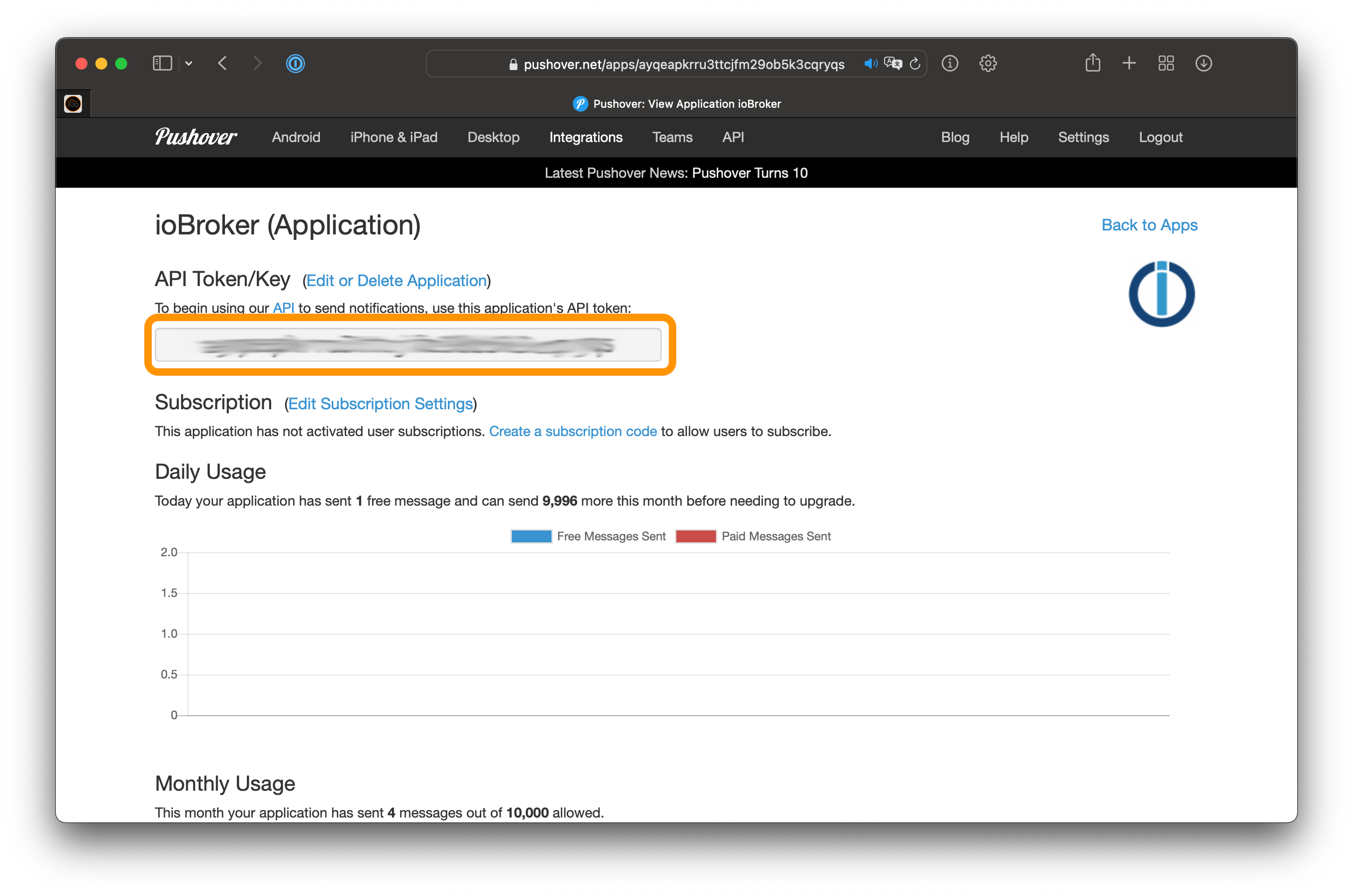
- Erstelle eine neue Applikation
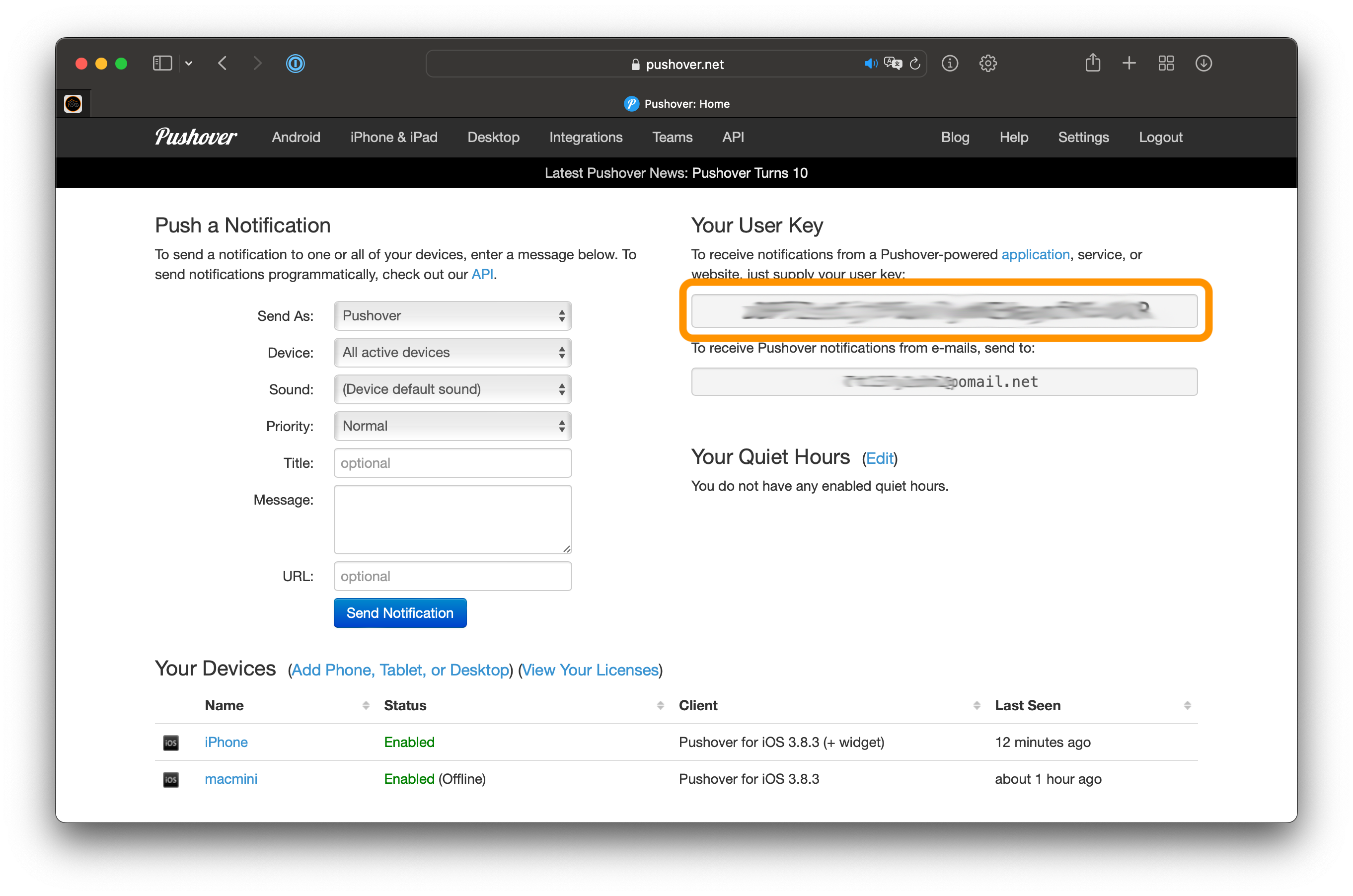
- Konfiguriere das Applikation-Token und Benutzer-Token in Deiner Pushover-Instanz
Usage
Push-Notifications mit dem JavaScript-Adapter zu versenden:
// send notification to all instances of pushover adapter
sendTo('pushover', 'message body');

// send notification to specific instance of pushover adapter
sendTo('pushover.1', 'message body');

// To specify subject or other options
sendTo('pushover', {
    message:  'Test text', // mandatory - your text message
    title:    'SweetHome', // optional  - your message's title, otherwise your app's name is used
    sound:    'magic',     // optional  - the name of one of the sounds supported by device clients to override the user's default sound choice
                           //    pushover, bike, bugle, cashregister, classical, cosmic, falling,
                           //    gamelan, incoming, intermission, magic, mechanical, pianobar, siren,
                           //    spacealarm, tugboat, alien, climb, persistent, echo, updown, none
    priority: -1,          // optional
                           //    -1 to always send as a quiet notification,
                           //    1 to display as high-priority and bypass the user's quiet hours, or
                           //    2 to also require confirmation from the user
    token: 'API/KEY token' // optional
                           // add other than configured token to the call
    url,                   // optional  - a supplementary URL to show with your message
    url_title,             // optional  - a title for your supplementary URL, otherwise just the URL is shown
    device,                // optional  - your user's device name to send the message directly to that device, rather than all of the user's devices
    timestamp,             // optional  - a Unix timestamp of your message's date and time to display to the user, rather than the time your message is received by our API
    html,                  // optional  - 1 to enable parsing of HTML formatting for bold, italic, underlined and font color
    monospace,             // optional  - 1 to display the message in monospace font
                           //    either html or monospace is allowed
    file:                  '/opt/picture.png', // optional - attachment
    file:                  { name: '/opt/picture.png', data: fs.readFileSync('/opt/picture.png') }, // optional - attachment
});

// Example for HTML format in the message
sendTo('pushover', {
    message: 'This message includes <b>bold</b>, <i>italic</i> and <u>underlined</u> text <font color=green>in</font> <font color=#ffa500>different</font> <font color=red>colors</font>.',
    html: 1
});

// Example for monospace font in the message
sendTo('pushover', {
    message: 'This message is in monospace font.',
    monospace: 1
});
Glances
Mit Pushover Glances können dauerhaft sichtbare Informationen versendet werden. Diese können zum Beispiel auf einer Apple Watch dargestellt werden.
sendTo('pushover', 'glances', {
    message:  'Test text',    // mandatory - (100 characters) - the main line of data, used on most screens
    title:    'SweetHome',    // optional  - (100 characters) - a description of the data being shown, such as "Widgets Sold"
    token:    'API/KEY token' // optional  - add other than configured token to the call
    subtext:  'Second line',  // optional  - (100 characters) - a second line of data
    count:    3,              // optional  - (integer, may be negative) - shown on smaller screens; useful for simple counts
    percent:  90,             // optional  - (integer 0 through 100, inclusive) - shown on some screens as a progress bar/circle
    device:   'DEVICE_NAME',  // optional  - a user's device name to restrict messages to the widget on that device, otherwise leave blank to send messages to all available widgets of that user
});
Changelog
6.0.1 (2026-08-18)
- (@GermanBluefox) Blockly migrated to TypeScript
- (@GermanBluefox) Dropped support for Node.js lower than 22
5.0.0 (2026-03-12)
- (@GermanBluefox) Updated packages
- (@GermanBluefox) Dropped support for node 18
- (@GermanBluefox) Migrated to TypeScript
- (@GermanBluefox) Added the lowest priority to messages
4.1.1 (2025-05-19)
- (robseh) Added a field "tags" to hand over a tag to pushover-service
- (@GermanBluefox) Updated packages
4.1.0 (2024-08-17)
- (isi07) added HTML/monospace options to blockly
- (isi07) fixed issue that blockly block is invalid when different priority other than normal is selected
- (isi07) fixed the error when log level selected by duplicate quotes
4.0.0 (2024-07-13)
- Breaking changes: NodeJS >= 18.x and js-controller >= 5 are required
- (@klein0r) Updated dependencies
- (@klein0r) Fixed blockly definitions
- (@klein0r) Updated translations
License
The MIT License (MIT)
Copyright (c) 2014-2026 bluefox dogafox@gmail.com
Permission is hereby granted, free of charge, to any person obtaining a copy of this software and associated documentation files (the "Software"), to deal in the Software without restriction, including without limitation the rights to use, copy, modify, merge, publish, distribute, sublicense, and/or sell copies of the Software, and to permit persons to whom the Software is furnished to do so, subject to the following conditions:
The above copyright notice and this permission notice shall be included in all copies or substantial portions of the Software.
THE SOFTWARE IS PROVIDED "AS IS", WITHOUT WARRANTY OF ANY KIND, EXPRESS OR IMPLIED, INCLUDING BUT NOT LIMITED TO THE WARRANTIES OF MERCHANTABILITY, FITNESS FOR A PARTICULAR PURPOSE AND NONINFRINGEMENT. IN NO EVENT SHALL THE AUTHORS OR COPYRIGHT HOLDERS BE LIABLE FOR ANY CLAIM, DAMAGES OR OTHER LIABILITY, WHETHER IN AN ACTION OF CONTRACT, TORT OR OTHERWISE, ARISING FROM, OUT OF OR IN CONNECTION WITH THE SOFTWARE OR THE USE OR OTHER DEALINGS IN THE SOFTWARE.