Integration of the Plex Media Server in ioBroker (with or without Plex Pass). Furthermore, Tautulli integration.
Table of contents
1. Features
- Receive detailed media information about the current played media item (such as video bitrate, codec, subtitle information, audio; see Advanced setup for a full list)
- Receive
eventsfrom Plex (via Plex Webhook and Plex Notifications using Plex Pass or via Tautulli, see setup!) - Playback control for players
- Retrieve
servers - Retrieve
libraries - Retrieve all items within a library
- Retrieve
users(only with Tautulli) - Retrieve
statistics(only with Tautulli) - Retrieve
playlists - Retrieve
settings - Retrieve all data from controllable clients
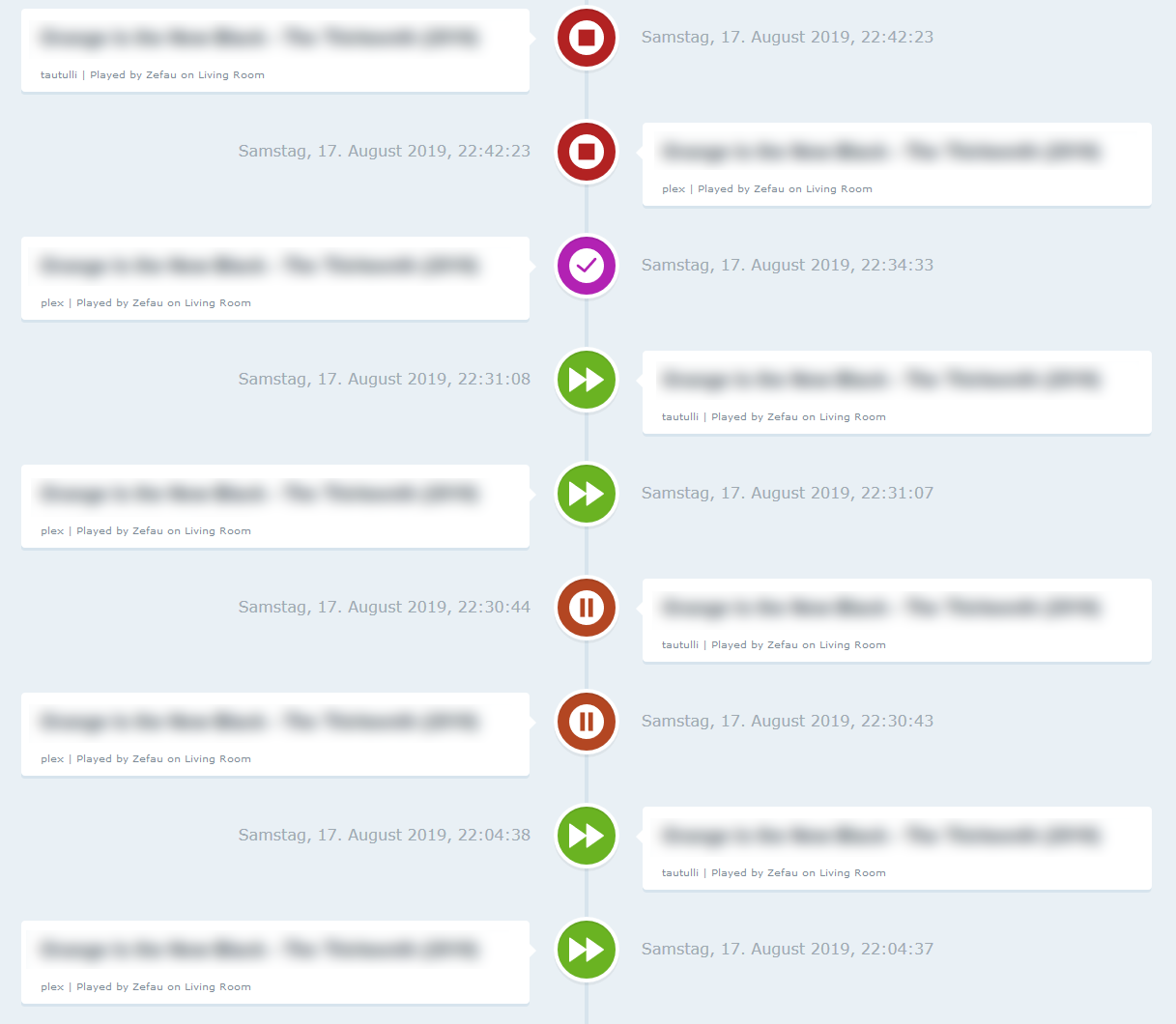
- Web Interface that shows the recent events from Plex:
2. Setup instructions
2.1. Basic Setup
For the basic setup it is required to provide the IP address (and port) of your Plex installation. Furthermore, you have to retrieve a dedicated token for the adapter to retrieve data from Plex.
Once this is given, ioBroker.plex will retrieve all the basic data (incl. Servers, Libraries). See Channels & States for the full list of basic data.
2.2. Advanced Setup (Plex Pass or Tautulli)
2.2.1. Plex Pass
Webhook
If you are a Plex Pass user, you may setup a webhook in the Plex Settings to retrieve the current event / action from your Plex Media Server (play, pause, resume, stop, viewed and rated).
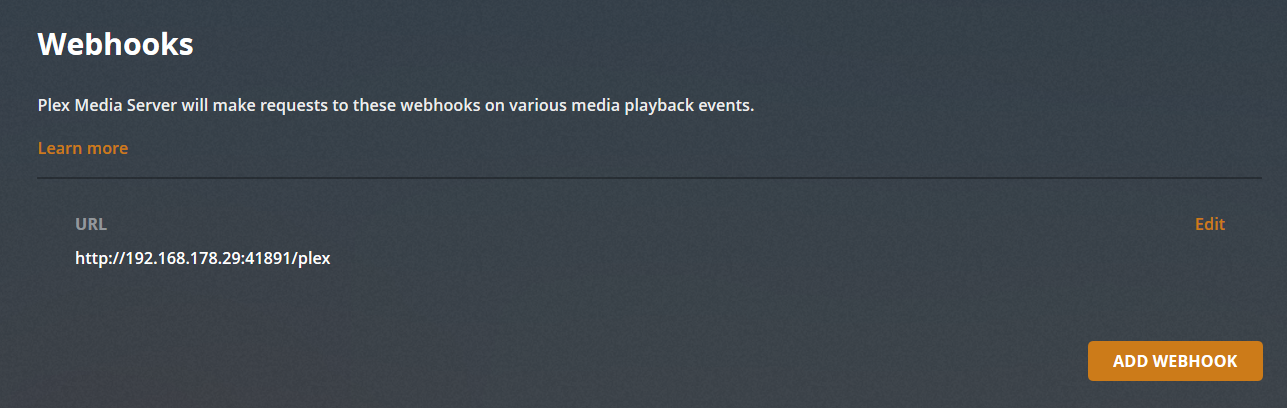
Navigate to your Plex Media Server and go to Settings and Webhook. Created a new webhook by clicking Add Webhook and enter your ioBroker IP adress with the custom port specified in the ioBroker.plex settings and trailing /plex path, e.g. http://192.168.178.29:41891/plex:
Events
For information regarding the Plex Notifications, please see the official documentation. To turn on Notifications on your Plex Media Server, go to Settings > Server > General and then enable the Push Notifications preference.
2.2.2.Tautulli
Tautulli is a 3rd party application that you can run alongside your Plex Media Server to monitor activity and track various statistics. Most importantly, these statistics include what has been watched, who watched it, when and where they watched it, and how it was watched. All statistics are presented in a nice and clean interface with many tables and graphs, which makes it easy to brag about your server to everyone else. Check out Tautulli Preview and install it on your preferred system if you are interested.
This adapter connects to the Tautulli API and also receives webhook events from Tautulli.
2.2.2.1. API
Once Tautulli is installed, open the Settings page from Tautulli dashboard and navigate to Web Interface. Scroll down to the API section and make sure Enable API is checked. Copy the API key and enter it in the ioBroker.plex settings. Furthermore, add the Tautulli IP address and port to allow API communication.
2.2.2.2. Webhook
Overview
To setup a webook using Tautulli, following the instrucutions below and make sure you have completed all 4 steps:
- Add Notification Agent
- Configure Webhook in Notification Agent
- Configure Triggers in Notification Agent
- Configure Data in Notification Agent
- Configure Notification options
Description
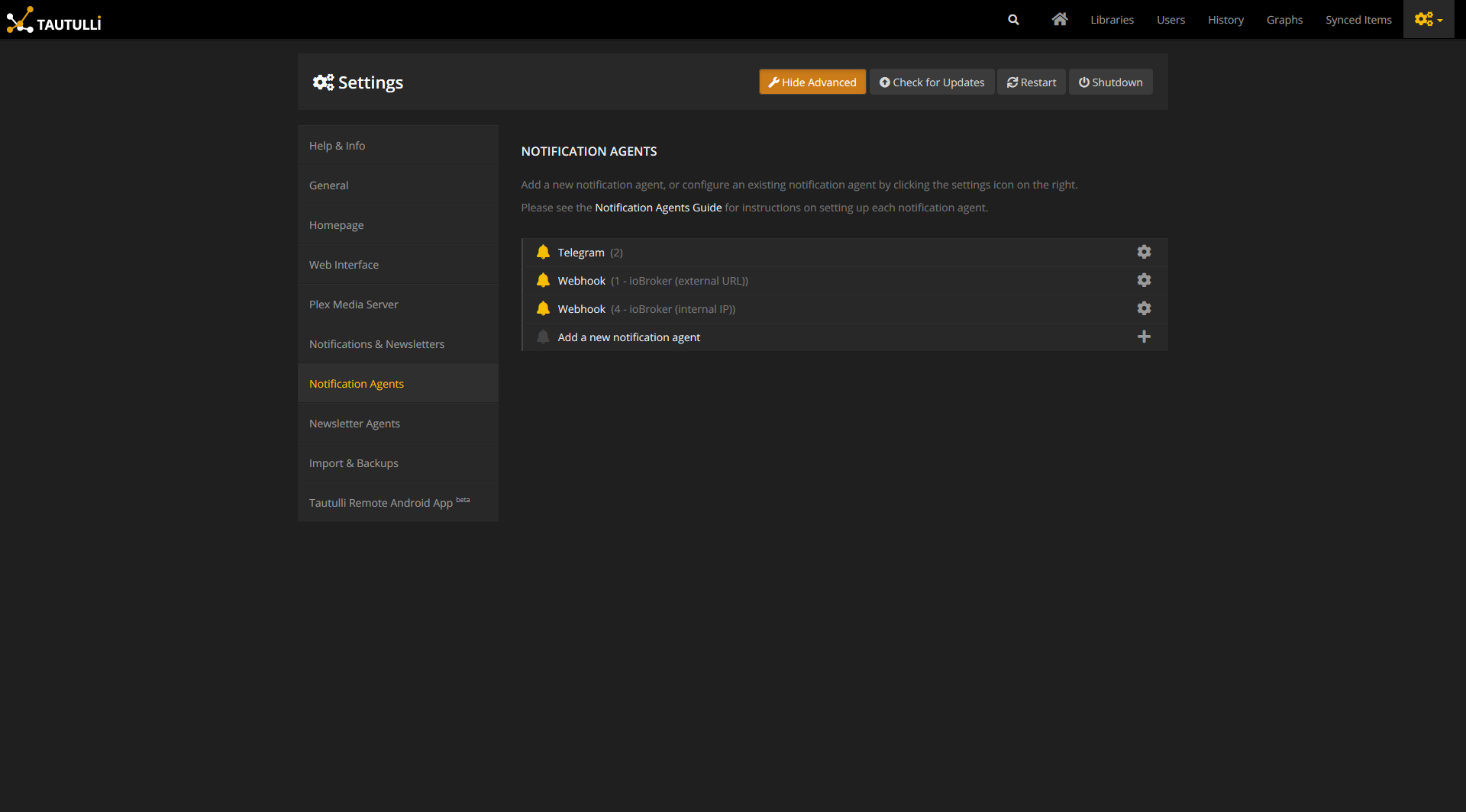
Once installed open the settings page from Tautulli dashboard and navigate to Notification Agents as seen below:
-
Click Add a new notification agent and Webhook.
-
Enter your ioBroker IP adress with the custom port specified in the ioBroker.plex settings and trailing
/tautullipath, e.g.http://192.168.178.29:41891/tautulli: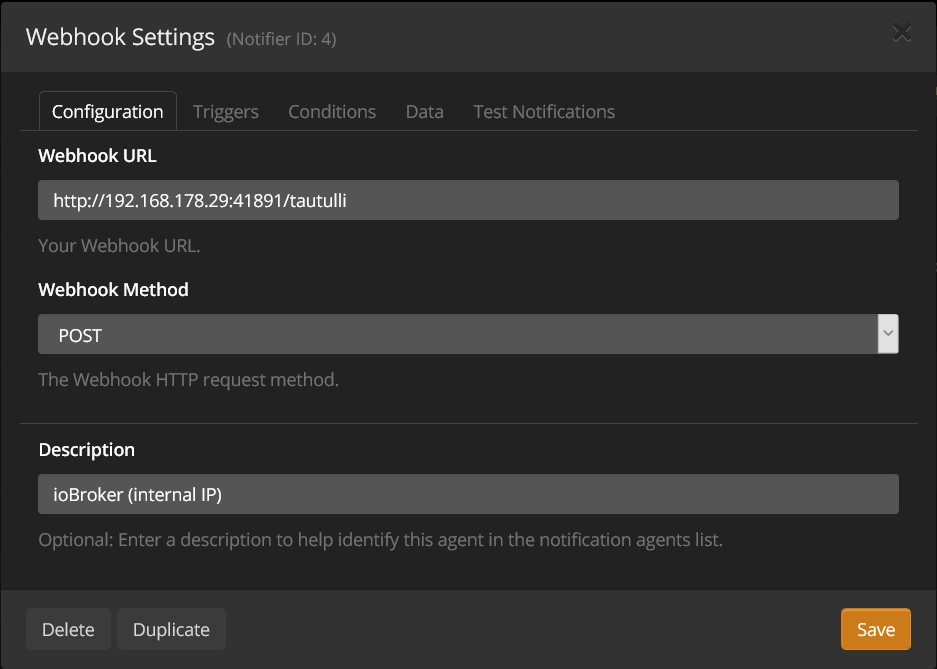 Furthermore, choose
 POSTfor the Webhook Method and enter any description you like in Description. -
Next, go to the Triggers tab, select your desired (or simply all) notification agents. An enabled notification agent will trigger an event which will then be sent to ioBroker. Make sure to provide the necessary data for each of the enabled notification agent in the next step!
-
Now, most importantly, fill in the respective data payload in the Data tab according to the Notification configuration found here. Copy the notification configuration of the relevant notification agents from the previous step (e.g.
Playback Start,Playback Stop,Playback PauseandPlayback Resume) in each of the text boxes as shown below forPlayback Start: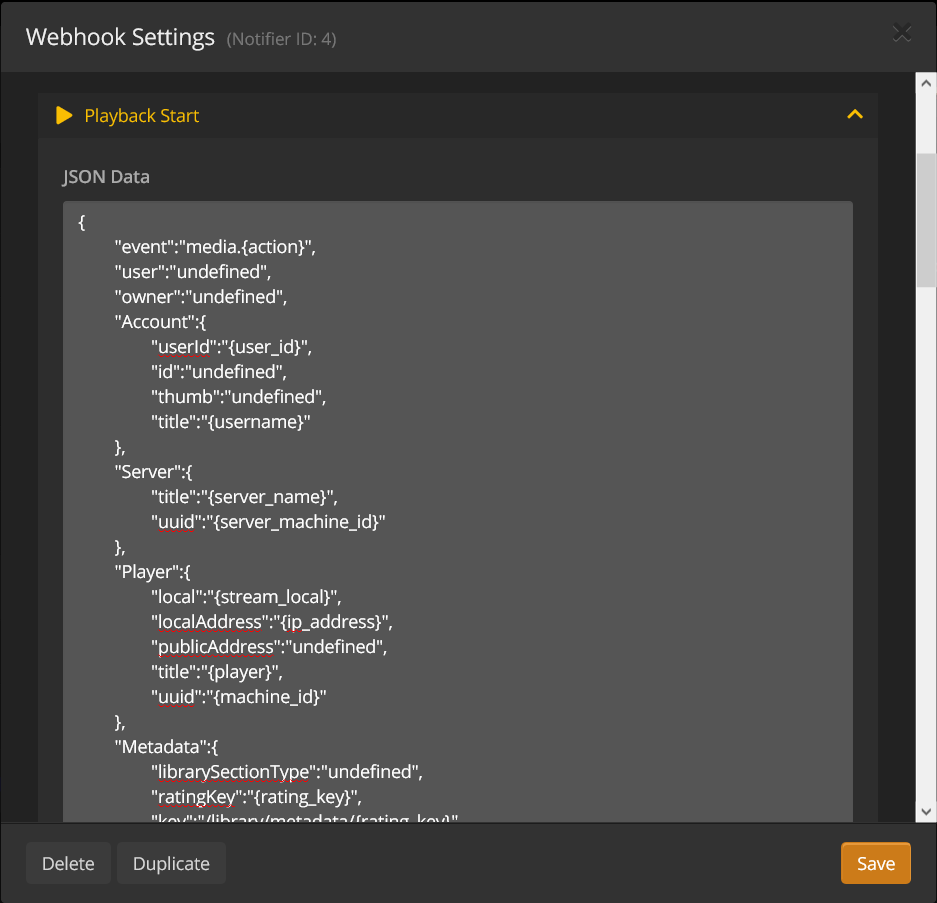
-
Finally, check the option
Allow Consecutive Notificationsto enable to allow sending of consecutive notifications (e.g. both watched & stopped notifications):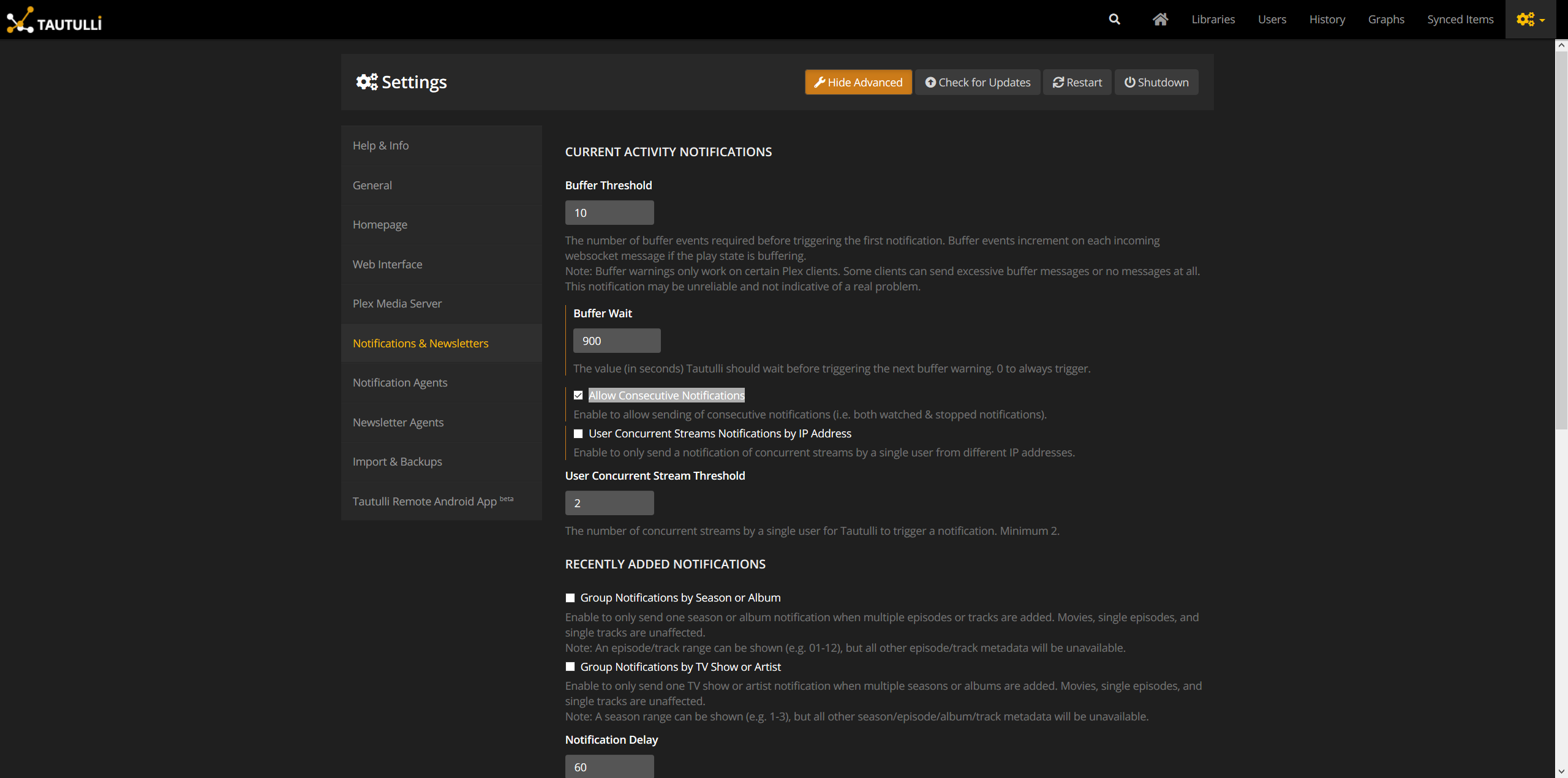
3. Channels & States
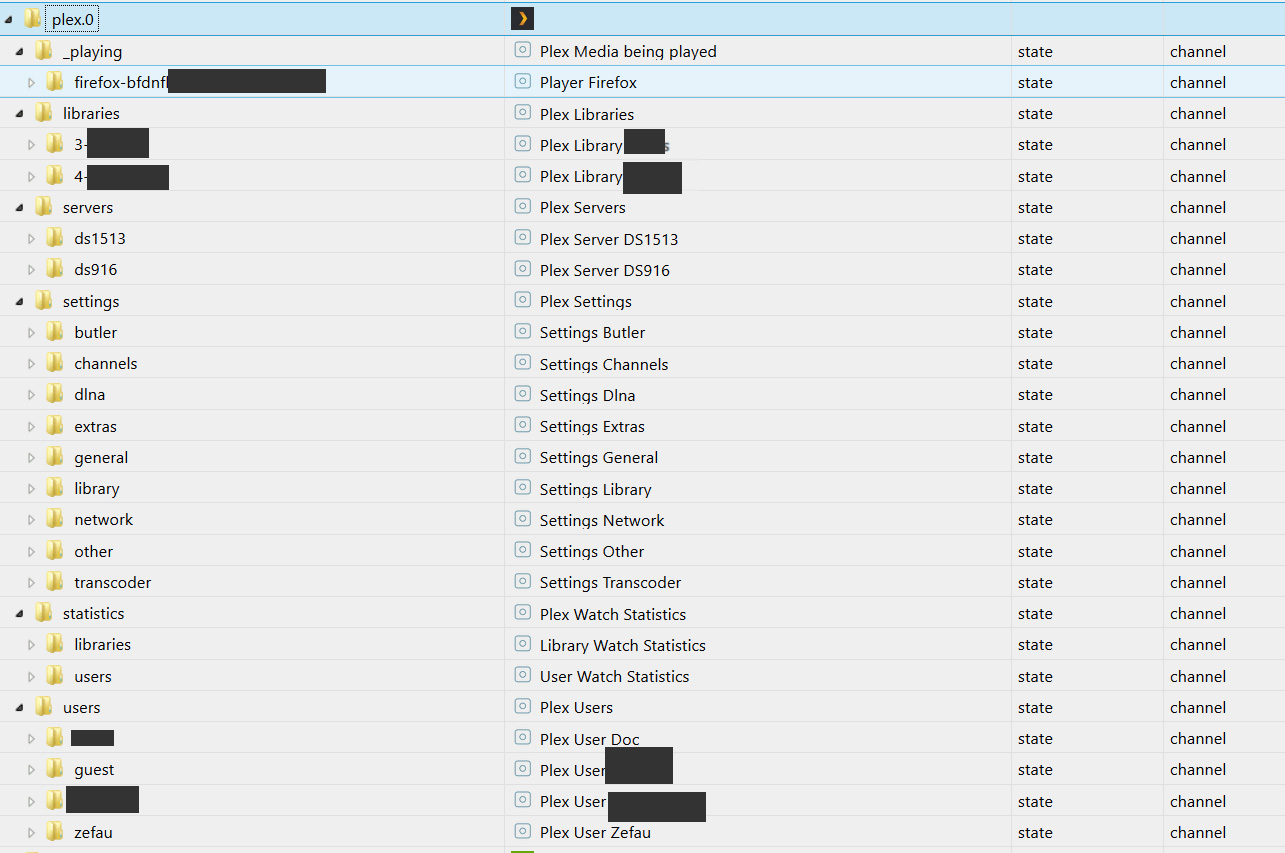
Having both the basic and advanced setup configured, the following channels will appear (libraries, servers and users are only examples of course). See further below for full list of channels & states.
3.1. With Basis Setup
After sucessful basic setup the channels according to the following table will be created. For a list of all states which will be created, please see dedicated list of states.
| Channel / Folder | Description |
|---|---|
| libraries | Plex Libraries |
| servers | Plex Servers |
| settings | Plex Settings |
3.2. With Advanced Setup
After sucessful advanced setup the following channels will additionally be created. For a list of all states which will be created, please see dedicated list of states.
| Channel / Folder | Description | Remark |
|---|---|---|
| _playing | Plex Media being played | with Plex Pass or Tautulli |
| statistics | Plex Watch Statistics | only with Tautulli |
| users | Plex Users | only with Tautulli |
Credits
This adapter would not have been possible without the great work of @Zefau (https://github.com/Zefau), who create and maintained it until 2021 .
Changelog
3.0.0 (2026-08-16)
- (bluefox) Breaking: Admin 8 or newer is now required — the configuration UI no longer runs under Admin 7.
- (bluefox) Dependencies have been updated.
2.1.1 (2026-06-21)
- (mcm1957) some issues reported by repository checker have been fixed
- (mcm1957) dependencies have been updated
2.1.0 (2026-05-13)
- (ticaki) New: server management commands — library scan, force-refresh, empty trash, analyze streams (
libraries.{id}._commands.*). - (ticaki) New: global maintenance buttons — refresh all libraries, clean bundles, optimize database (
maintenance.*). - (ticaki) New: Butler task buttons — trigger any of Plex's scheduled background tasks on demand (
butler.*). - (ticaki) New: per-media commands when playback starts — mark watched/unwatched, rate, refresh metadata (
_playing.*._Commands.*). - (ticaki) New: Plex server settings are now writable — changes are sent to the server immediately (
settings.*). - (ticaki) Fix: library
_refreshbutton was created as non-writable channel; now correctly a writable boolean button.
2.0.0 (2026-05-10)
- (ticaki) Breaking: Data points under
_playing.*have been restructured — existing scripts and Vis widgets need to be updated. - (ticaki) Data retrieval from Plex Media Server reworked; which fields are populated depends on the interface used (local / Plex.tv cloud).
- (ticaki) Adapter configuration fully migrated to the modern jsonConfig format.
- (ticaki) Built-in web interface redesigned: timeline of recent events, Now Playing display, and customizable layout.
- (ticaki) Player detection improved: Plexamp, Plex iOS/Android, PlexHTPC, and newer TV apps now reliably detected.
- (ticaki) Reconnect after connection errors accelerated: progressive backoff instead of fixed wait time.
- (ticaki) Fixed: Plex iOS, Android, and Web devices no longer generate "State has no existing object" log warnings after an upgrade.
- (ticaki) Fixed: deleting a device via adapter settings now correctly clears all internal state entries.
- (ticaki) New privacy option: media link states can store a placeholder instead of the real Plex token in plain text (configurable in adapter settings, enabled by default).
- (ticaki) Adapter rewritten in TypeScript. Requires Node.js >= 22.
1.1.5 (2024-12-11)
- (ticaki) State _playing.*.Metadata.viewOffset is created.
- (ticaki) Dependencies updated
- (mcm1957) Adapter requires nodejs >= 18 now
License
The MIT License (MIT)
Copyright (c) 2023-2026 iobroker-community-adapters
Copyright (c) 2019-2020 Zefau zefau@mailbox.org
Permission is hereby granted, free of charge, to any person obtaining a copy of this software and associated documentation files (the "Software"), to deal in the Software without restriction, including without limitation the rights to use, copy, modify, merge, publish, distribute, sublicense, and/or sell copies of the Software, and to permit persons to whom the Software is furnished to do so, subject to the following conditions:
The above copyright notice and this permission notice shall be included in all copies or substantial portions of the Software.
THE SOFTWARE IS PROVIDED "AS IS", WITHOUT WARRANTY OF ANY KIND, EXPRESS OR IMPLIED, INCLUDING BUT NOT LIMITED TO THE WARRANTIES OF MERCHANTABILITY, FITNESS FOR A PARTICULAR PURPOSE AND NONINFRINGEMENT. IN NO EVENT SHALL THE AUTHORS OR COPYRIGHT HOLDERS BE LIABLE FOR ANY CLAIM, DAMAGES OR OTHER LIABILITY, WHETHER IN AN ACTION OF CONTRACT, TORT OR OTHERWISE, ARISING FROM, OUT OF OR IN CONNECTION WITH THE SOFTWARE OR THE USE OR OTHER DEALINGS IN THE SOFTWARE.