Overview
Adapter to request game data for soccer or other games form openligadb.de
Configuration
Add an instance of the adapter and click on the wrench symbol
In the form you can add the shortcut from a league and a season.
Please visit openligadb.de for available leagues,seasons and shortcuts
If a season is spread over two years, please enter only the start year.
Example data for 1. German Bundliga is
shortcut = bl1 season = 2023
If you saved and closed the configuration, a short while after this there must be new datapoints for your league and season.
Widgets
Actually there are 5 widgets available. Please enter openligadb in the widget filter
Table 4

This is the classic table view. The table contains several columns.
- MP = Number of games played
- W = Wins
- D = Draw
- L = Losses
- Goals = Goal difference
- Points = Points standing
- T = Trend
Attribute Table
| Attributs | Group | Description |
|---|---|---|
| allmatches | Select the data point allmatches. (Note: In the legacy widget, table was used instead.) This data point is created during configuration after a league/season has been successfully set up. It contains all match data for the selected league/season in JSON format. All table views (modes) are derived from this dataset. | |
| currgameday | Select the data point currgameday. This data point is created during configuration after a league/season has been successfully set up. Its value is calculated by the adapter based on the current date. The matchday switches at the midpoint between the last match of the previous matchday and the first match of the next matchday. | |
| mode | Defines the table view mode. Available options: Total (1total), Home (2home), Away (3away), First half (4round1), Second half (5round2). | |
| mode_binding | Alternative to mode, intended for dynamic control via binding. Accepts the same values as mode. If a valid value is provided, it overrides the mode attribute. Typically, this field can remain empty. | |
| maxicon | Maximum size of the team icon (applies to both width and height). | |
| shortname | Displays the team short name instead of the full team name, if available in the dataset. | |
| sowtrend | Displays the team trend (e.g. recent performance) if available. | |
| highlight | Highlights teams whose names match the provided terms. Multiple terms can be separated by semicolons (;). Matches are wrapped in <b> tags. Additional styling can be applied via the CSS class favorite or by defining custom classes per highlight (see corresponding documentation section). | |
| filter | Filters the table by team names. Multiple filter terms can be separated by semicolons (;). | |
| iconup,icondn,iconst | Attribute group icons | Defines custom icons for trend indicators (up, down, stable). |
| showgameday in der Attributgruppe | Advanced settings | Allows overriding the automatically calculated matchday by specifying a fixed matchday. |
| lastgamecount in der Attributgruppe | Advanced settings | Limits the table calculation to a specific number of recent matchdays relative to the displayed matchday (currgameday or showgameday). Example: showgameday = 10 and lastgamecount = 5 → only matchdays 6–10 are considered. |
Games of Gameday v2

This widget displays the matchday. Depending on the settings, it can always show the current matchday, the matchday relative to the current matchday, or a specific matchday.
Furthermore, the number of matchdays displayed can also be set. Certain elements of the display have been tagged with CSS classes, for which a specific format can then be defined as desired:
| CSS class | Affects which element | Notes |
|---|---|---|
| favorite | Matchday header (date/time) | Allows formatting of date and time when the favorite team is playing on that matchday. Can optionally be combined with the CSS class todaygameheader. |
| favorite | Team name | Allows custom formatting of the team name. |
| todaygame | Entire match row | Applied when the match takes place on the current day. |
| todaygameheader | Matchday header (date/time) | Applied when the matchday date corresponds to the current day. |
Examples of CSS Classes
Example: Display Header for a Matchday (General Date)
.oldb-tt tr.favorite {
    color: yellow;
}
Example team name
.oldb-tt b.favorite {
    color: blue;
}
Example line of a game
.oldb-tt .todaygame {
    color: red;
}
Example display header for a match day (today's date)
.oldb-tt .todaygameheader {
    color: lightgreen;
}
Attribute Game of Gamedays
| Attribute | Group | Description |
|---|---|---|
| allmatches | A datapoint named allmatches must be selected here. This datapoint is created after configuring the league/season, provided the configuration is valid. It contains all matches and results of a league/season in JSON format. If a matchday takes place today, the date (todaygameheader) and the corresponding match (todaygame) are assigned CSS classes. | |
| currgameday | A datapoint named currgameday must be selected here. This datapoint is created after configuring the league/season, provided the configuration is valid. Its value is calculated by the adapter based on the current date. The current matchday switches halfway between the last match of the previous matchday and the first match of the next matchday. | |
| maxicon | Maximum size of the team icon in either x or y direction. | |
| shortname | Displays the short name instead of the team name, if available in the provided data. | |
| showgoals | Displays information about goal scorers. | |
| highlight | One or more terms can be entered here, separated by semicolons (;), to be highlighted. The search is performed only within team names. Matching names are wrapped with HTML <b> tags. More detailed formatting can be applied via the CSS class "favorite". Additionally, a custom CSS class can be defined per highlight. See chapter "todo". | |
| showgameday | Advanced Settings | If this field is empty, the current matchday is always displayed. If a positive number is entered, the specified matchday is shown (if available). If a negative number is entered, the matchday is displayed relative to the current one (e.g., -1 corresponds to the previous matchday). |
| showgamedaycount | Advanced Settings | Usually this field remains empty or contains 1, meaning exactly one matchday is shown. If another number is entered, that number of matchdays will be displayed, starting from the setting defined in showgameday. |
| showweekday | Advanced Settings | Optionally displays the weekday before the date. |
Examples
Examples of binding in the attribute showgameday
This field can also be calculated and populated using vis-binding, if necessary. Examples of a relatively calculated matchday: |
    Previous matchday
    {a:openligadb.0.bl1.2019.currgameday;a-1} or
    Next matchday
    {a:openligadb.0.bl1.2019.currgameday;a+1}
Since the binding is not calculated in the vis edit mode,
when using binding in edit mode, the current match day is always displayed.
Games of favorite clubs 2

This widget displays the upcoming matches of your favorite teams
from one or more leagues. By selecting the number of leagues to display,
a separate configuration group is shown for each league,
where the following settings can be configured.
If the match is today, the respective match (todaygame) will be tagged with CSS classes.
Example
.todaygame {
    color: red;
}

.todaygameheader {
    color: yellow;
}
Attribute
| Attribute | Group | Description |
|---|---|---|
| leaguecount | General | Specifies the number of leagues to be queried. A separate configuration group is displayed for each league. |
| maxicon | General | Maximum size of the team icon in either x or y direction. |
| showresult | General | Determines whether match results should be displayed, if available. |
| showabbreviation | General | To distinguish matches from different leagues, a custom abbreviation can be defined per configuration. This option controls whether that abbreviation is displayed. |
| showweekday | General | Optionally displays the weekday before the date. The following attributes in the League group may repeat depending on the value of leaguecount. |
| allmatches | League | A datapoint named allmatches must be selected here. This datapoint is created after configuring the league/season, provided the configuration is valid. It contains all matches and results of a league/season in JSON format. |
| currgameday | League | A datapoint named currgameday must be selected here. This datapoint is created after configuring the league/season, provided the configuration is valid. Its value is calculated by the adapter based on the current date. The current matchday switches halfway between the last match of the previous matchday and the first match of the next matchday. |
| showgameday | League | If this field is empty, the current matchday is used. If a positive number is entered, the specified matchday is used (if available). If a negative number is entered, the matchday is determined relative to the current one (e.g., -1 corresponds to the previous matchday). |
| showgamedaycount | League | Defines how many matchdays should be displayed. If left empty, all remaining matchdays are shown (max. 9999 matchdays). If a number is entered, matches for that number of matchdays are displayed, starting from the setting defined in showgameday. |
| shortname | League | Displays the short name instead of the team name, if available in the provided data. |
| abbreviation | League | Abbreviation to be displayed for this league, if showabbreviation is enabled. |
| highlight | League | One or more terms can be entered here, separated by semicolons (;), to identify favorite teams. The search is performed only within team names. Unlike other widgets, no special visual highlighting is applied here. |
Game of Favorite Clubs Examples
Examples of binding in the showgameday attribute for Game of Favorite Clubs
This field can also be calculated and populated using vis-binding.
Examples of a relatively calculated matchday:
Previous matchday
{a:openligadb.0.bl1.2019.currgameday;a-1} or
Next matchday
{a:openligadb.0.bl1.2019.currgameday;a+1}
Since the binding is not calculated in the vis edit mode, when using binding in edit mode, the current match day is always displayed.
Pivot Table 2
This widget displays all matches and results as a pivot table.
| CSS Class | Affects which element | Example |
|---|---|---|
| favorite | Team names selected via highlight |
Pivot Table Examples
Example: Team Name Selected via Highlight
.oldb-tt .favorite {
    color: yellow;
}
Attribute Pivot Table
| Attribute | Group | Description |
|---|---|---|
| allmatches | General | A datapoint named allmatches must be selected here. This datapoint is created after configuring the league/season, provided the configuration is valid. It contains all matches and results of a league/season in JSON format. |
| currgameday | General | A datapoint named currgameday must be selected here. This datapoint is created after configuring the league/season, provided the configuration is valid. Its value is calculated by the adapter based on the current date. The current matchday switches halfway between the last match of the previous matchday and the first match of the next matchday. |
| maxicon | Maximum size of the team icon in either x or y direction. | |
| sort4e | Defines the sorting criteria to be applied. | |
| shortname | Displays the short name instead of the team name, if available in the provided data. | |
| highlight at start | Displays highlighted teams at the beginning of the table. | |
| highlight | One or more terms can be entered here, separated by semicolons (;), to be highlighted. The search is performed only within team names. Matching names are wrapped with HTML <b> tags. More detailed formatting can be applied via the CSS class "favorite". |
Goal getters 2
This widget displays all the top scorers.
Attribute Goal getters
| Attribute | Group | Description |
|---|---|---|
| goalgetters | General | A datapoint named goalgetters must be selected here. This datapoint is created after configuring the league/season, provided the configuration is valid. It contains all top scorers of the current season. |
| maxcount | Limits the number of goal scorers to be displayed. | |
| sortorder | Defines the sorting order. | |
| onlyhighlight | Displays only entries matching the highlight filter. | |
| highlight | One or more terms can be entered here, separated by semicolons (;), to be highlighted. The search is performed only within player names. Matching names are wrapped with HTML <b> tags. More detailed formatting can be applied via the CSS class "favorite". |
Recipes for Reuse
Controlling table mode via buttons
- Create a table v2 widget and configure it as described in this documentation.
- In the widget settings, under the Visibility group, assign your created datapoint.
- Duplicate this widget and place the copies side by side so that a total of three instances exist in the view.
- In each widget’s Visibility settings, set the “Condition value”
to one of the following values (one per widget):
total,home,away - Create a new widget: Radiobuttons ValueList (included in the default vis installation).
- In this widget, under the General group, select your created Object ID.
- In the Values field, enter:
total;home;away(this must match the values used in the visibility settings of the widgets) - In the Texts field, enter:
Total;Home;Away - Open the vis runtime and test the setup.
- Once everything works, place the widgets exactly on top of each other so that they appear as a single widget.
Scrolling (marquee) effect for a widget row
This looks best when only one or a few rows are displayed, e.g., in the FavGame widget.
#w00000 is the ID of the widget that should be animated.
Expand
#w00000 .oldb-tt {
    max-width: 100vw; /* iOS needs this */
    overflow: hidden;
}

#w00000 .oldb-tt tbody {
    display: inline-block;
    padding-left: 100%;
    animation: marquee 10s linear infinite;
}

/* Make it move */
@keyframes marquee {
    0% {
        transform: translateX(0);
    }
    100% {
        transform: translateX(-100%);
    }
}
Spieltag über +/- Buttons steuern, sowie direkte Auswahl per Listbox
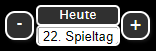
For this control, an additional data point of type number must be created. In this example, it was named javascript.0.bl1.spieltag.
Thanks to bommel_030 The 4 controls for import can be found here:
Expand
[{"tpl":"_tplGroup","data":{"members":["w00065","w00066","g00001"],"visibility-cond":"==","visibility-val":1,"visibility-groups-action":"hide","attrCount":"1","signals-cond-0":"==","signals-val-0":true,"signals-icon-0":"/vis/signals/lowbattery.png","signals-icon-size-0":0,"signals-blink-0":false,"signals-horz-0":0,"signals-vert-0":0,"signals-hide-edit-0":false,"signals-cond-1":"==","signals-val-1":true,"signals-icon-1":"/vis/signals/lowbattery.png","signals-icon-size-1":0,"signals-blink-1":false,"signals-horz-1":0,"signals-vert-1":0,"signals-hide-edit-1":false,"signals-cond-2":"==","signals-val-2":true,"signals-icon-2":"/vis/signals/lowbattery.png","signals-icon-size-2":0,"signals-blink-2":false,"signals-horz-2":0,"signals-vert-2":0,"signals-hide-edit-2":false,"lc-type":"last-change","lc-is-interval":true,"lc-is-moment":false,"lc-format":"","lc-position-vert":"top","lc-position-horz":"right","lc-offset-vert":0,"lc-offset-horz":0,"lc-font-size":"12px","lc-font-family":"","lc-font-style":"","lc-bkg-color":"","lc-color":"","lc-border-width":"0","lc-border-style":"","lc-border-color":"","lc-border-radius":10,"lc-zindex":0},"widgetSet":null,"style":{"top":38.28125,"left":"663px","width":"141px","height":"37px"}},{"tpl":"tplIconInc","data":{"oid":"javascript.0.bl1.spieltag","repeat_delay":"800","repeat_interval":"800","src":"","step":"-1","minmax":"1","text":"-","g_last_change":false,"lc-type":"last-change","lc-is-interval":true,"lc-is-moment":false,"lc-format":"","lc-position-vert":"top","lc-position-horz":"right","lc-offset-vert":0,"lc-offset-horz":0,"lc-font-size":"12px","lc-font-family":"","lc-font-style":"","lc-bkg-color":"","lc-color":"","lc-border-width":"0","lc-border-style":"","lc-border-color":"","lc-border-radius":10,"lc-zindex":0,"name":"spieltag_minus","g_visibility":false,"visibility-cond":"==","visibility-val":1,"visibility-groups-action":"hide","g_gestures":false,"g_signals":false,"signals-cond-0":"==","signals-val-0":true,"signals-icon-0":"/vis/signals/lowbattery.png","signals-icon-size-0":0,"signals-blink-0":false,"signals-horz-0":0,"signals-vert-0":0,"signals-hide-edit-0":false,"signals-cond-1":"==","signals-val-1":true,"signals-icon-1":"/vis/signals/lowbattery.png","signals-icon-size-1":0,"signals-blink-1":false,"signals-horz-1":0,"signals-vert-1":0,"signals-hide-edit-1":false,"signals-cond-2":"==","signals-val-2":true,"signals-icon-2":"/vis/signals/lowbattery.png","signals-icon-size-2":0,"signals-blink-2":false,"signals-horz-2":0,"signals-vert-2":0,"signals-hide-edit-2":false},"style":{"left":"0%","top":"16.22%","background":"#303030","width":"17.73%","height":"67.57%","z-index":"50","font-family":"","background-color":"#303030","font-weight":"bolder","border-width":"2px","border-radius":"10px","box-shadow":"2px 2px 3px rgba(20, 20, 20, 50)","color":"white","border-style":"solid","border-color":"white","font-size":""},"widgetSet":"jqui","grouped":true,"groupName":"w00065"},{"tpl":"tplIconInc","data":{"oid":"javascript.0.bl1.spieltag","repeat_delay":"800","repeat_interval":"800","src":"","step":"+1","minmax":"34","text":"+","gestures-offsetX":0,"gestures-offsetY":"-1","signals-cond-0":"==","signals-val-0":true,"signals-icon-0":"/vis.0/VIS/lowbattery.png","signals-icon-size-0":0,"signals-blink-0":false,"signals-horz-0":0,"signals-vert-0":0,"signals-hide-edit-0":false,"signals-cond-1":"==","signals-val-1":true,"signals-icon-1":"/vis.0/VIS/lowbattery.png","signals-icon-size-1":0,"signals-blink-1":false,"signals-horz-1":0,"signals-vert-1":0,"signals-hide-edit-1":false,"signals-cond-2":"==","signals-val-2":true,"signals-icon-2":"/vis.0/VIS/lowbattery.png","signals-icon-size-2":0,"signals-blink-2":false,"signals-horz-2":0,"signals-vert-2":0,"signals-hide-edit-2":false,"g_last_change":false,"lc-type":"last-change","lc-is-interval":true,"lc-is-moment":false,"lc-format":"","lc-position-vert":"top","lc-position-horz":"right","lc-offset-vert":0,"lc-offset-horz":0,"lc-font-size":"12px","lc-font-family":"","lc-font-style":"","lc-bkg-color":"","lc-color":"","lc-border-width":"0","lc-border-style":"","lc-border-color":"","lc-border-radius":10,"lc-zindex":0,"name":"spieltag_plus","g_visibility":false,"visibility-cond":"==","visibility-val":1,"visibility-groups-action":"hide"},"style":{"left":"82.27%","top":"16.22%","background":"#303030","width":"17.73%","height":"67.57%","z-index":"50","font-family":"","background-color":"#303030","font-weight":"bolder","border-width":"2px","border-radius":"10px","box-shadow":"2px 2px 3px rgba(20, 20, 20, 50)","color":"white","border-style":"solid","border-color":"white"},"widgetSet":"jqui","grouped":true,"groupName":"w00066"},{"tpl":"_tplGroup","data":{"members":["w00064","w00059"],"visibility-cond":"==","visibility-val":1,"visibility-groups-action":"hide","attrCount":"1","signals-cond-0":"==","signals-val-0":true,"signals-icon-0":"/vis/signals/lowbattery.png","signals-icon-size-0":0,"signals-blink-0":false,"signals-horz-0":0,"signals-vert-0":0,"signals-hide-edit-0":false,"signals-cond-1":"==","signals-val-1":true,"signals-icon-1":"/vis/signals/lowbattery.png","signals-icon-size-1":0,"signals-blink-1":false,"signals-horz-1":0,"signals-vert-1":0,"signals-hide-edit-1":false,"signals-cond-2":"==","signals-val-2":true,"signals-icon-2":"/vis/signals/lowbattery.png","signals-icon-size-2":0,"signals-blink-2":false,"signals-horz-2":0,"signals-vert-2":0,"signals-hide-edit-2":false,"lc-type":"last-change","lc-is-interval":true,"lc-is-moment":false,"lc-format":"","lc-position-vert":"top","lc-position-horz":"right","lc-offset-vert":0,"lc-offset-horz":0,"lc-font-size":"12px","lc-font-family":"","lc-font-style":"","lc-bkg-color":"","lc-color":"","lc-border-width":"0","lc-border-style":"","lc-border-color":"","lc-border-radius":10,"lc-zindex":0},"widgetSet":null,"style":{"top":"0%","left":"21.99%","width":"56.74%","height":"100%"},"grouped":true,"groupName":"g00001"},{"tpl":"tplJquiSelectList","data":{"oid":"javascript.0.bl1.spieltag","g_fixed":true,"g_visibility":false,"g_css_font_text":true,"g_css_background":true,"g_css_shadow_padding":true,"g_css_border":true,"g_gestures":false,"g_signals":false,"values":"1;2;3;4;5;6;7;8;9;10;11;12;13;14;15;16;17;18;19;20;21;22;23;24;25;26;27;28;29;30;31;32;33;34","texts":"1. Spieltag;2. Spieltag;3. Spieltag;4. Spieltag;5. Spieltag;6. Spieltag;7. Spieltag;8. Spieltag;9. Spieltag;10. Spieltag;11. Spieltag;12. Spieltag;13. Spieltag;14. Spieltag;15. Spieltag;16. Spieltag;17. Spieltag;18. Spieltag;19. Spieltag;20. Spieltag;21. Spieltag;22. Spieltag;23. Spieltag;24. Spieltag;25. Spieltag;26. Spieltag;27. Spieltag;28. Spieltag;29. Spieltag;30. Spieltag;31. Spieltag;32. Spieltag;33. Spieltag;34. Spieltag","height":"150","signals-cond-0":"==","signals-val-0":true,"signals-icon-0":"/vis/signals/lowbattery.png","signals-icon-size-0":0,"signals-blink-0":false,"signals-horz-0":0,"signals-vert-0":0,"signals-hide-edit-0":false,"signals-cond-1":"==","signals-val-1":true,"signals-icon-1":"/vis/signals/lowbattery.png","signals-icon-size-1":0,"signals-blink-1":false,"signals-horz-1":0,"signals-vert-1":0,"signals-hide-edit-1":false,"signals-cond-2":"==","signals-val-2":true,"signals-icon-2":"/vis/signals/lowbattery.png","signals-icon-size-2":0,"signals-blink-2":false,"signals-horz-2":0,"signals-vert-2":0,"signals-hide-edit-2":false,"no_style":true,"class":"","lc-type":"last-change","lc-is-interval":true,"lc-is-moment":false,"lc-format":"","lc-position-vert":"top","lc-position-horz":"right","lc-offset-vert":0,"lc-offset-horz":0,"lc-font-size":"12px","lc-font-family":"","lc-font-style":"","lc-bkg-color":"","lc-color":"","lc-border-width":"0","lc-border-style":"","lc-border-color":"","lc-border-radius":10,"lc-zindex":0,"open":false,"name":"spieltag_liste","visibility-cond":"==","visibility-val":1,"visibility-groups-action":"hide"},"style":{"left":"0%","top":"54.77%","height":"45.95%","width":"100%","background":"","box-shadow":"","border-radius":"5px","padding-left":"","padding-right":"","margin-right":"","color":"","font-weight":"bolder","border-width":"2px","border-style":"solid","border-color":"white","background-color":""},"widgetSet":"jqui","grouped":true,"groupName":"w00064"},{"tpl":"tplIconState","data":{"oid":"javascript.0.bl1.spieltag","g_fixed":true,"g_visibility":false,"g_css_font_text":true,"g_css_background":true,"g_css_shadow_padding":false,"g_css_border":true,"g_gestures":false,"g_signals":false,"g_last_change":false,"visibility-cond":"==","visibility-val":1,"visibility-groups-action":"hide","signals-cond-0":"==","signals-val-0":true,"signals-icon-0":"/vis/signals/lowbattery.png","signals-icon-size-0":0,"signals-blink-0":false,"signals-horz-0":0,"signals-vert-0":0,"signals-hide-edit-0":false,"signals-cond-1":"==","signals-val-1":true,"signals-icon-1":"/vis/signals/lowbattery.png","signals-icon-size-1":0,"signals-blink-1":false,"signals-horz-1":0,"signals-vert-1":0,"signals-hide-edit-1":false,"signals-cond-2":"==","signals-val-2":true,"signals-icon-2":"/vis/signals/lowbattery.png","signals-icon-size-2":0,"signals-blink-2":false,"signals-horz-2":0,"signals-vert-2":0,"signals-hide-edit-2":false,"lc-type":"last-change","lc-is-interval":true,"lc-is-moment":false,"lc-format":"","lc-position-vert":"top","lc-position-horz":"right","lc-offset-vert":0,"lc-offset-horz":0,"lc-font-size":"12px","lc-font-family":"","lc-font-style":"","lc-bkg-color":"","lc-color":"","lc-border-width":"0","lc-border-style":"","lc-border-color":"","lc-border-radius":10,"lc-zindex":0,"text":"Heute","invert_icon":false,"value":"{openligadb.0.bl1.2019.currgameday}"},"style":{"left":"0%","top":"0%","color":"white","background":"#303030","font-size":"small","font-weight":"normal","height":"45.95%","border-width":"2px","border-style":"solid","border-color":"white","width":"100%"},"widgetSet":"jqui","grouped":true,"groupName":"w00059"}]
Display of specific properties if one of your favorite teams is playing today
Example 1 The HTML widget gets a green background if Bayern is playing today.
The binding expression is placed here in the background-color field in the CSS Background tab.
{a:openligadb.0.bl1.2019.currgameday;vis.binds["openligadb"].checkTodayFavorite('openligadb.0.bl1.2019.allmatches','bayern')?'red':'green'}
Expand
[{"tpl":"tplHtml","data":{"g_fixed":false,"g_visibility":false,"g_css_font_text":false,"g_css_background":true,"g_css_shadow_padding":false,"g_css_border":true,"g_gestures":false,"g_signals":false,"g_last_change":false,"visibility-cond":"==","visibility-val":1,"visibility-groups-action":"hide","refreshInterval":"0","signals-cond-0":"==","signals-val-0":true,"signals-icon-0":"/vis/signals/lowbattery.png","signals-icon-size-0":0,"signals-blink-0":false,"signals-horz-0":0,"signals-vert-0":0,"signals-hide-edit-0":false,"signals-cond-1":"==","signals-val-1":true,"signals-icon-1":"/vis/signals/lowbattery.png","signals-icon-size-1":0,"signals-blink-1":false,"signals-horz-1":0,"signals-vert-1":0,"signals-hide-edit-1":false,"signals-cond-2":"==","signals-val-2":true,"signals-icon-2":"/vis/signals/lowbattery.png","signals-icon-size-2":0,"signals-blink-2":false,"signals-horz-2":0,"signals-vert-2":0,"signals-hide-edit-2":false,"lc-type":"last-change","lc-is-interval":true,"lc-is-moment":false,"lc-format":"","lc-position-vert":"top","lc-position-horz":"right","lc-offset-vert":0,"lc-offset-horz":0,"lc-font-size":"12px","lc-font-family":"","lc-font-style":"","lc-bkg-color":"","lc-color":"","lc-border-width":"0","lc-border-style":"","lc-border-color":"","lc-border-radius":10,"lc-zindex":0},"style":{"left":"445px","top":"589px","background":"{a:openligadb.0.bl1.2019.currgameday;vis.binds[\"openligadb\"].checkTodayFavorite('openligadb.0.bl1.2019.allmatches','bayer')?'red':'green'}","width":"70px","height":"70px","border-radius":"10px"},"widgetSet":"basic"}]
Selecting the Table Mode for the Table Widget
 This HTML widget controls the mode of the table widget.
The data point used in the following widget is:
This HTML widget controls the mode of the table widget.
The data point used in the following widget is:
javascript.0.tablemode
This must be bound to the mode_binding attribute in the table widget as follows:
{javascript.0.tabellemodus}
Here is the widget code for importing.
Expand
[{"tpl":"tplJquiRadioList","data":{"oid":"javascript.0.tabellemodus","g_fixed":true,"g_visibility":false,"g_css_font_text":true,"g_css_background":true,"g_css_shadow_padding":false,"g_css_border":false,"g_gestures":false,"g_signals":false,"g_last_change":false,"visibility-cond":"==","visibility-val":1,"visibility-groups-action":"hide","values":"1total;2home;3away;4round1;5round2","texts":"Gesamt;Heim;Auswärts;Hinrunde;Rückrunde","signals-cond-0":"==","signals-val-0":true,"signals-icon-0":"/vis/signals/lowbattery.png","signals-icon-size-0":0,"signals-blink-0":false,"signals-horz-0":0,"signals-vert-0":0,"signals-hide-edit-0":false,"signals-cond-1":"==","signals-val-1":true,"signals-icon-1":"/vis/signals/lowbattery.png","signals-icon-size-1":0,"signals-blink-1":false,"signals-horz-1":0,"signals-vert-1":0,"signals-hide-edit-1":false,"signals-cond-2":"==","signals-val-2":true,"signals-icon-2":"/vis/signals/lowbattery.png","signals-icon-size-2":0,"signals-blink-2":false,"signals-horz-2":0,"signals-vert-2":0,"signals-hide-edit-2":false,"lc-type":"last-change","lc-is-interval":true,"lc-is-moment":false,"lc-format":"","lc-position-vert":"top","lc-position-horz":"right","lc-offset-vert":0,"lc-offset-horz":0,"lc-font-size":"12px","lc-font-family":"","lc-font-style":"","lc-bkg-color":"","lc-color":"","lc-border-width":"0","lc-border-style":"","lc-border-color":"","lc-border-radius":10,"lc-zindex":0,"class":""},"style":{"left":"54px","top":"356px","background":"black","font-size":"xx-small"},"widgetSet":"jqui"}]
Special Functions
vis.binds["openligadb"].checkTodayFavorite(ObjectID,Favorites)
JavaScript function to check if a match is taking place today for one or more teams. This function can be used via the vis binding. Due to the binding requirements, a few things need to be considered.
This function can be used in the binding, for example, as follows.
For testing purposes, the following notation can be entered into an HTML widget. The result will then be either yes or no, depending on whether the search term was found in the team names today.
All quotation marks (single and double) must be entered exactly as shown.
Schema
{a:oid;vis.binds["openligadb"].checkTodayFavorite('oid_allmatches','clubsuche1,clubsuche2')?'ja':'nein'}
Real life Example
{a:openligadb.0.bl1.2024.currgameday;vis.binds["openligadb"].checkTodayFavorite('openligadb.0.bl1.2024.allmatches','bayern')?'ja':'nein'}
Bedeutung der Parameter
<table><tbody><tr><td>oid</td><td>An arbitrary data point that triggers the update. It is recommended to choose, for example, currgameday,<br>as this is updated simultaneously with allmatches.</td></tr><tr><td>oid_allmatches</td><td>Name of an allmatches data point for the respective league/season.</td></tr><tr><td>clubsuche</td><td>One or more names (can also be partial names), separated by commas (,). Please note:<br>This field corresponds to the highlight field in the widgets. Multiple search terms only need to be separated by commas here, not by semicolons as in the widgets.</td></tr></tbody></table>
Documentation for the vis-widgets are available inside vis or Widget-Documentation/german
sendTo Commands
getMatchData
Request the data from OpenLigaDB by league,season and a time range.
Mandatory parameters
Parameter | Example | Type | Description |
|---|---|---|---|
league | bl1 | string | identifier of the league, see openlogadb |
season | 2024 | string | name of the season, see openlogadb |
datefrom | 2024-09-01T00:00 | string | date in ISO notation |
datetill | 2024-09-10T00:00 | string | date in ISO notation |
Example sendTo
sendTo(
    'openligadb.0',
    'getMatchData',
    {
        league: 'bl1',
        season: '2024',
        datefrom: '2024-09-01T00:00',
        datetill: '2024-09-10T00:00',
    },
    function (matches) {
        console.log(matches);
    },
);
Todo
- validation in widget if user didnt select the right datapoint
translationdocumentation for new widgets pivottable and goalgettersextend table modes with 1st round,2nd roundnew widget pivot table of played gamesnew widget goal getter ranking with sort functionextend table with trend sign (arrow up/down, point for no change)extend table to calculate with x last gamesextend table to calculate ranking for a defined gamedaydocumentation adapter / widgetfix issue for dynamic with of club columnnew widget: next x games of clubwidget gameday setting for start gameday an length (-1,3 = show previous gameday and 3 gamedays after that)Replacement value for edit mode if showgameday is set with bindinghighlight favorite clubcontrollable gameday in the gameday widget
Changelog
WORK IN PROGRESS
- add old changelog
- update worklfow
- remove word.js
1.9.3 (2026-03-29)
- translate widgets
- translate readme
- move widgetscript to dist folder
- remove unused scripts
- release
- fix workflow
1.9.1 (2025-08-26)
- test remove node 18,extend to node 24
- fix calcCurrentGameDay if games array is empty
1.9.0 (2025-08-04)
- revert to node 18
- move to axios
- use ioUtils
- move to class
- improve currgameday calc if the season didnt start
1.8.1 (2025-01-23)
- adjust breakpoints in jsonConfig as a workaround for the new table/card-elements
1.8.0 (2024-10-27)
- move widget documentation from html file to readme
- adjust and prove responsive design for jsonconfig
- implement individual color settings for highlite and filters for each widget
1.7.0 (2024-09-16)
- fix quotes
1.6.0 (2024-09-16)
- reimplement checkTodayFavorite
1.5.0 (2024-09-15)
- Addition of a CSS example for the Pivot Table widget
- add
sendTocommand to getMatchData - remove deprecated widgets
- addition widget option "only logo" to supress the teamname
1.4.11 (2024-08-09)
- fix issues from adapter checker
1.4.10 (2024-08-02)
- switch to eslint 9
- adjust markdownlint settings to be compatible with prettier
1.4.9 (2024-06-13)
- fix if no game exist for team1/team2
- somme prettier changes
- launch config for vscode
1.4.8 (2024-06-06)
- release
1.4.7 (2024-06-04)
- update dependencies
1.4.6 (2024-06-01)
- fix yml structure
1.4.5 (2024-06-01)
- fix yml structure
1.4.4 (2024-06-01)
- Enable NPM Publish
- Enable dependabot
- fix checks from adapter checker
1.4.3 (2024-06-01)
- remove files from eslint check
1.4.2 (2024-06-01)
- fix double qoutes
- remove files from eslint check
1.4.1 (2024-06-01)
- update package and io-broker files
- fix problems with vis2
- remove vis as a
License
MIT License
Copyright (c) 2025-2026 oweitman
Permission is hereby granted, free of charge, to any person obtaining a copy of this software and associated documentation files (the "Software"), to deal in the Software without restriction, including without limitation the rights to use, copy, modify, merge, publish, distribute, sublicense, and/or sell copies of the Software, and to permit persons to whom the Software is furnished to do so, subject to the following conditions:
The above copyright notice and this permission notice shall be included in all copies or substantial portions of the Software.
THE SOFTWARE IS PROVIDED "AS IS", WITHOUT WARRANTY OF ANY KIND, EXPRESS OR IMPLIED, INCLUDING BUT NOT LIMITED TO THE WARRANTIES OF MERCHANTABILITY, FITNESS FOR A PARTICULAR PURPOSE AND NONINFRINGEMENT. IN NO EVENT SHALL THE AUTHORS OR COPYRIGHT HOLDERS BE LIABLE FOR ANY CLAIM, DAMAGES OR OTHER LIABILITY, WHETHER IN AN ACTION OF CONTRACT, TORT OR OTHERWISE, ARISING FROM, OUT OF OR IN CONNECTION WITH THE SOFTWARE OR THE USE OR OTHER DEALINGS IN THE SOFTWARE.