Bring meter readings from your phone into ioBroker — automatically.
MeterMaster is the bridge between the MeterMaster Android app and your smart home. Record electricity, gas, water or heat meters on your smartphone; the adapter stores them as ioBroker states with correct timestamps and full history — ready for scripts, visualizations and billing workflows.
No cloud account. Readings stay in your network.

Why use this adapter?
| Without MeterMaster | With MeterMaster |
|---|---|
| Manual entry into ioBroker or spreadsheets | One tap in the app → state updated |
| Guessed timestamps | State ts = real reading date |
| No history per meter | Full readings.history array |
| Separate tools for charts/CSV | Built-in Web UI with charts and export |
Typical users: homeowners, landlords and property managers who already read meters on site and want those values in ioBroker without retyping.
Quick start
- Install MeterMaster from the official ioBroker adapter list and create an instance.
- Note the HTTP port (default
8089) and set a Basic Auth password. - Install the Android app → Settings → ioBroker → MeterMaster adapter.
- Enter your ioBroker host, port, username and password → Test connection.
- Record a reading in the app — it appears under
metermaster.0.…and in the Web UI.
Android app ──HTTP──► MeterMaster adapter ──► ioBroker states + history + Web UI
Open the Web UI anytime at http://{ioBroker-IP}:8089/ (no password required for viewing).
Features
- HTTP receiver — accepts readings from the MeterMaster Android app (single or batch)
- Automatic states — house / apartment / meter objects are created on first sync
- Correct timestamps —
readings.latestuses the actual reading date as statets - Full history — every meter keeps a
readings.historyJSON array - Basic Auth — optional username/password protection for write endpoints
- Built-in Web UI — Data, Import, Logs and System tabs in DE/EN
- Delete in Web UI — remove apartments/meters from ioBroker (password confirm)
- Collapsible sections — fold house/apartment blocks in the Data tab
- Charts & CSV — history charts, monthly consumption and per-meter CSV export
- Backup import — restore MeterMaster app backups (schema 2.0) via drag & drop
Optional: ESP32 OLED display nodes can show selected meter values on a small display.
MeterMaster Android app
The adapter is the ioBroker side of MeterMaster — a local-first Android app for utility meters.
- Manage properties, apartments and meters (electricity, gas, water, heat, custom)
- Record readings with date/time and optional photos
- Consumption charts and annual billing / CSV / HTML export
- Local storage only — no cloud, no account, no tracking
- Optional integrations: ioBroker (this adapter), MQTT, Google Sheets, InfluxDB
| Google Play | MeterMaster |
| Source & docs | MPunktBPunkt/MeterMaster |
Screenshots
| Data — meter cards, KPI, history, chart & CSV | Chart — linear time axis & monthly consumption |
|---|---|
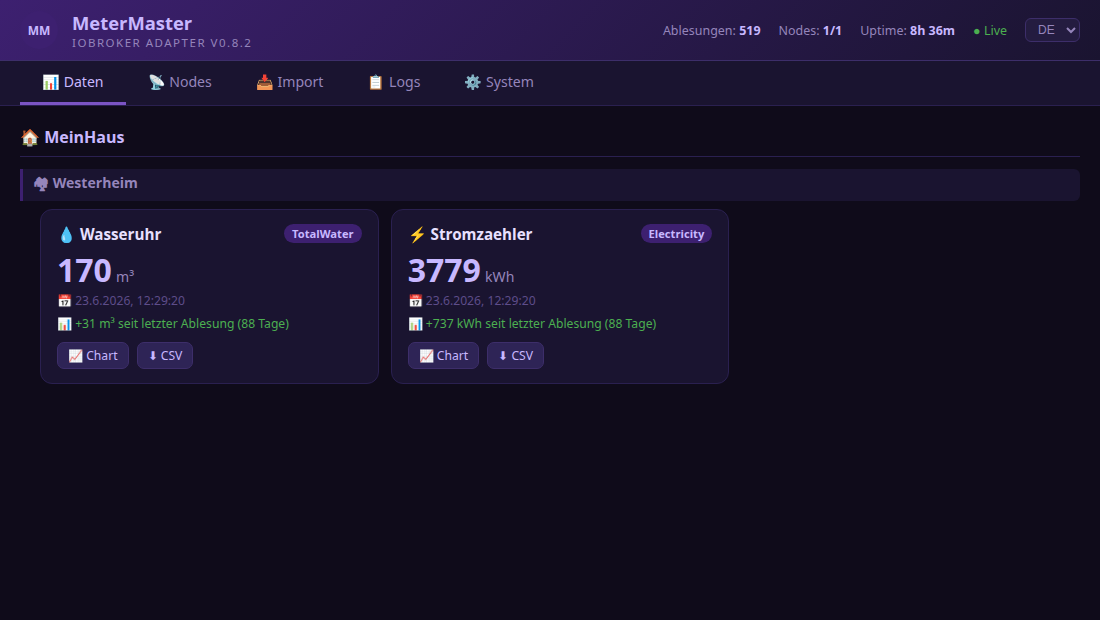 | 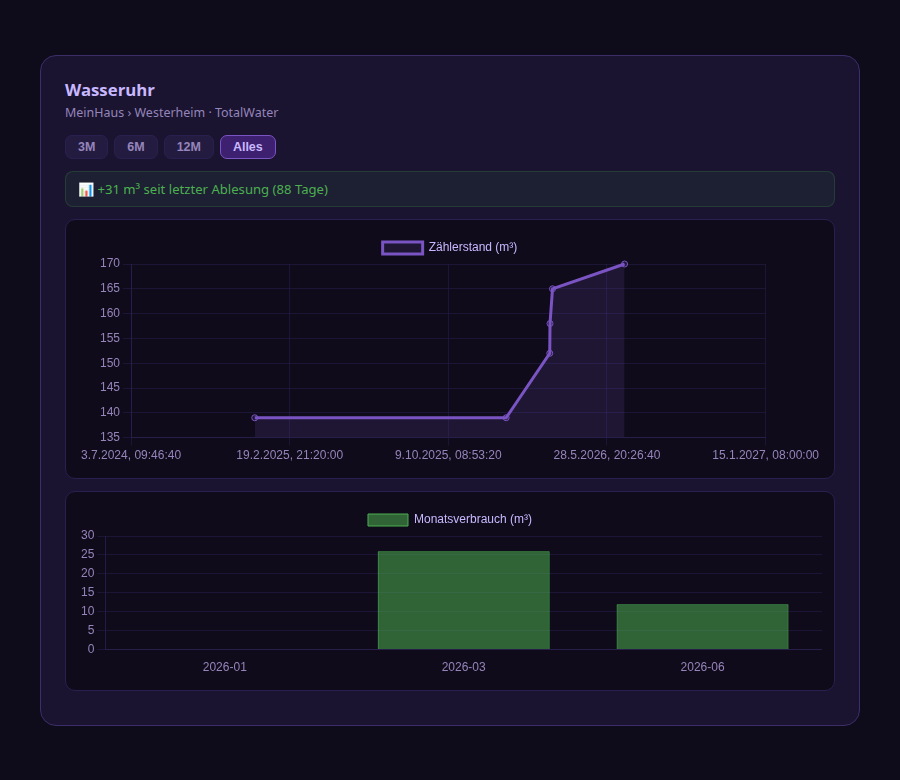 |
| Import — app backup via drag & drop | Logs — live filter & export |
|---|---|
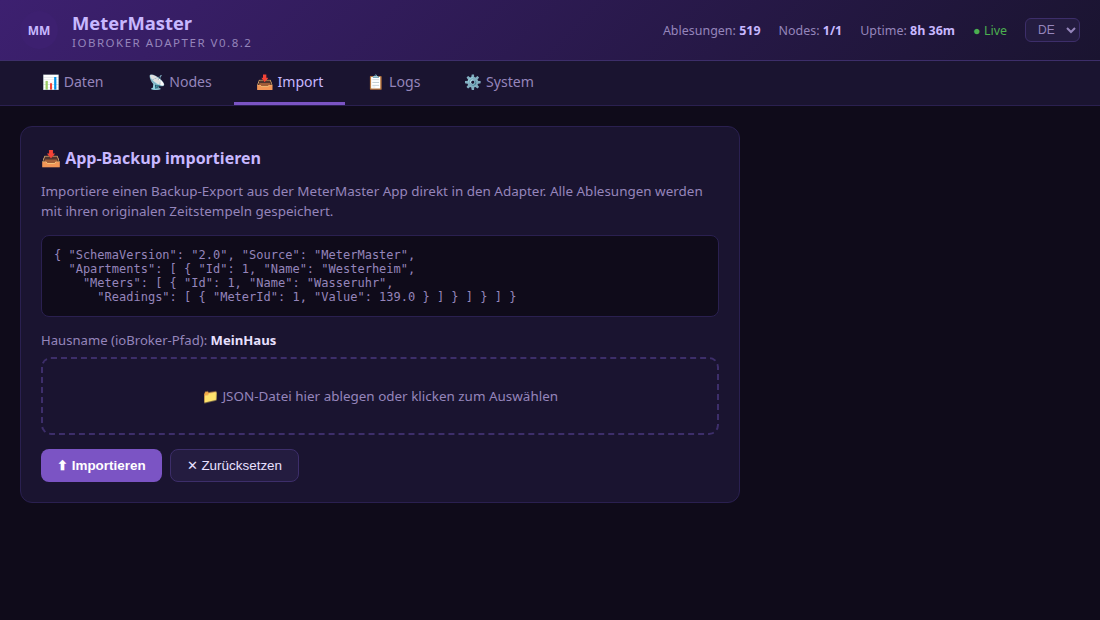 | 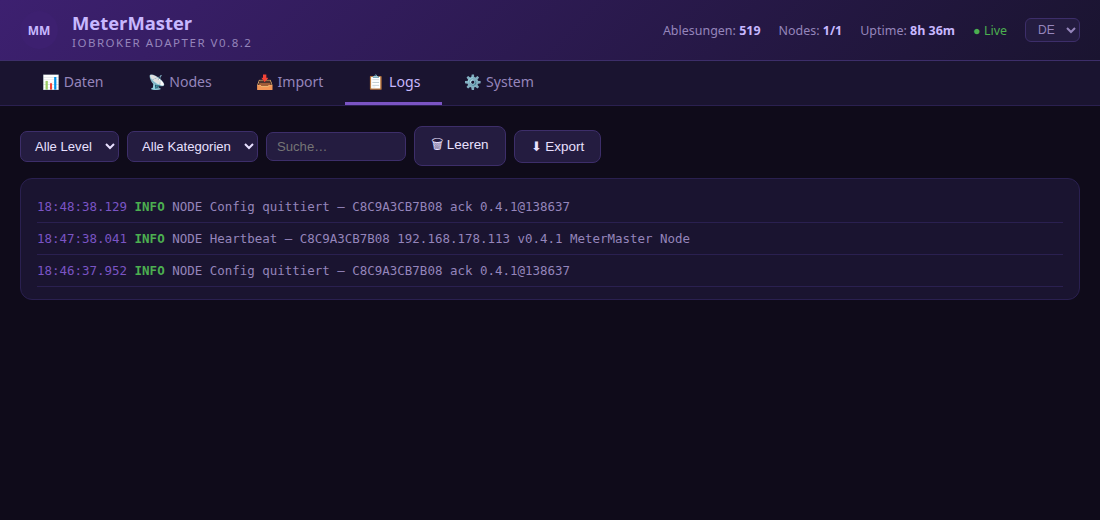 |
| System — statistics & version check | Nodes — optional ESP32 status |
|---|---|
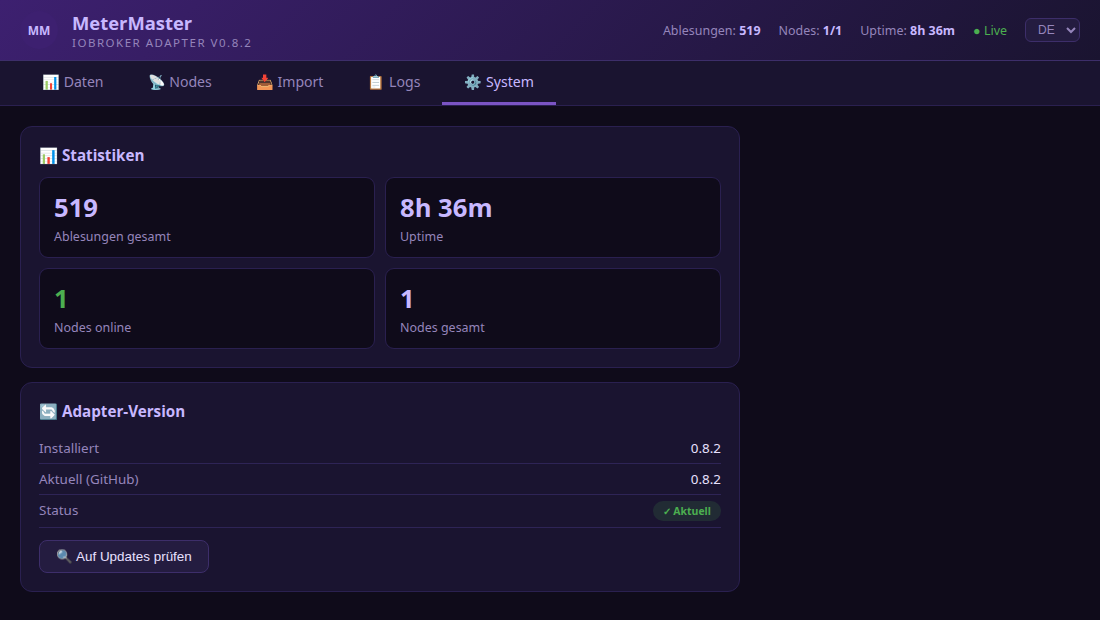 | 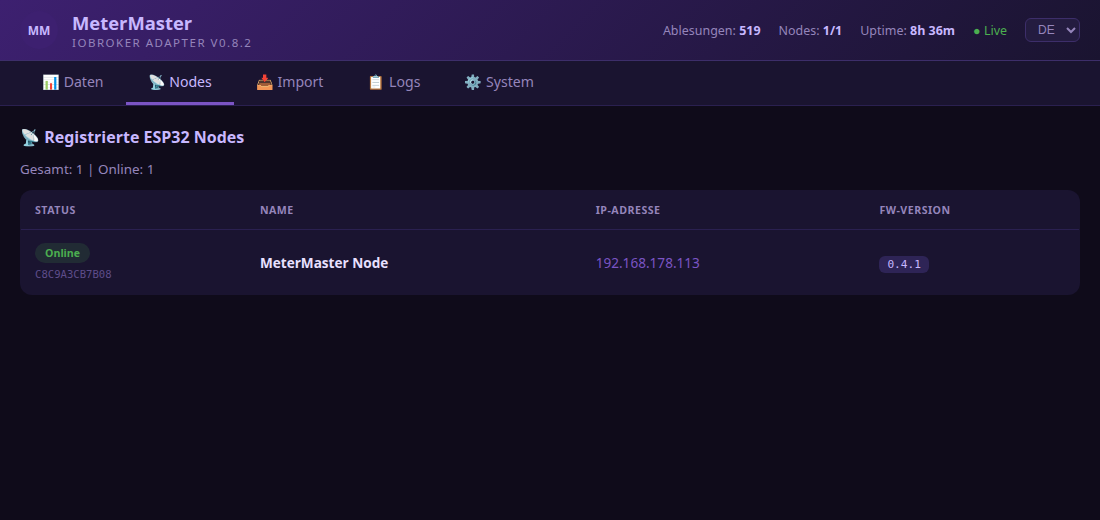 |
Installation
Install from the official ioBroker adapter list:
- Open ioBroker Admin → Adapters
- Search for MeterMaster
- Click Install and create an instance
From the command line on the ioBroker host:
iobroker add metermaster
iobroker start metermaster
If the app cannot reach the adapter, open the firewall for the configured port, e.g. sudo ufw allow 8089/tcp.
More notes: INSTALLATION.md
Instance configuration
ioBroker Admin → Adapters → MeterMaster → instance settings
| Setting | Default | Description |
|---|---|---|
| HTTP port | 8089 | Port the adapter listens on |
| Username | metermaster | Basic Auth username |
| Password | – | Basic Auth password (set a strong one) |
| Verbose logging | enabled | Show DEBUG entries in the log viewer |
| Log buffer | 500 | Maximum stored log entries |
| Keep history | 0 | 0 = unlimited readings per meter |
Configure the Android app
Settings → ioBroker → MeterMaster adapter
| Field | Value |
|---|---|
| Enable ioBroker | on |
| IP / hostname | IP address of the ioBroker server |
| Adapter port | 8089 (or your configured port) |
| Username | as in the adapter instance |
| Password | as in the adapter instance |
Use Test connection. Success looks like: MeterMaster adapter reachable ✓
Web UI
http://{ioBroker-IP}:8089/
| Tab | Content |
|---|---|
| Data | Meters grouped by house/apartment — history, charts, CSV |
| Import | MeterMaster app backup (JSON schema 2.0) via drag & drop |
| Logs | Real-time log with filter, auto-scroll and export |
| System | Statistics and update check |
| Nodes | Optional ESP32 displays (see below) |
Language switch: DE / EN in the Web UI.
Created data points
metermaster.0.
├── info.connection        bool    Adapter connected
├── info.lastSync          number  Timestamp of last sync (ms)
├── info.readingsReceived  number  Total readings received
│
├── {House}/{Apartment}/{Meter}/
│   ├── readings.latest      number  Latest value (ts = reading date)
│   ├── readings.latestDate  string  ISO-8601 date
│   ├── readings.history     string  JSON array of all readings
│   ├── name                 string
│   ├── unit                 string
│   └── typeName             string
│
└── nodes/{MAC}/             (only if ESP32 nodes are used)
    ├── ip, name, version, lastSeen
    ├── config, configAck, cmd
HTTP API
Without authentication
| Method | Path | Description |
|---|---|---|
| GET | / | Web UI |
| GET | /api/version | Version + GitHub check |
| GET | /api/stats | Statistics |
| GET | /api/data | All cached readings |
| GET | /api/logs | Log buffer (?level=&category=&text=) |
| GET | /api/nodes | Registered ESP32 nodes |
| GET | /api/discover | Known meter state IDs |
| POST | /api/register | ESP32 heartbeat |
With Basic Auth
| Method | Path | Description |
|---|---|---|
| GET | /api/ping | Connection test |
| POST | /api/reading | Store a single reading |
| POST | /api/readings | Store batch readings |
| POST | /api/import | Import app backup |
| DELETE | /api/apartment/{house}/{apartment} | Delete apartment channel tree |
| DELETE | /api/meter/{house}/{apartment}/{meter} | Delete single meter |
| GET/POST | /api/nodes/{MAC}/config | Get / set ESP32 config |
| POST | /api/nodes/{MAC}/configAck | Config acknowledgement |
| POST | /api/nodes/{MAC}/cmd | Immediate command (e.g. LED) |
Example: single reading
POST http://host:8089/api/reading
Authorization: Basic base64(user:password)
Content-Type: application/json

{
  "house": "MyHouse",
  "apartment": "West",
  "meter": "HotWater",
  "value": 128.75,
  "unit": "m³",
  "typeName": "HotWater",
  "readingDate": "2024-02-12T09:30:00.000Z"
}
Optional: ESP32 display nodes
As an optional add-on, the adapter can manage MeterMaster ESP32 nodes that show selected meter values on a small OLED.
- Nodes register via heartbeat (
POST /api/register) and poll config every 15 s - States under
metermaster.0.nodes.{MAC}.* - Web UI Nodes tab: online status, IP link, meter selection, LED control, firmware
You do not need an ESP32 to use the adapter or the Android app.
Update
Web UI: http://IP:8089/ → System → Check for updates (install via CLI).
Command line:
iobroker upgrade metermaster
iobroker restart metermaster.0
Changelog
WORK IN PROGRESS
- (ioBroker-Bot) Adapter requires admin >= 7.8.23 now.
0.9.10
- Repo checker (E2004/E6029): remove unpublished
0.9.5fromcommon.news - Trim
common.newsto 7 entries - Document releases 0.9.6–0.9.10 in README changelog
0.9.9
- Web UI: delete apartment/meter with password confirmation (DELETE API)
- Collapsible house/apartment sections in the Data tab (localStorage)
0.9.8
- Log MeterMaster app connection tests from User-Agent on
/api/pingat info level
0.9.7
- Print fix (Blob URL revoke)
- ESP32 discover proxy (
getStates/ node-discover) - Node heartbeat/ack logs moved to debug
0.9.6
- Assign display nodes via chips on meter cards in the Data tab
- Correct history on re-sync; edit values in Web UI; print chart and apartment/house latest readings
0.9.4
- All adapter log messages and API JSON error responses in English
- State common names and roles corrected (readings channel, date/text/json roles, info.firmware for nodes)
- Web UI i18n: full DE/EN coverage, English default HTML
- Config validation: clamped port (1024–65535), logBufferSize (50–5000), keepHistory (0–100000)
- Removed
/api/updateendpoint and one-click Web UI update (CLI commands card retained) migrateStateRoles()usesgetAdapterObjectsAsync(own adapter states only)- Removed dead
houseNameconfig; import default house isMyHouse - Fixed redundant state check in stateChange handler
@types/nodepinned to^22.0.0
0.9.3
- Fix state roles for ioBroker object structure check (repochecker E1008/E1009/E1011)
- Migration of existing objects on adapter start
0.9.2
- Adapter checker compliance: npm news cleanup, devDependencies, trusted publishing
- npm publish via GitHub Actions with provenance
0.9.1
- Lowered admin dependency to >=7.6.20 (fixes startup when admin 7.7.x is installed)
0.9.0
- Finalized for ioBroker repository: CI/CD testing, adapter checker compliance
- English README, updated dependencies (Node.js >= 22, adapter-core 3.4.x)
- Admin config i18n, encrypted password storage
- Requires js-controller >= 6.0.11 and admin >= 7.6.20
0.8.3
- Chart: linear time axis, yearly consumption projection toggle, README screenshots
0.8.2
- Bugfix: chart modal close button and range filters
0.8.1
- Bugfix: literal newline in CSV export JS broke Web UI
0.8.0
- Charts per meter, consumption KPI, CSV export, DE/EN language switch
See io-package.json common.news for full history. Older entries: CHANGELOG_OLD.md.
License
MIT License
Copyright (c) 2026 MPunktBPunkt
See LICENSE for the full license text.