LG WebOS SmartTV adapter for ioBroker
Remote controlling an LG WebOS SmartTV (2013 models and higher) from ioBroker.
Usage:
Install the adapter through the ioBroker admin interface. In the adapter config input the ip address of your LG WebOS TV. At first connection you will receive a pairing prompt on your TV screen where you should allow the connection.
Polling
Some TVs disconnect from the web socket when the TV is turned off and do not report this to the adapter correctly. Then additional polling is required. You can define the time in settings. If the value is empty, the adapter tries to detect this automatically: On adapter restart the polling (every 60 sec) is active until the first correct TV off event is detected.
Some examples:
setState('lgtv.0.states.popup', 'Some text!');
This will show a popup with the text "Some text!" on the TV. You can use HTML linebreaks (br) in the text.
setState('lgtv.0.states.turnOff', true);
Switching off the TV.
setState('lgtv.0.states.mute', true);
Mute the TV.
setState('lgtv.0.states.mute', false);
Unmute the TV.
setState('lgtv.0.states.volumeUp', true);
This will increase the volume of the TV.
setState('lgtv.0.states.volumeDown', true);
Decreasing the volume of the TV.
setState('lgtv.0.states.channelUp', true);
Increasing the current TV channel.
setState('lgtv.0.states.channelDown', true);
Decreasing the current TV channel.
setState('lgtv.0.states.3Dmode', true);
Activates the 3D mode on the TV
setState('lgtv.0.states.3Dmode', false);
Deactivates the 3D mode on the TV.
setState('lgtv.0.states.channel', 7);
Switching the live TV to channel number 7.
setState('lgtv.0.states.launch', 'livetv');
Switching to Live TV mode.
setState('lgtv.0.states.launch', 'smartshare');
Opening the SmartShare App on the TV.
setState('lgtv.0.states.launch', 'tvuserguide');
Runs the TV User Guide App on the TV.
setState('lgtv.0.states.launch', 'netflix');
Opening the Netflix App on the TV.
setState('lgtv.0.states.launch', 'youtube');
Opens the YouTube App on the TV.
setState('lgtv.0.states.launch', 'prime');
Opens the Amazon Prime App on the TV.
setState('lgtv.0.states.launch', 'amazon');
On some TVs this command opens the Amazon Prime App.
setState('lgtv.0.states.openURL', 'http://www.iobroker.net');
Opens the Webbrowser on the TV and navigates to www.iobroker.net. Can also be used to open images or videos (in the browser).
setState('lgtv.0.states.input', 'av1');
Switches the input on the TV to AV1.
setState('lgtv.0.states.input', 'scart');
Switches the input on the TV to Scart.
setState('lgtv.0.states.input', 'component');
Switches the input oh the TV to Component.
setState('lgtv.0.states.input', 'hdmi1');
Switches the input oh the TV to HDMI 1.
setState('lgtv.0.states.input', 'hdmi2');
Switches the input oh the TV to HDMI 2.
setState('lgtv.0.states.input', 'hdmi3');
Switches the input oh the TV to HDMI 3.
setState('lgtv.0.states.youtube', 'https://www.youtube.com/watch?v=AjSpMQfRmEo'); OR setState('lgtv.0.states.youtube', 'AjSpMQfRmEo');
Play YouTube video.
setState('lgtv.0.states.raw', '{"url": "ssap://system.launcher/launch", "cmd": "{id: 'netflix'}" }');
setState('lgtv.0.states.raw', '{"url": "ssap://api/getServiceList", "cmd": ""}');
Sending and response RAW command API.
setState('lgtv.0.remote.*KEY*', true);
Send remote KEY to TV.
setState('lgtv.0.states.power', true/false);
Turn Off TV and Turn On TV (TurnOn, works only LAN, using WOL).
setState('lgtv.0.states.soundOutput', 'external_arc');
Switch audio output through ARC (HDMI).
States
channel
holds the current channel
volume
holds the current volume level and can change the volume
on
it is true when TV is on and false if TV is off. The value follows the power state the TV
reports itself (states.powerState): on, screen_off and screen_saver count as on,
standby (the quick-start standby, in which the TV keeps its network connection open for a
while) and off count as off. TVs without that endpoint (webOS 3 and older) are considered
on while they report a foreground app.
powerState
the power state reported by the TV, mapped to on, screen_off, screen_saver, standby or off
(the TV itself reports Active, Screen Off, Screen Saver, Active Standby and Suspend/Power Off)
Remote control widget for ioBroker.devices
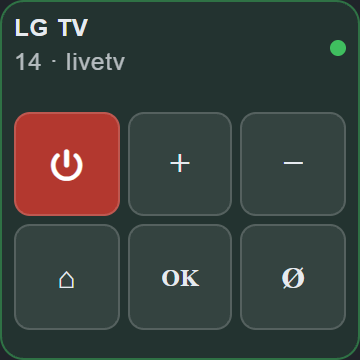
The adapter ships a Control TV widget for the devices adapter. Add it there via
Add widget → Control TV, pick the lgtv instance, and the widget drives the remote.* states
of that instance directly. The status line shows the current volume, the mute state and the
running app; the dot in the corner reflects states.on.
The power key follows remote.power: it sends the POWER button while the TV is on and a
Wake-on-LAN packet while it is off.
| Compact (1x1) | Wide (2x0.5) | Full remote (2x1 / 2x2) |
|---|---|---|
 |  | 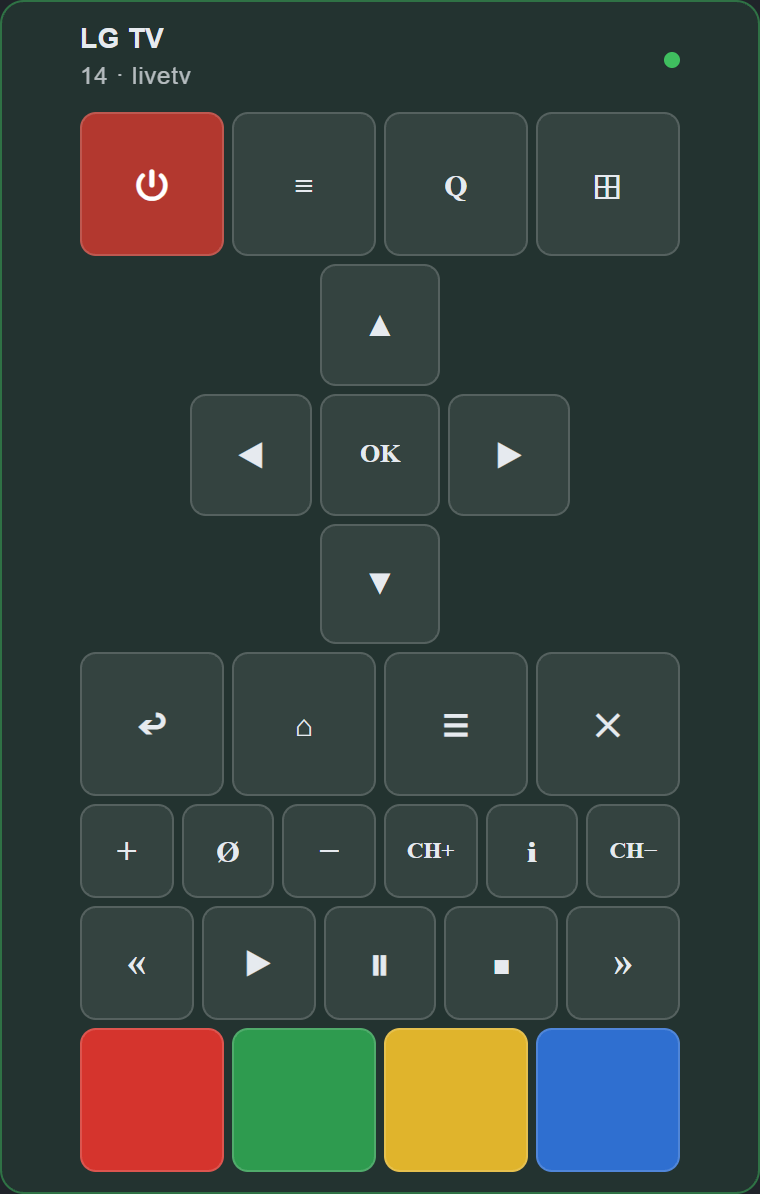 |
The channel keys, media keys, colour keys and the number pad can each be switched off in the widget settings.
Remote control in the admin
The instance settings have two tabs. Settings holds the configuration; Remote control
is a full remote for the TV, so it can be operated straight from the admin without a script or
a devices view.
It writes the same remote.* states as the widget above and shows the TV's power state, the
running app, the current input and the volume, which can also be dragged. The keys act
immediately — they are state writes, not settings, so the dialog's Save button has nothing to
do with them.
The instance has to be running: while it is stopped the keys are disabled and the tab says so.
Installation
Install this adapter using ioBroker repositories.
[!NOTE] This adapter does not support installation from GitHub.
Changelog
3.0.5 (2026-09-10)
- (GermanBluefox) The instance settings have a second tab with a remote control, so the TV can be operated directly from the admin
- (krobipd)
states.scrollandstates.dragno longer ignore a movement whose horizontal or vertical part is zero, so plain vertical scrolling (0,5) works - (krobipd) The configuration dialog is fully translated in all eleven languages; the minimum-value hints no longer show up as untranslated raw text
- (krobipd) The adapter no longer creates files in the home directory of the ioBroker user; the client key, the MAC cache and the certificate file all stay in the adapter's data directory
- (krobipd) Two volume changes in quick succession no longer fight over the TV, and an unreadable volume from the TV no longer disables the stepped volume ramp
- (krobipd) Stopping the adapter while the TV was connected no longer logs "setTimeout called, but adapter is shutting down"
- (krobipd) A stopped or crashed instance no longer keeps reporting
info.connectionas connected - (krobipd) The TV is no longer reported as switched off while it is actually running
- (krobipd) The new state
states.powerStateshows the power state the TV reports itself - (krobipd) Switching the TV off and on repeatedly no longer piles up connection checks
3.0.3 (2026-09-05)
- (GermanBluefox) The WebOS 26 pairing fallback now also asks for the pointer permissions, so the remote buttons, pointer moves, scrolling and clicks work after a fresh pairing
- (GermanBluefox) Older TVs get the signed pairing manifest again; the unsigned manifest is only used after the TV rejected the signed one (ported from lgtv2 2.0.1)
- (GermanBluefox) Adopted the upstream
lgtv2test suite for the vendored transport
3.0.2 (2026-09-05)
- (GermanBluefox) The
lgtv2library was ported to TypeScript and is now built into the adapter, so the ESM-only npm package is no longer required
3.0.1 (2026-09-04)
- (GermanBluefox) Removed a prepare script
3.0.0 (2026-09-04)
- (Voodoo2man) Add WebOS 26 compatibility.
- (Voodoo2man) Use the configured MAC address as a fallback for Wake-on-LAN.
- (GermanBluefox) A malformed MAC address or a Wake-on-LAN socket error does not terminate the adapter anymore
- (GermanBluefox) The MAC address is validated in the admin configuration
- (GermanBluefox) Added the missing default value for the
wolwithipsetting - (GermanBluefox)
remote.powerswitches the TV off again instead of only sending Wake-on-LAN - (GermanBluefox) Migrated the connection options from the deprecated
wsconfigblock to the lgtv2 v2 option names - (GermanBluefox) Removed the process wide TLS bypass, the certificate check is now relaxed per connection only
- (GermanBluefox) Removed the unused
websocketdependency - (GermanBluefox) The adapter was refactored to TypeScript. The sources moved to
src/, the published code is the compiledbuild/ - (GermanBluefox) The admin translations moved from
admin/i18n/<lang>/translations.jsonto the flatadmin/i18n/<lang>.json - (GermanBluefox) The unit tests use
node:assertinstead ofchai - (GermanBluefox) Added a "Control TV" remote-control widget for the
ioBroker.devicesadapter
License
MIT License
Copyright (c) 2024-2026 iobroker-community-adapters iobroker-community-adapters@gmx.de
Copyright (c) 2023 Sebastian Schultz.
Permission is hereby granted, free of charge, to any person obtaining a copy of this software and associated documentation files (the "Software"), to deal in the Software without restriction, including without limitation the rights to use, copy, modify, merge, publish, distribute, sublicense, and/or sell copies of the Software, and to permit persons to whom the Software is furnished to do so, subject to the following conditions:
The above copyright notice and this permission notice shall be included in all copies or substantial portions of the Software.
THE SOFTWARE IS PROVIDED "AS IS", WITHOUT WARRANTY OF ANY KIND, EXPRESS OR IMPLIED, INCLUDING BUT NOT LIMITED TO THE WARRANTIES OF MERCHANTABILITY, FITNESS FOR A PARTICULAR PURPOSE AND NONINFRINGEMENT. IN NO EVENT SHALL THE AUTHORS OR COPYRIGHT HOLDERS BE LIABLE FOR ANY CLAIM, DAMAGES OR OTHER LIABILITY, WHETHER IN AN ACTION OF CONTRACT, TORT OR OTHERWISE, ARISING FROM, OUT OF OR IN CONNECTION WITH THE SOFTWARE OR THE USE OR OTHER DEALINGS IN THE SOFTWARE.