You can find the official KODI documentation for the JSON-RPC API here and the full list of available commands (for protocol version 6) here.
KODI Configuration
Enable remote control and web server.
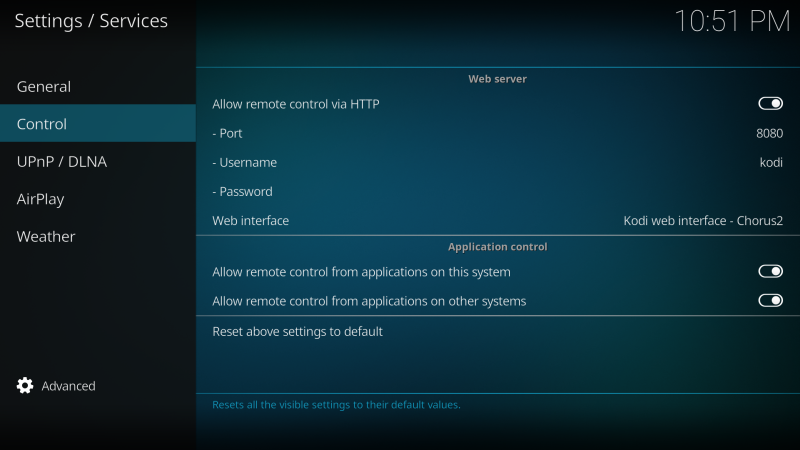
The JSON-RPC API uses port 9090 by default. To change it, you need to make changes to the advancedsettings.xml file.
Note: The advancedsettings.xml file does not exist by default. You must create it first!
<jsonrpc>
    <compactoutput>true</compactoutput>
    <tcpport>9999</tcpport>
</jsonrpc>
Adapter Configuration
In the adapter settings, specify the IP address and port for the JSON-RPC API (default 9090), and the login/password for accessing the Kodi web server.
Usage
ShowNotif:
One important point: if a message title is used, it must always be placed before the message text itself (Warning;Water leak). The position of other parameters is not critical.
Image: Message level
- 'info' - 0 (default),
- 'warning' - 1,
- 'error' - 2.
displaytime: Message display time in milliseconds, minimum 1500, maximum 30000 ms.
Example:
- 1;Warning;Water leak;15000
- Warning;Water leak;2;10000
- Warning;Water leak
- Water leak
You can also send messages from a JavaScript adapter:
sendTo("kodi.0", {
    message:  'Possible water leak', // Message text
    title:    'WARNING!!!', // Message title
    image: 'https://raw.githubusercontent.com/instalator/ioBroker.kodi/master/admin/kodi.png', // Icon URL
    delay: 7000 // Message display time in milliseconds (minimum 1500, maximum 30000 ms)
});
SwitchPVR:
Switching PVR IPTV channels by channel name in the playlist. Example: TV channel - Discovery Science can be found by full name or by "discover".
Youtube:
To open a video from YouTube, simply write the video code to this state. Starting from version 0.1.5 and above, you can insert a direct link to the video, as well as the code or full link to a playlist. For example: To open this video, you need to set the state to - Bvmxr24D4TA
Open:
Write the link to media content on the internet or the path to a local media file here. After writing the value, playback will start on the KODI player.
Position:
Current position in the playlist. You can also write the desired position to this state and KODI will immediately switch to playing this position.
Seek:
Current playback position value as a percentage from 0 to 100.
Repeat:
Repeat playback, accepts the following values:
- off - repeat playback disabled
- on - repeat current track
- all - repeat entire playlist
Shuffle:
Shuffle the list of tracks in the playlist for random playback.
Accepts values true and false
Play:
Start playback (true, false)
Speed:
Playback speed. Fixed values (-32, -16, -8, -4, -2, -1, 0, 1, 2, 4, 8, 16, 32), as well as 'increment' and 'decrement'
Directory:
Write the path to a folder or disk here. In response, a list of directories of the specified folder or disk will be written to this state.
ActivateWindow:
Activates a window in the player. Supports the following list:
"home", "programs", "pictures", "filemanager", "files", "settings", "music", "video", "videos", "tv", "pvr", "pvrguideinfo", "pvrrecordinginfo", "pvrtimersetting", "pvrgroupmanager", "pvrchannelmanager", "pvrguidesearch", "pvrchannelscan", "pvrupdateprogress", "pvrosdchannels", "pvrosdguide", "pvrosddirector", "pvrosdcutter", "pvrosdteletext", "systeminfo", "testpattern", "screencalibration", "guicalibration", "picturessettings", "programssettings", "weathersettings", "musicsettings", "systemsettings", "videossettings", "networksettings", "servicesettings", "appearancesettings", "pvrsettings", "tvsettings", "scripts", "videofiles", "videolibrary", "videoplaylist", "loginscreen", "profiles", "skinsettings", "addonbrowser", "yesnodialog", "progressdialog", "virtualkeyboard", "volumebar", "submenu", "favourites", "contextmenu", "infodialog", "numericinput", "gamepadinput", "shutdownmenu", "mutebug", "playercontrols", "seekbar", "musicosd", "addonsettings", "visualisationsettings", "visualisationpresetlist", "osdvideosettings", "osdaudiosettings", "videobookmarks", "filebrowser", "networksetup", "mediasource", "profilesettings", "locksettings", "contentsettings", "songinformation", "smartplaylisteditor", "smartplaylistrule", "busydialog", "pictureinfo", "accesspoints", "fullscreeninfo", "karaokeselector", "karaokelargeselector", "sliderdialog", "addoninformation", "musicplaylist", "musicfiles", "musiclibrary", "musicplaylisteditor", "teletext", "selectdialog", "musicinformation", "okdialog", "movieinformation", "textviewer", "fullscreenvideo", "fullscreenlivetv", "visualisation", "slideshow", "filestackingdialog", "karaoke", "weather", "screensaver", "videoosd", "videomenu", "videotimeseek", "musicoverlay", "videooverlay", "startwindow", "startup", "peripherals", "peripheralsettings", "extendedprogressdialog", "mediafilter".
ExecuteAction:
You can execute one of the following actions:
"left", "right", "up", "down", "pageup", "pagedown", "select", "highlight", "parentdir", "parentfolder", "back", "previousmenu", "info", "pause", "stop", "skipnext", "skipprevious", "fullscreen", "aspectratio", "stepforward", "stepback", "bigstepforward", "bigstepback", "osd", "showsubtitles", "nextsubtitle", "codecinfo", "nextpicture", "previouspicture", "zoomout", "zoomin", "playlist", "queue", "zoomnormal", "zoomlevel1", "zoomlevel2", "zoomlevel3", "zoomlevel4", "zoomlevel5", "zoomlevel6", "zoomlevel7", "zoomlevel8", "zoomlevel9", "nextcalibration", "resetcalibration", "analogmove", "rotate", "rotateccw", "close", "subtitledelayminus", "subtitledelay", "subtitledelayplus", "audiodelayminus", "audiodelay", "audiodelayplus", "subtitleshiftup", "subtitleshiftdown", "subtitlealign", "audionextlanguage", "verticalshiftup", "verticalshiftdown", "nextresolution", "audiotoggledigital", "number0", "number1", "number2", "number3", "number4", "number5", "number6", "number7", "number8", "number9", "osdleft", "osdright", "osdup", "osddown", "osdselect", "osdvalueplus", "osdvalueminus", "smallstepback", "fastforward", "rewind", "play", "playpause", "delete", "copy", "move", "mplayerosd", "hidesubmenu", "screenshot", "rename", "togglewatched", "scanitem", "reloadkeymaps", "volumeup", "volumedown", "mute", "backspace", "scrollup", "scrolldown", "analogfastforward", "analogrewind", "moveitemup", "moveitemdown", "contextmenu", "shift", "symbols", "cursorleft", "cursorright", "showtime", "analogseekforward", "analogseekback", "showpreset", "presetlist", "nextpreset", "previouspreset", "lockpreset", "randompreset", "increasevisrating", "decreasevisrating", "showvideomenu", "enter", "increaserating", "decreaserating", "togglefullscreen", "nextscene", "previousscene", "nextletter", "prevletter", "jumpsms2", "jumpsms3", "jumpsms4", "jumpsms5", "jumpsms6", "jumpsms7", "jumpsms8", "jumpsms9", "filter", "filterclear", "filtersms2", "filtersms3", "filtersms4", "filtersms5", "filtersms6", "filtersms7", "filtersms8", "filtersms9", "firstpage", "lastpage", "guiprofile", "red", "green", "yellow", "blue", "increasepar", "decreasepar", "volampup", "volampdown", "channelup", "channeldown", "previouschannelgroup", "nextchannelgroup", "leftclick", "rightclick", "middleclick", "doubleclick", "wheelup", "wheeldown", "mousedrag", "mousemove", "noop".
System:
- EjectOpticalDrive - Ejects or closes the optical drive (if available)
- Hibernate - Enables hibernation mode
- Reboot - Reboots the system
- Shutdown - Shuts down the system
- Suspend - Suspends Kodi
Changelog
WORK IN PROGRESS
- (copilot) Adapter requires node.js >= 22 now
- (copilot) Adapter requires admin >= 7.7.22 now
- (copilot) Adapter requires js-controller >= 6.0.11 now
- (copilot) Adapter requires admin >= 7.6.17 now
3.1.0 (2024-04-18)
- (mcm1957) Adapter requires node.js >= 18 and js-controller >= 5 now
- (mcm1957) Dependencies have been updated
3.0.0 (2023-09-08)
- (agross) Fixed seeking on Kodi >= 19
- (bluefox) Supported only node.js versions >= 16
2.0.9 (2022-12-08)
- (Apollon77) Prevent crash if received data from Kodi are not valid UTF-8
- (Apollon77) Optimize Adapter unload
2.0.8
- Important: js-controller >= 2.0.0 is required at least
- (Apollon77) Update kode-ws dependency
- (Apollon77) Prevent some js-controller 3.3. errors
2.0.7
- (instalator) fixed error subscribeNotification Player.OnResume issues 49
- (instalator) added user ratings issues 57
- (instalator) fix error issues 58
- (instalator) fixed error widgets
2.0.5
- (instalator) changed css classes
- (instalator) fixed error
2.0.4
- (instalator) fixed thumbnails widget
- (instalator) fixed info.tagline
2.0.2
- (instalator) changed title in io-package.json
- (instalator) changed seek
- (instalator) fixed widgets
- (instalator) fixed for thumbnails
2.0.1 (2020-04-13)
- (instalator) fixed error if not used PVR
2.0.0 (2020-04-12)
- (instalator) support admin3
- (instalator) support compact mode
- (instalator) refactoring
- (instalator) fixed different error
- (instalator) added english manual
- (instalator) big change code
1.0.0 (2017-11-13)
- (instalator) up to stable
0.2.4 (2017-10-16)
- (instalator) fix error
0.2.3 (2017-08-15)
- (instalator) fix error switchPVR
- (instalator) Added description "System" to readme
0.2.2 (2017-08-14)
- (instalator) added object - System (EjectOpticalDrive, Hibernate, Reboot, Shutdown, Suspend)
- (instalator) fix playlist widget
0.2.0 (2017-01-07)
- (instalator) added object - state
- (instalator) change repeat to bool
0.1.9 (2017-01-05)
- (instalator) change for vis-players
0.1.8 (2016-12-25)
- (instalator) change open youtube playlist
0.1.6 (2016-12-23)
- (instalator) added Tests
- (instalator) added open youtube playlist and open youtube link
0.1.4 (2016-07-05)
- (instalator) fix error for Open
- (instalator) fix method number
0.1.3
- (bluefox) fix error milti instance
0.1.2 (2016-07-05)
- (instalator) change pvr switch - add stop
- (instalator) change dependencies
- (instalator) fix change play/stop state
0.1.1 (2016-05-30)
- (instalator) change admin setting
- (instalator) Fix error 'playerid' of undefined
0.1.0 (2016-05-22)
- (instalator) beta
0.0.6 (2016-05-08)
- (bluefox) fixed crash when the driver turned on the KODI
- (bluefox) make adapter disabled by default, because no IP set
- (instalator) Thumbnail widget
- (instalator) added GetDirectory, GetVideoLibrary
- (instalator) added Scan & Clean Library
0.0.5 (2016-05-04)
- (instalator) change creating object
- (instalator) added info.connection state
0.0.4 (2016-05-03)
- (instalator) fix error
- (instalator) added VIS widgets
0.0.3 (2016-05-01)
- (instalator) fix error
- (instalator) added send message from JS
0.0.2 (2016-04-24)
- (instalator) remote player
- (instalator) ShowNotification
- (instalator) info playing
- (instalator) GetPVRChannel
0.0.1
- (instalator) initial (17.04.2016)
License
The MIT License (MIT)
Copyright (c) 2024-2026 iobroker-community-adapters iobroker-community-adapters@gmx.de Copyright (c) 2020-2023 ioBroker Community and instalator vvvalt@mail.ru
Permission is hereby granted, free of charge, to any person obtaining a copy of this software and associated documentation files (the "Software"), to deal in the Software without restriction, including without limitation the rights to use, copy, modify, merge, publish, distribute, sublicense, and/or sell copies of the Software, and to permit persons to whom the Software is furnished to do so, subject to the following conditions:
The above copyright notice and this permission notice shall be included in all copies or substantial portions of the Software.
THE SOFTWARE IS PROVIDED "AS IS", WITHOUT WARRANTY OF ANY KIND, EXPRESS OR IMPLIED, INCLUDING BUT NOT LIMITED TO THE WARRANTIES OF MERCHANTABILITY, FITNESS FOR A PARTICULAR PURPOSE AND NONINFRINGEMENT. IN NO EVENT SHALL THE AUTHORS OR COPYRIGHT HOLDERS BE LIABLE FOR ANY CLAIM, DAMAGES OR OTHER LIABILITY, WHETHER IN AN ACTION OF CONTRACT, TORT OR OTHERWISE, ARISING FROM, OUT OF OR IN CONNECTION WITH THE SOFTWARE OR THE USE OR OTHER DEALINGS IN THE SOFTWARE.