About this adapter
With this adapter the Fully Kiosk Browser (with Plus license) can be controlled. Via the REST API various commands like "screen on/off", "screen saver on/off", etc. can be sent to the Fully.
Additionally, MQTT events (like "screen on") are always immediately communicated to the adapter and set in the corresponding states. Furthermore, the Fully Browser always sends all device information via MQTT automatically at least every 60 seconds, which are set to the info states accordingly. Please note that all commands are sent via the REST API and not MQTT, since the Fully Browser does not support sending commands via MQTT.
Fully-Browser settings
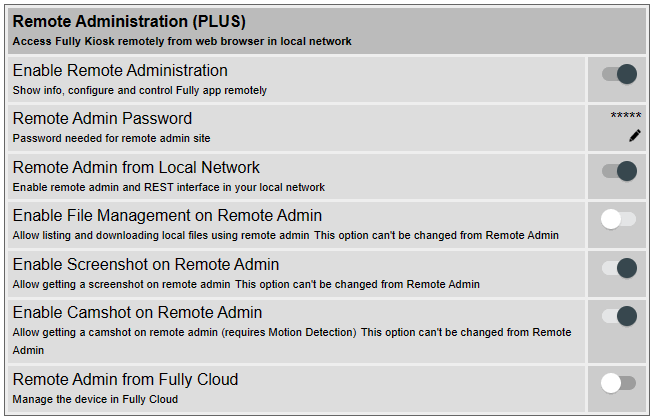
Activate Remote Admin
- On the tablet, open the Fully Browser app and open the Fully Browser settings.
- Open menu item Remote Administration (PLUS)
- Enable Enable Remote Administration
- Remote Admin Password: enter a password
- Enable Remote Admin from Local Network
Activate MQTT
- On the tablet, open the Fully Browser app and open the Settings. Alternatively, you can also open the Remote Admin from another device (e.g. PC) from a browser, the URL is typically always http://ip-address:2323, you will be asked for the password assigned above.
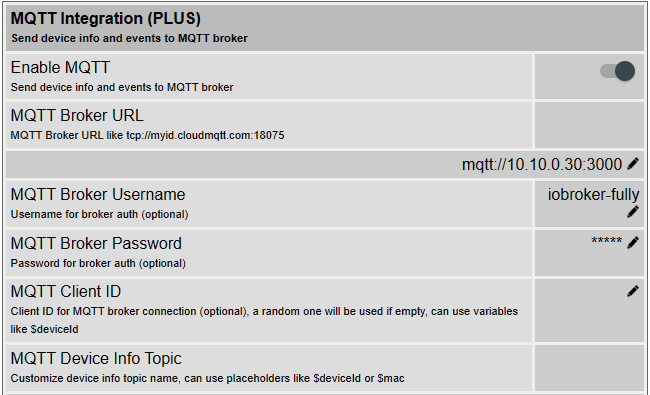
- Open: Settings -> Other Settings -> MQTT Integration (PLUS)
- Enable Enable MQTT
- MQTT Broker URL: Enter in the format
mqtt://iobroker-ip-address:3000, whereiobroker-ip-addressis the IP address of the ioBroker, and3000is the port number used for the MQTT connection. - MQTT Broker Username: here you can optionally enter a username
- MQTT Broker Password: here you can optionally enter a password
- MQTT Client ID: can be left empty
- MQTT Device Info Topic: here you can leave the default setting, it will not be used by the adapter.
- MQTT Event Topic: here you can leave the default setting, it will not be used by the adapter.
Adapter Settings
Fully Browser Devices
Add Fully Browser device(s), i.e. the tablets running Fully Browser, accordingly:
- Device Name: Any name, which is also used as part of the objects/states, e.g.
Tablet Flurbecomesfully-mqtt.0.Tablet-Flur. - Protocol: leave
httpas it is. Ifhttpsshould be used: see notes under Remote Admin. - Remote Admin Password: enter the password as set above.
MQTT Configuration
- Port: Use the same port number as above in the Fullybrowser MQTT settings (e.g.
3000). - Do not verify user and password: can be activated to disable username and password verification
- User name: optional
- Password: optional
Expert Settings: MQTT
- Do not process published info more than every x seconds: Per Fully Documentation, info is published only every 60 seconds, but in my tests this happened more often, so a limit can be set with this option.
- Always update info objects: Normally all info states are set/updated only if there was a change. If this option is enabled, states will always be updated (with ack:true), even if there was no change from the previous value.
- Client and Connection errors as info in log: If activated, client and connection errors are always output as info and not as error in the log. This serves to keep the log clean and not to fill it unnecessarily just because a tablet logs off briefly and logs on again after a few seconds. "Longer-term" errors and warnings are always displayed in the log accordingly.
Expert Settings: Remote Admin (REST API)
- Request Timeout: After this number milliseconds, REST API requests (i.e. sending commands) are aborted if not successful.
Links
- ioBroker-Forum: Adapter Fully Browser mit MQTT
- fully-kiosk.com REST API
- fully-kiosk.com MQTT Integration
Changelog
WORK IN PROGRESS
- (copilot) Adapter requires node.js >= 22 now
3.1.5 (2026-04-21)
- (arteck) fix aedes
3.1.4 (2026-04-21)
- (arteck) refactoring
- (arteck) fix aedes
3.1.3 (2026-04-12)
- (arteck) Dependencies have been updated
3.1.2 (2025-07-20)
- (arteck) add device name into the warning message
- (arteck) dependency update
3.1.1 (2025-02-19)
- (arteck) typo
3.1.0 (2025-02-16)
- (arteck) add new command takePicture, check new settings
3.0.13 (2025-01-05)
- (arteck) add setBooleanSetting
3.0.12 (2024-03-05)
- (arteck) set batteryLevel to 0 if tablet is offline is configurable
3.0.11 (2024-02-25)
- (arteck) translate api-type
3.0.10 (2024-02-06)
- (arteck) set batteryLevel to 0 when device is offline
3.0.9 (2023-12-07)
- (arteck) corr error message
3.0.8 (2023-12-05)
- (arteck) toForeground corr
3.0.7 (2023-11-20)
- (arteck) check credentials
3.0.6 (2023-11-11)
- (arteck) add mqttTimeout in settings
3.0.5 (2023-11-09)
- (arteck) add setRAW DP, this allows you to send a fullbrowser command directly
3.0.4 (2023-11-06)
- (arteck) set to zero corr
3.0.3 (2023-11-04)
- (arteck) setStringSettings corr
3.0.2 (2023-11-02)
- (arteck) add motionDetection
- (arteck) for Rooted Devices add rebootDevice
3.0.0 (2023-11-02)
- (arteck) breaking change - new structure from fully-mqtt Adapter from Acgua
- here is the Orginal https://github.com/Acgua/ioBroker.fully-mqtt
#----------------------------------------------------------------------
2.2.0 (2023-10-27)
- (arteck) intervall corr
2.1.6 (2022-11-23)
- (arteck) add name of device to admin
- (arteck) corr status when login fail
- (arteck) corr psw typo
2.1.2 (2022-04-05)
- (arteck) encodeUri in psw
2.1.1 (2022-02-07)
- (arteck) js-controller 4.x
2.1.0 (2022-02-07)
- (arteck) js-controller 4
2.0.14 (2022-01-31)
- (arteck) life tick error
... ... ...
1.0.1 (2019-06-20)
- (arteck) encodeURL
License
The MIT License (MIT)
Copyright (c) 2014-2026 Arthur Rupp arteck@outlook.com
Permission is hereby granted, free of charge, to any person obtaining a copy of this software and associated documentation files (the "Software"), to deal in the Software without restriction, including without limitation the rights to use, copy, modify, merge, publish, distribute, sublicense, and/or sell copies of the Software, and to permit persons to whom the Software is furnished to do so, subject to the following conditions:
The above copyright notice and this permission notice shall be included in all copies or substantial portions of the Software.
THE SOFTWARE IS PROVIDED "AS IS", WITHOUT WARRANTY OF ANY KIND, EXPRESS OR IMPLIED, INCLUDING BUT NOT LIMITED TO THE WARRANTIES OF MERCHANTABILITY, FITNESS FOR A PARTICULAR PURPOSE AND NONINFRINGEMENT. IN NO EVENT SHALL THE AUTHORS OR COPYRIGHT HOLDERS BE LIABLE FOR ANY CLAIM, DAMAGES OR OTHER LIABILITY, WHETHER IN AN ACTION OF CONTRACT, TORT OR OTHERWISE, ARISING FROM, OUT OF OR IN CONNECTION WITH THE SOFTWARE OR THE USE OR OTHER DEALINGS IN THE SOFTWARE.