ausführliche Beschreibung
Der Adapter admin dient der Bedienung der gesamten ioBroker-Installation. Er stellt ein Webinterface zur Verfügung. Dieses wird unter der <IP-Adresse des Servers>:8081 aufgerufen. Dieser Adapter wird direkt bei der Installation von ioBroker angelegt.
Über das vom Adapter zur Verfügung gestellte GUI können u.a. folgenden Funktionen abgerufen werden:
- Installation weiterer Adapter
- Zugriff auf Objektübersicht
- Zugriff auf die Zustandsübersicht der Objekte
- Zugriff auf Benutzer und Gruppen Administration
- Zugriff auf das Logfile
- Verwaltung der Hosts
Installation
Dieser Adapter wird direkt bei der Installation von ioBroker angelegt eine manuelle Installation ist nicht notwendig
Konfiguration
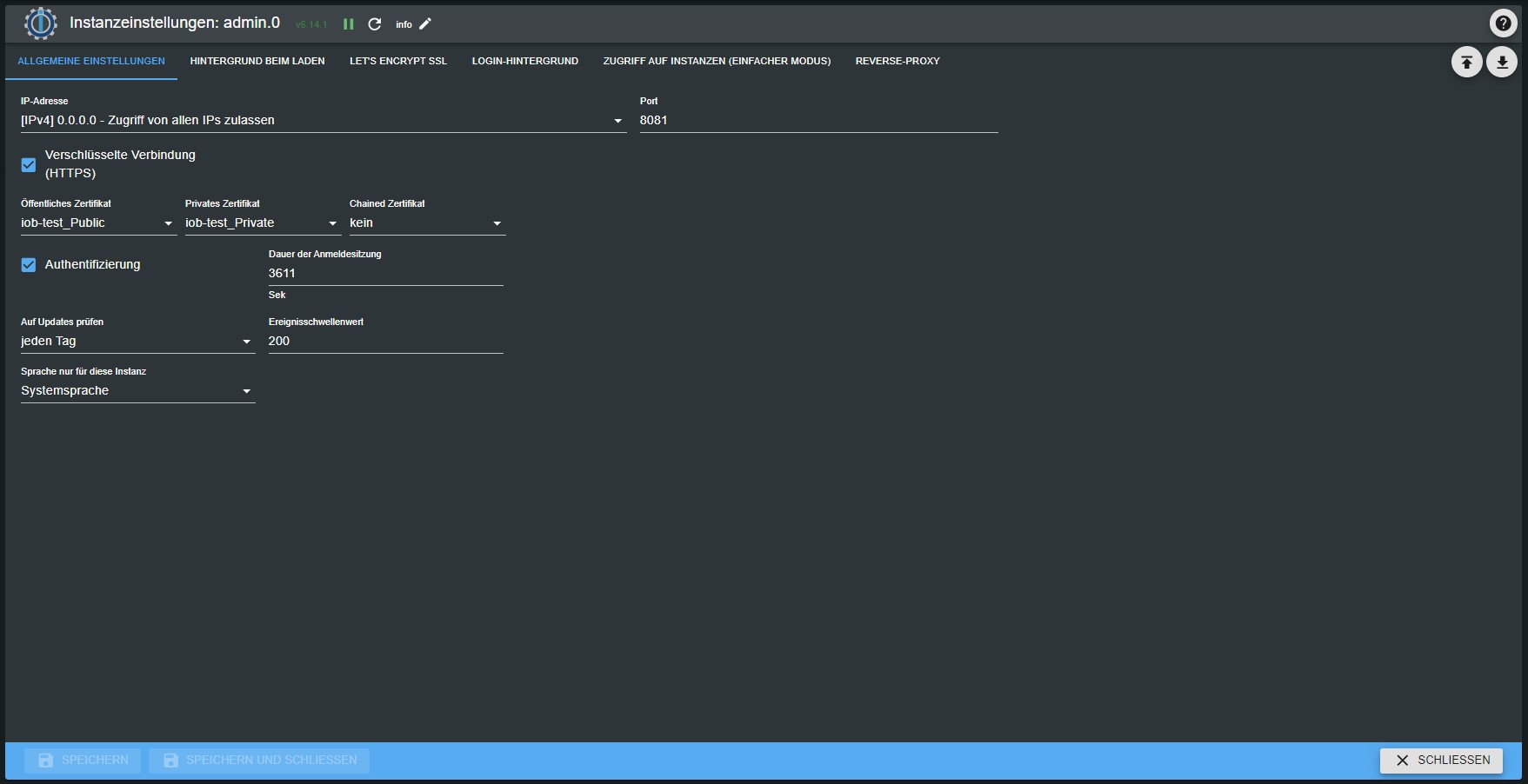
IP
Hier wird die IP-Adresse unter der der Adapter erreichbar ist eingegeben. Verschiedene Ipv4 und Ipv6 Möglichkeiten stehen zur Auswahl. Default ist 0.0.0.0. Dies darf nicht verändert werden!
Port
Hier wird der Port, unter der der Administrator aufgerufen werden kann eingestellt. Falls auf dem Server mehrere Webserver laufen muss dieser Port angepasst werden, damit es nicht zu Problemen wegen doppelter Portvergabe kommt.
Verschlüsselung
Soll das sichere Protokoll https verwendet werden ist hier ein Haken zu setzen.
Authentifikation
Soll eine Authentifizierung erfolgen ist hier ein Haken zu setzen.
Bedienung
Über den Webbrowser die folgende Seite aufrufen:
<IP-Adresse des Servers>:8081
Reiter
Die Hauptseite des Administrators besteht aus mehreren Reitern. In der Grundinstallation werden die Reiter wie in der Abbildung angezeigt. Über das Bleistift-Icon rechts oben (1) können nach der Installation zusätzlicher Adapter weitere Reiter hinzugefügt werden. Dort können auch Reiter deaktiviert werden um eine besser Übersicht zu erhalten.
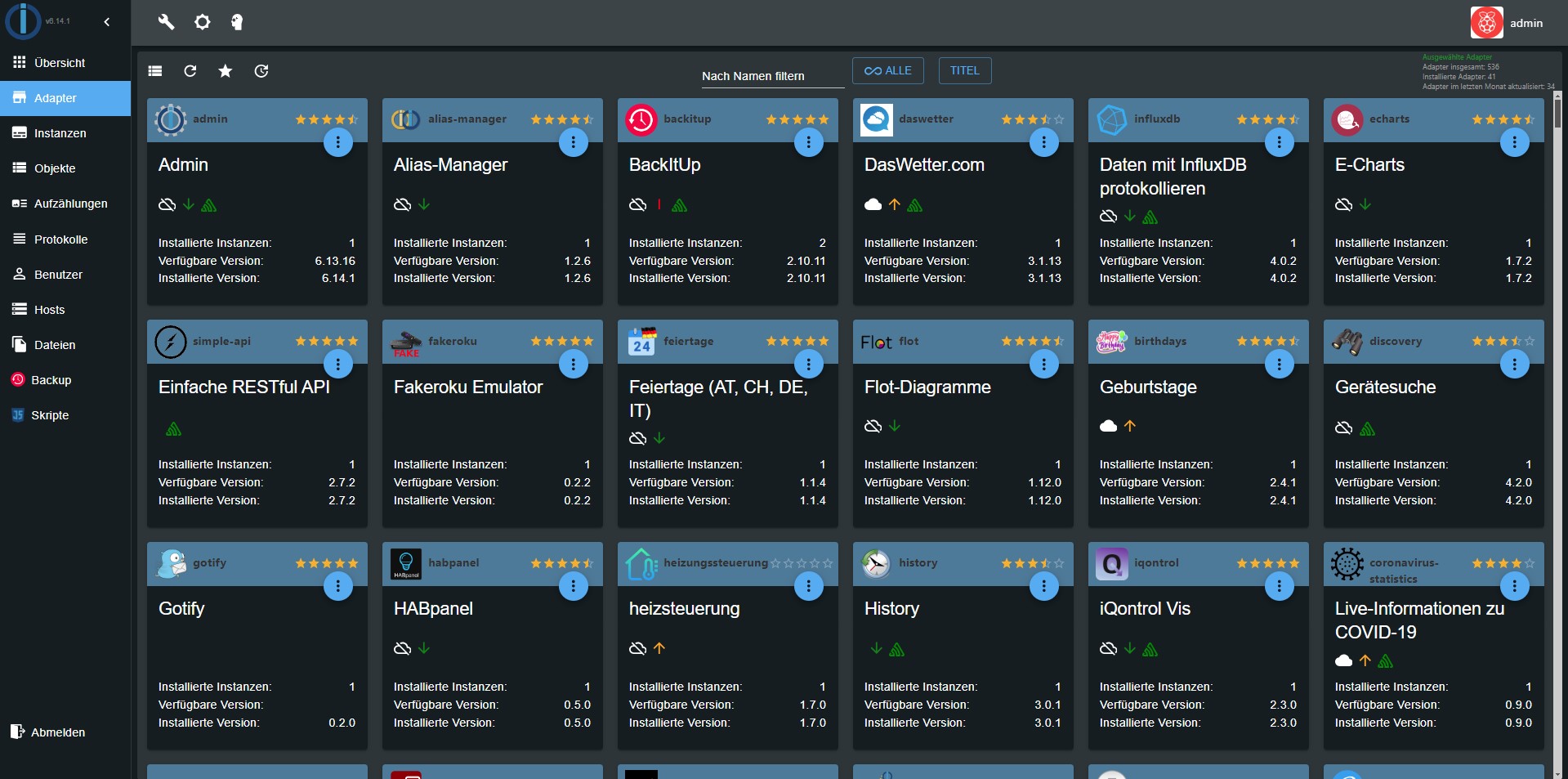
Ausführliche Informationen sind in den Seiten hinterlegt, die über die Überschriften verlinkt sind.
Adapter
Hier werden die verfügbaren und installierten Adapter angezeigt und verwaltet.
Instanzen
Hier werden die bereits über den Reiter Adapter installierten Instanzen aufgelistet und können entsprechend konfiguriert werden.
Objekte
Die verwalteten Objekte (z.B. die Geräte/Variablen/Programme der CCU). Hier können Objekte angelegt und gelöscht werden. Über die Pfeil hoch und Pfeil runter Knöpfe können ganze Objektstrukturen hoch- oder runtergeladen werden. Ein weiterer Knopf ermöglicht die Anzeige der Expertenansicht.
Werden Werte in roter Schrift angezeigt, sind sie noch nicht bestätigt (ack = false).
Zustände
Die aktuellen Zustände der Objekte.
Ereignisse
Eine Liste der laufenden Aktualisierung der Zustände.
Gruppen
Hier werden die angelegten Usergruppen angelegt und die Rechte verwaltet
Benutzer
Hier können Benutzer angelegt und zu den bestehenden Gruppen hinzugefügt werden.
Aufzählungen
Hier werden die Favoriten, Gewerke und Räume aus der Homematic-CCU aufgelistet.
hosts
Informationen über den Rechner, auf dem ioBroker installiert ist. Hier kann die aktuelle Version des js-Controllers upgedated werden. Liegt eine neue Version vor, erscheint die Beschriftung des Reiters in grüner Farbe.
Log
Hier wird das log angezeigt
Im Reiter Instanzen kann bei den einzelnen Instanzen der zu loggende Loglevel eingestellt werden. In dem Auswahlmenü wird der anzuzeigende Mindest-Loglevel ausgewählt. Sollte ein Error auftreten, erscheint die Beschriftung des Reiters in roter Farbe.
Nach der Installation zusätzlicher Adapter können noch weitere Reiter über das Bleistift-Icon oben rechts (1) aktiviert werden. Die Beschreibung dieser Reiter befindet sich bei dem entsprechenden Adapter.
Systemeinstellungen
In dem sich hier öffnenden Menü werden Einstellungen wie Sprache, Zeit- und Datumsformat sowie weitere systemweite Einstellungen getätigt.
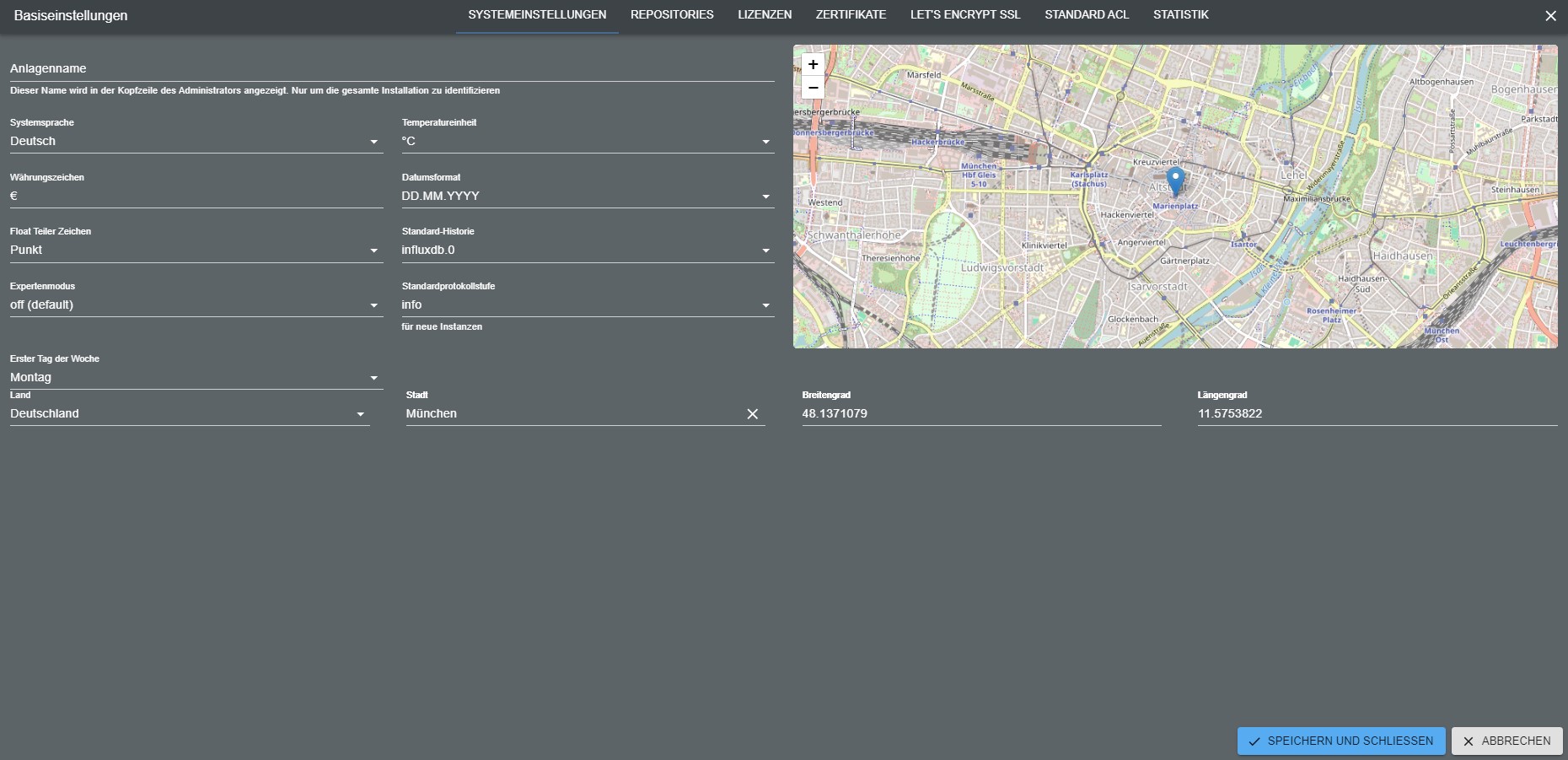
Auch die Repositorien und Sicherheitseinstellungen können hier eingestellt werden. Eine tiefergehende Beschreibung ist über den Link in dem Titel dieses Abschnitts zu erreichen.
Changelog
8.0.14 (2026-09-15)
- (@GermanBluefox) Fixed: the old, non-React adapter configuration pages stayed bright in the
modernDarktheme. Their stylesheet only knows the theme names that existed when it was written, soadapter-settings.jsmaps every newer name -modernDark,modernLightand the vendor themes - down onto the plaindark/lightit descends from. React-based configurations are untouched: they take the theme from the local storage and keep the new designs - (@GermanBluefox) Fixed: after saving an enum (e.g., a new icon) or dragging an object into it, the "Enums" tab showed only this one enum until the page was reloaded. The collected changes did not start from a copy of all enums any more, so the list was rebuilt from the changed enum alone; deleted enums did not disappear either
- (@GermanBluefox) Added: the object list on the right side of the "Enums" tab can be hidden with a new toolbar button, and the choice is remembered. While it is hidden, a hint explains that states, channels and devices are added by dragging them from this list
- (@GermanBluefox) Added: every enum in the "Enums" tab has an "Add objects" button, which opens the object selection with multi-select - adding members no longer requires drag and drop
- (@GermanBluefox) Fixed: dropping a folder that is not an object itself (e.g.
0_userdata.0.lights) onto an enum showed only a "TODO" alert. Now it asks whether to add the states, channels and devices found below it - (@GermanBluefox) Fixed: enum members whose object was deleted were hidden silently but stayed in the enum. They are shown now with a warning and can be removed
- (@GermanBluefox) The "Enums" tab reads the members of all enums with a few bulk requests instead of one request per member
- (@GermanBluefox) The icon selection of enums, users and groups offers the new icon library of
@iobroker/gui-components: 448 icons in 15 categories with names in all languages and a search, next to the classic room and device icons - (@GermanBluefox) Fixed: rooms created by the setup wizard got the file name of their icon (e.g. "Living Room") instead of the icon itself, so they were shown without an icon
- (@GermanBluefox) The room and function templates are taken from
@iobroker/gui-componentsnow, the admin's own copy of the template icons was removed - (@GermanBluefox) New layout of the "Enums" tab: a compact list of the entries of a category on the left (nested entries like floors can be opened and closed), the details of the selected entry in the middle and the object list on the right, which collapses into a narrow bar. The details group the members by device or channel and show their role, their current value and the rooms or functions they belong to - a click on one of them opens it. Objects, members and entries can be dragged onto the list and onto the details. On narrow screens the list and the details are shown one after another
8.0.12 (2026-09-09)
- (@GermanBluefox) Updated
@iobroker/json-configto 10.x, which does not bringreact-aceany more: the admin hands its own editor in with the new propertyAceEditor. Until now every custom component of every adapter carried the wholeace-buildsin its bundle, although only three of the sixty controls ever show an editor - (@GermanBluefox) Added the "Did you know ...?" dialog. It shows one tip about the admin when it is opened, and one can leaf through the tips. The checkbox in the dialog switches it off for the whole installation, and the system settings switch it on again ("Tips at start")
- (@GermanBluefox) Fixed: the assistant switched the reasoning of an OpenAI-compatible endpoint off as soon as a base URL was configured. That is right for a small local model and wrong for everything else - in front of a proxy that serves a hosted model it turns off the reasoning one is paying for. The chat settings have a "Reasoning effort" selector now, and its default leaves the parameter out and lets the endpoint decide. A model that refuses function tools while reasoning still gets
noneautomatically, as before, because it says so itself - (@GermanBluefox) Fixed: the admin sent the user to the login page and sometimes logged them out for good, when the access token expired while the browser tab was in the background. The refresh timer of a hidden tab fires late, and the server cut the connection the very second the token expired. Together with the new
@iobroker/socket-classesand@iobroker/socket-clientthe connection now refreshes the token when the server asks for it, and a refresh that was already done by another tab is no longer mistaken for an invalid login - (@GermanBluefox) Fixed: the login page threw the stored tokens away when its token refresh failed because another tab had renewed them in the meantime, which logged out every tab
- (@GermanBluefox) Added the setting "Stay logged in for" (days). Until now the login without a password was renewed for one week at most
- (@GermanBluefox) Fixed:
/sessionalways reported an expired session, as it looked up the second character of the access token instead of the token - (@GermanBluefox) The help text of "Login timeout" explains that the value is the lifetime of the access token, which is renewed automatically while the admin is open
- (@GermanBluefox) Fixed with the new
@iobroker/gui-components: the object browser lost the column widths as soon as the objects page was left and opened again, the checkboxes of the states view columns had no effect while "Auto" was off, the buttons column could not be resized, and switching "Auto" off left the table with nothing but the ID column after a reload: https://github.com/ioBroker/ioBroker.admin/issues/3616 - (@GermanBluefox) Fixed: an adapter could be updated, although a dependency was not fulfilled. The update dialog showed the dependency in red, but the check behind the button did not know
globalDependencies, where an adapter declares which admin version it needs. Both now come from the same place, which also covers the other hosts of a multihost setup: https://github.com/ioBroker/ioBroker.admin/issues/3614 - (@GermanBluefox) Intro was redesigned
8.0.11 (2026-09-01)
- (@GermanBluefox) CI: requests to a host that is not running (e.g. in adapter tests without js-controller) are answered immediately with a timeout error, so the GUI does not wait for its read timeout
- (@GermanBluefox) Fixed: clearing the adapter name filter showed an empty adapter list instead of all adapters
8.0.9 (2026-08-31)
- (@GermanBluefox) The discovery dialog opens on the result page when the last scan left proposals that are not ignored
- (@GermanBluefox) The discovery button carries a badge with the number of proposals that are neither created nor ignored
- (@GermanBluefox) Added the option to create the first instance directly after the installation from npm/GitHub/URL/file, if the adapter has no instance yet
- (@GermanBluefox) Updated web socket server
- (@GermanBluefox) Improvements of the device manager
8.0.8 (2026-08-27)
- (@GermanBluefox) Added the option to answer ACME HTTP-01 challenges of the acme adapter
- (@GermanBluefox) Fixed the CORS headers missing on the OAuth2 endpoints. They answer without passing the request on, so retrieving a token from a browser on another origin failed with
No Access-Control-Allow-Origin header is present. The CORS middleware is now registered in front of all routes - (@GermanBluefox)
src-admin/src/version.jsonis now generated frompackage.jsonat build time, so the version logged by the GUI is no longer stale
License
The MIT License (MIT)
Copyright (c) 2014-2026 bluefox dogafox@gmail.com